





dweb
Members
-
Joined
-
Last visited
-
Hallo zusammen, ich habe das S3 Sleep Plugin seit mehreren Jahren im Einsatz und es hat immer ohne Probleme funktioniert. Ich habe nun bemerkt dass es seit meinem Update auf Unraid 7.x ein Problem mit dem WebUI nach dem Wake gibt. Der Server ist erreichbar, aber das Web UI lädt nicht. Ich wollte mich erkudigen ob noch jemand diese Probleme hat? Ich konnte es nun lösen indem ich im S3 sleep plugin folgende Zeilen in Custom commands after wake-up eingetragen habe: /usr/local/sbin/emhttp stop && /usr/local/sbin/emhttp start
-
Habe auch gerade einen ASM1166 nach der Anleitung geflasht. Leider hängt sich mein Unraid noch immer kurze Zeit nach dem ausführen von "powertop --auto-tune" auf. Habt ihr noch weitere Ideen was ich prüfen könnte?
-
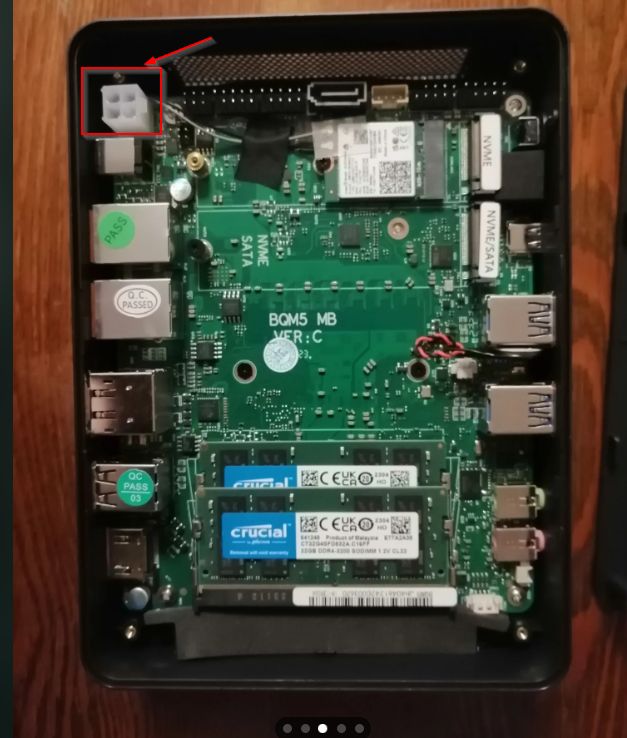
Okay I think I found the issue. Problem are 3.5 HDD drives which reqire 12V but the MiniPC only provides 5V. When powering the ICY Box Enclosure from a secondary PC, everything is booting up and working. I am wondering what my possibilities are. - Can I use a PicoPSU to power the whole PC+Enclosure? There is a small slot on the Mainboard (Screenshot attached, is this a power source?) - Can I use a external 12V Power Brick to power just the enclosure? Are there any issues with this setup (i.e. Spindown) Any guidance would be highly appreciated.
-
I think x4 PCIe. Its a V600 i7-1260P with BQM5 Mainboard similar to this one Mini PC. I founding the following Information: 1 x M.2 2280 slot (support SATA 3.0/NVME SSD, PCIE x3 Gen3) 1 x M.2 2280 slot (support NVME SSD, PCIE x4 Gen4) 1 x 2.5” SATAIII HDD/SSD I Used the slot without the SATA Label, but seems it is gen4 while the JMB585 is Gen3.
-
I use a ICY BOX enclosure, but even if i remove all sata cables from the pc, but keep the nvme converter inserted, the post takes ages.
-
Something strange I noticed is since I plugged in the m.2 card, the PC boot takes much longer to get out of the bootscreen (more than a minute). Swapped the ports but currently not even one drive is recognized anymore. unraid-diagnostics-20240215-1822.zip
-
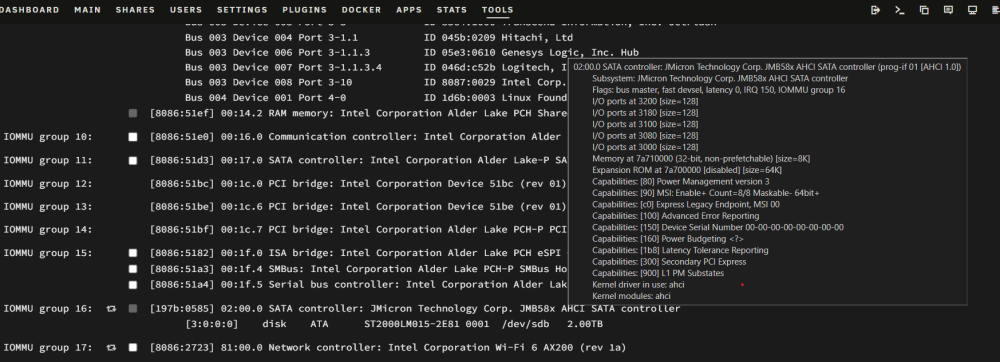
Hi all, I just bought a JMB585 Amazon port multiplier for my m.2 ssd slot in my mini PC. However, when booting into Unraid only a single disk is being recognized, but 4 are attached to the HDD rack. Looking at the HDD rack there is only disk2 having a blue status LED. I am currently not sure wheter my pc does not support the multiplier, wheter I need to do change some BIOS setting, or wheter it is something in Unraid. Maybe someone with more experience can help me to troubleshoot. unraid-diagnostics-20240215-1750.zip
-
Vielen Dank den Thread hatte ich auch schon überflogen, aber ich wundere mich warum die C states funktionieren bis ich eine VM starte?
-
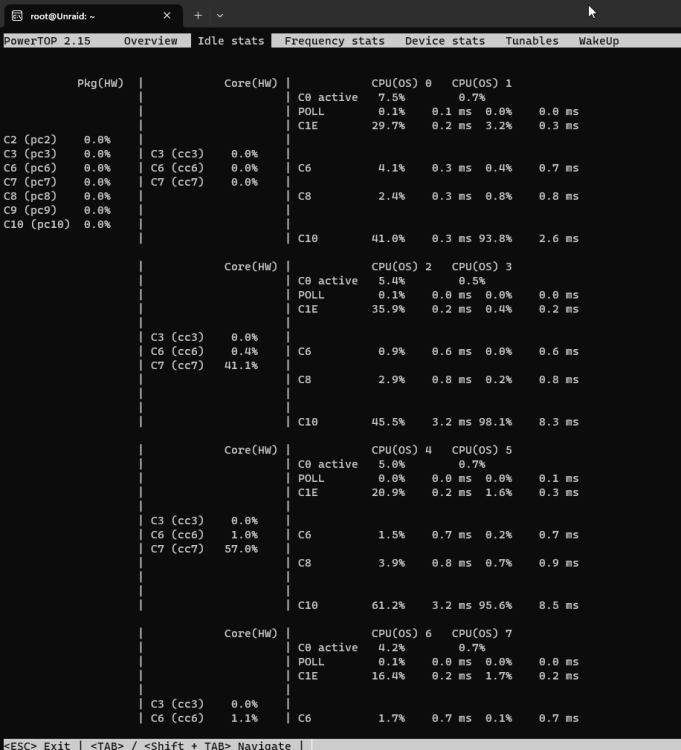
Hallo zusammen, ich habe mir einen neuen Mini PC als Unraid System angeschafft und es soll darauf einige Docker sowie eine Windows VM 24/7 laufen. Ich muss mich die Tage noch durch das BIOS kämpfen (habe selten so viele Einstellungen gesehen) aber ich habe zunächst eine Frage bezüglich der C-States. Nach dem Start des Arrays liegt der Verbrauch bei 9W ohne VMs und Docker. Powertop zeigt dass pkg(HW) wie gewünscht auf einem höheren C state ist. Wenn Docker aktiviere sind auch noch 50% in niedrigeren C states. Wenn ich jedoch eine Windows VM starte, sehe ich in jedem C state 0%. Woran kann das liegen? Ich habe nur 4 Cores an die VM gepinnt.
-
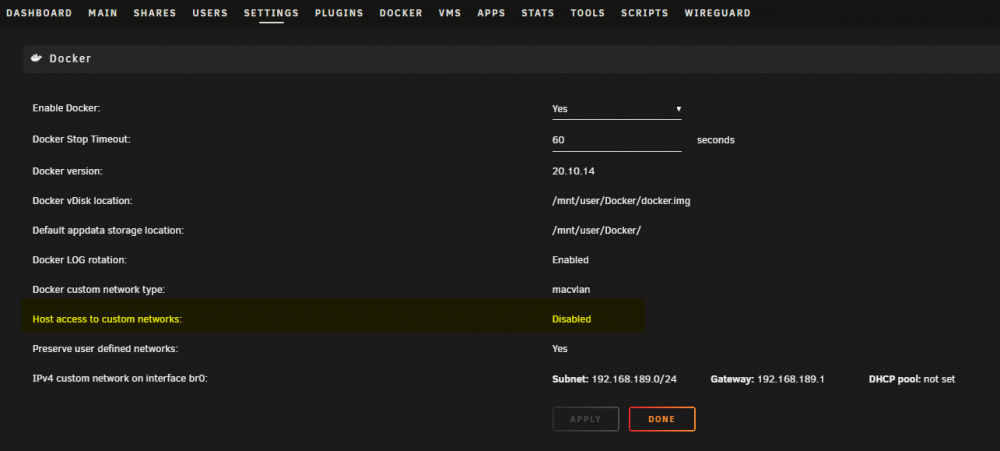
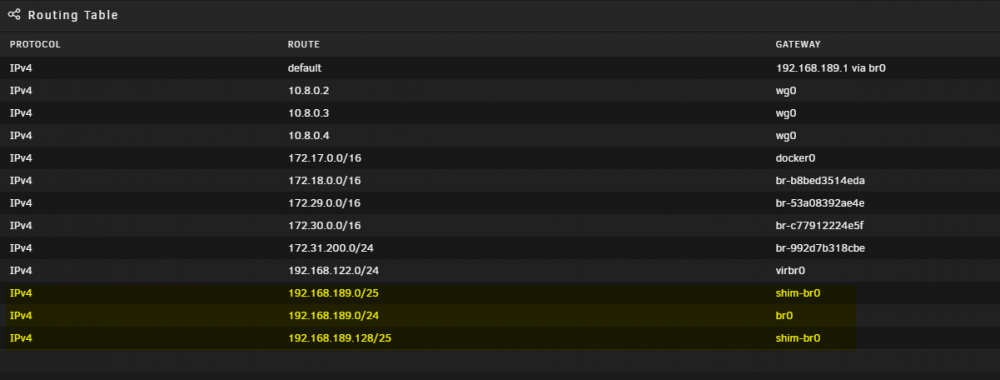
I figured out that the shim-br0 routes will be created once I enable the Docker settings "Host access to custom networks". Disabling this setting unfortunately disables the access from the host to the custom network dockers, but at least all other machines will be accessible via wireguard. I keep the setting disabled until I find a better way.
-
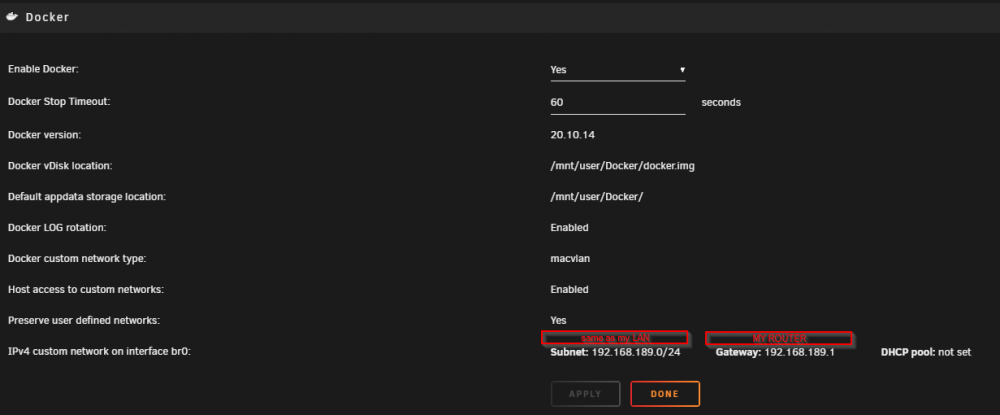
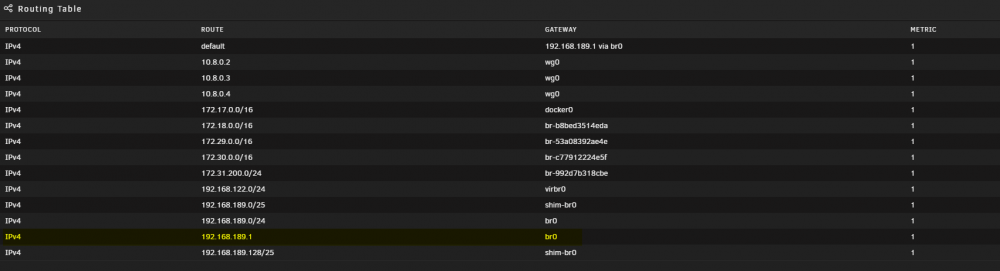
Hi, I am trying to connect with my smartphone to my unraid. Issue is that if I enabled the br0 macvlan in docker (custom ip used in for my pihole docker), my via wireguard connected phone is not able to connect to my router at 192.168.189.1 anymore. I can only access the dockers that are part of the br0 network and my unraid machine. If docker is turned off, everything is working fine. Once I add the custom br0 network in docker settings, the following routing entries seem to get added: Any ideas what is causing this behaviour and how to fix it? Edit: I can add a new custom route to my router 192.168.189.1 via br0 which seems to overwrite and allows access of my router via Wireguard, but I am not planning to do this for devices on my network:
-
I want to replace my Raspi Wireguard Cient with my Unraid Machine. To me it looks like Unraid can only be a server, but is it also possible to make it a client? Server is a AWS cloud server. Then I have Client Site A and Client Site B(Unraid). On the Rapspi I use the folloWing config to also allow access to my LAN for other clients: [Interface] PrivateKey = KEY Address = 10.8.0.6/24 DNS = 10.8.0.1 PostUp = iptables -A FORWARD -i %i -j ACCEPT; iptables -t nat -A POSTROUTING -o eth0 -j MASQUERADE PostDown = iptables -D FORWARD -i %i -j ACCEPT; iptables -t nat -D POSTROUTING -o eth0 -j MASQUERADE [Peer] PublicKey = KEY PresharedKey = KEY Endpoint = myserverdomain.com:port AllowedIPs = 10.6.0.0/24, 192.168.189.0/24(subnet Site A) PersistentKeepalive = 25
-
I was further searching in the forum and ended up with the following code which my phone sends via ssh: echo -n 'YOUR_KEY' > /root/keyfile \ && CSRF=$(cat /var/local/emhttp/var.ini | grep -oP 'csrf_token="\K[^"]+') \ && curl -k --data "startState=STOPPED&file=&csrf_token=${CSRF}&cmdStart=Start&luksKey=/root/keyfile" http://localhost/update.htm First it generates the keyfile, then it reads the csrf token for webui, then it starts the array with the token and the keyfile. Seems to work so far.
-
This forum helped me a lot so I also wanted to share my "Unlocking" Processs for Unraid, maybe this is interesting to someone. My goal was kind of a 2 Factor authentication with my phone to be able to react if UNRAID boots up when I am not home to see what happened. Maybe you have some more ideas or please let me know if there are any security breaches/concerns as I am quite new to the linux world. My go file looks: #!/bin/bash # Start the Management Utility /usr/local/sbin/emhttp & #Send Pushover Message that UNRAID started and needs the keyfile curl -s \ --form-string "token=TOKENID" \ --form-string "user=USERID" \ --form-string "message=UNRAID STARTED" \ --form-string "priority=1" \ https://api.pushover.net/1/messages.json This means after a reboot I get a Pushover notification on my Android. The buzzword "UNRAID STARTED" triggers Tasker to close this Pushover Notification and instead show me a new notification with a button "UNLOCK" on it. This Unlock button will trigger my OpenVPN to access my local network, then it will ssh into my Unraid server with the follwowing command: ssh root@SERVER "pkill emhttpd && echo -n 'YOUR-KEY-HERE' > /root/keyfile && /usr/local/sbin/emhttp" Especially on the last part with the pkill emhttpd I am not sure if this is a clean solution. Probably you have better ideas.
-
I just figured it out... wondering that it was working previously because I thought all plugins are activated by default. Thanks for your hint.


