





Brucey7
Members
-
Joined
-
Last visited
-
More than likely.
-
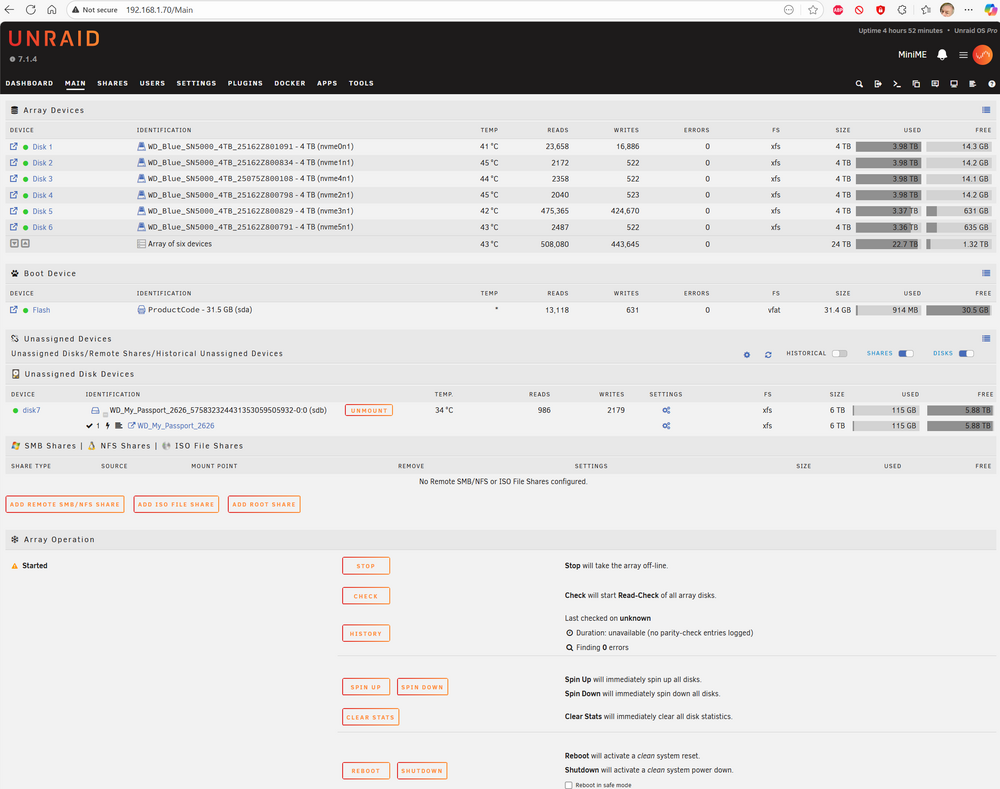
I have solved it, I had to increase the "Slots" on the Main tab. I think this is a new field and that's what threw me.
-
Here's a screenshot
-
I have managed to format it XFS as per the rest of my SSD drives. I can't find a way to add it to the array however. It appears under Unassigned Devices. I want it to be part of a specific share with 2 other array devices. Is this possible
-
Thank you,I will try.
-
Thank you, I couldn’t find a way to do it so I currently have the USB disk attached through Unassigned Devices. Can you walk me through what I need to do?
-
7.1.4, I don't run any parity drives, all 6 of my drives are 8TB SSD's and I have a 6TB USB attach drive I'd like to add a folder on it (or the entire drive) as a share. None of the data is important and if it's ever lost, it's not a great problem.
-
Fixed, the thermal management of the computers wasn't working, fan set to full on and no issues for 4 days
-
thanks, I will try that
-
I have a Beelink Mini ME server with 6 of 4TB WD Blue NVME SSD's and an USB attach 6TB WD Passport. It kept turning itself off, sometimes it would lose it's Identification and default to Tower. I fixed the powering off issue by setting it to boot on power so now it reboots randomly. I have attached the diagnostics, it's running v7.1.4 I would be very grateful if someone can tell me what the problem is? minime-diagnostics-20250818-1118.zip
-
There appears to be an error in this tool. When you are using a flash backup as the source and enter a fixed IP address in the tool, it concatenates two IP addresses into an impossible IP address, it also duplicates DNS lines etc.
-
I need some help in installing the iHD media driver for a Jellyfin install. UNRAID 7.1.4
-
I found a work around. I think the help text is wrong, I created another folder /data/tvshows2 and added that to the library
-
Issue with Path: /data/tvshows Help text says Container Path: /data/tvshows Container Path: /data/tvshows Media goes here. Add as many as needed e.g. '/data/movies' , '/mnt/data/tv' If I enter /mnt/disks/My_Passport/TV/ It loads the TV library from that and works fine and if I enter /mnt/user/TV/ it works fine from the TV share but if I enter /mnt/disks/My_Passport/TV/ , /mnt/user/TV/ The container starts but /data/tvshows/ is empty when it starts, and if I format it with the delimiter character show in the help text (i.e.) ' /mnt/disks/My_Passport/TV/' , '/mnt/user/TV/' The container fails to start with an error message about illegal characters (specifically ' ) What am I doing wrong? I'm grateful for any help Bruce
-
Self explanatory, on both my servers. tower1-diagnostics-20250112_1852.zip

