TreksterDK
Members
-
Joined
-
Last visited
-
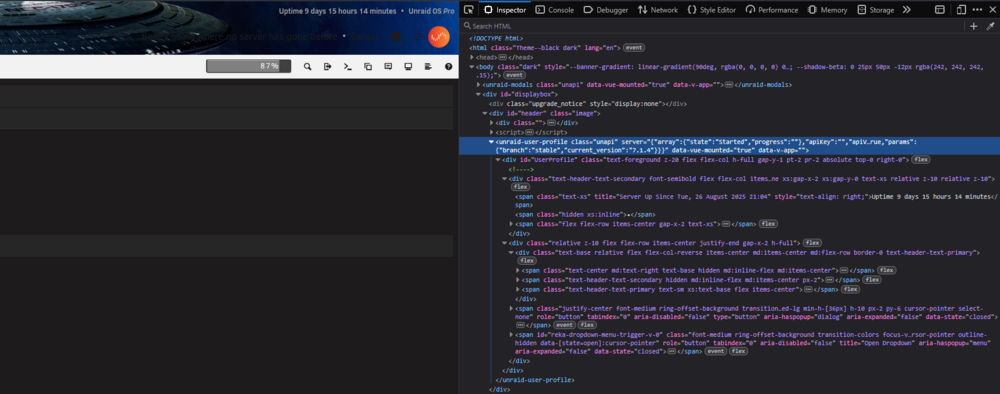
@JorgeB @elibosley Ok, I have spent some more time today looking into this - again 😉, and I think I now have a explanation for both why it breaks on my end, and why it works in your screenshots (JorgeB). Just to be transparent: I used AI (Who doesn't these days) to help investigate the code and track down the change. I will separate what I observed myself from what the AI found, so it is clear where the information comes from 🙂 As mentioned back in August, both my servers run Unraid 7.3.2. Galaxy, my main server, lost the gradient after updating Unraid Connect. I deliberately left my backup server - Intrepid, on the older plugin because the gradient still worked there. Then I kinda forgot about it until today. But today I updated Intrepid - and as soon as I refreshed the page, the gradient was gone. Same server, same Unraid version, same display settings. It worked before the Connect update and stopped working afterwards. This time I kept the old page open (It was the plugins page), so I could compare it with the page after the update. I saved the before/after HTML and took screenshots of the CSS in the inspector. What I could see was that the extra div which displayed the gradient was present before the update and missing afterwards - just like in the comparison I posted back in August. After that I asked AI to go through those files, the history in this thread and the older threads, and the public GitHub code, to see if it could find out exactly what changed. The AI's explanation is: The before/after exports show Connect 4.35.1 → 4.37.5, with Unraid remaining on 7.3.2. The Black theme, banner and gradient settings are unchanged and enabled. The custom header colors are empty in both, and the relevant inline gradient CSS is identical. The gradient element was removed from the older UserProfile component in PR #2037, included in Connect 4.37.0. The replacement was supposed to draw the gradient using #header.image::before instead. However, the CSS build adds a .unapi prefix. The actual installed rule becomes: This cannot match the saved DOM. has-banner-gradient is on <html>, while .unapi is on components inside #header. The selector requires the opposite ancestor order. .unapi .has-banner-gradient #header.image::before An isolated browser reproduction using Galaxy's installed stylesheet confirms that the selector matches nothing and the pseudo-element has no gradient background. Restoring the previous internal gradient element, or correcting the outer CSS selectors, restores gradient rendering in that test. The relevant source links are: The change which removed the legacy gradient element - PR #2037 / commit 62574cd9 The CSS scoping code in Connect 4.37.5 The header gradient rules in main.css I also only noticed this now: your screenshots show Unraid 7.4.0-beta.1, while both of mine run 7.3.2. So we are comparing different Unraid versions here - even if the Connect plugin and display settings are the same. The AI found that the newer consolidated header has its own internal gradient element. There is even a comment in that component explaining that it needs this because the outer header's CSS gradient does not match due to the .unapi scope. That protection exists in the new header, but the corresponding element was removed from the older UserProfile header that my servers still use. The newer Header component, including that explanation and its internal gradient element Unraid 7.3.2's Header.php, which still mounts the older header components So this looks like the explanation for the different results. Maybe if you can inspect your DOM, we could confirm that yours uses <unraid-header> - that would settle that part. Mine uses <unraid-header-os-version> and <unraid-user-profile>. Could you please test this on Unraid 7.3.2, with the older header, rather than on 7.4.0-beta.1? And please pass these findings on to the developers responsible, so the compatibility issue can be fixed. Yeah, I know this is "just" a "visual issue", but it has been broken here since August now, and today I reproduced it on my second server by updating Connect - and since I am both a former coder and now a UX designer, I care about these things 😁. With the before/after evidence, the specific code change and a reproduction of the CSS failure, I hope we can get it fixed now instead of leaving it at "cannot reproduce". Restoring the older header's conditional gradient element looks like a focused fix, although that still needs testing in the complete plugin. Thanks!
-
Do you have custom colors. What we found the last time is that while installing and there is no custom colors (meaning defaults), then it failed. But if you had it it worked when installing. I don't know if it is the same error now, but the same behaviour as you describe (can't reproduce it), we also saw back then: But @Mainfrezzer managed to reproduce it back then, by removing the default color, and then installing the connect plugin again.
-
Are you using the same display settings? Because this matters. The last time I think the error was only on the dark theme: And under certain conditions. It seams the error has reverted back to that. I can see if I can find the original thread where it was discovered what happened.
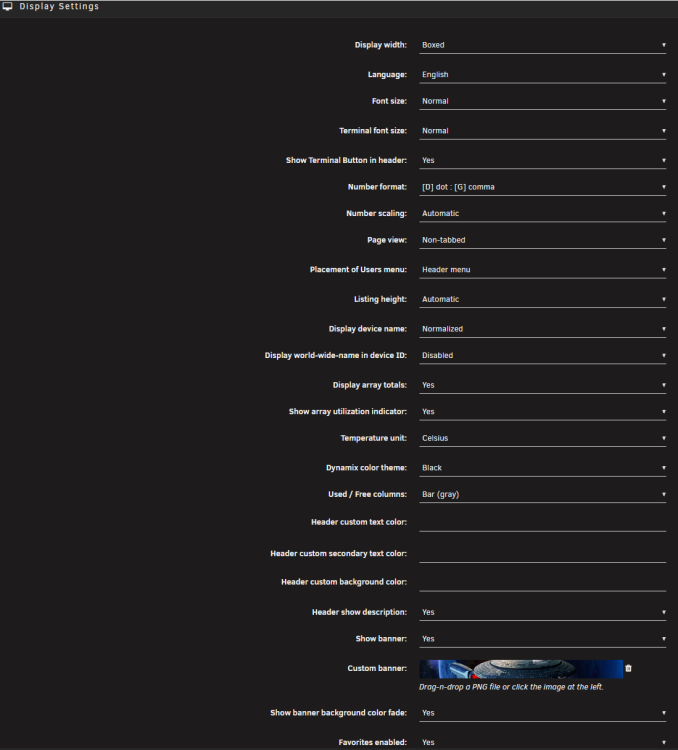 Both servers run Unraid 7.3.2, as mentioned in the first post ;)Main server on the left, Backup server on the right. Main is updated and gradient is not showing. Backup is not updated, and gradient is showing. It has an extra div, as the red arrow shows - that is not present on the updated server. That Div is the gradient.
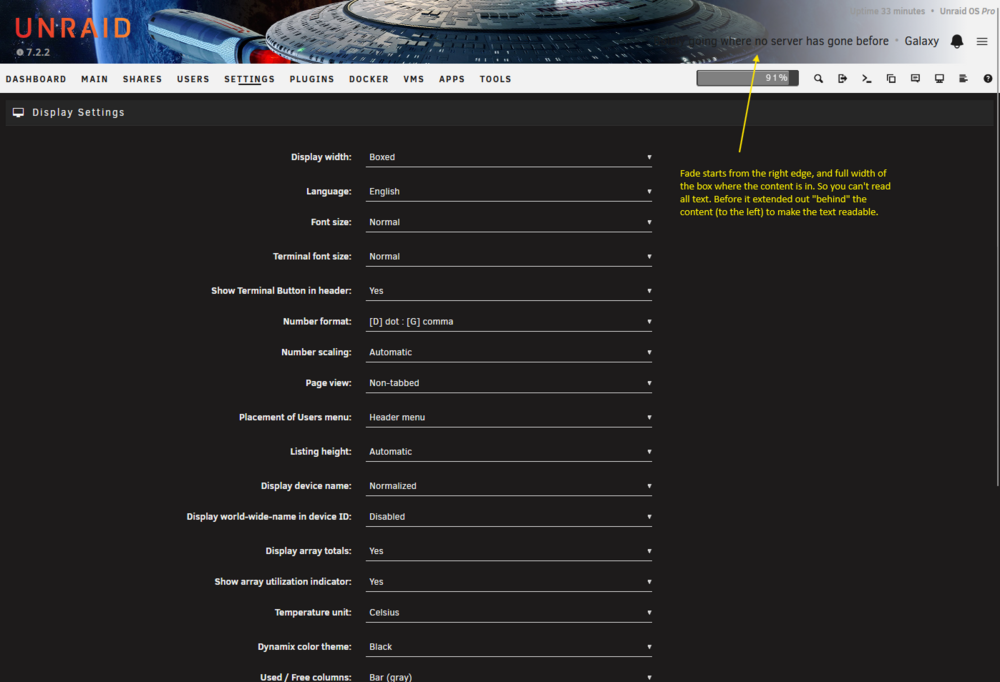
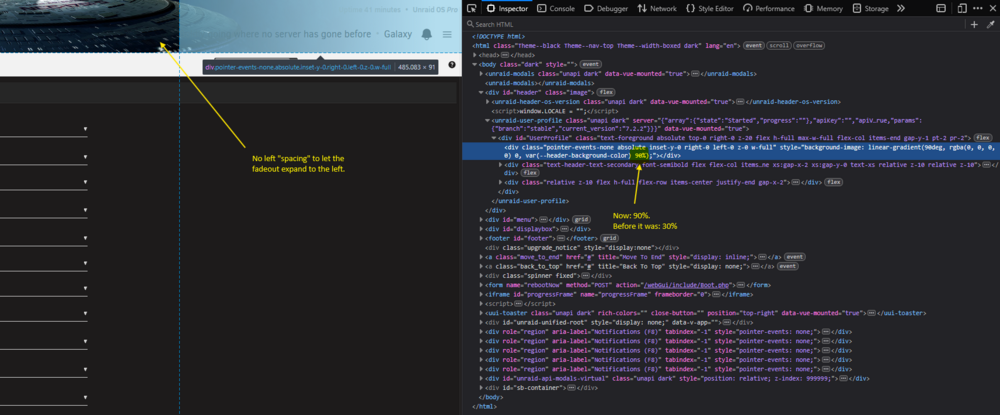
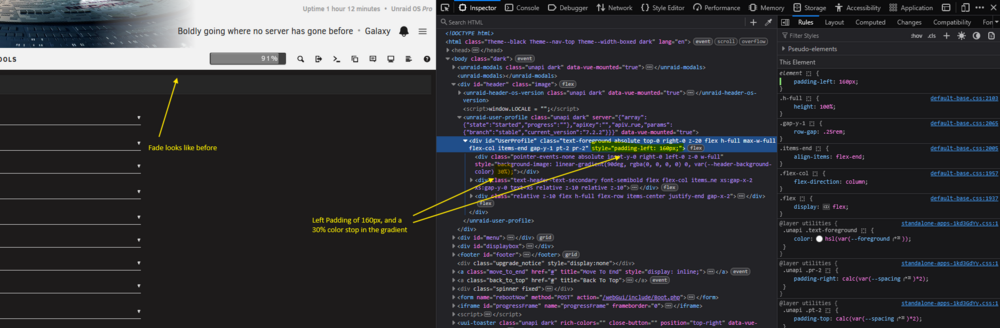
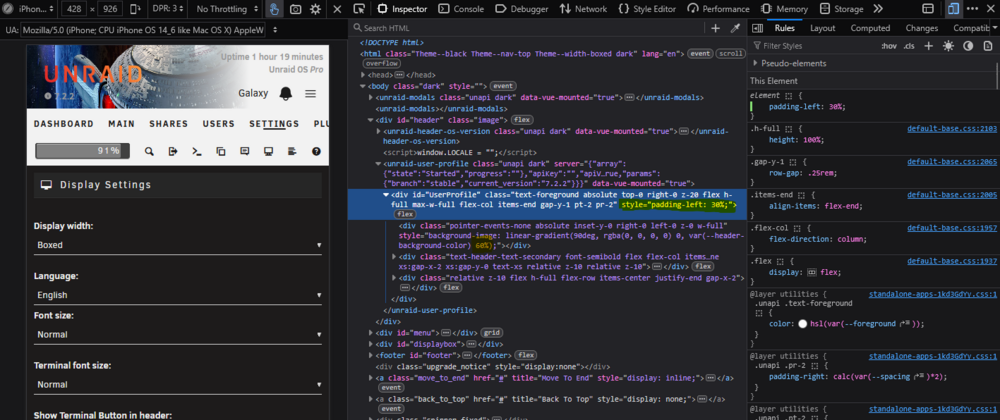
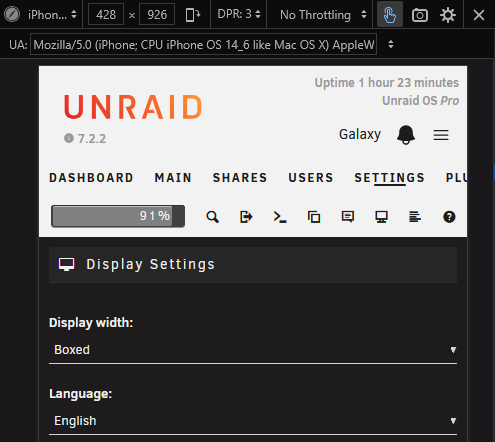
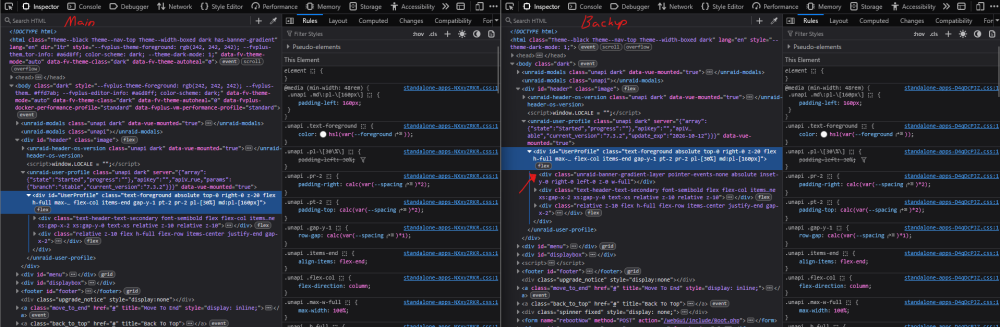 @JorgeB @elibosley This bug is back after updating Unraid Connect to "2026.08.12.1944" Today. My backup server is on "2026.06.18.1729" and it does not have the problem. Both run Unraid 7.3.2This seams to work now - as far as I can see.I uninstalled Unraid Connect previously, because I didn't like this bug - it looked too broken. I deliberately waited to install Unraid 7.2.2 because I had hoped this would be fixed, after a few bug fixing rounds. But unfortunately It is still not fixed 😞 - It got worse actually, because now it is also broken even without the Unraid Connect plugin installed. Yes, there is a fade now - at least 😉, but it is obviously not the intended look. I have added a screenshot of how it looks here: The color stop in the gradient is now 90% whereas it was before 30%. Also there is no spacing to the left: I messed around in the Firefox inspector and got it to kind of look similar as before, by adding a style of "padding-left: 160px" to the UserProfile div, and then setting the color stop to 30% as before. It works - in desktop, but it breaks in "responsive mode" (I have no idea how many breakpoints you have). So in "responsive mode", you could run with something like: "padding-left: 30%" on the UserProfile div, and then set the color stop to around 60%. This is just me doing some quick hacking, but it could work like that. Another idea. Maybe turn off the background image in responsive mode - by default, and then have a new option to preserve background image on responsive, or even better have a custom responsive image for that 🤩. Example with the image off: Hope this bug gets fixed soon. You tend to look at this interface quite often, and it is just an eye sore - and looks so broken. As as UX designer, I hope you also prioritize visual stuff like this 🙂 Thanks!
 Hey This bug "seems to be back". Reference to the previous thread: https://forums.unraid.net/topic/186992-unraid-connect-breaks-default-css-of-header/#findComment-1576801 I posted there first, but I am opening a new thread since the behavior is a bit different now I found. Summary Installing the Unraid Connect plugin while having no custom colors set removes the header fade. The setting Display Settings -> “Show banner background color fade” has no effect. Expected With no custom colors and "Show banner background color fade" = Yes, the header shows the gradient fade based on the default theme color. Actual The fade is missing. On reload, the gradient appears for a split second, then disappears. In DevTools the child element that renders the gradient is present when the plugin is not installed, but is removed from the DOM once Unraid Connect is installed and the page finishes loading. In contrast to the old bug, the theme color variable now resolve to a value (with a slightly different name). So the issue is not a missing CSS variable like before, but that the gradient container div is gone after the plugin initializes - at least that is what I figured out. Screenshots Working (no plugin) - 2 Screenshots: Gradient element present with inline background-image: linear-gradient(...) on the absolute child. Broken (plugin installed) - 2 Screenshots: That gradient element is missing from the HTML. Steps to reproduce Settings -> Display Theme: Black Ensure no custom colors are set Set “Show banner background color fade” = Yes Install Unraid Connect Refresh Result: header fade is gone. Browsers tested: Chrome and Firefox Notes Setting Header custom background color does not restore the fade, like in the old bug. It looks like Unraid Connect is rewriting the header markup and dropping the gradient container. If needed I can provide a a short screen recording?
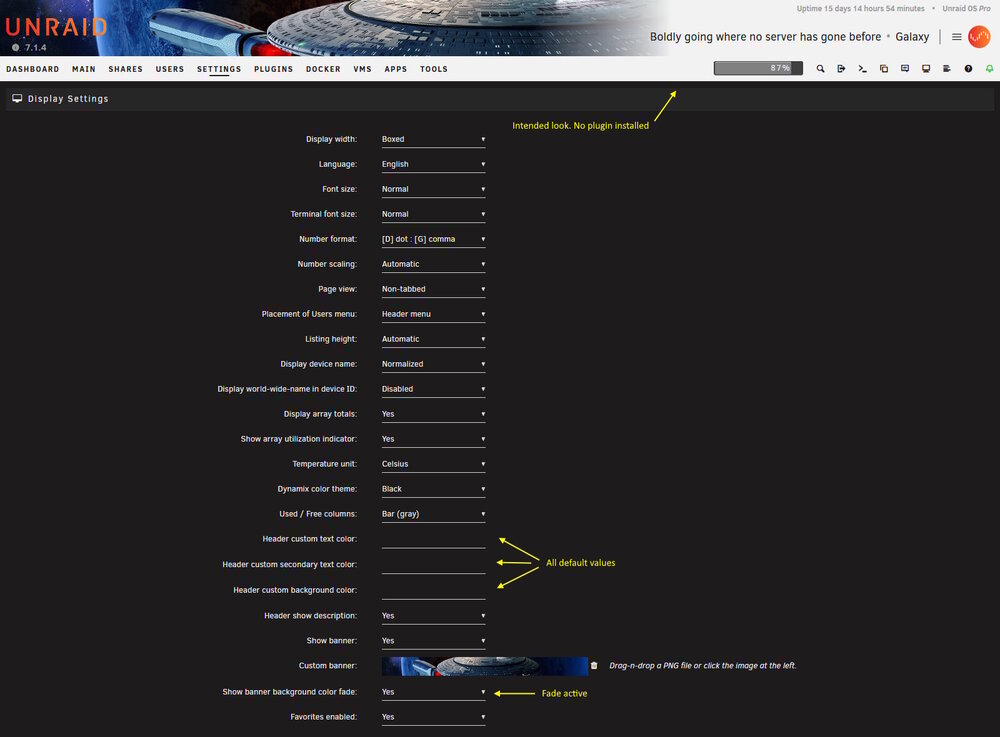
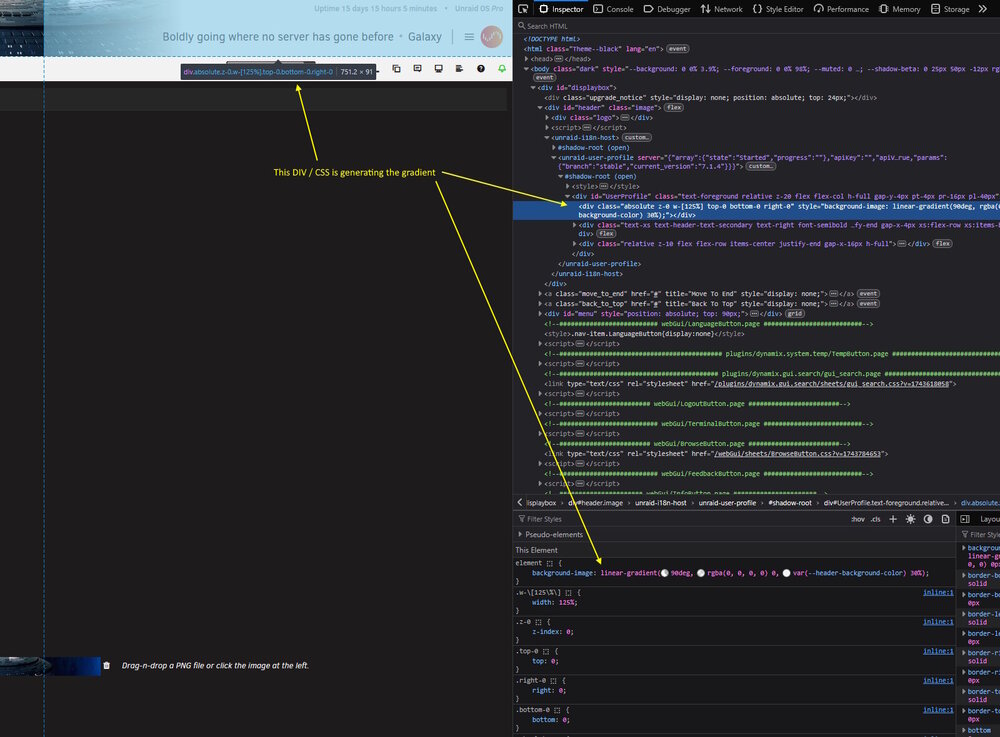
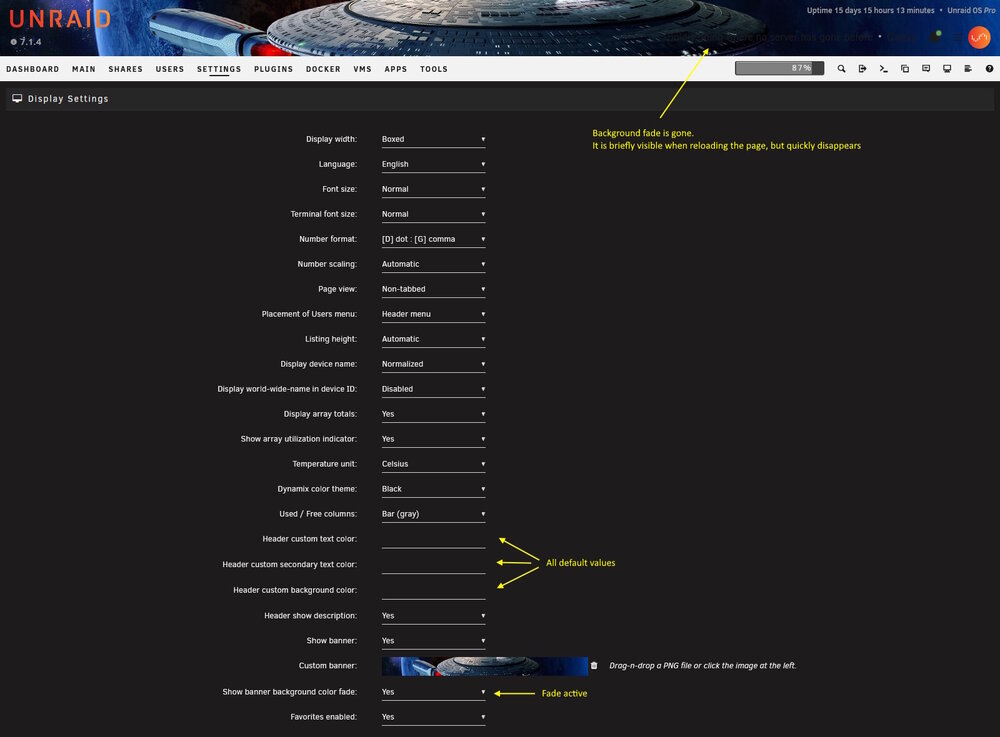
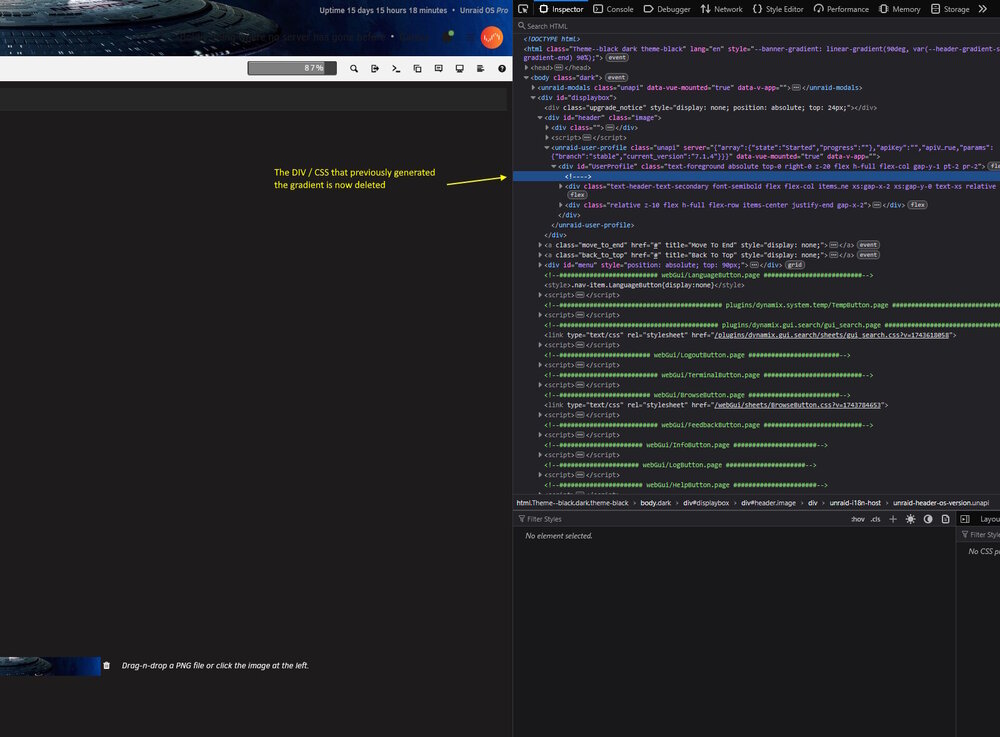 @pujitm This bug has returned :( It seems to me that the div that had the gradient background before, is simply just deleted now? You see it briefly when reloading the page, and then it disappears.
 Regarding the ITE IT87 plugin. Hey. I'm running Unraid on a Gigabyte Z790 UD motherboard with an Intel i7-14700 CPU. Earlier this month, I installed the ITE IT87 plugin because I was not able to see any fans on my new system. I had been using Dynamix Auto Fan Control previously on my old setup, but it did not detect any fans on this new HW - your plugin made them visible. My plan was originally to control my fans in Unraid, but I later changed my mind and decided to just let the BIOS handle all fan control. Since then (beginning of this month) I have really only used the plugin to monitor fan RPMs in the dashboard (collecting the data in Home Assistant). Everything was actually running nice for some days but after a power outage yesterday, my system started acting strange. My front fans now ramp up to full speed even though the system is idle and CPU/motherboard temps are totally normal. What is strange is that this does not happen immediately after boot. The system can run normally for several hours before the fans suddenly spike. When I check the sensor output at that point, I see acpitz-acpi-0 Adapter: ACPI interface temp1: +16.8°C temp2: +27.8°C nvme-pci-0100 Adapter: PCI adapter Composite: +31.9°C (low = -273.1°C, high = +81.8°C) (crit = +84.8°C) Sensor 1: +31.9°C (low = -273.1°C, high = +65261.8°C) Sensor 2: +31.9°C (low = -273.1°C, high = +65261.8°C) gigabyte_wmi-virtual-0 Adapter: Virtual device temp1: +86.0°C temp2: +35.0°C temp3: +35.0°C temp4: +31.0°C temp5: +32.0°C temp6: +30.0°C it8689-isa-0a40 Adapter: ISA adapter in0: 708.00 mV (min = +0.00 V, max = +3.06 V) in1: 2.03 V (min = +0.00 V, max = +3.06 V) in2: 2.02 V (min = +0.00 V, max = +3.06 V) in3: 1.99 V (min = +0.00 V, max = +3.06 V) in4: 1.52 V (min = +0.00 V, max = +3.06 V) in5: 768.00 mV (min = +0.00 V, max = +3.06 V) in6: 1.99 V (min = +0.00 V, max = +3.06 V) 3VSB: 3.36 V (min = +0.00 V, max = +6.12 V) Vbat: 3.10 V fan1: 936 RPM (min = 0 RPM) fan2: 2089 RPM (min = 0 RPM) fan3: 1991 RPM (min = 0 RPM) fan4: 1182 RPM (min = 0 RPM) temp1: +86.0°C (low = +127.0°C, high = +127.0°C) sensor = disabled temp2: +35.0°C (low = +127.0°C, high = +127.0°C) sensor = disabled temp3: +35.0°C (low = +127.0°C, high = +127.0°C) sensor = Intel PECI temp4: +31.0°C (low = +127.0°C, high = +127.0°C) sensor = thermistor temp5: +32.0°C (low = +0.0°C, high = -119.0°C) sensor = thermistor MB Temp: +30.0°C (low = +127.0°C, high = +127.0°C) sensor = thermistor intrusion0: OK coretemp-isa-0000 Adapter: ISA adapter CPU Temp: +36.0°C (high = +80.0°C, crit = +100.0°C) Core 0: +35.0°C (high = +80.0°C, crit = +100.0°C) Core 4: +33.0°C (high = +80.0°C, crit = +100.0°C) Core 8: +34.0°C (high = +80.0°C, crit = +100.0°C) Core 12: +30.0°C (high = +80.0°C, crit = +100.0°C) Core 16: +35.0°C (high = +80.0°C, crit = +100.0°C) Core 20: +34.0°C (high = +80.0°C, crit = +100.0°C) Core 24: +34.0°C (high = +80.0°C, crit = +100.0°C) Core 28: +33.0°C (high = +80.0°C, crit = +100.0°C) Core 32: +35.0°C (high = +80.0°C, crit = +100.0°C) Core 33: +35.0°C (high = +80.0°C, crit = +100.0°C) Core 34: +35.0°C (high = +80.0°C, crit = +100.0°C) Core 35: +35.0°C (high = +80.0°C, crit = +100.0°C) Core 36: +31.0°C (high = +80.0°C, crit = +100.0°C) Core 37: +31.0°C (high = +80.0°C, crit = +100.0°C) Core 38: +31.0°C (high = +80.0°C, crit = +100.0°C) Core 39: +31.0°C (high = +80.0°C, crit = +100.0°C) Core 40: +33.0°C (high = +80.0°C, crit = +100.0°C) Core 41: +33.0°C (high = +80.0°C, crit = +100.0°C) Core 42: +33.0°C (high = +80.0°C, crit = +100.0°C) Core 43: +33.0°C (high = +80.0°C, crit = +100.0°C) nvme-pci-0200 Adapter: PCI adapter Composite: +33.9°C (low = -273.1°C, high = +84.8°C) (crit = +84.8°C) Sensor 1: +33.9°C (low = -273.1°C, high = +65261.8°C) Sensor 2: +30.9°C (low = -273.1°C, high = +65261.8°C) The high 86 degree readings seem to be what is triggering the BIOS fan response (I guess?) - even though actual temps are in the 30–35°C range. If I reboot, there is nothing in BIOS (normal temps), and after reboot the system is then back to normal. But after a while it spikes again. So far I have seen it twice. So of course I asked ChatGPT for thoughts 🙂 (Yes, I know I can not rely on it on it's own, which is why I am asking here 😉 - but it's here for context), and it's theory is that after a full power loss, the hardware may boot into a slightly different state. When the plugin (or the driver) initializes the sensors, it may be exposing or activating something that the BIOS then responds to - even if Unraid is not actively controlling the fans. Have you seen this behaviour before, and do you know the fix for it? I would like to just have the fans visible in my dashboard really. I have added my diag file. Thanks in advance! galaxy-diagnostics-20250708-1043.zipJust wanted to say thanks - everything went smoothly! 👍 The missing disk has now been successfully rebuilt using the cloned drive (which is actually a borrowed disk): Duration: 14 hours, 45 minutes, 42 seconds Average speed: 150.6 MB/s Next step: I will remove the cloned disk and rebuild it onto a new 8TB drive. A huge thank you to everyone here for the invaluable help and guidance - it is truly appreciated! 🙏Data-Rebuild is running! 🤞 Will keep you posted. Thanks so much!! - for all the help - so far