





miicar
Members
-
Joined
-
Last visited
Everything posted by miicar
-
Thats good to hear...i guess the note is just left overs from before the workaround/fix was baked into unraid. I'll look into that later...unless its maybe causing conflict between the mpt3sas driver? UPDATE: So LSI called me back (and gained a ton of respect for doing so)! Apparently the LSI-9200 cards i have do not have thermal throttling, and could be the reason it hard crashed my kernel (and rebooted the machine) while running the backup last night. I'm going to have to keep an eye on that, and was advised to add a fan to the controller heat sync.
-
Ok. I think i found the key to my problem. Like some other dockers i've run into, it hasn't been remapped to recognized multiple cache pools yet! This is just a guess, but when UNraid bypassed the FUSE layer (Exclusive share) when the share lives only on a cache pool, that seems to strip LB the ability to see the share anymore!! As soon as i change my secondary storage from none (the requirement for Exclusive Access) to "Array", LB sees the share...whether its hidden, or shared by SMB at all. BUT doing this ALSO removes that shares ability to Exclusive Access itself to the network; slowing down some of the r/w operations. So this is annoying! I don't feel smart enough to fix it and retain my Exclusive Access settings. I hope someone can tell me what i am doing wrong? Or do is LB just not able to see exclusive access shares, and I have to go back to writing manual R-Sync scripts for everything? I want to use my exclusive shares again and LB.
-
all good. i have allot going on in this server! BUT, as a side note, should i be trying to flash my onboard HBA to a different/better firmware? Its worked for 2 years without any issues, but now i have added an expander to it, but it seems to be fine with everything still (as long as i keep it x16 disks or less...otherwise both myself and it has a mental breakdown and thats another 26 hour story). I did see this note under the mpt3sas driver info, "# limetech - Workaround for kernel crash with LSI 92xx based HBA cards (and may be others) options mpt3sas max_queue_depth=10000". And my addon card is a lsi-9200-8e. I'm guessing i have to set that in the cards bios? or is this in unraid somewhere??
-
That was the first thing i verified, and flashed on to this card, before i even started this (i didn't re-add the bios though, cuz i had to make a bootable USB, and find a mobo that both recognized the HBA, and liked to boot in legacy mode. It didn't seem worth the effort, as i will never be booting from any disks connected to this HBA)! Maybe you are confusing with the onboard (LSI SAS3-3108) MegaRAID? The card with all the current issues is listed as "[1000:0072] 82:00.0 Serial Attached SCSI controller: Broadcom / LSI SAS2008 PCI-Express Fusion-MPT SAS-2 [Falcon] (rev 03)" in sysdevices. My onboard HBA is MegaRAID capable, also in JBOD mode, is running fine (besides the silly x16 drive cap surprise, that, annoyingly, forced me to used this LSI-9200-8e in the first place!!)...but maybe there is a way to flash it to even more IT mode? i have JBOD and RAID as the options in the onboard HBA's bios settings. (FYI @JorgeBthis is the same card you were helping me with, in another thread, where i imported this pool the wrong way at first and was getting clones appearing in UD. This happened after i seemed to fix it and get it working properly, then ran a backup to that pool.)
-
The HBA bios was removed by the previous owner, and i didn't bother putting it back. the disks do show up in undaid's sys devices under that controller tho (see above). Of course a reboot fixed it, but i have no idea why it happened in the first place...which is a big problem for me.
-
well this is fun. Woke up this morning to a restarted server and 3 of the 7 disks showing "emhttpd: device /dev/sd(x) has size zero" Of course a reboot fixed it, but i have no idea why it happened in the first place...which is a big problem for me. maybe I should go move into the bush and make friends with wolves... UPDATE: LSI/Broadcom called me back and informed me that there is not thermal protection on the 9200 HBA cards, so when i was running the backup, it probably got too hot and shut itself down; causing unraids kernel to panic and reboot (which is good i guess). After i rebooted the server, all the disks came back and are operating as expected (running a scrub atm just to be sure).
-
no luck? i just woke up to this issue. Different controller and disk shelf. Everything was working great when i went to bed last night! i have x7 identical disks in the same shelf...x3 of them are missing/zero-size. Seems like the server hard rebooted before this as well, as i woke up to the array not started, and the x3 out of x6 disks missing from the pool they were in. I might have over filled them with a backup last night...but that shouldn't make unraid crash reboot itself and forget drives right? [1000:0072] 82:00.0 Serial Attached SCSI controller: Broadcom / LSI SAS2008 PCI-Express Fusion-MPT SAS-2 [Falcon] (rev 03) [12:0:1:0] disk SEAGATE ST3000NM0023 GS0D /dev/sdaa - [12:0:2:0] disk SEAGATE ST33000650SS RE12 /dev/sdab 3.00TB [12:0:3:0] disk SEAGATE ST3000NM0023 GS0D /dev/sdac - [12:0:4:0] disk SEAGATE ST3000NM0023 GS0D /dev/sdad - [12:0:5:0] disk SEAGATE ST33000650SS RE12 /dev/sdae 3.00TB [12:0:6:0] disk SEAGATE ST33000650SS RE12 /dev/sdaf 3.00TB [12:0:0:0] disk SEAGATE ST33000650SS RE12 /dev/sdz 3.00TB Again, these drives were fully precleared, and were running in the pool last night without issue! The ONLY bad thing is i didn't calculate the backup i was running and it was bigger then the pool. But again, that should have caused a write error, NOT a hard crash/reboot and disks forgetting their size...right? I've attached a bunch of stuff here...feel free to kick me to a new topic if i'm hijacking this thread. elmstorage-diagnostics-20240102-0933.zip elmstorage-syslog-20240102-1524.zip
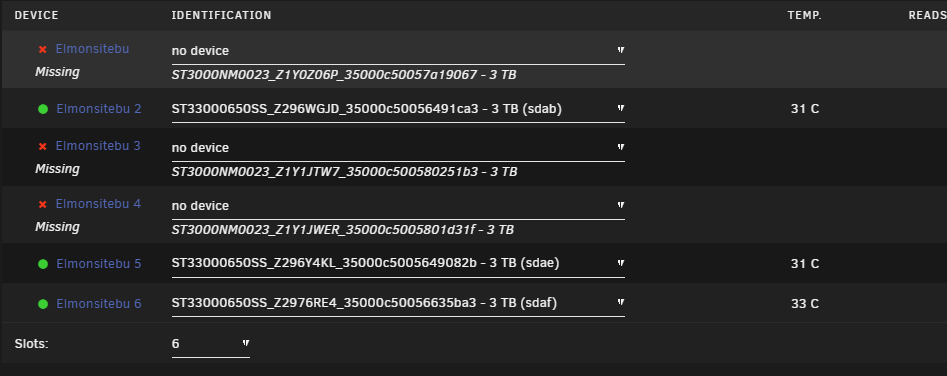
-
Ok. I think i found the key to my problem. Like some other dockers i've run into, it hasn't been remapped to recognized multiple cache pools yet! This is just a guess, but when UNraid got rid of the FUSE layer when the share lives on a cache pool, that strips LB the ability to see it anymore as well. As soon as i change my secondary storage from none (the requirement for Exclusive Access) to "Array", LB sees the share...weather its hidden, or shared by SMB at all. Doing this ALSO removes that shares ability to Exclusive Access itself to the network; slowing down some of the r/w operations. So this is annoying! I don't feel smart enough to fix it and retain my Exclusive Access settings. I hope someone can tell me what i am doing wrong? Or do is LB not able to see exclusive access shares and I have to go back to writing manual R-Sync scripts for everything? I want to use my exclusive shares again.
-
Hope that fixes it for you! You could make a test task and schedule it in an hour or something as a proof of concept as well. Now if i could only figure out how to make it show ALL the shares, not just the public SMB ones...hmm Still hoping for a solution to that issue!
-
Make sure you guys have "Console Mode" selected in the Schedule profile...that stumped me for a bit too, but it does work on schedule after i checked that. Make sure you re-"cronIT !!" after making those changes. (forgetting that step will also run you around in madness for a couple hours )
-
So...Everything seems fine now! The pool has imported and mounted properly; no clones, no spamming IO errors in the sys log, and no frozen GUI! So i ask myself: - Was it (on a whim) changing the PCI-e lanes that HBA from x8x4x4 ---->x4x4x4x4 (i couldn't get it to run at its designed x8 lanes on any PCI-e slot...seems to be an issue that these v2.0 cards have. Most people recommend running them at x4. Its mainly used for backups, so speed isn't a concern)? - Did the second cable confuse the unraid config and it couldn't forget over multiple (hard) reboots? - Or simply (as i hope) b'cuz i edited the pool settings instead of leaving it to auto detect on import. - And furthermore, why did any of that mess up my dockers before?!?!?! I don't know if this thread should be left up for other people who might have similar issues or not (i haven't found many forums talking about duplicate drives listings). when i have time, i think i'll set up some more simulation on another mobo/HBA/drive cab, and see if i can make it do this again. For this round, I will mark this as solved. Thank you so much for nudging me in the right direction...i still feel like i solved it by rolling dice tho...not sure the actual cause!
-
The SC400 has 2 removable banks; each with x4 mini-sas connections that act as expanders (i had x60 drives running at once when testing drives in multiple enclosures that were daisy-chained together). I know the bottom bank is used for failover/multilink, so i have never used it in the current configuration. Regardless, i am only running one cable now. Being new years day, I will have to remote desktop into the site. So for now, i can only post diags with having one cable plugged in anyway. I rather get that working at least, before i tackle dual link. To get this server stable for production, I have removed the pool from the array, but all the x7 3TB disks, in UD, are the ones connected to that external cabinet (x6 pool disks, one test disk). Something i didn't try the other day: After i took this diag, i tried mounting the pool within UD, and it seems to mount fine in UD, and read/write through SMB to a windows machine. I did my quarterly updates, the only thing changed since the other day. My staff have the day off today, so i am going to try officially adding this pool back into the mix, and i'll report back what happens. Just so i'm clear on the proper import procedure: - add new pool of 6 devices; named the same as it is on the disks - add the disks to the pool (order shouldn't matter??) - go into the pools settings and change to zfs, Rz2 (I'm an idiot and cannot follow instructions...leave the FS type to auto...i wonder if that is why i had this cloning problem, as i had manually set up that on the previous attempt) - hit start! elmstorage-diagnostics-20240101-0922.zip ~# zpool import pool: elmonsitebu id: 4775391284715079306 state: ONLINE action: The pool can be imported using its name or numeric identifier. config: elmonsitebu ONLINE raidz2-0 ONLINE sdaa1 ONLINE sdac1 ONLINE sdad1 ONLINE sdab1 ONLINE sdaf1 ONLINE sdae1 ONLINE
-
Ok. So i defiantly have dual link then. With both cables, plugged into a single HBA, i get duplicates all the time, and with the one cable, im getting them ONLY when the array is started and the whole system grinds to a halt and needs a hard restart to bring back. Just a note: This pool was made on a newer vs of unraid then i imported it too...don't think that matters tho?
-
Fair enough...i probably have my terminology (and understanding) wrong. If i understand correctly, multipath is from more then one HBA card or server? The question remains, why the clones and crashing?
-
So here's a weird one...i installed a LSI-9200-8e in my Supermicro X10DRC-LN4+ mobo. (FYI: This card refuses to work on x8, only x4, even after I flashed the latest firmware.) I also noticed the bios is missing from the card (...haven't had a chance to put that back, but google tells me that's ONLY for bootable devices to be seen; which obviously i do not need in unraid). First i plugged both SAS-e ---> mini SAS-e cables into my Dell SC400. This contains x6 SAS disks in a ZFSz2 pool, that I created on my home server, filled with data, then moved to the main server enclosure. Before I even started my array, I was getting double disks showing up in unraid. One set in the assigned places, and the identical disks in UD, but with a different UID. I figured it was UNraid's lack of support for dual-link (I had hoped the SC400 acted like an expander and used all the bandwidth from both cables and not redundancy, but it seemed not to...im new to this). So i did what anyone would do, I removed the second cable, and BAM no clones in UD...so i thought! But, soon as i started up the array the clones were back! Ok, so everything showed normal in my array/cache pools otherwise, and i'm aware that SAS has 2 paths available, so cool...except nothing worked! i cant stop the array, reboot, nothing...i can click the buttons, but its like they laugh at me when i do! There was a bunch of IO errors in the disks (these disks had worked flawless, and without clones, in this same case from my home servers onboard HBA). The only way to use my server again is to eliminate this from the server and it seems to be ok. As an added bonus, once everything booted again, i had no docker containers installed (thank God for backups!). This is so annoying cuz i don't have any access to the settings of this HBA card. I remember something about my onboard sas had a "dual-link" option that gave me clones as well, so how do i turn that feature off; or make UNRAID ignore dual link devices (till/if its supported)?? I am hoping someone has an easy answer i overlooked. Unfortunately, I didn't take a diag file while this was happening as i couldn't do anything other then click on the tabs while the array was started. And it was 6am, and i had started working on it at noon the day before. But if we have to, i can make my unraid unstable again and take a diag before i start the array (with both and just the single SAS-e cable installed).
-
The problem is back...I upgraded the Video card from AMD to NVIDIA and now the lockup at login, while the KB/M is active, issue has attacked me again! Windows is now popping a BSOD with an "WDF_VIOLATION" as the error, the moment i add the Logitech Dongle via HotPlug...PLEASE HELP ME!! I've attached the DIAG (yes, i know i have some SAS controller issues...stupid supermicro x16 max drives on the onboard HBA has me using old HBA's as Band-Aids) elmstorage-diagnostics-20231230-1123.zip UPDATE: after trying a couple different USB ports, It seems the USB3 port doesn't cause a crash, (not yet at least) but the USB2 does...still want to figure out why this seems to randomly happen.
-
Quick question. I need to backup some shares that are private, or not shown to SMB at all. When giving LB "/mnt/user" and root = true, I can only see the shares that are shares. But if i give LB only "/" then i see all the shares (even hidden ones), but i get a double "/mnt/user/mnt/user/(share name)". the extra "/mnt/user" is annoying and i don't understand why i cant see all the shares, if my start point is "/mnt/user", since i do have root = true set as well!?! Maybe I'm not understanding something here?? I am also having another issue of LB locking up if it doesn't like something (wrong IP address for the remote server for example), then it wont stop/restart the docker container. It has also seemed to lock while running a local backup, now that im using "/" as the start path. I haven't tried the remote BU yes since i made the path change. prior, everything was working great (till i noticed the private shares weren't showing up).
-
Just to flog an old horse, i just did a fun one! After losing a couple pools due to drive swapping issues, I have found that managing cache pools is much faster (and safer) with CLI. So to learn this better, i decided to toss a bunch of drives into a drive enclosure and play with a non-critical pool; adding, replacing, and removing disks over a week period! I did all this remotely, without ever stopping the array!! From plugging the e-SAS into the drive enclosure, inserting the drives, and running the various commands i was looking to learn, everything was done "hot"! (the rest of the server is used in production so it couldn't be stopped)! So what happened?? Well, as expected, the GUI didn't update the new pool drive assignments as i was moving things around via CLI! The old drives were still showing in the pool but spun down. And the new, actively running, drives were still in Unassigned Devices area (with the "mount" button greyed out...might have said "pool" instead. I should have saved the screenshots.). But of course the CLI showed the correct information and my operations were working great! Once i was done everything i wanted to try, and it was ok to take the server offline, i took a screenshot of the most recent, CLI-derived, drive assignments for that pool and stopped the array. Then changed those drive assignments in the GUI to match the CLI, and hit start! Everything worked and all is well! And just to add to the fun, it's the ill fated BTRFS RAID5! hehe🤪 Was it confusing? Definitely!!! I had to be super careful to keep everything organized and not f-up an active drive...10/10 would not suggest!! BUT, at your own risk, it is possible to manage pools, hot swap new/old disks while the array is happily running IF YOU ARE SUPER CAREFUL AND KEEP DETAILED NOTES AS YOU ARE MANAGING THINGS!! (and if your hardware supports hot swapping of course) I haven't tried anything with the array itself while its still running...my guess is that would not be possible and you would probably break allot of things if you tried...but maybe one day i'll fire up my OG unraid ddr2 P3 mobo together and test it!
-
did that not get fixed? I just had to sign-in in order to replace my key on a new USB. Otherwise i was just getting errors. apparently it's still an issue!
-
these ones are multi (x6 disks zR6)
-
weird, how i mount and run ZFS pools in UD all the time! i must have the special edition?? 🤪 anyway, after making a pool and putting those drives in there, again, then removing the drives, and deleting the pool, it did mount in UD again, and i transfered about 3tb from my array! Anyway...i think i am having USB issues, as random issues come and go lately.
-
U V: 6:12.4 - all plugins up to date. I am also getting this error on a (x6) disk z2 pool in UD. I created the pool in the array with the gui. Then moved the disks to UD, as it's going to be an offsite backup, then deleted the pool from the unraid gui. Mounted the pool in UD and moved the backup images over. Everything transferred without issue. I unmounted it went about my day till i remembered i wanted to put one more folder in the backup pool before i move it to its new home across town...now it wont mount. it doesn't matter which of the 6 disks i click mount on, it says the same info (just changed to match the disk i am clicking mount on)
-
I just finished clearing around 100 new (to me) drives using the UD/preclear plugin! great plugin! One stupid annoying thing kept happening! every time i clicked on a disk log, it opens the CLI log window (as expected) AND ALSO the whole page bounces to the top for absolutely no reason; losing my place, and making me scroll back down to UD to search through the list again, in order to find the drive i was JUST ON before i clicked its log. One can imagine with 20 or 30 drives in UD, that's annoying af to do over and over and over again! Not a browser issue (tried in FF and edge with the same annoyance happening). I tried right clicking to "open in new tab" and it just opens the main page again in the new tab...not the disk log...so that's not a work around. It also does this jumping when adding/removing disks to a pool...that i can put up with, as it must need to refresh the page to show real-time info and im not swapping disks around that often...but the main page jumping when I click on a disk log, that opens in a new window by default anyway, just doesn't make sense to me. but I am also quite dum Is there a setting to stop this? Is there a legitimate reason for this annoyance? Am i just too fussy and should just live with the bullshit? Somehow i feel this is new behaviour or it would have annoyed me before now...just like the new notification bell style annoys all of us.
-
Just going to confirm this is something i have gotten used to with Krusader. If I mount a file system in UD, I have to restart Krusader in order to write to that mount! It catches me out every time, then i remember... It really sucks when im already doing another transfer, and i mount a new FS to do some work with. Doesn't happen enough to piss me off to much tho.
-
So i have seen this mentioned in this forum, but i'll just share my experiences. I was copying a couple of large backups (4TBish), of random sized files from GB to KB in size, to a new pool with FM. I noticed the "% done" message jumped to around 80% right away, and the ETA seemed wrong (transfer speed was always correct/matched the speeds shown in the main tab of unraid). After roughly half the files had copied over I noticed the % had jumped to high 90%'s (and the time-left still all over the place). The files moved as expected, so it wasn't a game changer, just annoying! It seems that with lower sized transfers, i don't have this annoyance (or at least its not noticable). I also would like to echo what other were saying. Having a que system, for after you have already started an operation in FM, would be super helpful!
