





miicar
Members
-
Joined
-
Last visited
Everything posted by miicar
-
So this just happened. I stopped the array to make some new pools. Upon stop, i noticed my parity drive assignment had reverted back to the old 4TB parity disk that i had replaced, with a 6TB (SAS), a couple weeks back. I had just left the old 4TB in the drive bay, meaning to clear it later. When i tried to put the 6TB (current) drive back, it shows "All existing data ...will be overwritten" on the parity slot, but the 4TB (old) drive shows parity is ok (and i know it is not). As a precaution, i am going to physically remove both the current and old parity drives, and install a totally new drive, then let the parity run again. I'm going to assume the data on the array disks is fine and somehow the system got confused with both parity disks still in play. I will include the diag file after it happened, with the array still stopped, for your assessment if desired... miicarstorage-diagnostics-20231109-1621.zip
-
Yea, the reason this pool exists is to make use the most space of random HDDs. I accept the risk and only use it for non-critical data (steam games, printer scans, wallpaper share, surveillance camera cache, etc).
-
fair enough. I guess the question remains, can i trust this pool again? or should i keep moving the millions of tiny files off the pool and rebuild it? I'm trying to figure out why i cant break the 20MB/s R/W wall...cant even get close most of the time (and not the tiny files, just in general). (i was wrong about the speed issues. Seems to be able to go over 100MB/s again. Which, for the drives im using, is fine). It seems (from my own and reading through others experiences), removing a drive from a BTRFS pool is a risky move to do. Sometimes the FS doesn't wanna let it go (its happened to me on 2 different pools now). Drive adds and replacement, while slow in raid5, have completed without issue. But any issue i have had with BTRFS revolves around removing a drive. It always seems to leave stuff dangling behind, in my experience. Then (before i knew to check), i would add/swap another drive and all hell would break loose!
-
so. late last night i accidentally rebooted this server, attempting to reboot another server (got my browsers and sleep mixed up). After reboot, the BTRFS operation started automatically again, i had to go to work, so i left it. Just got home, its done! watch -n 10 sudo btrfs fi show Label: 'Emergency_ONLY_UNraid_Spare_Drive_(SmartErrors)' uuid: c9fdb522-0c4c-4b78-89e7-c9518d596bf1 Total devices 5 FS bytes used 1.77TiB devid 2 size 931.51GiB used 552.00GiB path /dev/sdh1 devid 4 size 931.51GiB used 552.00GiB path /dev/sdi1 devid 7 size 931.51GiB used 552.03GiB path /dev/sdb1 devid 8 size 3.64TiB used 569.03GiB path /dev/sdj1 devid 9 size 3.64TiB used 467.00GiB path /dev/sdl1 No longer shows a missing device. The space used isn't the same across like sized disks, as i would expect it to be. Might attempt a balance and see what happens. Is there things i can check so i can trust this pool without formatting and starting over? It's still moving files uselessly slow, but i think that its is partly due to the tiny file size of each file as well as one of the drives might be quitting. Here is today's diag... elmstorage-diagnostics-20231103-1917.zip
-
ok yea I tried that last night too...this was its reply: :~# btrfs device remove missing /mnt/Servernstorj ERROR: cannot access '/mnt/Servernstorj': No such file or directory Tried with all caps, as it shows and all lowercase...no dice. I also tried pulling the disks out of the pool assignment, and putting them in UD to mount (something that i done before to rescue my last crashed pool). It wouldn't mount; in UD or by CLI. Something about missing profile tree...(i should have took a screenshot). So i put it back as it was in the pool, and it mounts immediately (degraded and slow of course). ==== This pool is going to get smashed and rebuilt as soon as the painfully slow file move is done, but if ya'll wanna de-bug it before i do that i'm game to play along! Or maybe my use-case is so rare that its not really worth troubleshooting for the average user (mixed bag of random sized, not so healthy sata, and sometimes even IDE drives, in the forbidden BTRFS raid5). I have multiple pools that are for production, and contain perfect drives that get swapped out at the first sign of distress, those pools don't give me any issues (although im moving to the ZFS now for most of the pools now that unraid supports it). I don't know if this is more a BTRFS issue, or how unraid is asking it to do things. This is the second time i have had a drive removal end up destroying a BTRFS pool in unraid, using the listed methods to replace or remove a drive, through the GUI. ==== My personal takeaway in all this, is that i'm going to do these operations through CLI going forward. I think that will entice me to look at the status of the pool between steps, and catch potential issues, before i compound more issues on top; something unraids gui doesn't really give you much insight on between rebuilds. and really, i don't want it too give more info in the GUI side of things...more stuff happening in the background means slower OS in the long run. i also wonder if that will allow me to manage pools whilst the rest of the system is still live...which would be wonderful. I choose this path. Guess I gotta learn the proper way to walk it like a proper Penguin! Thx, C
-
figured out how to stop the "remove" procedure, so the backup is going a tiny bit faster now. I thought i would try removing the "missing" devid 1 that shows when i type "btrfs fi show". It has zero used space and so it should just go and allow the pool to balance properly right?? I typed, "btrfs device remove "devid 1" /mnt/(pool name)" but it tells me, "ERROR: not a block device: devid 1". I am probably typing that syntax wrong...(i'll admit, i made that line up from reading --help commands.) I would like to keep this BTRFS, but i keep running into stability issues with this fs (partly from lack of proper understanding, i am sure).
-
unbalance...be careful with that app tho...tmk it hasn't been updated since unraid added multiple cache pools, and it DOES NOT support that part. i had lost some files trying to move from the cache to the array...personally, since that frantic recovery i had to do, i don't trust it any more.
-
i have avoided mover for that reason...trying to use the file manager plug in (since krusader doesn't seem to like to access some of the folders). its been at 95% for a day now...no movement in the space on either disk tho...
-
I think that is due to storj DB files being on the (SSD) cache, and there is a storj process that hates BTRFS being so slow during a rebuild/degraded drive. My guess is thats what was holding it back. I can post todays diag. Array is in production and running fine overall; still moving files off this pool to change it to a z-pool, but its painfully slow moving. elmstorage-diagnostics-20231028-1251.zip
-
I think i am having the same issue...it's been "removing" a drive for a month, over many reboots. The raid5 (yea i know...call me crazy) BTRFS pool is made up of old retired disks with plenty of repaired sectors and stuff. The pool is not meant to be fast or incredibly safe. It worked great for my needs for the last couple years, as a storj node and surveillance camera recording (archived footage we want to keep, would get moved to the unraid array by the surveillance software); Replacing really bad drives along the way without issue (maybe a day or 2 max for the rebuilds). Now i tried just pulling a smaller HDD, as it was the only one of its size left and i was happy with the current size (and replacement disks if one died). Recently, unraid started telling me one of the other drives in the pool is missing, but its not...its still there error free and seemingly working. Now simply hitting reboot doesn't do much while this issue has been going on! The log says one line about rebooting, then it sits there till i type "powerdown -r"...then it ACTUALLY starts rebooting. I am in the process of backing up and formatting...but i cant get the array to stop, without rebooting with auto-start turned off, to add the backup-disks to a temp pool, so its taking a long time. But hopefully these logs show a possible bug. It could also be i don't really know what i'm doing and royally messed up some things. Anyway, here's the diags!! Thanks elmstorage-diagnostics-20231027-2153.zip (i should add that i was in the middle of trying to manually stop the array when i took these diags...so some things might be extra)
-
Would have been the first thing I did...if people didn't rely on it to be up without interruption. So i have to wait till the night time to reboot....yay
-
So when its locked up, how do we restart it? I tried to change ownership of a share after a while the window closed itself, but now i cannot do ANYTHING in File Manager. When i click on any action, or check box i get a no smoking sign and "job running". great...what job where, and how do i kill it? (and no i cant just reboot my unraid box when this happens in the middle of a work week)
-
why do all these "propfind" error threads fade off into the sunset without a solution? For me its random throughout the day from a couple different computer ip's on the network. Some days it doesn't happen, then for a few days it happens 3 or 4 times.... heres the latest error today...they flood the log for a few lines, always show IP's from 2 or 3 of the same PC's, and block up SMB access from the other PC's on the network for a few seconds...super weird. Oct 23 10:57:16 (MY SERVER NAME) nginx: 2023/10/23 10:57:16 [error] 13123#13123: *7729068 limiting requests, excess: 20.130 by zone "authlimit", client: 192.168.11.23, server: , request: "PROPFIND /login HTTP/1.1", host: "(MY SERVER NAME)" Oct 23 10:57:16 (MY SERVER NAME) nginx: 2023/10/23 10:57:16 [error] 13123#13123: *7729071 limiting requests, excess: 20.076 by zone "authlimit", client: 192.168.11.23, server: , request: "PROPFIND /login HTTP/1.1", host: "(MY SERVER NAME)" Oct 23 10:57:16 (MY SERVER NAME) nginx: 2023/10/23 10:57:16 [error] 13123#13123: *7729073 limiting requests, excess: 20.055 by zone "authlimit", client: 192.168.11.23, server: , request: "PROPFIND /login HTTP/1.1", host: "(MY SERVER NAME)" Oct 23 10:57:16 (MY SERVER NAME) nginx: 2023/10/23 10:57:16 [error] 13123#13123: *7729075 limiting requests, excess: 20.033 by zone "authlimit", client: 192.168.11.23, server: , request: "PROPFIND /login HTTP/1.1", host: "(MY SERVER NAME)" Oct 23 10:57:16 (MY SERVER NAME) nginx: 2023/10/23 10:57:16 [error] 13123#13123: *7729077 limiting requests, excess: 20.011 by zone "authlimit", client: 192.168.11.23, server: , request: "PROPFIND /login HTTP/1.1", host: "(MY SERVER NAME)" (i have read through this whole thread, and tried every non-working solution attempt...still happening...still pissing off my staff!) everything is up to date
-
why do all these "propfind" error threads fade off into the sunset without a solution? For me its random throughout the day from a couple different computer ip's on the network. Some days it doesn't happen, then for a few days it happens 3 or 4 times.... heres the latest error today...they flood the log for a few lines, always show IP's from 2 or 3 of the same PC's, and block up SMB access from the other PC's on the network for a few seconds...super weird. Oct 23 10:57:16 (MY SERVER NAME) nginx: 2023/10/23 10:57:16 [error] 13123#13123: *7729068 limiting requests, excess: 20.130 by zone "authlimit", client: 192.168.11.23, server: , request: "PROPFIND /login HTTP/1.1", host: "(MY SERVER NAME)" Oct 23 10:57:16 (MY SERVER NAME) nginx: 2023/10/23 10:57:16 [error] 13123#13123: *7729071 limiting requests, excess: 20.076 by zone "authlimit", client: 192.168.11.23, server: , request: "PROPFIND /login HTTP/1.1", host: "(MY SERVER NAME)" Oct 23 10:57:16 (MY SERVER NAME) nginx: 2023/10/23 10:57:16 [error] 13123#13123: *7729073 limiting requests, excess: 20.055 by zone "authlimit", client: 192.168.11.23, server: , request: "PROPFIND /login HTTP/1.1", host: "(MY SERVER NAME)" Oct 23 10:57:16 (MY SERVER NAME) nginx: 2023/10/23 10:57:16 [error] 13123#13123: *7729075 limiting requests, excess: 20.033 by zone "authlimit", client: 192.168.11.23, server: , request: "PROPFIND /login HTTP/1.1", host: "(MY SERVER NAME)" Oct 23 10:57:16 (MY SERVER NAME) nginx: 2023/10/23 10:57:16 [error] 13123#13123: *7729077 limiting requests, excess: 20.011 by zone "authlimit", client: 192.168.11.23, server: , request: "PROPFIND /login HTTP/1.1", host: "(MY SERVER NAME)"
-
BTRFS Cache pool containing 6 drives. Removed a old slow 500gb drive (ensuring lots of spare space...over 2 TB free in the pool, over the size of the removed 500GB drive) leaving 5. Rebuild started automatically (as expected) has been running faithfully now....for a F-ING MONTH!!! I know it takes about 4 hours tops to move 500gb of data (on really slow hardware)...why is this taking months to rebalance a small pool??? This has happened with other pools on other machines as well, and one time taking 3 months to finish...all the while, making read/write time almost unusable for normal operation...if i cancel the rebuild, i risk losing the pool all together (experience taught me that silly lesson). This would have been 1000000000x faster if i moved all the data to another pool, rebuilt this pool and started from scratch every time i want to add, replace, or remove a drive! Is that normal for BTRFS management or is something wrong (it better be, cuz this time spent isn't ok). I don't know if ya'll would want the full diag, or something more specific to this pool...so i will await a gurus advice!
-
my use case was old retired HDD's in an enclosure already being used for business stuff. that was great for the first couple years...still used those pools for other things at the same time (temp network scan folders, steam library, storing wallpapers, etc), my complaint is that over time, it seems that STORj has gotten greedy about IO time. if it cant have exclusive access to the HDD's it throws a fit and seems to reboot the docker container, or lock up the pool for a second...Im going to stick it out and hope things keep taking off to the point where it will pay to have dedicated file servers. If not on the storj platform, maybe in another...i am learning allot about server/network storage in the process.
-
The last few versions have had a problem of randomly restarting the Storj Docker. its been like this on a couple different systems in different locations. I have also noticed that the 4 threads i allocate to storj are pinned max allot! I thought this was supposed to be light weight so it could run on things like RiPi...seems like its getting more and more of a power hog as time goes on. The goal is to use the EXTRA space on already used pools...but lately, storj seems to get mad if other people are accessing the pool drives at the same time... they don't pay enough to dedicate hardware to this. Lets hope the original goal and MO hasn't been forgotten!
-
So the most wonderfully stupid/great thing happened....the unraid machine has been running for about 10 days without reboot since i tried the logitech receiver last (VM runs 24/7 as well); nothing's changed since i threw up my hands and plugged in a cheap mouse and kb to be able to get use out of the VM. In order to get the diag to show the crash, I added the Logitech receiver through the "HotPlug" plugin, BUT nothing bad happened! Just like this problem came randomly, it left as randomly as well. I am guessing the cause is the wave of forced Micro-peni$ "updates" that have been happening (and changing settings without asking...i hope class actions start soon); maybe they got something wrong(er), then fixed it??!!??!! I'll mark this as "limbo" as it wasn't solved...it just is working again.
-
Interesting, but unraid stays running stable while this happens (albeit with a few cores sometimes pinned...at least in the dashboard). The w10 VM locks up and eventually (sometimes) crashes.
-
BUMP! Anyone with any insights? Is Logitech not compatible with UNraid?
-
yea, i think i might do something like that too, i will try to find a super lightweight distro that's basically a media player, and have a cheap USB soundcard. Im just trying to provide an, easily adjustable, background/hold music loop for a business. For now i just have an old 3gb sony mp3 player plugged into the phone system, but its a pain in the ass to update the music/voice loop. I love that 98se is alive and well still!
-
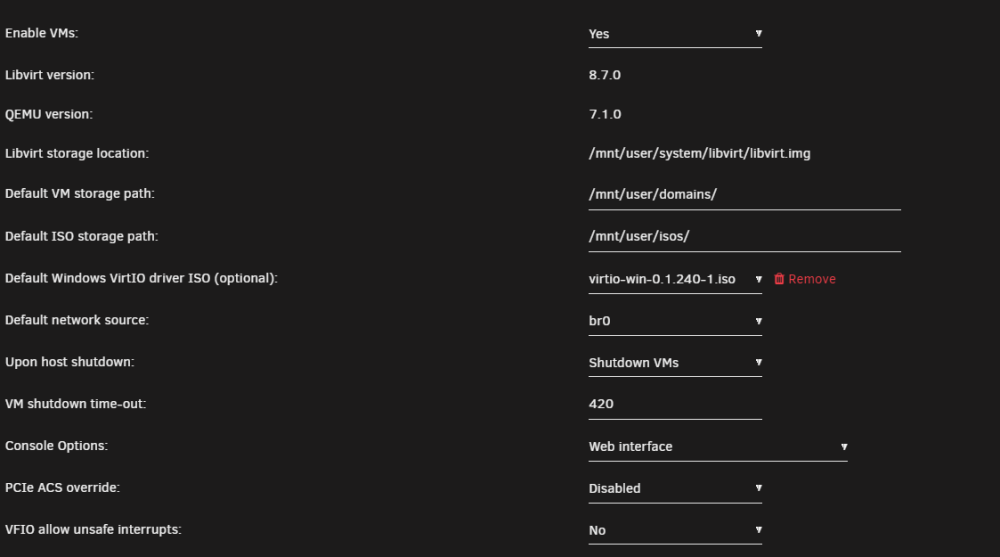
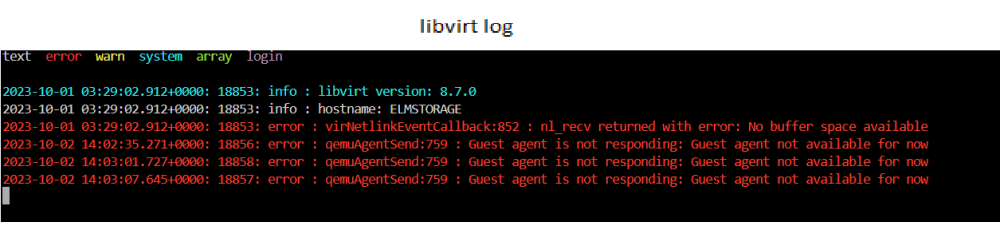
VM was running great, then suddenly, after I installed Blue Iris for security cameras (and rebooted), the existence of the receiver caused one of 2 things to happen: ...if i add it while its running (via hotplug USB, or VM settings) , the VM locks one core at 100%, freezes and never recovers. ...if its added before boot (VM settings), all the reserved cores lock to 100%, and eventually the VM just turns off Things i have tried: re-made the VM template (using the old image of course), i have rebooted the server many times, i have moved the receiver to EVERY USB port on the system, changed USB type, removed ALL Logitech software, disabled both "PCIe ACS override" and "VFIO allow unsafe interrupts" (VM still boots and runs great with those off now...i seem to remember needing that when i made the VM a couple years ago, but i digress), ran "SFC /scannow" (no issues), changed machine type, moved cores around (pinned and unpinned to both CPU's, single core...nothing changes)...im sure ive missed something...been trying everything i can for a couple weeks. Tried x3 different unifying receivers (same crash with all of them). Otherwise, the VM works great (i am typing this post on it) with the old cheap trash and keys are sticky keyboard and mouse i have (that's why i got this top end Logitech setup...that worked great for a couple weeks...till it suddenly didn't). I am about to lose my mind. Let me know what diags/logs i need to post here! This is a production machine, (and the one i mainly work on) so this not working properly is causing allot of cursing and wasted time. Sys info: - Supermicro X10DRC-LN4+ , Version 1.02; American Megatrends Inc., Version 3.4 - x2 Intel® Xeon® CPU E5-2690 v3 - 64GB ECC ram (32GB given to VM...yes i have fiddled with that too) - VM is on a x4 NVME SSD BTRFS pool; Raid 10 - unraid V: 6.12.4

-
Reviving this thread, cuz i am having the same issues with a Logitech unifying receiver. VM was running great, then suddenly, after I installed Blue Iris for security cameras (and rebooted), the existence of the receiver caused one of 2 things to happen: ...if i add it while its running (via hotplug USB, or VM settings) , the VM locks one core at 100%, freezes and never recovers. ...if its added before boot (VM settings), all the reserved cores lock to 100%, and eventually the VM just turns off Things i have tried: re-made the VM template (using the old image of course), i have rebooted the server many times, i have moved the receiver to EVERY USB port on the system, changed USB type, removed ALL Logitech software, disabled both "PCIe ACS override" and "VFIO allow unsafe interrupts" (VM still boots and runs great with those off now...i seem to remember needing that when i made the VM a couple years ago, but i digress), ran "SFC /scannow" (no issues), changed machine type, moved cores around (pinned and unpinned to both CPU's, single core...nothing changes)...im sure ive missed something...been trying everything i can for a couple weeks. Tried x3 different unifying receivers (same crash with all of them). Otherwise, the VM works great (i am typing this post on it) with the old cheap trash and keys are sticky keyboard and mouse i have (that's why i got this top end Logitech setup...that worked great for a couple weeks...till it suddenly didn't). I am about to lose my mind. Let me know what diags/logs i need to post here! This is a production machine, (and the one i mainly work on) so this not working properly is causing allot of cursing and wasted time. Sys info: - Supermicro X10DRC-LN4+ , Version 1.02; American Megatrends Inc., Version 3.4 - x2 Intel® Xeon® CPU E5-2690 v3 - 64GB ECC ram (32GB given to VM...yes i have fiddled with that too) - VM is on a x4 NVME SSD BTRFS pool; Raid 10
-
Something like this would be great! Post back if you ever find such a solution!!
-
The system is dual Xeon CPU's. For VM's, I have been pinning/isolating cores from the CPU that is controlling the video card PCI-E slot (that was fun trying to figure out...). I've been curious if there is any advantage to having pinned cores split half and half from each CPU, or is it better to just pin one CPUs cores to a VM...or does it matter at all?!?! Is there any benefit to having both CPU's involved (pinned and/or isolated) in a single VM? Additionally, I am thinking of adding 3 or 4 VM's for the kids to use to do homework, stream videos and maybe some light lan gaming. Is there anything wrong with pinning the same cores to multiple VM/Docker containers to share at once, with a video card for each, all running at the same time? I, suppose i would have to monitor overall usage in the unraid dashboard, and add more cores to the lot if needed, or for the overachieving kid who installs a 3D cad compiler on their VM or something 😎). (Sorry if this was already discussed somewhere else; maybe i've missed the threads discussing this already? I am quite green at this Linux stuff, but I'm trying to get better.)


