





miicar
Members
-
Joined
-
Last visited
Everything posted by miicar
-
Just chiming in to report this issue as well! Rebooting temporarily resolves the issue. But it randomly returns, and my users are reporting flaky file access (crashes, slow to load etc). This only seems to have become an issue since "upgrading" to v.6.11.5. I am also getting a random error "kernel: traps: lsof[*****] general protection fault ip:************* error:0 in libc-2.36.so[**********]" in my logs as well. This is quite frustrating over the last few weeks, as random things i do "resolve" the issue, so i have no idea what the actual cause/solution is! (BTW, i just noticed that we all seem to be running Supermicro boards (mine is x10)...i wonder if that is related?) EDIT #2: Yet another observation: I had the "Starting Services" message on the bottom, then i hit mover (to move some local machine image backups from the cache to the array), and it seems like the "starting services" message is gone! AHHHHHHHHHH!!! The randomness continues!
-
anyone have any light to shed on this??
-
If i, manually, run a ballance, i can check the "Balance Status" under settings! If i replace a drive in a pool, the re-ballance (?) seems to launch automatically (that's good), but doesn't show any status anywhere (other then "STOP" being greyed out and "BTRFS operation is running" shown) The sys log is describing the BTRFS operations that are running on the pool, but unlike when you run a balance manually, there is no way to know how far along the operation is (when its launched automatically). (If I'm missing something and the status is showing in another place, please let me know and remove this post from requests; although, it would be nice for it to be shown in the same place as the manual balance section!)
-
So i will assume it just my s*** 3 month old Adata NVME drives that were causing the issues then...i have since replaced them with Samsung 980 Pro NVME's, so i hope that issue is dealt with. anyone wanna buy lightly used Adata drives? *smh*
-
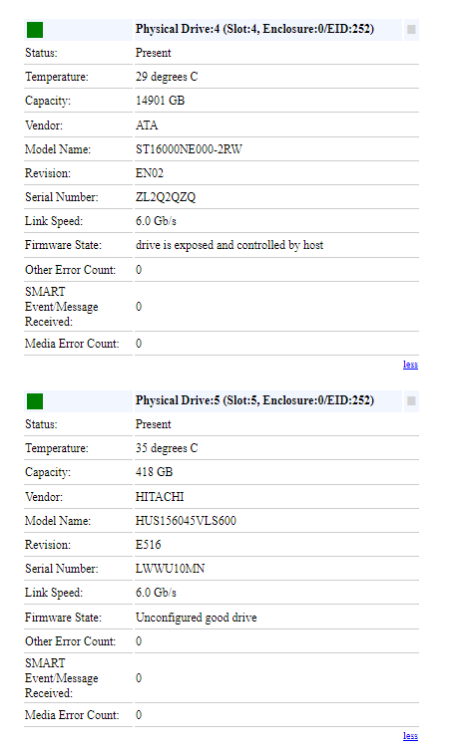
So i should probably start a new thread instead, but I'll start here (till I'm scolded otherwise). I Have a supermicro (X10DRC-LN4+) board with onboard SAS, and a PCI-e LSI HBA, all going into a x24 backplane. The PCI-e LSI HBA recognizes, and gives unraid, any drive i throw at it (SATA or SAS; the onboard controller ONLY passes SATA drives to unraid, but will not pass SAS drives to unraid (yes, "JOBD" is selected in the onboard settings...finding that was another story...but i digress). SATA always works instantly! The SAS drive shows up in the Storage Monitoring area of the supermicro IPMI GUI as "Unconfigured good drive", but not in unraid anywhere! Its not in system devices of unraid or unassigned devices If I plug the same SAS drive into the HDD slots controlled by the external PCI-e HBA, it shows up immediately! I am confused! This screen shot, of the onboard controller, shows a SATA drive first (drive4) and the SAS drive second (drive5), for comparison. Drive4 is shown and used by unraid, drive5 does not show up anywhere inside unraid (nor unraid's "system devices" area).
-
Did this thought just die? or has anyone heard that UnRaid might be thinking about doing something like a HotSpare? i would be nice for some of us!
-
So, i am having similar issues to this with a couple of my cache pools dropping drives (without cause...3 month old NVME drives; that do not show any smart errors). I am a little confused on the syntax order for this "nvme_core.default_ps_max_latency_us=0" string. i have seen some posts (including this one) have it both ways; Between "append" and "initrd=/bzroot", and AFTER "initrd=/bzroot"....Which is officially correct? (or does it even matter where it sits in the command?) Thanks
-
so this is frustrating; when i click a folder to move, i expect the contents INCLUDING the folder to move into the folder i selected...not just the contents of that folder! but it seems like it only moves the contents, and deletes the containing folder (which i selected to move). This is really dumb! It should intuitively, move the whole folder, that was selected, not just the data contained...if i wanted to move JUST the data, i should have to go into that folder and select the files to move (as any other file manager has always done). Am i missing some logic here?
-
Ok...so i figured out how to do this in a super easy way!! - Install a basic w10 VM; or any OS for that matter (...maybe even have a basic instal *.img floating around to copy to a domain folder? haven't tested this tho) - Once you are up and running, don't worry about any drivers etc, just instal Macrium Reflect - Go to restore, browse for image and find your backup (mine was stored on the same array that hosts my VMs, but I'm sure a USB HDD would work as well if that's where your bu images are stored) - Choose restore, select your VM's disk (usually contains "C:" drive) - Delete ALL the partitions on the selected disk - Copy all partitions from the source to the destination. - Next, Next, (till finish) - Since you are overwriting the drive you are currently loaded into, It will ask you if you want to reboot, and start in windows PE mode, say yes (i choose "without prompts" so i can walk away)! Now the program will load the BU image, and build a temp environment that it will automatically boot from, and restore the image that you had backed up before your VM stopped working properly (or as in my case, before my cache array bit the dust...i don't trust this BTRFS for anything at all tbh). come back in an hour or so and you will be sitting at your login screen with everything restored as before! it seems to be the cleanest way of restoring a MR *.mrimg without doing a bunch of weird conversions and format changes! Hope this helps!
-
fine...if i was using Rsync and the missing folders were in the backup that i copied to...but this issue was the folders went missing from the copy-from folder...not the destination...in fact, they were in the destination (if i recall...its been a while and i've just stopped using that app)
-
Either no one uses dell servers, or they are so clunky that no one has any answers. I too am looking for a better solution! With the dynamix plugin, i can control x2 out of all the fan headers, kind of (it shows x3, but one i don't have any control over). The rest of the fans i have to set on high in bios, or they stay slow and let the system overheat during heavy workloads or if boot hangs! its so frustrating/weird how little fan control we have in unRAID. I wish i knew coding, cuz i would just write my own scripts...if thats even possible.
-
Hey thanks for the reply. No i didn't modify that, and i checked if it was and it only shows the default "-X". I will try the dry run, like you suggested, but i think i'll avoid this plugin from now on.
-
Hey guys. I RAN INTO A HUGE PROBLEM! (and yes, I know this plugin hasn't really been updated in a while; and yes, i realize that since its been left to die, it doesn't handle multiple cache pools that unRAID now (thankfully) has, BUT i loved this plugin for what it did before....but i digress) For the most part, i use MC or other methods to move files between disks, but the other day, i decided to move some files around my production server with unBALLANCE again (carefully avoiding the cache drive, as i know its not really supported anymore)...boy did that seem to turn into a nightmare! My goal was to move the active production files to a faster HDD installed on the array (and archive completed files on the older/slower drives). The next day, after moving ("Gather") the files to the new array drive using unBALANCE overnight, my design team reported missing a bunch of their empty production and folder-structure template folders!!! It seems like every folder that was touched by the unBALANCE move was stripped of its empty folders! (at first we thought we lost actual files, but after HOURS of reviewing my regular backups, i've concluded its only the empty folders that were deleted). There wasn't anything suspect in the logs of unBALANCE, other then the permissions warning at the start. But that's never been an issue in the past, as it had only left some files/folders behind that i could manually clean up later. These deleted folders did not go into the Recycle Bin (unraid plug-in) folder, as any other deleted files do...just gonzo! And again, ONLY the empty folders are missing...if there was even a hidden file in the folder, it survived! I guess i should never use this plugin again, unless its brought back from the dead with proper support for current unRAID versions (currently running 6.10.3)...but i would still like to figure out what happened, why it happened, and how to make sure it never happens again...and THANK GOD FOR REGULAR BACKUPS! Has anyone else had this experience with this plugin? is there a setting I flipped by accident? Can my team trust me again? Should i hang up my SATA cables and work at Wall-Mart?
-
Hey guys. I RAN INTO A HUGE PROBLEM! I know this plugin hasn't really been updated in a while; and yes, i realize that since its been left to die, it doesn't handle multiple cache pools that unRAID now (thankfully) has, BUT i loved this plugin for what it did before. For the most part, i use MC or other methods to move files between disks, but the other day, i decided to move some files around my production server with unBALLANCE again (carefully avoiding the cache drive, as i know its not really supported anymore)...boy did that seem to turn into a nightmare! My goal was to move the active production files to a faster HDD installed on the array (and archive completed files on the older/slower drives). The next day, after moving ("Gather") the files to the new array drive using unBALANCE overnight, my design team reported missing a bunch of their empty production and folder-structure template folders!!! It seems like every folder that was touched by the unBALANCE move was stripped of its empty folders! (at first we thought we lost actual files, but after HOURS of reviewing my regular backups, i've concluded its only the empty folders that were deleted). There wasn't anything suspect in the logs of unBALANCE, other then the permissions warning at the start. But that's never been an issue in the past, as it had only left some files/folders behind that i could manually clean up later. These deleted folders did not go into the Recycle Bin (unraid plug-in) folder, as any other deleted files do...just gonzo! And again, ONLY the empty folders are missing...if there was even a hidden file in the folder, it survived! I guess i should never use this plugin again, unless its brought back from the dead with proper support for current unRAID versions (currently running 6.10.3)...but i would still like to figure out what happened, why it happened, and how to make sure it never happens again...and THANK GOD FOR REGULAR BACKUPS! Has anyone else had this experience with this plugin? is there a setting I flipped by accident? Can my team trust me again? Should i hang up my SATA cables and work at Wall-Mart? (i will also pose this question in general questions forum, as it seems this one is quite stale)
-
I don't get why, after countless complaints, this hasn't been addressed at by unRAID yet. This issue so annoying! I manage multiple unraid systems; cant trust my kids (or employees) to have admin unraid access when im not home/work, but if they unplug the xbox controller, or BT dongle (for example), and need to restart, they cant use their computer(s) till they plug it into THE SAME usb port it was before. Its a known issue that seems to be ignored! and no, i don't want to install/pass through a USB controller for each VM...i don't have the PCI-e space.
-
SO. i love unRAID...kicks ass for many reasons...except one...copying text from the webUI is next to impossible (unless you fast and lucky). You highlight the text, and by the time you go to copy its un-highlighted! I have almost smashed my keyboard working on things. i get it refreshes constantly, and that's probably why the highlighted text doesn't stay highlighted...BUT *EXPLITIVE RIDDEN MOMENT* it is annoying when you are trying to copy the EXACT information for say a HDD SN and you end up having to manual type it in and hope your fvinger doesn't slip and put an extra letter (see what i did there?)!!! this is more of a rant then a request, but i hope there is something that could be done. I'm using Chrome BTW, and no, i don't want to use another one atm...and yes, i know they are the evil overlords of the world and should be boycotted, but i digress. I feel better now...till the next time i try to copy some text
-
Any word on this? I am having the blank log page issue as well (6.10.0-rc3) on a production server i built/manage. A reboot briefly "fixes" the issue, but it soon returns. EDIT: So as Squid suggested below, i updated to "RC5" (had to reboot first to get that to actually work cuz the update popup stayed blank) and now the "Disk Log Information" popup, instead of just being blank, says "502 BAD GATEWAY, nginx"). As per the behaviour i am used to, it's fine after reboot, till 24 hours later...and now i have blank logs again! All the client shares are being accessed and used without noticeable issue...dockers and VM work fine...but the web UI response is a bit sluggish (i am connecting remotely), and it seems some actions are just ignored; can't change a share setting, or invoke mover from main page, for example...button is clicked, and it just sits there and never applies setting...seems like the UI half-crash is still here for me as well. (I have been having some UI issues for a while, and it was one of the reasons i switched to the RC versions to try to resolve the UI soft crashes i have been experiencing on both my servers from time to time; but to no avail so far. At time of writing this edit, i have CPU 8 showing maxed out at 100% but/and it doesn't seem to be real-time updating the graph neither; even with a page refresh.) NOW, I feel I should mention, i have a bunch of maybe-bad, maybe-not-bad HDD drives i am running various tests, pre-clear and repairs (or just sitting idle) in unassigned devices, and in a "testing" pool with anywhere from 3 or more drives in BTRFS RAID1 (i hate throwing things out that have some use left in them, and if the drive is salvageable, they are used in secondary drive pools on a workstation, or added to a STORj mining pool). The data in the testing pools is temp at best. I save printer scans to the "testing" pool, that get moved and deleted right after. If the number of "testing" pool drives were to die beyond the redundancy in that pool, it wouldn't matter and those folders are set to "ONLY" so there isn't risk of corrupted files being moved to the main array. Some of these disks are really messed up and do throw all sorts of errors in SMART, so I don't know if independent disks (not in a pool or array) crashing can bring the whole system down...but i thought i should mention it. Please note: All drives in the array (dual parity) are always brand new at time of install and replaced if any SMART errors present themselves, as they hold the important data for the graphic artists. In summary, i am facing a few issues: web UI lockup (sometimes to the point where the shares are no longer writable), and blank LOG pages, and i have noticed reboots are not clean and parity check is started (and yes, i have set long wait times for VM, shutdowns, disk activity etc as per other forms addressing this issue). I might be traveling down a different rabbit hole then the OP, so feel free to kick me to a new thread if it makes it less confusing for this one! But it all might be related somehow! I don't feel comfortable publicly posting the diag file here, as it would contain company/client names etc in the file/folder names... Sys info: Supermicro x10DRL-iT w/ dual E5-2690 V3's and 64GB DDR4 ECC RAM.
-
....so this appears as "solved"...what did you do?
-
I'm glad someone else noticed this behaviour too! Something to look at in future updates i hope! i think, along with it actually working as one would expect, moving both those settings to each share page would be less confusing as well. Thanks for the reply!
-
So i have built a few UNraid boxes, and i keep running into a little dilemma. I would like the option, in "Shares", to have a seperate "Minimum Free Space" settings for the array AND the cache of a particular share. Sometimes i would like my array disks to not fill up with less than 200GB free remaining, but my SSD cache drive on that share is only an 150GB M.2 and i don't want that to fill up with less then 20GB free space remaining! I hope you all see my dilemma! Currently, i have no choice but to set the "Minimum Free Space", for a share, to the minimum i want left on the SSD Cache, but the HDD on the Array copies all the way to that 20GB free mark as well; if i set the share up to leave 200GB free, my cache isn't used at all! It will spin up the array and write directly to it (defeating the reason to have a fast write cache at all on that share). This is one of the frew things that has always bugged me since i started using UNraid...maybe i'm the only one cuz i don't see anyone else complaining. hahaha I hope i trigger something!
-
man...it helps when i read EVERYTHING and not skip important steps! i was pulling my hair out and screaming for months over the "security issue" of the "admin" account always being there (after deleting it multiple times). Now that i have changed that line in as.config, everything is good! i can no longer log in as "admin - password". thanks to myself for making me feel silly!
-
I am also extremely interested in getting my MFP/Scanner to work through unraid. Already have printing done through CUPS (and works extremely well). I would like to scan as well! THHHANK YOU!
-
so after finding, sharing etc the USB printer (in CUPS), i can no longer find it on my windows 7 computer connected to the same router as the unraid NAS! this is getting frustrating as it was working great till nothing was changed and then it stopped working...again...just stopped working! is there a step by step guide to set this up on UNRAID (like everything else)? again, worked great till it didn't! Can we get a CUPS only FAQ?

