





saitoh183
Members
-
Joined
-
Last visited
-
I had a question about the gateway restart. Everytime the Assistant execute a gateway restart the gataway doesnt restart and i in the log of the container, it has stop logging. So the only way to get things back up is to restart the container. Is this a limitation of using this as a docker container?
-
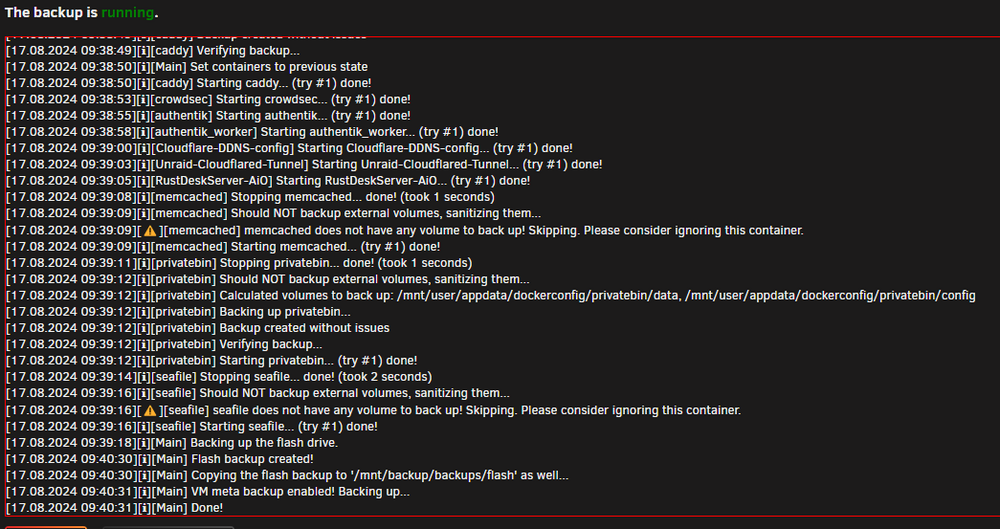
Backup is still running since the 17th and abort isnt working...how can i kill besides restarting server if possible. It is done just not stopping.
 Ah! thanks!I noticed that when the back is created, it creates a new user share each time. Is there a way for it to just store the backup in the destination without creating a user share? Or is the share necessary for the restore process to work? I just find it clutters up my User share tab with all the backup folders. Also every share that is created, has primary storage set to Array even if the destination is a my single drive pool with a 2TB SSD drive. I just dont want the backups to be stored on the ArrayI found a Dell T620 on marketplace at a decent price. However since it is old hardware im not sure about it supporting 20TB Sata drives. since on paper it only supported 8TB max i know that there still might be a possibility that 20tb works anyways. But having someone more knowing than me to way in would help would go a long way in helping make the choice to purchase it (if it is still available) Here are the specs from the seller: CPU: 2X Xeon E5-2640 @2.5GHz RAM: 40GB 1333Mhz (i assume DDR3) Raid controller: PERC H710P The tower has room for 8 disk but it is missing a caddy. It also comes with 2x900GB SAS and 2x600GB SAS but he says lights says degraded. I dont really care about the drives since i have 20TB drives to put in there. price is 450$ if i dont take the drives. I read that i could flash the Raid controller to IT mode. But on my current system i have a LSI Logic SAS 9207-8i. So I assume i could move that over to it if the H710P was a issue for the 20tb drives? Thanks in advancedI was trying to setup this drive with the SAS card and it seem to not be detected by it. Then i decided to plug it straight to the motherboard and plugged a 20tb x20 to the SAS card and that was seen no problem and the x22 was seen by the motherboard as well. Does this mean the x22 is not compatible with the LSI card or there is some other configuration i need to do on the card in order to get it to be seen?Thanks for this...I just tried it and yes it works with vpn off. I just switched to NordVPN and set it to custom. Im on a hetzner box. So i figure it might have something to do with the LAN Network or Firewall setting i need to add maybe? Im not sure what to put in Lan Network and if it is a Firewall, i dont know what rule i would need to add. I know the VPN works as i can get to the webui the docker ip. Also on a side note, is it normal that the logs show this in repetition? 2020-02-03 06:27:41,234 DEBG 'watchdog-script' stdout output: [debug] iptables chain policies are in place 2020-02-03 06:27:41,247 DEBG 'watchdog-script' stdout output: [debug] VPN IP is 10.7.0.2 [debug] Deluge IP is 10.7.0.2just pulled latest build ___. .__ .__ \_ |__ |__| ____ | |__ ____ ___ ___ | __ \| |/ \| | \_/ __ \\ \/ / | \_\ \ | | \ Y \ ___/ > < |___ /__|___| /___| /\___ >__/\_ \ \/ \/ \/ \/ \/ https://hub.docker.com/u/binhex/ 2018-03-16 23:44:38.486664 [info] System information Linux ec1dc240d262 4.9.0-0.bpo.3-amd64 #1 SMP Debian 4.9.30-2~bpo8+1 (2017-06-14) x86_64 GNU/Linux 2018-03-16 23:44:38.574209 [info] PUID defined as '1000' 2018-03-16 23:44:38.667035 [warn] PGID not defined (via -e PGID), defaulting to '100' 2018-03-16 23:44:38.857990 [warn] UMASK not defined (via -e UMASK), defaulting to '000' 2018-03-16 23:44:38.947159 [info] Permissions already set for volume mappings 2018-03-16 23:44:39.030368 [info] Setting permissions on files/folders inside container... chown: cannot access '/var/lib/nzbhydra2': No such file or directory binhex/arch-nzbhydra2: 1.4.7-1-01 works@Spike via iptables? I tried a few things in there but to no avail iptables -t nat -A PREROUTING -p tcp --dport 58846 -j REDIRECT --to-port 58846 iptables -A OUTPUT -p tcp --dport 58846 -j ACCEPT iptables -A INPUT -p tcp --dport 58846 -j ACCEPT iptables --append FORWARD --match tcp --protocol tcp --sport 58846 --dport 58846 --jump ACCEPTits not the real domain nameIf i do a curl localhost:8112 or sub.domain.com:8112 on the server via ssh, I get a response from deluge: <head> <title>Deluge: Web UI 1.3.15</title> <link rel="shortcut icon" href="/icons/deluge.png" type="image/png" /> <link rel="icon" href="/icons/deluge.png" type="image/png" /> <link rel="apple-touch-icon-precomposed" media="screen and (resolution: 163dpi)" href="/icons/apple-pre-57.png" /> <link rel="apple-touch-icon-precomposed" media="screen and (resolution: 132dpi)" href="/icons/apple-pre-72.png" /> <link rel="apple-touch-icon-precomposed" media="screen and (resolution: 326dpi)" href="/icons/apple-pre-114.png" /> <!-- Stylesheets --> <link rel="stylesheet" type="text/css" href="/css/ext-all-notheme.css" /> <link rel="stylesheet" type="text/css" href="/themes/css/xtheme-gray.css" /> <link rel="stylesheet" type="text/css" href="/css/ext-extensions.css" /> <link rel="stylesheet" type="text/css" href="/css/deluge.css" /> <script type="text/javascript"> deluge = { author: 'Damien Churchill <[email protected]>', version: '1.3.15', ..... but if i do it from my PC i get a timeout. And i cant for the life of me get the 58846 to connect with my Deluge thin client app. but im guessing the 2 problems are related if i run with VPN off everything works ...Yeah i configure that and restarted the container. So the RP works but http://wanIP:Port for the webui doesnt work so im guessing WanIP:58846 wont either



