





Aceriz
Members
-
Joined
Everything posted by Aceriz
-
Thanks for that. I will give it a try
-
Hey all, I am running a clamav daemon the one from mk0x/docker-clamav:alpine. .. setup for nextcloud antivirus... I keep getting error below in the logs. [bootstrap] Initial clam DB download. Thu Mar 11 17:44:55 2021 -> ClamAV update process started at Thu Mar 11 17:44:55 2021 Thu Mar 11 17:44:55 2021 -> daily database available for download (remote version: 26105) Thu Mar 11 17:44:55 2021 -> ^downloadFile: Unexpected response (429) from https://database.clamav.net/daily.cvd Thu Mar 11 17:44:55 2021 -> ^getcvd: Can't download daily.cvd from https://database.clamav.net/daily.cvd Thu Mar 11 17:44:55 2021 -> Trying again in 5 secs... Thu Mar 11 17:45:00 2021 -> daily database available for download (remote version: 26105) Thu Mar 11 17:45:00 2021 -> daily database available for download (remote version: 26105) Thu Mar 11 17:45:00 2021 -> ^downloadFile: Unexpected response (429) from https://database.clamav.net/daily.cvd Thu Mar 11 17:45:00 2021 -> ^getcvd: Can't download daily.cvd from https://database.clamav.net/daily.cvd Thu Mar 11 17:45:00 2021 -> Trying again in 5 secs... Thu Mar 11 17:45:05 2021 -> daily database available for download (remote version: 26105) Thu Mar 11 17:45:05 2021 -> !downloadFile: Unexpected response (429) from https://database.clamav.net/daily.cvd Thu Mar 11 17:45:05 2021 -> !getcvd: Can't download daily.cvd from https://database.clamav.net/daily.cvd Thu Mar 11 17:45:05 2021 -> Giving up on https://database.clamav.net... Thu Mar 11 17:45:05 2021 -> !Update failed for database: daily Thu Mar 11 17:45:05 2021 -> ^fc_update_databases: fc_update_database failed: HTTP GET failed (11) Thu Mar 11 17:45:05 2021 -> !Database update process failed: HTTP GET failed (11) Thu Mar 11 17:45:05 2021 -> !Update failed.
-
Hey all hoping someone might have some insights... I am running Unraid 6.9.1. with the latest pull of Nextcloud. It appears to be working well however i keep noticing the following error code… I am trying to workout where it is coming from but have not been able to figure out what to do next. Below is the Error log from within Nextcloud https://pastebin.com/FdbnhZ6V Nextcloud version -21 Operating system and version _Operating System: Linux 5.10.21-Unraid x86_64 NGINX - SWAG unraid on "Latest " Behind a Cloudflare dns PHP version _PHP Built within SWAG Config file with Identifying info removed https://pastebin.com/ywBqfmut
-
Hi All hoping that someone will be able to help me out. I was following the instructions below for updating the Cache to be at the 1Mib. I followed the Unassign/Re-assign Method as described below. I have made it through steps 1-4 with it Balancing and completing balance at each of the steps. I am now ready to go to the second drive of my Two drive Cache and am hitting problem.. When I did the above unassign/ re-assign for the first time I chose the second of my two drives first removing it from the pool then starting array, having the balance occur then stoping and readding the second drive. After the balance completes for the second time I can see that the second drive now has 1Mib alignment. When I go now to remove the 1st SSD and restart the array leaving only the 2nd (newly balanced ssd) I am getting error where it says "No BTRFS devices unmountable . no file system. Asking me to format the drive . I tried to turn off thrizznetunraid-diagnostics-20210310-1201.zipe array and select again both or just the first drive... and am getting the same error. I am not sure what to do... would really appreciate help I have attached diagnostics
-
Hey all hoping someone might be able to help me out. Noticed the following error within nextcloud... Not sure where it is coming from or how to investigate. It looks to be spreed app ? but when I go to the app store page there isn't anything by that name installed ? when I search for spreed "talk" app shows up... any help of where to go next greatly appreciated https://pastebin.com/zyzejp5j Error cron TypeError: Argument 1 passed to OC\DB\SchemaWrapper::__construct() must be an instance of OC\DB\Connection, instance of OC\DB\ConnectionAdapter given, called in /config/www/nextcloud/apps/spreed/lib/BackgroundJob/CheckReferenceIdColumn.php on line 59 /config/www/nextcloud/apps/spreed/lib/BackgroundJob/CheckReferenceIdColumn.php - line 59: OC\DB\SchemaWrapper->__construct() /config/www/nextcloud/lib/public/BackgroundJob/Job.php - line 80: OCA\Talk\BackgroundJob\CheckReferenceIdColumn->run() /config/www/nextcloud/lib/public/BackgroundJob/TimedJob.php - line 61: OCP\BackgroundJob\Job->execute() /config/www/nextcloud/cron.php - line 128: OCP\BackgroundJob\TimedJob->execute()
-
Hey wondering I have this your excellent docker all setup and working with Nextcloud But am wondering when I try and enable within nextcloud the Use OnlyOffice to generate a Document preview... I keep getting an error below Is the preview option not something supported ? or do I have to do somethign different in the setup ? Exception: Error occurred in the document service: Error while downloading the document file to be converted. /config/www/nextcloud/apps/onlyoffice/lib/documentservice.php - line 94: OCA\Onlyoffice\DocumentService->ProcessConvServResponceError() /config/www/nextcloud/apps/onlyoffice/lib/preview.php - line 266: OCA\Onlyoffice\DocumentService->GetConvertedUri() /config/www/nextcloud/lib/private/Preview/ProviderV1Adapter.php - line 54: OCA\Onlyoffice\Preview->getThumbnail() /config/www/nextcloud/lib/private/Preview/GeneratorHelper.php - line 63: OC\Preview\ProviderV1Adapter->getThumbnail() /config/www/nextcloud/lib/private/Preview/Generator.php - line 244: OC\Preview\GeneratorHelper->getThumbnail() /config/www/nextcloud/lib/private/Preview/Generator.php - line 140: OC\Preview\Generator->getMaxPreview() /config/www/nextcloud/lib/private/Preview/Generator.php - line 109: OC\Preview\Generator->generatePreviews() /config/www/nextcloud/lib/private/PreviewManager.php - line 190: OC\Preview\Generator->getPreview() /config/www/nextcloud/core/Controller/PreviewController.php - line 170: OC\PreviewManager->getPreview() /config/www/nextcloud/core/Controller/PreviewController.php - line 143: OC\Core\Controller\PreviewController->fetchPreview() /config/www/nextcloud/lib/private/AppFramework/Http/Dispatcher.php - line 218: OC\Core\Controller\PreviewController->getPreviewByFileId() /config/www/nextcloud/lib/private/AppFramework/Http/Dispatcher.php - line 127: OC\AppFramework\Http\Dispatcher->executeController() /config/www/nextcloud/lib/private/AppFramework/App.php - line 157: OC\AppFramework\Http\Dispatcher->dispatch() /config/www/nextcloud/lib/private/Route/Router.php - line 302: OC\AppFramework\App::main() /config/www/nextcloud/lib/base.php - line 993: OC\Route\Router->match() /config/www/nextcloud/index.php - line 37: OC::handleRequest()
-
So I am not sure what the post arguement parameter does. But in the official ClamAV on appstore not the one I describe above). I note that the appstore ClamAV has a post arguement of " -i" I have been doing a bunch of testing. When I remove this. . I can see in the log folder that clam appears to be scanning somewhat properly- (can now see the specific files. still get some of the errors but now it appears to continue to scan. It also appears to work with the reporting from squids user script... (had run a few smaller folder tests.. am currently running a full server test of this... Will report back once finished to ensure getting correct output.from script.. If Perhaps TQ can you clarify what the post arguement of -i does ? is this important for the function.... what It appears to do from what I am seeing is change what is shown in the logs? ?
-
Hey so I see that you said you got the fix from the developer working... mind if I ask how you applied the patch? I have tried uninstalling the app in nextcloud app page. restarting the containter and then reinstalling the app.. (but I think it is just pulling the old 1.9.0 version.. not the one with the patch that has been committed. Thanks
-
Hey so trying to just clarify I have setup with Delugevpn fully up and working. I have the sonarr and radarr and jackett previously set to proxy through delugevpn. so in https://github.com/binhex/documentation/blob/master/docker/faq/vpn.md 25/26. am I now having to add the step 24 to also have the proxy working ? just trying to clarify what is the next steps ... as I had gone into sonnar and radarr and updated to ignore local address as per 25/26 but this did not appear to work... so before I went on to 24 wanted to clarify things...
-
I had created that issue, but as per the developer he had expressed that it might be an issue with the nextcloud primary install.. so thought this might be an appropriate area to inquire as well. If you are able to figure out a solution please let me know
-
Hello All hoping that someone might be able to help me out with. Thank you so much in advance. I recently did a complete fresh re-install of the Nextcloud docker. With removal of nextcloud from docker tab, and removal of appdata folder using krusader. I have been able to completely reinstall and is all appeared to be working. I got to re-installing the apps I use specifically getting to the Ransomware proection app. (just updated to NC 21). Unfortunately at reinstalling this app (which I had been using before prior to doing my complete wipe and redo).. I am now getting the below error which comes about ever 1 minute while the app is enabled.. I had already asked the developer of app he suggested I come here (https://discord.com/channels/354974912613449730/506925392603512839/816299887062679582). . Below is the two errors that repeat every minute.. Any help figuring this out would be great... Happy to provide more info just unclear what else will be helpful....
-
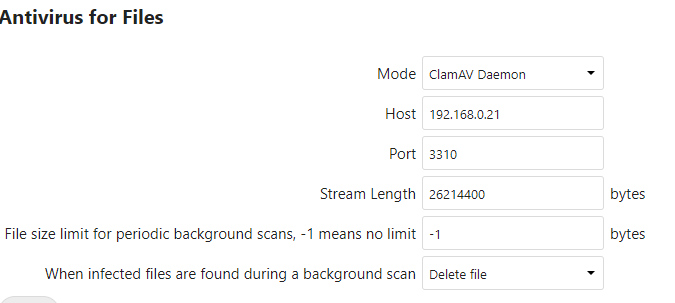
In case you never figured this out I was able to using an alternate version of ClamAV the "mk0x/docker-clamav:alpine" found on the docker hub... Then within nextcloud set the AV to the following settings in the image. . (both had to be on the proxynet to work ...
-
So I think I might have figured out where the problem is coming from and a possible solution... again I am not that great at the backend stuff But was able to get a working copy of the CLAMav So again not sure what the difference is... but rather than pulling the CLAMav that is from TQ's community application, I went onto the docker hub search in the apps tap finding TQ your https://hub.docker.com/r/tquinnelly/clamav-alpine/ I pulled this one down setting it up with alll of the same permissions and settings as is found within your community applications but without the post arguement of " -i" not sure what it does?? (your input would be helpful). I then am able to run a scan using this newly downloaded docker. and it outputs active details into the log of what it is scanning.. there in an initial error of "CRITICAL: fmap() failed" then it says out of memory error and directs at the docker image.... this version however continues to scan (outputting the files it is scanning into the log file). So I can see it is progressing I have tested quickly changing Squids user script to direct at this docker (testing with a smaller /scan directory)... and it is able to produce the notifications, start the scan and report the outcomes... So TQ it would be great to find out perhaps is the CRITICAL: fmap() failed being due to scanning of the docker.img ?? also again not sure what the "-i" post arguement is supposted to do... still relatively new to things so trying to look into this. Again this was my attempt at a solution...
-
So I just tried deleting the entire CLAMav docker removing the app data folder, and re installing But continue to get the following error .... Did you change anything in the Docker edit page when pulling down the image? change the /scan 2021-03-02T04:10:19+0000 ClamAV process starting Updating ClamAV scan DB ClamAV update process started at Tue Mar 2 04:10:19 2021 daily.cvd database is up to date (version: 26095, sigs: 3956535, f-level: 63, builder: raynman) main.cvd database is up to date (version: 59, sigs: 4564902, f-level: 60, builder: sigmgr) bytecode.cvd database is up to date (version: 332, sigs: 93, f-level: 63, builder: awillia2) Freshclam updated the DB ClamAV 0.103.1/26095/Mon Mar 1 12:10:16 2021 Scanning /scan LibClamAV Warning: fmap: failed to get MD5 LibClamAV Error: CRITICAL: fmap() failed
-
This was awesomely written !!!
-
When you are using CA to back up what specifically are you pulling if you mind me asking... Mind posting like a screen shot of your setting.. (then I can and will figure out the rclone part thanks
-
I am also getting this error... any update that you find greatly appreciate sharing
-
I would second this.. Do you know at all if NPM is setup with GeoIP and how to go about enabling this?
-
Had you been able to figure out how to get FAIL2BAN working with Nginx Proxy manager.. ? I am considering the move over but didn't want to as I have it working with SWAG...
-
Is this something you Figured out?
-
Hi all hoping someone might be able to help me out. After much digging I haven't been able to find an answer as of yet.. I am looking at switching over from SWAG to the Nginx Proxy manager.(NPM) But am wondering is there is a way to configure Fail2Ban. (forgive me if this is a stupid idea-- But am I able to leave SWAG installed and running and just map over the error log files and proxy_host log from NPM? ? if so which ones would I need to map to have the "nginx-http-auth, and nginx-badbots, nginx-botsearch, and nginx-deny" running properly with the NPM. Secondly, wondering if anyone can advise steps needed to setup GeoIP2 within NPM? Reason for looking to switch is that I like the UI of Nginx Proxy manager. I enjoy that it appears to be a very easy and intuitive interface for setup of future reverse proxy. But want to have the backend security I was able to setup with Fail2ban and GEOIP2 within SWAG. additionally i like that within Nginx Proxy Manager.. I could setup easily an Custom Origin Cloudflare Cert and key for Origin end to end security (which I haven't been able to figure out an easy way to do within SWAG.(so if someone knew how to do that that would possible work as well.. Thanks in advance for support !!
-
Hi all.. So I am wondering where would I go within UNRAID Docker Edit page for SWAG to add a Docker-Mod trying to enable https://github.com/linuxserver/docker-mods/tree/swag-f2bdiscord It appears to have 3 enviromental variables I need to enable but not sure where I would put them.. or how they should be formatted. any help much appreciated
-
So Glad that it works for you Yes Nextcloud is great. If your able to figure out the Fail2ban issues with bitwarden let me know....
-
HI all thanks in advance for help. thought this question might be better suited here under SWAG as the issue is with the FAiL2BAN setup of ... So explanation of my situation. I am working on setting up FAIL2BAN for Bitdefender as well as EMBY (had been doing nextcloud but realized it has built in one so don't have to now). I have everything working in terms of the reverse proxy using spaceinvaders wonderful videos for support doing this. With the SWAG FAIL2BAN I have edited the jail.local to have the following additional under the default 4 jails. [bitwarden] enabled = true port = http,https filter = bitwarden2 action = iptables-allports[name=bitwarden] logpath = /log/bitwarden.log ignoreip = 192.168.0.0/24 maxretry = 3 bantime = 14400 findtime = 14400 [bitwarden-admin] enabled = true port = http,https filter = bitwarden-admin action = iptables-allports[name=bitwarden] logpath = /log/bitwarden.log ignoreip = 192.168.0.0/24 maxretry = 2 bantime = 14400 findtime = 14400 [emby] enabled = true port = http,https filter = emby logpath = /logs/emby/embyserver.txt ignoreip = 192.168.0.0/24 maxretry = 3 bantime = 14400 findtime = 14400 Within the filter.d folder I have created the following three config files EMBY # Fail2Ban filter for emby # [INCLUDES] # Read common prefixes. If any customizations available -- read them from # common.local before = common.conf [Definition] failregex = AUTH-ERROR: <HOST> - Invalid user HTTP Response 401 to <HOST>. Bitwarden2 # Fail2Ban filter for Bitwarden # Detecting failed login attempts # Logged in bwdata/logs/identity/Identity/log.txt [INCLUDES] before = common.conf [Definition] failregex = ^.*Username or password is incorrect\. Try again\. IP: <ADDR>\. Username:.*$ ignoreregex = Bitwarden-admin [INCLUDES] before = common.conf [Definition] failregex = ^.*Invalid admin token\. IP: <ADDR>\.*$ ignoreregex = When I go to test the fail2ban (by going onto my cell network) and attempting to connect to the reverse proxy emby or bitwarden with incorrect login past the "maxretry" It does not activate... HOWEVER... When I go to reset the SWAG container, then the blocking occurs.. (Confirmed by using the terminal tools "docker exec -it swag fail2ban-client status" and "docker exec -it swag fail2ban-client status <jail name>" While doing the testing the Jails are all shown as active... . any thoughts on why this is ?
-
Okay so I have been able to setup another regex... but it is having a weird response.... When I try logging into the reversed proxy multiple times past the "maxretry" amounts I don't get banned... but when i Reset the SWAG container then the bans take effect... I am not sure why or even where to go from here... any thoughts would be great
