





ibasaw
Members
-
Joined
-
Last visited
-
new psu, no more shutdowns
-
shutdown under memtest, test multiple times, same results i have ordered a new psu => same model my temperatures are all fines, all is under monitoring ++
-
hi, since yesterday, my server running unraid shutdown itself here the log i will do memtest for the day ++ the-beast-diagnostics-20250704-0849.zip
-
ok, i had give up, i had re install a new fresh os on my internal disk, not my SSD, no passthrought, i will do snapshot for backup thank you for your time.
-
this is a physical disk, i use ssd as passthrought Any idea to fix that ? i can boot my computer with that disk, if i disconnect my usb unraid media. windows 11 works as itself on that disk, i used this disk in anotther computer with linux on it, but it works for months like this just one day, it does not boot anymore.
-
<?xml version='1.0' encoding='UTF-8'?> <domain type='kvm'> <name>Windows 11 passthrough</name> <uuid>xxx</uuid> <metadata> <vmtemplate xmlns="unraid" name="Windows 11" icon="windows11.png" os="windowstpm" webui=""/> </metadata> <memory unit='KiB'>8388608</memory> <currentMemory unit='KiB'>8388608</currentMemory> <memoryBacking> <nosharepages/> <source type='memfd'/> <access mode='shared'/> </memoryBacking> <vcpu placement='static'>8</vcpu> <cputune> <vcpupin vcpu='0' cpuset='4'/> <vcpupin vcpu='1' cpuset='12'/> <vcpupin vcpu='2' cpuset='5'/> <vcpupin vcpu='3' cpuset='13'/> <vcpupin vcpu='4' cpuset='6'/> <vcpupin vcpu='5' cpuset='14'/> <vcpupin vcpu='6' cpuset='7'/> <vcpupin vcpu='7' cpuset='15'/> </cputune> <os> <type arch='x86_64' machine='pc-i440fx-7.2'>hvm</type> <loader readonly='yes' type='pflash'>/usr/share/qemu/ovmf-x64/OVMF_CODE-pure-efi.fd</loader> <nvram>/etc/libvirt/qemu/nvram/xxx_VARS-pure-efi.fd</nvram> </os> <features> <acpi/> <apic/> <hyperv mode='custom'> <relaxed state='on'/> <vapic state='on'/> <spinlocks state='on' retries='8191'/> <vpindex state='on'/> <synic state='on'/> <stimer state='on'/> <vendor_id state='on' value='none'/> </hyperv> </features> <cpu mode='host-passthrough' check='none' migratable='on'> <topology sockets='1' dies='1' clusters='1' cores='4' threads='2'/> <cache mode='passthrough'/> </cpu> <clock offset='localtime'> <timer name='hpet' present='no'/> <timer name='hypervclock' present='yes'/> </clock> <on_poweroff>destroy</on_poweroff> <on_reboot>restart</on_reboot> <on_crash>restart</on_crash> <devices> <emulator>/usr/local/sbin/qemu</emulator> <disk type='file' device='cdrom'> <driver name='qemu' type='raw'/> <source file='/mnt/user/Isos/virtio-win-0.1.248-1.iso'/> <target dev='hda' bus='sata'/> <readonly/> <address type='drive' controller='0' bus='0' target='0' unit='0'/> </disk> <disk type='block' device='disk'> <driver name='qemu' type='raw' cache='writeback' discard='ignore'/> <source dev='/dev/disk/by-id/ata-Samsung_SSD_870_EVO_250GB_S61WNF0RA10151V'/> <target dev='hdc' bus='sata' rotation_rate='1'/> <serial>vdisk1</serial> <boot order='1'/> <address type='drive' controller='0' bus='0' target='0' unit='2'/> </disk> <controller type='sata' index='0'> <address type='pci' domain='0x0000' bus='0x00' slot='0x04' function='0x0'/> </controller> <controller type='virtio-serial' index='0'> <address type='pci' domain='0x0000' bus='0x00' slot='0x03' function='0x0'/> </controller> <controller type='pci' index='0' model='pci-root'/> <controller type='usb' index='0' model='nec-xhci' ports='15'> <address type='pci' domain='0x0000' bus='0x00' slot='0x07' function='0x0'/> </controller> <interface type='bridge'> <mac address='52:54:00:fa:e8:ec'/> <source bridge='virbr0'/> <model type='e1000'/> <address type='pci' domain='0x0000' bus='0x00' slot='0x02' function='0x0'/> </interface> <serial type='pty'> <target type='isa-serial' port='0'> <model name='isa-serial'/> </target> </serial> <console type='pty'> <target type='serial' port='0'/> </console> <channel type='unix'> <target type='virtio' name='org.qemu.guest_agent.0'/> <address type='virtio-serial' controller='0' bus='0' port='1'/> </channel> <input type='tablet' bus='usb'> <address type='usb' bus='0' port='2'/> </input> <input type='mouse' bus='ps2'/> <input type='keyboard' bus='ps2'/> <graphics type='vnc' port='-1' autoport='yes' websocket='-1' listen='0.0.0.0' keymap='fr' sharePolicy='ignore'> <listen type='address' address='0.0.0.0'/> </graphics> <audio id='1' type='none'/> <video> <model type='qxl' ram='65536' vram='65536' vgamem='16384' heads='1' primary='yes'/> <address type='pci' domain='0x0000' bus='0x00' slot='0x1e' function='0x0'/> </video> <hostdev mode='subsystem' type='usb' managed='no'> <source> <vendor id='0x041e'/> <product id='0x324d'/> </source> <address type='usb' bus='0' port='1'/> </hostdev> <memballoon model='virtio'> <address type='pci' domain='0x0000' bus='0x00' slot='0x06' function='0x0'/> </memballoon> </devices> </domain>
-
@JorgeB this is not multiboot, just my windows 11
-
this is not normal, we don't have to do that, this is an os issue software (not windows)
-
i think i got same problem...
-
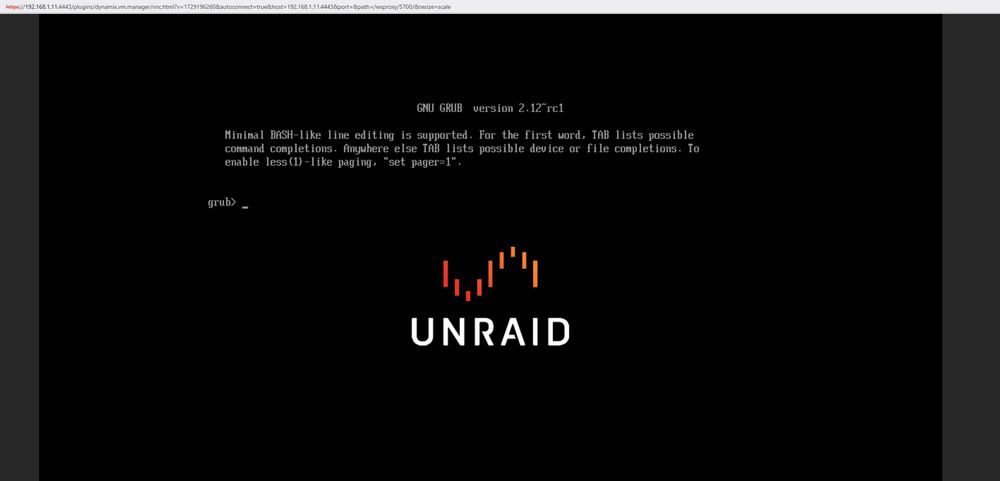
hi lately, my vm don't want to boot up anymore, i did not touch my vm or configuration in the device, i put the /dev/disk/by-id/ata-Samsung_SSD_870_EVO_250GB_S61WNF0RA10151V i got the grub screen, cant boot my windows disk here the device log Apr 1 20:50:46 THE-BEAST kernel: ata4: SATA max UDMA/133 abar m2048@0xa5617000 port 0xa5617280 irq 128 Apr 1 20:50:46 THE-BEAST kernel: ata4: SATA link up 6.0 Gbps (SStatus 133 SControl 300) Apr 1 20:50:46 THE-BEAST kernel: ata4.00: supports DRM functions and may not be fully accessible Apr 1 20:50:46 THE-BEAST kernel: ata4.00: ATA-11: Samsung SSD 870 EVO 250GB, SVT02B6Q, max UDMA/133 Apr 1 20:50:46 THE-BEAST kernel: ata4.00: 488397168 sectors, multi 1: LBA48 NCQ (depth 32), AA Apr 1 20:50:46 THE-BEAST kernel: ata4.00: Features: Trust Dev-Sleep NCQ-sndrcv Apr 1 20:50:46 THE-BEAST kernel: ata4.00: supports DRM functions and may not be fully accessible Apr 1 20:50:46 THE-BEAST kernel: ata4.00: configured for UDMA/133 Apr 1 20:50:46 THE-BEAST kernel: ata4.00: Enabling discard_zeroes_data Apr 1 20:50:46 THE-BEAST kernel: sd 4:0:0:0: [sde] 488397168 512-byte logical blocks: (250 GB/233 GiB) Apr 1 20:50:46 THE-BEAST kernel: sd 4:0:0:0: [sde] Write Protect is off Apr 1 20:50:46 THE-BEAST kernel: sd 4:0:0:0: [sde] Mode Sense: 00 3a 00 00 Apr 1 20:50:46 THE-BEAST kernel: sd 4:0:0:0: [sde] Write cache: enabled, read cache: enabled, doesn't support DPO or FUA Apr 1 20:50:46 THE-BEAST kernel: sd 4:0:0:0: [sde] Preferred minimum I/O size 512 bytes Apr 1 20:50:46 THE-BEAST kernel: ata4.00: Enabling discard_zeroes_data Apr 1 20:50:46 THE-BEAST kernel: sde: sde1 sde2 sde3 sde4 Apr 1 20:50:46 THE-BEAST kernel: sd 4:0:0:0: [sde] Attached SCSI disk Apr 1 20:51:53 THE-BEAST emhttpd: online: Samsung_SSD_870_EVO_250GB_S61WNF0RA10151V (sde) 512 488397168 Apr 1 20:51:56 THE-BEAST emhttpd: read SMART /dev/sde Apr 1 20:52:28 THE-BEAST kernel: ata4.00: Enabling discard_zeroes_data Apr 1 20:52:28 THE-BEAST kernel: sde: sde1 sde2 sde3 sde4 Apr 3 13:12:29 THE-BEAST kernel: ata4.00: Enabling discard_zeroes_data Apr 3 13:12:29 THE-BEAST kernel: sde: sde1 sde2 sde3 sde4 Apr 3 13:12:30 THE-BEAST kernel: ata4.00: Enabling discard_zeroes_data Apr 3 13:12:30 THE-BEAST kernel: sde: sde1 sde2 sde3 sde4 Apr 3 13:12:30 THE-BEAST kernel: ata4.00: Enabling discard_zeroes_data Apr 3 13:12:30 THE-BEAST kernel: sde: sde1 sde2 sde3 sde4 Apr 3 13:13:37 THE-BEAST kernel: ata4.00: Enabling discard_zeroes_data Apr 3 13:13:37 THE-BEAST kernel: sde: sde1 sde2 sde3 sde4 Apr 3 13:15:45 THE-BEAST kernel: ata4.00: Enabling discard_zeroes_data Apr 3 13:15:45 THE-BEAST kernel: sde: sde1 sde2 sde3 sde4 Apr 3 13:15:46 THE-BEAST kernel: ata4.00: Enabling discard_zeroes_data Apr 3 13:15:46 THE-BEAST kernel: sde: sde1 sde2 sde3 sde4 Apr 3 13:15:46 THE-BEAST kernel: ata4.00: Enabling discard_zeroes_data Apr 3 13:15:46 THE-BEAST kernel: sde: sde1 sde2 sde3 sde4 Apr 3 13:18:48 THE-BEAST kernel: ata4.00: Enabling discard_zeroes_data Apr 3 13:18:48 THE-BEAST kernel: sde: sde1 sde2 sde3 sde4 Apr 3 13:18:59 THE-BEAST kernel: ata4.00: Enabling discard_zeroes_data Apr 3 13:18:59 THE-BEAST kernel: sde: sde1 sde2 sde3 sde4 Apr 3 13:18:59 THE-BEAST kernel: ata4.00: Enabling discard_zeroes_data Apr 3 13:18:59 THE-BEAST kernel: sde: sde1 sde2 sde3 sde4 Apr 3 13:18:59 THE-BEAST kernel: ata4.00: Enabling discard_zeroes_data Apr 3 13:18:59 THE-BEAST kernel: sde: sde1 sde2 sde3 sde4 Apr 3 13:19:28 THE-BEAST kernel: ata4.00: Enabling discard_zeroes_data Apr 3 13:19:28 THE-BEAST kernel: sde: sde1 sde2 sde3 sde4 Apr 3 13:19:52 THE-BEAST kernel: ata4.00: Enabling discard_zeroes_data Apr 3 13:19:52 THE-BEAST kernel: sde: sde1 sde2 sde3 sde4 Apr 3 13:19:52 THE-BEAST kernel: ata4.00: Enabling discard_zeroes_data Apr 3 13:19:52 THE-BEAST kernel: sde: sde1 sde2 sde3 sde4 Apr 3 13:19:52 THE-BEAST kernel: ata4.00: Enabling discard_zeroes_data Apr 3 13:19:52 THE-BEAST kernel: sde: sde1 sde2 sde3 sde4 Apr 3 13:20:33 THE-BEAST kernel: ata4.00: Enabling discard_zeroes_data Apr 3 13:20:33 THE-BEAST kernel: sde: sde1 sde2 sde3 sde4 Apr 3 13:21:09 THE-BEAST kernel: ata4.00: Enabling discard_zeroes_data Apr 3 13:21:09 THE-BEAST kernel: sde: sde1 sde2 sde3 sde4 Apr 3 13:21:10 THE-BEAST kernel: ata4.00: Enabling discard_zeroes_data Apr 3 13:21:10 THE-BEAST kernel: sde: sde1 sde2 sde3 sde4 Apr 3 13:21:10 THE-BEAST kernel: ata4.00: Enabling discard_zeroes_data Apr 3 13:21:10 THE-BEAST kernel: sde: sde1 sde2 sde3 sde4 Apr 3 13:29:10 THE-BEAST kernel: ata4.00: Enabling discard_zeroes_data Apr 3 13:29:10 THE-BEAST kernel: sde: sde1 sde2 sde3 sde4 Apr 3 13:29:37 THE-BEAST kernel: ata4.00: Enabling discard_zeroes_data Apr 3 13:29:37 THE-BEAST kernel: sde: sde1 sde2 sde3 sde4 Apr 3 13:29:38 THE-BEAST kernel: ata4.00: Enabling discard_zeroes_data Apr 3 13:29:38 THE-BEAST kernel: sde: sde1 sde2 sde3 sde4 Apr 3 13:29:38 THE-BEAST kernel: ata4.00: Enabling discard_zeroes_data Apr 3 13:29:38 THE-BEAST kernel: sde: sde1 sde2 sde3 sde4 Apr 3 13:29:51 THE-BEAST kernel: ata4.00: Enabling discard_zeroes_data Apr 3 13:29:51 THE-BEAST kernel: sde: sde1 sde2 sde3 sde4 Apr 3 13:31:22 THE-BEAST kernel: ata4.00: Enabling discard_zeroes_data Apr 3 13:31:22 THE-BEAST kernel: sde: sde1 sde2 sde3 sde4 Apr 3 13:32:04 THE-BEAST kernel: ata4.00: Enabling discard_zeroes_data Apr 3 13:32:04 THE-BEAST kernel: sde: sde1 sde2 sde3 sde4 Apr 3 13:32:14 THE-BEAST kernel: ata4.00: Enabling discard_zeroes_data Apr 3 13:32:14 THE-BEAST kernel: sde: sde1 sde2 sde3 sde4 Apr 3 13:32:14 THE-BEAST kernel: ata4.00: Enabling discard_zeroes_data Apr 3 13:32:14 THE-BEAST kernel: sde: sde1 sde2 sde3 sde4 Apr 3 13:32:14 THE-BEAST kernel: ata4.00: Enabling discard_zeroes_data Apr 3 13:32:14 THE-BEAST kernel: sde: sde1 sde2 sde3 sde4 Apr 3 13:33:09 THE-BEAST kernel: ata4.00: Enabling discard_zeroes_data Apr 3 13:33:09 THE-BEAST kernel: sde: sde1 sde2 sde3 sde4 Apr 3 13:34:12 THE-BEAST kernel: ata4.00: Enabling discard_zeroes_data Apr 3 13:34:12 THE-BEAST kernel: sde: sde1 sde2 sde3 sde4 Apr 3 13:34:13 THE-BEAST kernel: ata4.00: Enabling discard_zeroes_data Apr 3 13:34:13 THE-BEAST kernel: sde: sde1 sde2 sde3 sde4 Apr 3 13:34:13 THE-BEAST kernel: ata4.00: Enabling discard_zeroes_data Apr 3 13:34:13 THE-BEAST kernel: sde: sde1 sde2 sde3 sde4 Apr 3 13:37:33 THE-BEAST kernel: ata4.00: Enabling discard_zeroes_data Apr 3 13:37:33 THE-BEAST kernel: sde: sde1 sde2 sde3 sde4 Apr 3 13:38:51 THE-BEAST kernel: ata4.00: Enabling discard_zeroes_data Apr 3 13:38:51 THE-BEAST kernel: sde: sde1 sde2 sde3 sde4 Apr 3 13:38:52 THE-BEAST kernel: ata4.00: Enabling discard_zeroes_data Apr 3 13:38:52 THE-BEAST kernel: sde: sde1 sde2 sde3 sde4 Apr 3 13:38:52 THE-BEAST kernel: ata4.00: Enabling discard_zeroes_data Apr 3 13:38:52 THE-BEAST kernel: sde: sde1 sde2 sde3 sde4 Apr 3 13:43:02 THE-BEAST kernel: ata4.00: Enabling discard_zeroes_data Apr 3 13:43:02 THE-BEAST kernel: sde: sde1 sde2 sde3 sde4 Apr 3 13:43:20 THE-BEAST kernel: ata4.00: Enabling discard_zeroes_data Apr 3 13:43:20 THE-BEAST kernel: sde: sde1 sde2 sde3 sde4 Apr 3 13:43:21 THE-BEAST kernel: ata4.00: Enabling discard_zeroes_data Apr 3 13:43:21 THE-BEAST kernel: sde: sde1 sde2 sde3 sde4 Apr 3 13:43:21 THE-BEAST kernel: ata4.00: Enabling discard_zeroes_data Apr 3 13:43:21 THE-BEAST kernel: sde: sde1 sde2 sde3 sde4 Apr 3 13:45:57 THE-BEAST kernel: ata4.00: Enabling discard_zeroes_data Apr 3 13:45:57 THE-BEAST kernel: sde: sde1 sde2 sde3 sde4 Apr 3 13:46:21 THE-BEAST kernel: ata4.00: Enabling discard_zeroes_data Apr 3 13:46:21 THE-BEAST kernel: sde: sde1 sde2 sde3 sde4 Apr 3 13:46:21 THE-BEAST kernel: ata4.00: Enabling discard_zeroes_data Apr 3 13:46:21 THE-BEAST kernel: sde: sde1 sde2 sde3 sde4 Apr 3 13:46:21 THE-BEAST kernel: ata4.00: Enabling discard_zeroes_data Apr 3 13:46:22 THE-BEAST kernel: sde: sde1 sde2 sde3 sde4 Apr 3 13:46:50 THE-BEAST kernel: ata4.00: Enabling discard_zeroes_data Apr 3 13:46:50 THE-BEAST kernel: sde: sde1 sde2 sde3 sde4 Apr 3 13:47:20 THE-BEAST kernel: ata4.00: Enabling discard_zeroes_data Apr 3 13:47:20 THE-BEAST kernel: sde: sde1 sde2 sde3 sde4 Apr 3 13:47:20 THE-BEAST kernel: ata4.00: Enabling discard_zeroes_data Apr 3 13:47:20 THE-BEAST kernel: sde: sde1 sde2 sde3 sde4 Apr 3 13:47:20 THE-BEAST kernel: ata4.00: Enabling discard_zeroes_data Apr 3 13:47:20 THE-BEAST kernel: sde: sde1 sde2 sde3 sde4 Apr 3 13:47:34 THE-BEAST kernel: ata4.00: Enabling discard_zeroes_data Apr 3 13:47:34 THE-BEAST kernel: sde: sde1 sde2 sde3 sde4 Apr 3 13:47:55 THE-BEAST kernel: ata4.00: Enabling discard_zeroes_data Apr 3 13:47:55 THE-BEAST kernel: sde: sde1 sde2 sde3 sde4 Apr 3 13:47:55 THE-BEAST kernel: ata4.00: Enabling discard_zeroes_data Apr 3 13:47:55 THE-BEAST kernel: sde: sde1 sde2 sde3 sde4 Apr 3 13:47:55 THE-BEAST kernel: ata4.00: Enabling discard_zeroes_data Apr 3 13:47:55 THE-BEAST kernel: sde: sde1 sde2 sde3 sde4 the disk is fine and boot properly, i try it on the server, and i was able to login to my desktop windows 11 ++ the-beast-diagnostics-20250403-1745.zip
-
Parity Parity is valid Last check completed on Saturday, 11 January 2025, 00:04 (today) Duration: 6 hours, 27 minutes, 19 seconds. Average speed: 129.1 MB/s Finding 5 errors Next check scheduled on Monday, 5 May 2025, 00:00 Due in: 113 days, 12 hours, 46 minutes i did another parity check with corrections ON, same issue, always 5 errors on the raid. the-beast-diagnostics-20250111-0943.zip
-
it will not do partity check 20 times, i don't understand.
-
i had already done it ? again ? @JorgeB
-
both result of the extended test are : Completed without error so what should i do now ?
-
hi, i got 5 errors on my parity i had done a parity check with corrections after that i redone a parity without corrections and today the result is the same. i know that i have some disk with smart errors, until they are working, i keep them. ++ the-beast-diagnostics-20250108-1304.zip


