





gleech
Members
-
Joined
-
Last visited
-
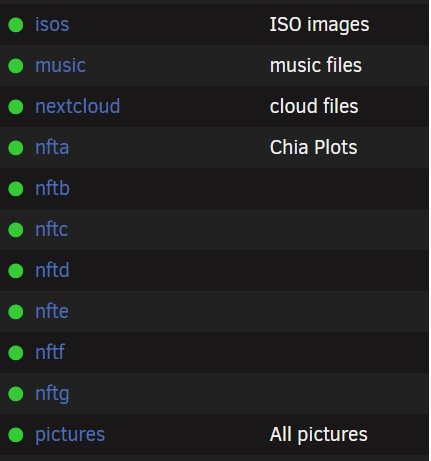
I found the culprit. For some reason after my update to 6.10.3. Unraid added those disk label that I have on UD as Shares. That must be the duplicate entry on the log. The cctv label auto-mounted because Unraid did not created a Share with the same label, not sure why Unraid left this one. So I removed all the Shares with the same disk label as my UD, rebooted any everything is back to normal. Thank you for your help.
-
I checked every disks that won't mount and I can click each one of them without any error.
-
root@Tower:~# cat /var/state/unassigned.devices/disk_names.json { "sdj": "dev1", "sdk": "dev2", "sdh": "dev3", "sdg": "dev4", "sdb": "dev5", "sdf": "dev6", "sdi": "dev7" }root@Tower:~# root@Tower:~# cat /var/state/unassigned.devices/share_names.json { "sdj1": "nftd", "sdk1": "nftg", "sdh1": "nftf", "sdg1": "nftc", "sdb1": "nftb", "sdf1": "cctv", "sdi1": "nfte" }root@Tower:~# Thank you for the help @dlandon.
-
Thank you. Here is my diagnostics zip file. tower-diagnostics-20220618-0818.zip
-
I need help. I updated Unraid to 6.10.3 from 6.9.2. I have 7 disks in UD and I set it to auto-mount. Right after the update, only one disk was mounted, I tried to click the MOUNT button, it just spins and goes back to MOUNT. I tried to reboot and disable auto-mount, and still the same. Any idea how to resolve my issues. Thank you.
-
Try adding this one your yaml. frontend: port: 9442
-
Confirmed. NVMe's with SM2262 controller passing through without problems.
-
I think the patch that was applied was only for the SM2262 controller. Maybe @aw_ can make another patch for the SM2263 controller.
-
I will report back once I solve my no video issues on my vm. But I think it's fine now since I'm not getting any error anymore on my Adata SX8200 using SM 2262 controller.
-
Can some confirm with a working vm. I think this is already fix on the new 6.7 RC1 version. I have a vm setup but its not showing any video yet, I have to play with the video setting. But I'm not getting any error anymore if I passthrough my Adata SX8200.
-
Hopefully someone will show us how to install the patch to Unraid. I have Adata SX8200
