





phoenixdiigital
Members
-
Joined
-
Last visited
-
Interesting. While I haven't seen this issue in months I did have the unbalanced plugin installed and enabled (its status must survive reboots). While I haven't used unbalanced for at least 6 months it has been enabled. Have turned it off and will see how things go. FWIW when I first saw the issue people were blaming GPU Statistics. I haven't had it installed since last year but I was still getting the issue.
-
Good job making the script. It's weird that this happens completely at random with no obvious change to the system. Just so you know something is wrong with your attachment it seems to be empty. Tried to open on both windows and linux and it doesn't seem to have the script.
-
I had a similar issue recently where my flash drive became corrupt and wouldn't boot anymore (bzfirmware was corrupted and failed the SHA check on boot) In the end I did the following. made a new fresh install USB stick with the UnRAID USB creator making sure the USB stick used the same version of UnRAID I had installed. copied across the config directory from my backup to the USB stick made sure there was only one licence .key file in there reboot If you want to sanity check your config directory in your backup just open up all the .cfg files in a text editor and make sure nothing looks garbled. Check the bz* files for a match on their associated SHA256 files. Can use any SHA256 tool or even powershell. The only other important file is config/super.dat which you can't look at in a text editor. That apparently contains all the drive assignments. My old thread : https://forums.unraid.net/topic/190346-warning-your-flash-drive-is-corrupted-or-offline/ I eventually got back online which was a relief. Edit: Whoops. This was an almost 2 month old post. The UnRAID forum bot asked me if I could help out. Silly Bot and Inattentive Hooman.
-
OK I've managed to revive the WebGUI with the suggested fix I posted earlier in the year for others getting this issue. Essentially I recreated the symlink ln -s /var/local/emhttp /usr/local/emhttp/stateThen tried to reload the Web GUI (Didn't bother trying to restart the web GUI service) IT'S ALIVE!!!! Someone on the previous page a few months back said that fix didn't work for them so I hadn't tried yet. Glad I did. Full details here of before/after. root@Tower:/boot/config# ls -al /usr/local/emhttp/ total 43 drwxr-xr-x 1 root root 160 Jun 26 14:34 ./ drwxr-xr-x 1 root root 140 Jun 22 10:17 ../ -rw-r--r-- 1 root root 0 Jun 26 17:29 0 -rw-r--r-- 1 root root 1831 Jun 4 17:38 auth-request.php -rw-rw-rw- 1 root root 738 Jun 4 17:38 auth-request.php.patch lrwxrwxrwx 1 root root 5 Nov 16 2023 boot -> /boot/ -rw-r--r-- 1 root root 15086 Nov 16 2023 favicon.ico drwxr-xr-x 1 root root 60 Nov 16 2023 languages/ lrwxrwxrwx 1 root root 8 Nov 16 2023 log -> /var/log/ -rw-r--r-- 1 root root 6757 Nov 16 2023 logging.htm -rw-r--r-- 1 root root 1438 Feb 3 2024 login.php lrwxrwxrwx 1 root root 4 Nov 16 2023 mnt -> /mnt/ drwxr-xr-x 1 root root 640 Jun 22 10:17 plugins/ -rw-r--r-- 1 root root 1649 Jan 10 08:26 redirect.htm -rw-r--r-- 1 root root 26 Nov 16 2023 robots.txt -rw-r--r-- 1 root root 3036 Nov 16 2023 update.htm -rw-r--r-- 1 root root 6006 Aug 28 2024 update.php lrwxrwxrwx 1 root root 15 Nov 16 2023 webGui -> plugins/dynamix/ root@Tower:/boot/config# ln -s /var/local/emhttp /usr/local/emhttp/state root@Tower:/boot/config# ls -al /usr/local/emhttp/ total 43 drwxr-xr-x 1 root root 160 Jun 26 18:45 ./ drwxr-xr-x 1 root root 140 Jun 22 10:17 ../ -rw-r--r-- 1 root root 0 Jun 26 18:45 0 -rw-r--r-- 1 root root 1831 Jun 4 17:38 auth-request.php -rw-rw-rw- 1 root root 738 Jun 4 17:38 auth-request.php.patch lrwxrwxrwx 1 root root 5 Nov 16 2023 boot -> /boot/ -rw-r--r-- 1 root root 15086 Nov 16 2023 favicon.ico drwxr-xr-x 1 root root 60 Nov 16 2023 languages/ lrwxrwxrwx 1 root root 8 Nov 16 2023 log -> /var/log/ -rw-r--r-- 1 root root 6757 Nov 16 2023 logging.htm -rw-r--r-- 1 root root 1438 Feb 3 2024 login.php lrwxrwxrwx 1 root root 4 Nov 16 2023 mnt -> /mnt/ drwxr-xr-x 1 root root 640 Jun 22 10:17 plugins/ -rw-r--r-- 1 root root 1649 Jan 10 08:26 redirect.htm -rw-r--r-- 1 root root 26 Nov 16 2023 robots.txt lrwxrwxrwx 1 root root 17 Jun 26 18:45 state -> /var/local/emhttp/ -rw-r--r-- 1 root root 3036 Nov 16 2023 update.htm -rw-r--r-- 1 root root 6006 Aug 28 2024 update.php lrwxrwxrwx 1 root root 15 Nov 16 2023 webGui -> plugins/dynamix/ Hope the fix works for others encountering it. Glad I don't have to reboot every time this pops up.
-
Yeah we all scoured the logs the last few times too. The server can work fine for months (with the same plugins) but this just crops us randomly. So gradually adding plugins sadly won't really identify the issue unless I re-add a plugin every 2 months. When I started this thread last year I had suspected the GPU stats plug which I've never put back on but the issue still comes back. I've not added any new plugins beyond the ones I have in about 8 months. Do you know who I might be able to talk to to find out what part of the boot process adds these symlinks? Being able to recreate them will mean I can get the GUI back without a blind reboot. There are plenty of others seeing this issue too with nothing obvious in the logs as to why the symlinks suddenly dissapear.
-
Are you referring to these? 2025-06-26T14:47:34.797739+10:00 Tower webGUI: error: /plugins/unassigned.devices/include/UnassignedDevices.php - uninitialized csrf_token 2025-06-26T14:47:35.790424+10:00 Tower webGUI: error: /plugins/unassigned.devices/include/UnassignedDevices.php - uninitialized csrf_token 2025-06-26T14:47:36.801497+10:00 Tower webGUI: error: /plugins/unassigned.devices/include/UnassignedDevices.php - uninitialized csrf_token 2025-06-26T14:47:37.798279+10:00 Tower webGUI: error: /plugins/unassigned.devices/include/UnassignedDevices.php - uninitialized csrf_token 2025-06-26T14:47:38.800184+10:00 Tower webGUI: error: /plugins/unassigned.devices/include/UnassignedDevices.php - uninitialized csrf_token 2025-06-26T14:47:39.804975+10:00 Tower webGUI: error: /plugins/unassigned.devices/include/UnassignedDevices.php - uninitialized csrf_token 2025-06-26T14:47:40.413511+10:00 Tower webGUI: error: /plugins/dynamix.system.temp/include/SystemTemp.php - uninitialized csrf_token 2025-06-26T14:47:45.815652+10:00 Tower webGUI: error: /plugins/unassigned.devices/include/UnassignedDevices.php - uninitialized csrf_token 2025-06-26T14:47:46.421163+10:00 Tower webGUI: error: /plugins/dynamix.system.temp/include/SystemTemp.php - uninitialized csrf_token 2025-06-26T14:47:46.816625+10:00 Tower webGUI: error: /plugins/unassigned.devices/include/UnassignedDevices.php - uninitialized csrf_token 2025-06-26T14:47:47.823506+10:00 Tower webGUI: error: /plugins/unassigned.devices/include/UnassignedDevices.php - uninitialized csrf_token 2025-06-26T14:47:48.828000+10:00 Tower webGUI: error: /plugins/unassigned.devices/include/UnassignedDevices.php - uninitialized csrf_tokenPretty sure that's because the critical "state" symlink in /usr/local/emhttp have dissapeared which is the cause of the web gui being dead. When I was digging into the web gui code last time this happened I saw lots of errors referencing "state" files. Someone else discovered some other missing links on the previous page I think. /usr/local/emhttp/ when in a working state root@Tower:~# ls -al /usr/local/emhttp/ total 43 drwxr-xr-x 1 root root 140 Feb 9 15:52 ./ drwxr-xr-x 1 root root 160 Dec 20 00:15 ../ -rw-r--r-- 1 root root 0 Feb 9 15:53 0 -rw-r--r-- 1 root root 1742 Feb 9 15:51 auth-request.php -rw-rw-rw- 1 root root 648 Feb 9 15:51 auth-request.php.patch lrwxrwxrwx 1 root root 5 Nov 16 2023 boot -> /boot/ -rw-r--r-- 1 root root 15086 Nov 16 2023 favicon.ico drwxr-xr-x 1 root root 60 Nov 16 2023 languages/ lrwxrwxrwx 1 root root 8 Nov 16 2023 log -> /var/log/ -rw-r--r-- 1 root root 6757 Nov 16 2023 logging.htm -rw-r--r-- 1 root root 1438 Feb 3 2024 login.php lrwxrwxrwx 1 root root 4 Nov 16 2023 mnt -> /mnt/ drwxr-xr-x 1 root root 700 Dec 20 00:15 plugins/ -rw-r--r-- 1 root root 1649 Jan 10 08:26 redirect.htm -rw-r--r-- 1 root root 26 Nov 16 2023 robots.txt lrwxrwxrwx 1 root root 17 Nov 16 2023 state -> /var/local/emhttp/ -rw-r--r-- 1 root root 3036 Nov 16 2023 update.htm -rw-r--r-- 1 root root 6006 Aug 28 05:19 update.php lrwxrwxrwx 1 root root 15 Nov 16 2023 webGui -> plugins/dynamix/ /usr/local/emhttp/ in it's current dead state root@Tower:/boot/config# ls -al /usr/local/emhttp/ total 43 drwxr-xr-x 1 root root 160 Jun 26 14:34 ./ drwxr-xr-x 1 root root 140 Jun 22 10:17 ../ -rw-r--r-- 1 root root 0 Jun 26 17:29 0 -rw-r--r-- 1 root root 1831 Jun 4 17:38 auth-request.php -rw-rw-rw- 1 root root 738 Jun 4 17:38 auth-request.php.patch lrwxrwxrwx 1 root root 5 Nov 16 2023 boot -> /boot/ -rw-r--r-- 1 root root 15086 Nov 16 2023 favicon.ico drwxr-xr-x 1 root root 60 Nov 16 2023 languages/ lrwxrwxrwx 1 root root 8 Nov 16 2023 log -> /var/log/ -rw-r--r-- 1 root root 6757 Nov 16 2023 logging.htm -rw-r--r-- 1 root root 1438 Feb 3 2024 login.php lrwxrwxrwx 1 root root 4 Nov 16 2023 mnt -> /mnt/ drwxr-xr-x 1 root root 640 Jun 22 10:17 plugins/ -rw-r--r-- 1 root root 1649 Jan 10 08:26 redirect.htm -rw-r--r-- 1 root root 26 Nov 16 2023 robots.txt -rw-r--r-- 1 root root 3036 Nov 16 2023 update.htm -rw-r--r-- 1 root root 6006 Aug 28 2024 update.php lrwxrwxrwx 1 root root 15 Nov 16 2023 webGui -> plugins/dynamix/ A reboot will fix but it's annoying this keeps coming back. I probably wont have time for a reboot for a few days when I have time to troubleshoot. All dockers and shares still seem to be functioning so I'll just hope that continues. I'd love to know what part of the UnRAID boot process creates all these symlinks and how I can recreate them without a reboot.
-
This issue has started happening again with error 500 on Web GUI :( I've recently (3 weeks ago) replaced my flash drive with a brand new sanddisk so I doubt that's the issue. Same problem as documented before where the critical files in /usr/local/emhttp are missing stopping the web gui from restarting when you run /etc/rc.d/rc.php-fpm restart Does anyone know what part of the UnRAID boot process creates all of these? It's been running fine for weeks. The only major thing I was doing prior to me noticing the failure was copying a bunch of backups ~60G from my main PC to the array. The copy is still going about 50% but the WebGUI is inaccessible. root@Tower:~# df -h Filesystem Size Used Avail Use% Mounted on rootfs 32G 2.4G 29G 8% / tmpfs 128M 2.7M 126M 3% /run /dev/sda1 29G 2.0G 27G 7% /boot overlay 32G 2.4G 29G 8% /usr overlay 32G 2.4G 29G 8% /lib tmpfs 128M 2.0M 127M 2% /var/log devtmpfs 8.0M 0 8.0M 0% /dev tmpfs 32G 0 32G 0% /dev/shm efivarfs 256K 146K 106K 59% /sys/firmware/efi/efivars tmpfs 1.0M 0 1.0M 0% /mnt/disks tmpfs 1.0M 0 1.0M 0% /mnt/remotes tmpfs 1.0M 0 1.0M 0% /mnt/addons tmpfs 1.0M 0 1.0M 0% /mnt/rootshare /dev/md1p1 7.3T 5.4T 2.0T 74% /mnt/disk1 /dev/md2p1 7.3T 5.3T 2.0T 73% /mnt/disk2 /dev/md5p1 7.3T 6.6T 778G 90% /mnt/disk5 /dev/md7p1 7.3T 6.8T 500G 94% /mnt/disk7 /dev/md8p1 7.3T 6.6T 717G 91% /mnt/disk8 /dev/sdd1 224G 27G 196G 12% /mnt/cache shfs 37T 31T 5.9T 84% /mnt/user0 shfs 37T 31T 5.9T 84% /mnt/user /dev/nvme0n1p1 466G 99G 368G 22% /mnt/disks/Dockers /dev/nvme1n1p1 1.9T 166G 1.7T 9% /mnt/disks/VMs /dev/sdb1 2.8T 2.8T 9.3G 100% /mnt/disks/WD-WCC4N2CZCNS3-security_feeds /dev/loop2 100G 32G 67G 32% /var/lib/docker /dev/loop3 1.0G 6.8M 904M 1% /etc/libvirt tmpfs 6.3G 0 6.3G 0% /run/user/0 tower-diagnostics-20250626-1553.zip
-
Thankfully I've got a screenshot of the current config if it comes to that. My only concern was if one of the disks is currently disabled how I would tell UnRAID to rebuild that from parity. Probably getting ahead of myself as the backup last thurs might be good enough as the disk was in a disabled state then. Cool thanks I suspected that might be the case. Hopefully the server can limp along without a reboot until I get everything ready.
-
As noted in the second post the backup of it's current state fails. I'll try to restore from the automatic backup taken last thurs. Am I going to run into issues transferring the licence to a new USB since I only did this last week? Isn't there a limit of one transfer per year using the automated system?
-
Just noticed I have a backup from 4 days ago from the automated backup plugin. So I have a newer backup thankfully. Where are the disk assignments stored in config and will that contain info that disk 7 is in in disabled state? I can see a DISK_ASSIGNMENTS.txt file but it's from 2 years ago and definitely doesn't match the current config. Edit: Ok I dug into the online docco and config/super.dat on the backup contains the drive assignments. Hard to say if the current backup I have is valid as it seems to be a binary file. It seems to also be in the diagnositic I attached to my first post. Edit Edit: I tried to get a backup of it in place and the current USB seems very very unhealthy so I'd say this current backup is not viable. The one from last Thurs (2 days after USB restore) should be good though. root@Tower:/mnt/user/backups# cp -r /boot/config /mnt/user/backups/flash_backup_20250519 cp: cannot stat '/boot/config/plugins/user.scripts/scripts/Check Docker Image Sizes': Input/output error cp: cannot stat '/boot/config/plugins/user.scripts/scripts/delete.ds_store': Input/output error cp: cannot stat '/boot/config/plugins/user.scripts/scripts/delete_dangling_images': Input/output error cp: cannot stat '/boot/config/plugins/user.scripts/scripts/Security Feeds Remove Old Files': Input/output error cp: cannot stat '/boot/config/plugins/user.scripts/scripts/Unlock NVidia': Input/output error cp: cannot stat '/boot/config/plugins/user.scripts/scripts/viewDockerLogSize': Input/output error cp: error reading '/boot/config/plugins/unassigned.devices.preclear/utempter-1.2.0-x86_64-3.txz': Input/output error cp: error reading '/boot/config/plugins/unassigned.devices-plus/packages/parted-3.5-x86_64-1.txz': Input/output error cp: error reading '/boot/config/plugins/unassigned.devices-plus/packages/parted-3.3-x86_64-1.txz': Input/output error cp: error reading '/boot/config/plugins/unassigned.devices-plus/packages/nmap-7.80-x86_64-3.txz': Input/output error cp: error reading '/boot/config/plugins/unassigned.devices-plus/packages/libnl-1.1.4-x86_64-2.txz': Input/output error cp: error reading '/boot/config/plugins/unassigned.devices-plus/packages/libfsapfs-20181215-x86_64-1_slonly.txz': Input/ output error cp: error reading '/boot/config/plugins/unassigned.devices-plus/packages/libbsd-0.8.7-x86_64-1_slonly.txz': Input/output error cp: error reading '/boot/config/plugins/unassigned.devices-plus/packages/libbsd-0.12.2-x86_64-1cf.txz': Input/output err or cp: error reading '/boot/config/plugins/unassigned.devices-plus/packages/libbsd-0.11.7-x86_64-1cf.txz': Input/output err or cp: error reading '/boot/config/plugins/unassigned.devices-plus/packages/libbsd-0.10.0-x86_64-2_slonly.txz': Input/outpu t error cp: error reading '/boot/config/plugins/unassigned.devices-plus/packages/fuse-exfat-1.2.8-x86_64-1_slonly.txz': Input/ou tput error cp: error reading '/boot/config/plugins/unassigned.devices-plus/packages/exfat-utils-1.2.8-x86_64-1_slonly.txz': Input/o utput error cp: error reading '/boot/config/plugins/unassigned.devices-plus/packages/apfsfuse-v20200708-x86_64-1.txz': Input/output error cp: error reading '/boot/config/plugins/unassigned.devices/packages/unassigned.devices-2021.03.09.tgz': Input/output err or cp: error reading '/boot/config/plugins/tips.and.tweaks/powertop-2.14-x86_64.txz': Input/output error cp: cannot access '/boot/config/plugins/rclone': Input/output error cp: cannot access '/boot/config/plugins/open.files': Input/output error cp: error reading '/boot/config/plugins/NerdTools/packages-desc': Input/output error cp: error reading '/boot/config/plugins/NerdTools/packages.json': Input/output error cp: error reading '/boot/config/plugins/NerdPack/packages/6.9/p7zip-16.02-x86_64-1sl.txz': Input/output error cp: error reading '/boot/config/plugins/NerdPack/packages/6.9/packages-desc': Input/output error cp: error reading '/boot/config/plugins/NerdPack/packages/6.9/packages.json': Input/output error cp: error reading '/boot/config/plugins/NerdPack/packages/6.9/perl-5.32.0-x86_64-1.txz': Input/output error cp: error reading '/boot/config/plugins/NerdPack/packages/6.9/unrar-5.8.5-x86_64-1_SBo.txz': Input/output error cp: error reading '/boot/config/plugins/NerdPack/packages/6.8/p7zip-16.02-x86_64-1sl.txz': Input/output error cp: error reading '/boot/config/plugins/NerdPack/packages/6.8/packages-desc': Input/output error cp: error reading '/boot/config/plugins/NerdPack/packages/6.8/packages.json': Input/output error cp: error reading '/boot/config/plugins/NerdPack/packages/6.8/unrar-5.6.1-x86_64-1.txz': Input/output error cp: error reading '/boot/config/plugins/NerdPack/packages/6.7/p7zip-16.02-x86_64-1sl.txz': Input/output error cp: error reading '/boot/config/plugins/NerdPack/packages/6.7/packages-desc': Input/output error cp: error reading '/boot/config/plugins/NerdPack/packages/6.7/packages.json': Input/output error cp: error reading '/boot/config/plugins/NerdPack/packages/6.7/unrar-5.6.1-x86_64-1.txz': Input/output error cp: error reading '/boot/config/plugins/NerdPack/packages/6.6/packages-desc': Input/output error cp: error reading '/boot/config/plugins/NerdPack/packages/6.6/packages.json': Input/output error cp: error reading '/boot/config/plugins/NerdPack/packages/6.6/perl-5.26.1-x86_64-4.txz': Input/output error cp: error reading '/boot/config/plugins/NerdPack/packages/6.6/unrar-5.6.1-x86_64-1.txz': Input/output error cp: error reading '/boot/config/plugins/NerdPack/packages/6.5/packages-desc': Input/output error cp: error reading '/boot/config/plugins/NerdPack/packages/6.5/packages.json': Input/output error cp: error reading '/boot/config/plugins/NerdPack/packages/6.5/perl-5.26.1-x86_64-4.txz': Input/output error cp: error reading '/boot/config/plugins/NerdPack/packages/6.4/packages-desc': Input/output error cp: error reading '/boot/config/plugins/NerdPack/packages/6.4/packages.json': Input/output error cp: error reading '/boot/config/plugins/NerdPack/packages/6.4/perl-5.26.1-x86_64-4.txz': Input/output error cp: error reading '/boot/config/plugins/dynamix.wireguard/dynamix.wireguard.txz': Input/output error cp: error reading '/boot/config/plugins/dynamix.system.temp/sensors-detect': Input/output error cp: error reading '/boot/config/plugins/dynamix.system.stats/sysstat-12.0.2.txz': Input/output error cp: error reading '/boot/config/plugins/dynamix.my.servers/webComps/unraid.min.js': Input/output error cp: error reading '/boot/config/plugins/dynamix.file.integrity/logs/disk1.export.20240606.sha256.bad.log': Input/output error cp: error reading '/boot/config/plugins/dynamix.file.integrity/logs/disk1.export.20240706.sha256.bad.log': Input/output error cp: error reading '/boot/config/plugins/dynamix.file.integrity/logs/disk1.export.20241006.sha256.bad.log': Input/output error cp: error reading '/boot/config/plugins/dynamix.file.integrity/logs/disk1.export.20250506.sha256.bad.log': Input/output error cp: error reading '/boot/config/plugins/dynamix.file.integrity/logs/disk6.export.20240606.sha256.bad.log': Input/output error cp: error reading '/boot/config/plugins/dynamix.file.integrity/logs/disk6.export.20240706.sha256.bad.log': Input/output error cp: error reading '/boot/config/plugins/dynamix.file.integrity/logs/disks.export.20231206.sha256.bad.log': Input/output error cp: error reading '/boot/config/plugins/dynamix.file.integrity/logs/disks.export.20231208.sha256.bad.log': Input/output error cp: error reading '/boot/config/plugins/dynamix.file.integrity/logs/disks.export.20231213.sha256.bad.log': Input/output error cp: error reading '/boot/config/plugins/dynamix.file.integrity/logs/disks.export.20231214.sha256.bad.log': Input/output error cp: error reading '/boot/config/plugins/dynamix.file.integrity/logs/disks.export.20231217.sha256.bad.log': Input/output error cp: error reading '/boot/config/plugins/dynamix.file.integrity/logs/disks.export.20231225.sha256.bad.log': Input/output error cp: error reading '/boot/config/plugins/dynamix.file.integrity/logs/disks.export.20231228.sha256.bad.log': Input/output error cp: error reading '/boot/config/plugins/dynamix.file.integrity/logs/disks.export.20231229.sha256.bad.log': Input/output error cp: error reading '/boot/config/plugins/dynamix.file.integrity/logs/disks.export.20231230.sha256.bad.log': Input/output error cp: error reading '/boot/config/plugins/dynamix.file.integrity/logs/disks.export.20231231.sha256.bad.log': Input/output error cp: error reading '/boot/config/plugins/dynamix.file.integrity/logs/disks.export.20240102.sha256.bad.log': Input/output error cp: error reading '/boot/config/plugins/dynamix.file.integrity/logs/disks.export.20240103.sha256.bad.log': Input/output error cp: error reading '/boot/config/plugins/dynamix.file.integrity/logs/disks.export.20240105.sha256.bad.log': Input/output error cp: error reading '/boot/config/plugins/dynamix.file.integrity/logs/disks.export.20240107.sha256.bad.log': Input/output error cp: error reading '/boot/config/plugins/dynamix.file.integrity/logs/disks.export.20240109.sha256.bad.log': Input/output error cp: error reading '/boot/config/plugins/dynamix.file.integrity/logs/disks.export.20240110.sha256.bad.log': Input/output error cp: cannot stat '/boot/config/wireguard/peers': Input/output error cp: error reading '/boot/config/plugins-error/dynamix.file.manager.plg': Input/output error cp: error reading '/boot/config/plugins-error/dynamix.wireguard.plg': Input/output error cp: error reading '/boot/config/plugins-error/gpustat.plg': Input/output error cp: error reading '/boot/config/plugins-removed/ca.backup.plg': Input/output error cp: error reading '/boot/config/plugins-removed/ca.backup2.plg': Input/output error cp: error reading '/boot/config/plugins-removed/ca.mover.tuning.plg': Input/output error cp: error reading '/boot/config/plugins-removed/dynamix.file.integrity.plg': Input/output error cp: error reading '/boot/config/plugins-removed/fix.common.problems.plg': Input/output error cp: error reading '/boot/config/plugins-removed/gpustat.plg': Input/output error cp: error reading '/boot/config/plugins-removed/intel-gpu-top.plg': Input/output error cp: error reading '/boot/config/plugins-removed/NerdPack.plg': Input/output error cp: error reading '/boot/config/plugins-removed/NerdTools.plg': Input/output error cp: error reading '/boot/config/plugins-removed/nvidia-driver.plg': Input/output error cp: error reading '/boot/config/plugins-removed/preclear.disk.plg': Input/output error cp: error reading '/boot/config/plugins-removed/ProFTPd.plg': Input/output error cp: error reading '/boot/config/plugins-removed/tailscale.plg': Input/output error
-
Hi All, I just replaced my flash drive 6 days ago (with a minor hiccup) and it's been running fine since then. However I just got this message and it seems like the USB drive I replaced it with is failing. Granted it wasn't a new stick but didn't expect it to die in less than 6 days. As advised I've attached my diagnostics. I also attempted to take a flash backup which I think mostly worked. Looking into the backup all of the config/*.cfg files are intact except for the disk.cfg file which I thankfully still have a copy of from when I took a backup last week (attached) when I replaced the USB Drive. What are my options here? I'll go buy a fresh new USB stick tomorrow morning but I'm not sure about using this current flash backup and it might be better off rebuilding from the backup I took last week. To make matters worse I do currently have a drive disabled which I was planning on rebuilding from parity once I put better SAS-> SATA cables in place disabled disk - Disk 7 ST8000VN004-3CP101_WWZ6WWKG - 8 TB (sde) The disk got disabled during a parity check after the flash swap 6 days ago. It was likely due to poor cooling or cheap SAS/SATA cables both of which I've recitifed in the last 2 days. I just haven't gotten around to rebuilding disk 7 from parity. However I'm very hesitant to reboot with this current USB Flash warning and a potentially bad backup. Yikes!!! tower-diagnostics-20250519-1802.zip disk.cfg

-
That worked thanks. The replacement documentation probably needs to be upgraded slightly to suit modern 7.x UnRAID as things were a little different. I also hit a snag as I had 3x keys on there which Unraid had a hissy fit about. Trial Key - From 2018 Plus key - from 2018 - When I first purchased UnRAID Pro key - from 2024 - When I upgraded unRAID licence. I had to remove the Trial and Plus keys from the USB Drive and restart before I could see the "Replace Key" option for the new USB Stick.
-
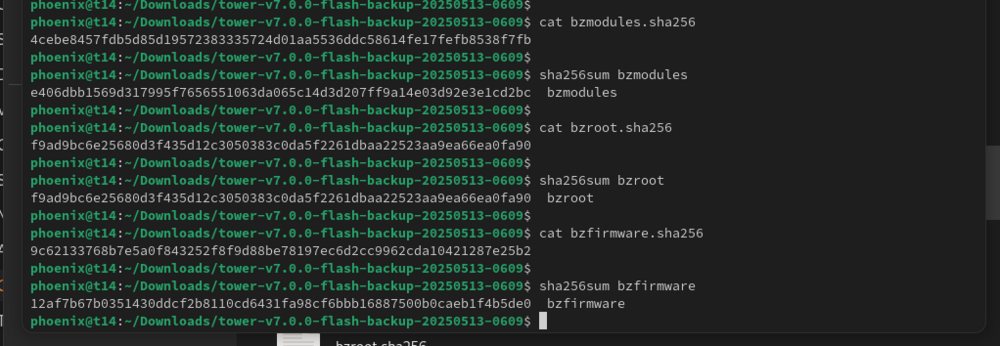
Also I took two backups this morning about an hour apart and the bzmodule checksum was different between both. So the old drive is likely dead.
-
Hi All, I got a warming this morning about my USB stick not being writable so went through the steps outlined https://docs.unraid.net/unraid-os/manual/changing-the-flash-device/#:~:text=Obtain a new good quality,important Took a backup Used USB Creator to write onto new stick When rebooting with the new stick It gave me a bzmodules checksum error. Looking at the backup and the recreated USB Stick the checksum error is definitely off. Looks like a mismatch for bzfirmware too. So what do I do now? Should I use the USB Creator to build a fresh v.7.0.0 USB stick then copy over my "config" directory? I suppose I'm at risk of some of the files in config being off too. Are there any specific critical ones I should check? I did find this forum thread which indicates the above steps should be OK but just wanted to be sure as I'm not running the latest UNRaid. https://forums.unraid.net/topic/132705-bzmodules-checksum-error/ Thanks
-
The only recommendation to @ryans100 and @Excision I would have would be remove all non-critical plugins you have then try a reboot and see. If it works start adding them back one by one leaving a day or two between adding another one. In my case GPU Statistics was a "nice to have" purely from a nerd perspective to see the GPU usage. It made no difference to the functionality of my UnRAID server. It's definitely an annoying bug and even more annoying that nothing was captured in the logs.


