





VladoB
Members
-
Joined
-
Last visited
Everything posted by VladoB
-
Hi, trying to setup kanboard, all is OK, but I have no config file inside of root or Data or plugins. I simply created config.php inside of data, with SMTP configuration, but it seems that docker is not using is, because when debugging email flow, I cannot simply see any action there related to emailing. Can you advice? Thanks Vladimir
-
Hi friends, I bought Teltonica USB LTE modem which I planned to use for SMS gateway. When I want to connect to Windows 10 VM, I see it nicely in available device to PT When I PT to VM, I can see it in windows 10 machine I can install drivers, everything is OK After driver installation I do see COM5 serial port AT which is one I need to use for sending SMS When I connect to device via Putty/serial connection, I can communication with device send AT commands, send test SMS etc. But ONCE I CLOSE PUTTY, it looks that COM port is never fully released, because when I open putty again, it does not communication with modem any more. I need to unplug USB on host level (from Unraid VM template menu) and connect again so that it works again in VM, but behaviour is the same. Is this known issue? Or do you have advice for me? Thanks Vladimir
-
Many thanks Simon, so I do not need it, thanks again.
-
Thanks a lot Simon, indeed it is now clear. can you please advice, what it means that Guest not installed? Is it necessary to install something into Windows so that all is OK?
-
Hi friends, I want to use snapshot for VM but when I do it, I can see only that it was done, see picture, but I have no option to see snapshots and recover it as I can see on your pictures above. What is my problem please? Many thanks Vladimir

-
Can anybody help me with SWAG and Youtrack? I am running Youtrack as docker on another Unraid, from LAN I can access it as http://192.168.1.50:8765 from any computer. On SWAG I setup as: ## Version 2024/07/16 server { listen 443 ssl; listen [::]:443 ssl; server_name youtrack.*; include /config/nginx/ssl.conf; client_max_body_size 0; location / { include /config/nginx/proxy.conf; include /config/nginx/resolver.conf; set $upstream_app 192.168.1.50; set $upstream_port 8765; set $upstream_proto https; proxy_pass $upstream_proto://$upstream_app:$upstream_port; } } But this does not work and when trying to connect youtrack.buzalka.cz I got reply 502 Bad gateway Many thanks V
-
Dears, I need your advice, I have mikrotik router which is setup os internal LAN DHCP server. When I have virtual machine set to obtain DHCP, everything works correct, IP as assigned and all is good. But when I decide to have IP fixed, i.e. enter it manualy from scope of LAN, but out of scope of DHCP, I loose connection. As soon as I change again to DHCP all is OK. I am probably missing something evident, can you advice? Thanks V
-
Ah sorry, I realized now, I uninstalled another template and installed yours and it works nicely, thanks.
-
Dear ZappyZap, can you have a look? What is it dnsmasq? udp 0 0 0.0.0.0:57885 0.0.0.0:* 7670/rpcbind udp 0 0 0.0.0.0:67 0.0.0.0:* 22820/dnsmasq udp 0 0 192.168.1.76:111 0.0.0.0:* 7670/rpcbind udp 0 0 127.0.0.1:111 0.0.0.0:* 7670/rpcbind udp 0 0 127.0.0.1:659 0.0.0.0:* 7677/rpc.statd udp 0 0 0.0.0.0:50212 0.0.0.0:* 7677/rpc.statd udp6 0 0 ::1:111 :::* 7670/rpcbind udp6 0 0 :::37249 :::* 7677/rpc.statd udp6 0 0 :::49723 :::* 7670/rpcbind
-
Hi ZappyZap, any idea how to check? Because I went through the dockers one by one and none is using that port.
-
I have unraid servers, one is old but big ( 160 TB) where I do store data only and no dockers, will try to install there, just to check whether error will be the same. ok? On another unraid server it works, I do not understand.
-
and error is visible only when docker is created, because it does not start, it has empty log and it has no directory created in appdata
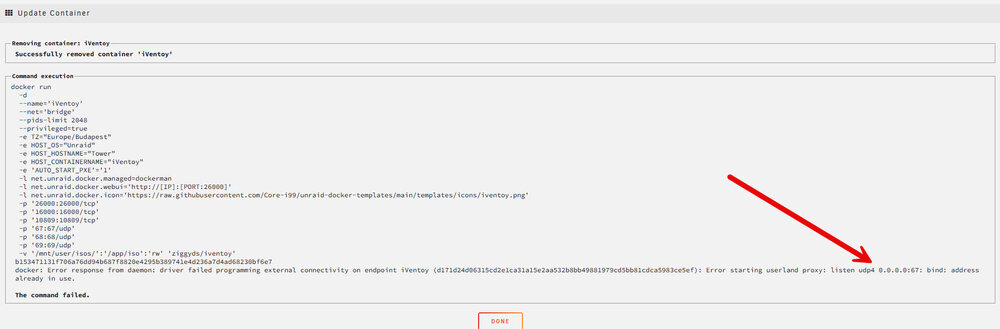
-
hi, I am not able even to start docker, it simply says Execution error.
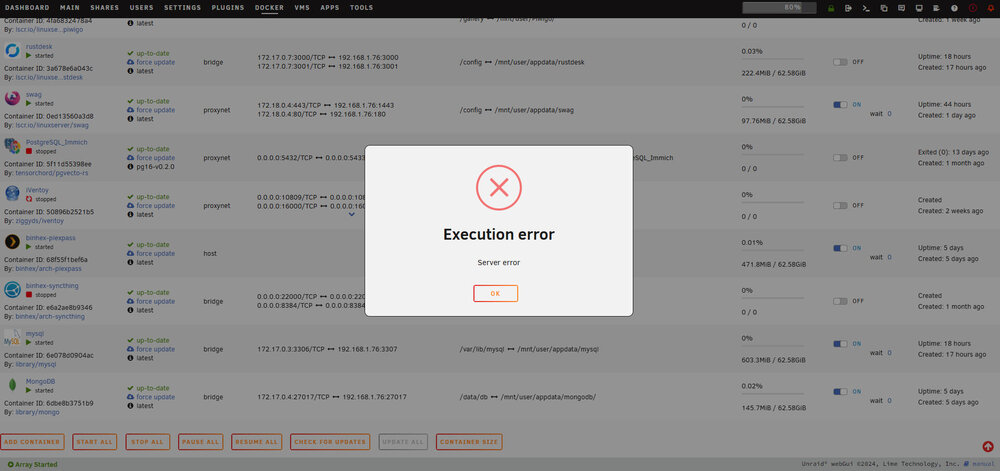
-
No problem, thanks for taking care, let us know then. V
-
Hi @ZappyZap have you had time to check the issue? many thanks V
-
Hi Friends, my first attempt to PXE, but got error 50896b2521b5f516f7831cf9ac36114fe0552724fb60ccb18307d81fb194520e docker: Error response from daemon: driver failed programming external connectivity on endpoint iVentoy (d4050464e6d74d4141560d479acd14f1e4fea2522e1cb2df6ace7c08fbb45614): Error starting userland proxy: listen udp4 0.0.0.0:67: bind: address already in use. Any advice? I am not aware of any docker using UDP 67 Many thanks V
-
Hi friends, i have mysql docker which shows me this error: packet.raise_for_error() File "Z:\TW22Pycharm\.venv\Lib\site-packages\pymysql\protocol.py", line 219, in raise_for_error err.raise_mysql_exception(self._data) File "Z:\TW22Pycharm\.venv\Lib\site-packages\pymysql\err.py", line 150, in raise_mysql_exception raise errorclass(errno, errval) pymysql.err.InternalError: (3, "Error writing file '/tmp/MLfd=147' (OS errno 28 - No space left on device)") Process finished with exit code 1 I believe it is due to mysql engine is writing tmp files directly in the container, i.e. in docker image. But why those files are left in docker even if I do db commit after each sql update? CAn you advice? Thanks V
-
Dear friends, I have latest version of Unraid and I have VMs running windows. One is working without any troubles all the time. Another one, despite being setup same way as first one is not able to connect to LAN. Can you guide me please with steps to find the problem? Many thanks V
-
Dear Jorge, thanks for advice, I will try to recreate docker image file later on. Can you advice for network configuration issue? I can see in log many entries like Jul 31 20:05:46 Tower kernel: br0: received packet on bond0 with own address as source address (addr:00:1f:29:5e:ac:f6, vlan:0) Jul 31 20:05:56 Tower kernel: br0: received packet on bond0 with own address as source address (addr:00:1f:29:5e:ac:f6, vlan:0) Jul 31 20:05:56 Tower kernel: br0: received packet on bond0 with own address as source address (addr:00:1f:29:5e:ac:f6, vlan:0) Jul 31 20:06:06 Tower kernel: br0: received packet on bond0 with own address as source address (addr:00:1f:29:5e:ac:f6, vlan:0) Jul 31 20:06:06 Tower kernel: br0: received packet on bond0 with own address as source address (addr:00:1f:29:5e:ac:f6, vlan:0) Jul 31 20:06:08 Tower kernel: br0: received packet on bond0 with own address as source address (addr:00:1f:29:5e:ac:f6, vlan:0) Jul 31 20:06:08 Tower kernel: br0: received packet on bond0 with own address as source address (addr:00:1f:29:5e:ac:f6, vlan:0) Jul 31 20:06:09 Tower kernel: br0: received packet on bond0 with own address as source address (addr:00:1f:29:5e:ac:f6, vlan:0) Jul 31 20:06:09 Tower kernel: br0: received packet on bond0 with own address as source address (addr:00:1f:29:5e:ac:f6, vlan:0) Jul 31 20:06:10 Tower kernel: br0: received packet on bond0 with own address as source address (addr:00:1f:29:5e:ac:f6, vlan:0) Jul 31 20:06:10 Tower kernel: br0: received packet on bond0 with own address as source address (addr:00:1f:29:5e:ac:f6, vlan:0) Jul 31 20:06:16 Tower kernel: br0: received packet on bond0 with own address as source address (addr:00:1f:29:5e:ac:f6, vlan:0) Jul 31 20:06:16 Tower kernel: br0: received packet on bond0 with own address as source address (addr:00:1f:29:5e:ac:f6, vlan:0) Jul 31 20:06:26 Tower kernel: br0: received packet on bond0 with own address as source address (addr:00:1f:29:5e:ac:f6, vlan:0) Jul 31 20:06:26 Tower kernel: br0: received packet on bond0 with own address as source address (addr:00:1f:29:5e:ac:f6, vlan:0) Jul 31 20:06:36 Tower kernel: br0: received packet on bond0 with own address as source address (addr:00:1f:29:5e:ac:f6, vlan:0) Many thanks
-
Hi Jorge, here is it, many thanks that you will check. tower-diagnostics-20240731-1615.zip.crdownload
-
Dear friends, can you advice what is the problem? Which information you need from me? I am new to Unraid. Many thanks V
-
-
Hi friends, I am wondering how I can check in Unraid current speed of network card, something like in Windows you click on adapter→status→you see current speed. Thanks V
-
Dears, I need to add information to this topic as I believe it will be found usefull by many people in similar situation that is described here. I have old synology NAS and I wanted to have its share mounted to unraid via SMB. I created user, set password with medium complexity like "Vlado9674++-", synology was happy. I started adding new share in Unraid, selected WINDOWS, clicked Search for server, found synology, clicked on that, added user and entered password "Vlado9674++-" and was shown list of shares on synology. I selected one I needed and clicked OK. Share was added into Unraid page, but once I clicked MOUNT - I got error CIFS: Status code returned 0xc000006d NT_STATUS_LOGON_FAILURE CIFS: VFS: \\SYNOLOGYMALY Send error in SessSetup = -13 CIFS: VFS: cifs_mount failed w/return code = -13 I was desperate and tested all things which I found around, IP address instead of name of synology machine, changing versions of samba protocol, mount points, read only etc. And then I found sentence of DLANDON here: Avoid special characters in names and passwords. Letters and numbers only are the best. And you know what? When I changed synology user password from "Vlado9674++-" to "MBDo@w", suddenly it started to work. DLANDON - please can you elaborate more on why + and - are strange characters? As they are obviously. Many thanks and good luck V
-
Dear Jorge, thanks it worked, I do not know why previously disk was labeled UDEV.


