





InfInIty
Members
-
Joined
-
Last visited
-
Should I stop the data rebuild to resolve this, or just let it finish then fix this?
-
I think I know what it is since you mentioned a go file. If there is a modified go file should I just remove it? I was attempting to have some SSH users and access persist over a reboot and used a go file to do it.
-
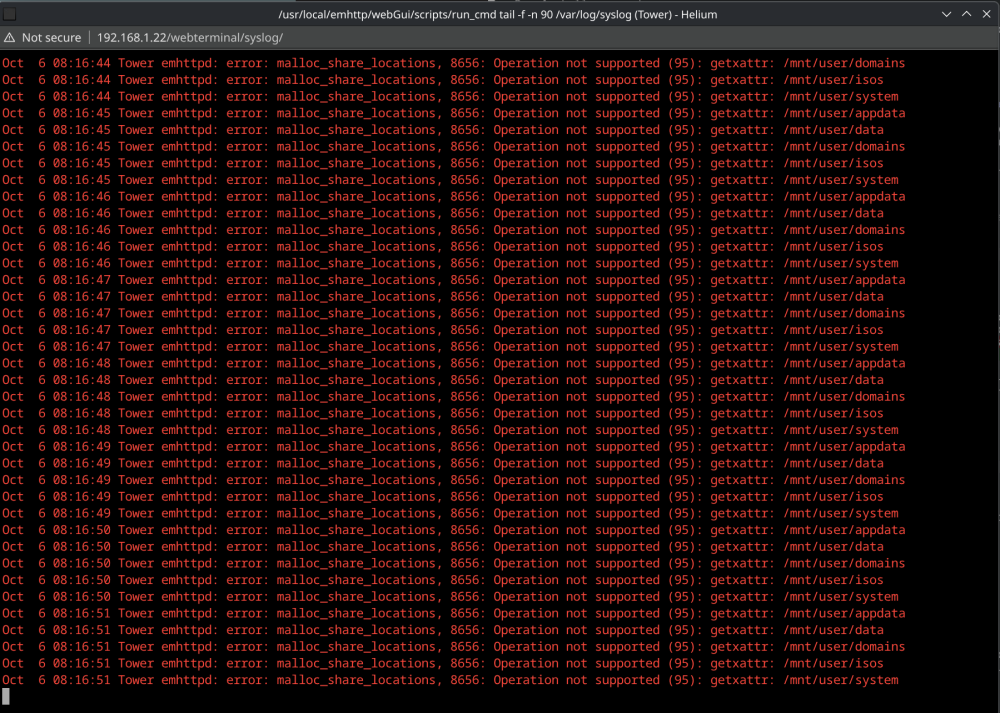
Hello Everyone, A bit of a horror story, but im realtively sure its all recoverable. I had two drives failing in my system, one of my 2 parity drives and a data disk. So I picked up a new 16TB drive to replace the 2nd parity drive. I stopped the arrary unassigned the bad parity drive, and restarted the arrary to clear it out. Shut the array back down turned the system off, replaced the drive. Added the new drive as a second parity drive and started checking things. All my docker images where no longer there. I am getting them back from previously installed apps, but I am having to reconfigure all of them for some reason. Not the biggest deal, but I feel like its not how this should function. The bigger issue is my data share has nothing in it, but if I search the actual disks for my media, its there. How can I get all the media data that is spanned across multiple disks back to the /mnt/user/data share? That is the part I havent figured out. After that I would really love to understand how to prevent this from happening again because I need to replace the other failing drive as well. I see a ton of error about all my shares in the syslog window Any help would be greatly appreciated. Thanks. tower-diagnostics-20261006-0817.zip
-
So i killed off dockers and it would start to go down, but I turned the array off, and back on and its just pegged again. What can I do to find the culprit?
-
When I try to stop any docker I get an execution error
-
Docker as a whole? I litterally just replaced that with a fresh new drive, so yea I have seen the errors, but I'm wondering if its something else. I replaced the hba card as well, but maybe I need to get that replaced again.
-
Hello everyone, The system has had very high CPU utilization for the last day and a half or so. I thought maybe it was the parity check, so I killed it. I had to wait overnight for it to finally stop. When I got back to it this morning, it was still showing very high CPU utilization. I have attached the diagnostic, but htop and top are not giving me any ideas into what this is. Any help would be appreciated. Thanks. tower-diagnostics-20250220-0819.zip
-
So I think I dodged a bullet. I tried the unassigned devices thing, but I used Encrypted XFS so it would not mount it. So I used the "New Config Tool" and reset the array. Put the drive back and put in a new parity drive, and it seems everything is in working order. All my containers are up and running, as of now I am not noticing any major data loss. I do suspect that my SBA card might be a bit flakey or getting hot, so I put a cooler on it for now, going to order 2 new ones as I am at the point that I need additional sata connections to continue to upgrade the server, the first one being adding another parity drive.
-
Hello Everyone, So I ran into a precarious issue today. My array just put a disk in disconnected state for some reason. I have had this happen before, and the parity drive seemed to be fine, so I removed the disk from the array, started the array, shutdown the array, put the disk back and it started a rebuild. Except as soon as the array starts, the system just hangs. Inspected syslog, and it's full of disk0 read error, which is the parity drive. Took the parity drive out and ran seatoosl on it, and it appears to be dead, it wont even run a smart test on the drive. The drive that the array disconnected is fine, but I do not know if it wiped any of the data. The rebuild process never got past 0%, but I don't know if it attempted to format the drive. Is there anyway I can put that drive back in, get unraid to just read the drive as is, without trying to rebuild it, and then rebuild parity with a new drive? If that's not possible, how much data did I lose? Did I lose just the data from that one disk, or did I lose the whole array? I think it should just be the data from that disk, but I don't know. Any help or any info you need from me would be appreciated. Thanks.
-
I did a manual downgrade to 6.11.5, and now a bunch of my docker containers give me a fail to start/execution error when I try to start them. tower-diagnostics-20230702-1709.zip
-
Well, I did the i915 mod before I went out for a couple hours. It crashed before I got home. Started syslog to flash, and it literally crashed in 10 minutes. I scrolled through it and saw a few things, but no smoking gun that I can tell. syslog
-
I have been trying to enable syslog server, and it never seems to save them anywhere I can get to after a crash.
-
Hello everyone, for about a month now I have been trying to diagnoise an issue, where on the screen connected to unraid. I see a kernel panic, system will not stay up for more than 12 hours it seems, usually 4 at the most. I went so far as replacing mobo ram and processor today, without any luck. The only hardware that is still in the system that was original is the SAS card, Power supply and hard drives. My only other thought at this point is to do a fresh install of unraid, but want to make sure I do it without loosing any of my data, or appdata for dockers. I have attached my diagnostics, any help would be greatly appreciated. I am at my wits end with this issue. tower-diagnostics-20230701-2332.zip
-
I hope someone can help me with this, but this has happened twice now. I am working on getting authentik up and running. I am using this postgres container for it, per the recomendation of an ibracorp video. I get it up and going and its fine, I come back to it the next day, and the container will not start and I get an error about the data folder existing but not being empty. initdb: error: directory "/var/lib/postgresql/data" exists but is not empty It looks like the data is still there, but it doesn't think it should be there. Any help would be greatly appreciated.
-
Anyone have any thoughts on this. With many unraid users hosting public servers with unraid. I think it would be a very good idea to get something like this up and running to help keep your system secure.
