





Blaze9
Members
-
Joined
-
Last visited
Everything posted by Blaze9
-
Is there a way we can upgrade nginx to 1.3.x? Home assistant needs websocket support for reverse proxy to work. Even if the docker itself isn't updated, is there a way I can update the image I have downloaded? I've tried apk add --no-cache --update nginx but nginx -v still says 1.12.x Thanks!
-
Grafana + Influxdb + Telegraf
-
I'm thinking this is docker log and not the actual container database.. Wonder if clearing it would be OK or not... Hmm.
-
Yeah it would be really good to have an option to individually search threads. Quite cumbersome to go through 10+ pages of random discussion if you want to search for a few keywords....
-
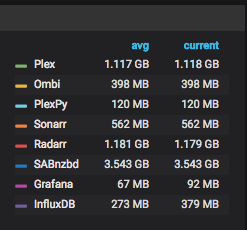
Does anyone know why the container is constantly using high (3GB+) of ram? This is persistent after restarts too. Doesn't "ramp up" just goes from 0 when off to 3ish GB when on.
-
This will truncate the docker logs, but just to be certain, data of my individual docker containers aren't affected? I'm not sure if any container logs actual data to the -json.log files.
-
Hi, I have InfluxDB/Grafana/Telegraf setup for system monitoring. My docker img has become very full due to InfluxDB logs (1.8GB/1.6GB json files). Is there any way to have this setup write to a different directory instead of /var/lib/docker/containers/xxxx? Thanks!


