





Magma
Members
-
Joined
-
Last visited
-
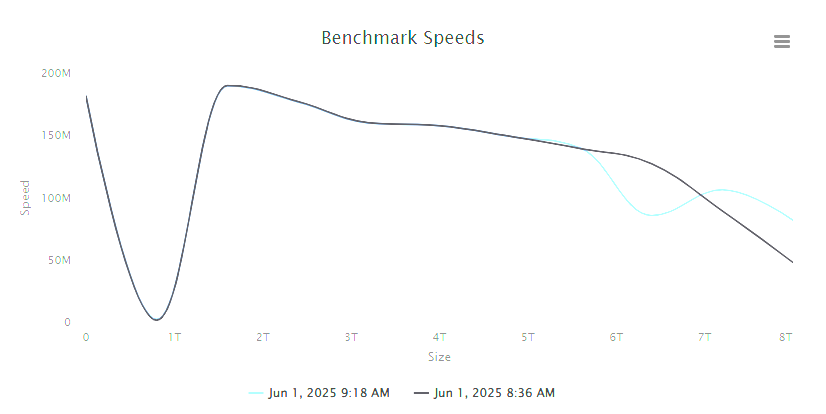
After swapping the cables I am still seeing the same issue. Additionally I ran a DiskSpeed test before an after the swap and the results are similar (attached). There is a catastrophic drop in speed around the 750GB mark on both the old and new cable. I assume based on these results I should be replacing the drive ASAP? I probably should not resume the scheduled parity check until after the swap as well?
-
Hi, Woke up to a notification that one of my drives (sdb) is showing errors, currently 9600. When I checked I also notice that the parity check was often dropping to less than 2.5 MB/s for long stretches of time (~15 mins) before returning to normal speed for a few minutes and the cycle repeating. SMART report for the drive seems fine to my untrained eyes but this is the first time I've had errors showingon a drive. Just curious if I should let parity run it's course, despite an estimated finish of over 2 months, or if I should stop the check and replace the drive ASAP. Diagnostics attached. Thanks thepitt-diagnostics-20250601-0818.zip
-
Same issue. I left the version blank and tried 11 but it would not download anything. This was using the Foundry Username + Password method. I had to specify the exact version for the installation to happen.
-
Yeah I noticed the same thing for a couple of my dockers as well.
-
So I noticed since sometime yesterday nzbhydra2 hasn't been loading. Looking at the logs I see the following error. [2m2021-02-18 15:22:26.118[0;39m [33m WARN[0;39m [2m---[0;39m [2m[ main][0;39m [36m.s.c.a.CommonAnnotationBeanPostProcessor[0;39m [2m:[0;39m[35m [0;39m[34m[0;39mDestroy method on bean with name 'nzbHydra' threw an exception: org.springframework.beans.factory.BeanCreationNotAllowedException: Error creating bean with name 'downloaderWebSocket': Singleton bean creation not allowed while singletons of this factory are in destruction (Do not request a bean from a BeanFactory in a destroy method implementation!) Does anyone have any ideas?
-
So I just noticed since I have updated to v3 that Radarr is not functioning correctly remotely. When I click "Add Movie" nothing happens. When I attempt to make changes to the settings I cannot save them. It always says there are unsaved changes despite hitting save. This all works correctly when accessing radarr locally. I have not made any changes to my reverse proxy or organizr settings. Any ideas? Thanks.
-
I have been trying to get Plex SSO working with Ombi V3 and Organizr V2. I have configured my reverse proxy according to https://github.com/causefx/Organizr/wiki/Plex-SSO. When I go to https://domain.com/plex I get a 401 error. If I go to https://domain.com/plex/web/index.html I am able to successfully reach plex. Any ideas as to what may be going on here? If it helps I've been following these guides: https://technicalramblings.com/blog/how-to-setup-organizr-with-letsencrypt-on-unraid/ https://technicalramblings.com/blog/installing-ombi-v3-beta-on-unraid-setting-up-sso-with-plex-and-ombi/ Thanks
