





John Graham
Members
-
Joined
-
Last visited
Everything posted by John Graham
-
Back Again... Still not working i tried: occ maintenance:mode --off and ./occ maintenance:mode --off ./ worked but gave me this : # ls 3rdparty apps core data lib ocs remote.php status.php AUTHORS config cron.php index.html occ ocs-provider resources themes COPYING console.php custom_apps index.php ocm-provider public.php robots.txt version.php # pwd /var/www/html # occ maintenance:mode --off sh: 9: occ: not found # ./occ maintenance:mode --off Console has to be executed with the user that owns the file config/config.php Current user id: 0 Owner id of config.php: 33 Try adding 'sudo -u #33' to the beginning of the command (without the single quotes) If running with 'docker exec' try adding the option '-u 33' to the docker command (without the single quotes) # sudo sh: 11: sudo: not found # ./sudo occ maintenance:mode --off sh: 12: ./sudo: not found #
-
boy thanks i was just going to beed hehehe ... I tryed and this is waht comes up # php /config/www/nextcloud/occ maintenance:mode --off Could not open input file: /config/www/nextcloud/occ # pwd /var/www/html # php occ maintenance:mode --off Console has to be executed with the user that owns the file config/config.php Current user: root Owner of config.php: www-data Try adding 'sudo -u www-data ' to the beginning of the command (without the single quotes) If running with 'docker exec' try adding the option '-u www-data' to the docker command (without the single quotes) # # sudo sh: 15: sudo: not found # -u www-data php occ maintenance:mode --off sh: 17: -u: not found # thanks again ...
-
Hello ... This is John G. a long time user of next cloud. Found that 20.x will be the one to switch to .. Installed the DataBase and then next cloud with no problem played around with it Nice added some stuff and played. Logged off and today tried to get back in and it is stuck in "Maintenance mode" i can not get it past this ... I have read and looked over the interweb and nothing will work! i have been trying " sudo -u abc php /config/www/nextcloud/occ maintenance:mode --off" i found no sudo in the console how can i get it out of "Maintenance mode" Sorry to Ask here if this is the wrong place ... thanks John G.
-
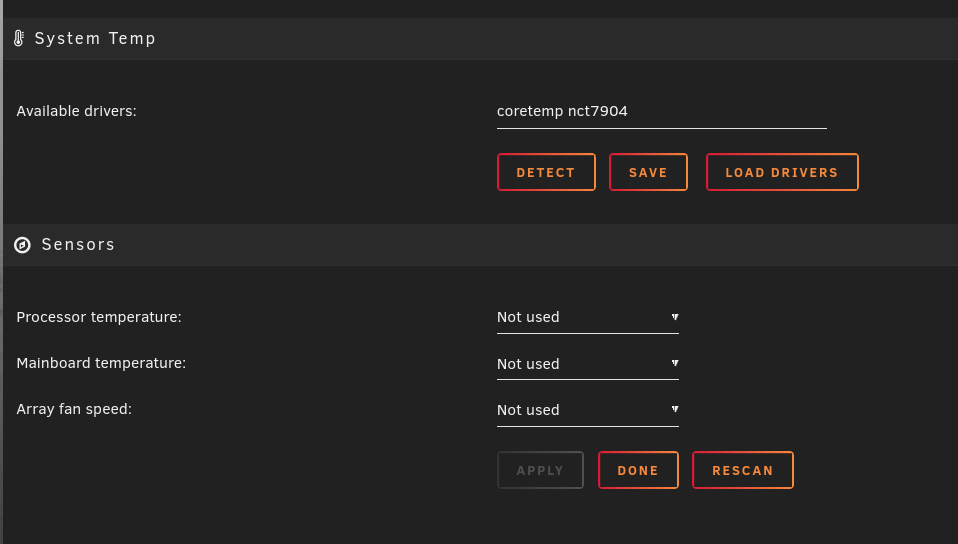
I dont know ,,, i would but up to try it ,,, i just tryed Dynamix System Temp with about the same outcome ,,, furst timw it worked but ever time after that it dose not work..?? i am lost. Might be my new setup but i dont thing so. the only thing i see is a comment about somthing call "Dynamix webGui" searched for it but cant find it? I will send a screen dump of my screen. i have tryed un instaling and reinstalling still nothing Thanls and dont get me wrong i am not bitching just trying out all the buttons ?;-{
-
i played around some more and it looks like it is using a bad path "/sys/devices/pci0000:00/0000:00:1f.3/i2c-0/0-002e/hwmon/hwmon5/fan1_input" I search the system and this is all that i could find with fan1_inout >> i input this file and saved it but still not good Thanks for your help tower-diagnostics-20190415-1648.zip
-
Hello ... As many here have said thanks for all your work ... i have been using you fan control from day on and loved it .. My server has gone down and forced to upgrad ( long story ) I am running a Supermicro x9qr7-tf+ mother board now and i am having all kinds of probllems with the plugin sometimes it finds every thing and other times nothing. Nothing means hot cpu! Dont need that ?;->> on and on i just removed it and seted it again and this is what i go .. Any thoughs ... Thanks John G. errors are ( <br /><b>Warning</b>: file_put_contents(): Only 0 of 1 bytes written, possibly out of free disk space in <b>/usr/local/emhttp/plugins/dynamix.system.autofan/include/SystemFan.php</b> on line <b>40</b><br /><br /><b>Warning</b>: file_put_contents(): Only 0 of 3 bytes written, possibly out of free disk space in <b>/usr/local/emhttp/plugins/dynamix.system.autofan/include/SystemFan.php</b> on line <b>41</b><br /><br /><b>Warning</b>: file_put_contents(): Only 0 of 3 bytes written, possibly out of free disk space in <b>/usr/local/emhttp/plugins/dynamix.system.autofan/include/SystemFan.php</b> on line <b>44</b><br /><br /><b>Warning</b>: A non-numeric value encountered in <b>/usr/local/emhttp/plugins/dynamix.system.autofan/include/SystemFan.php</b> on line <b>50</b><br /><br /><b>Warning</b>: A non-numeric value encountered in <b>/usr/local/emhttp/plugins/dynamix.system.autofan/include/SystemFan.php</b> on line <b>50</b><br /><br /><b>Warning</b>: A non-numeric value encountered in <b>/usr/local/emhttp/plugins/dynamix.system.autofan/include/SystemFan.php</b> on line <b>50</b><br /><br /><b>Warning</b>: A non-numeric value encountered in <b>/usr/local/emhttp/plugins/dynamix.system.autofan/include/SystemFan.php</b> on line <b>50</b><br /><br /><b>Warning</b>: A non-numeric value encountered in <b>/usr/local/emhttp/plugins/dynamix.system.autofan/include/SystemFan.php</b> on line <b>50</b><br /><br /><b>Warning</b>: A non-numeric value encountered in <b>/usr/local/emhttp/plugins/dynamix.system.autofan/include/SystemFan.php</b> on line <b>50</b><br /><br /><b>Warning</b>: A non-numeric value encountered in <b>/usr/local/emhttp/plugins/dynamix.system.autofan/include/SystemFan.php</b> on line <b>50</b><br /><br /><b>Warning</b>: A non-numeric value encountered in <b>/usr/local/emhttp/plugins/dynamix.system.autofan/include/SystemFan.php</b> on line <b>50</b><br /><br /><b>Warning</b>: A non-numeric value encountered in <b>/usr/local/emhttp/plugins/dynamix.system.autofan/include/SystemFan.php</b> on line <b>50</b><br /><br /><b>Warning</b>: A non-numeric value encountered in <b>/usr/local/emhttp/plugins/dynamix.system.autofan/include/SystemFan.php</b> on line <b>50</b><br /><br /><b>Warning</b>: A non-numeric value encountered in <b>/usr/local/emhttp/plugins/dynamix.system.autofan/include/SystemFan.php</b> on line <b>50</b><br /><br /><b>Warning</b>: A non-numeric value encountered in <b>/usr/local/emhttp/plugins/dynamix.system.autofan/include/SystemFan.php</b> on line <b>50</b><br /><br /><b>Warning</b>: A non-numeric value encountered in <b>/usr/local/emhttp/plugins/dynamix.system.autofan/include/SystemFan.php</b> on line <b>50</b><br /><br /><b>Warning</b>: A non-numeric value encountered in <b>/usr/local/emhttp/plugins/dynamix.system.autofan/include/SystemFan.php</b> on line <b>50</b><br /><br /><b>Warning</b>: A non-numeric value encountered in <b>/usr/local/emhttp/plugins/dynamix.system.autofan/include/SystemFan.php</b> on line <b>50</b><br /><br /><b>Warning</b>: A non-numeric value encountered in <b>/usr/local/emhttp/plugins/dynamix.system.autofan/include/SystemFan.php</b> on line <b>50</b><br />

