





FlorinB
Members
-
Joined
-
Last visited
-
Hi, after upgrading to Unraid 6.9.0-rc2, I have noticed that the HDD temperatures are not displayed anymore I am using a SuperMicro motherboard with temperature dependent controlled fan speeds. Without the HDD temperature readings my server is unbearable noisy. See below image and the diag. node804-diagnostics-20201221-2341.zip
-
With multiple pools I am seeing this as multiple "cache" drives. Since the Mover is able to move the data from the pools to Array, it will be helfpul (at least for me) to use the unBalance as well for Scatter & Gather the data between Array and pools.
-
Would it be possible to update the plugin to support the Unraid 6.9 version with multiple cache pools? Thank you.
-
Hi, Changing VM name leads to impossibility to edit save the VM config afterwise. It hangs in Updating... I have noticed this since version 6.8.x, but looks it still remains under 6.9 as well. Althrough it is a "minor" issue, I was struggling a while to find the reason. Example: The initial vm name was "Windows Server 2019" and I have added after VM creation _1 at the end. The result: It hangs in updating. Best regards, Florin
-
Hi, I have created a pool with one 2TB SSD. Is this normal or is a bug? It was the same in 6.9.0-beta24 Attached you can find also the diag file. Br, Florin node804-diagnostics-20200712-2255.zip
-
Restore functionality would be great. Until then where I can find a manual restore procedure? Thanks in advance.
-
Instructions into linuxserver/letsencrypt docker: /appdata/letsencrypt/nginx/proxy-confs/plex.subdomain.conf.sample # make sure that your dns has a cname set for plex, if plex is running in bridge mode, the below config should work as is, for host mode, # replace the line "proxy_pass https://$upstream_plex:32400;" with "proxy_pass https://HOSTIP:32400;" HOSTIP being the IP address of plex # in plex server settings, under network, fill in "Custom server access URLs" with your domain (ie. "https://plex.yourdomain.url:443") I had filled in the Custom server access URL with my external NGINX fqdn for plex. Everything is working now with the custom network, as it was in the Bridgde network: - accessibile via Unraid IP http://Unraid_IP:32400/web/index.html - accessibile via https://app.plex.tv/desktop# And additionally thanks to the NGINX reverse proxy from Internet, in a more secure way than with Plex Remote Access enabled. Thank you very much for your help @aptalca and @happyagnostic.
-
Do not need this, the Plex is already reachable from outside via NGINX reverse proxy mapping. This did the trick: now Plex is reachable from the internal network as well. The ports are mapped and translated to the Unraid IP. I do not want/need to enable Remote access. The only issue, is that in this setup: Plex in custom dedicated network with letsencrypt is not reachable via https://apps.plex.tv When it is configured with the Bridge network I can access it like that from my notebook. Thanks @happyagnostic for the tips and help.
-
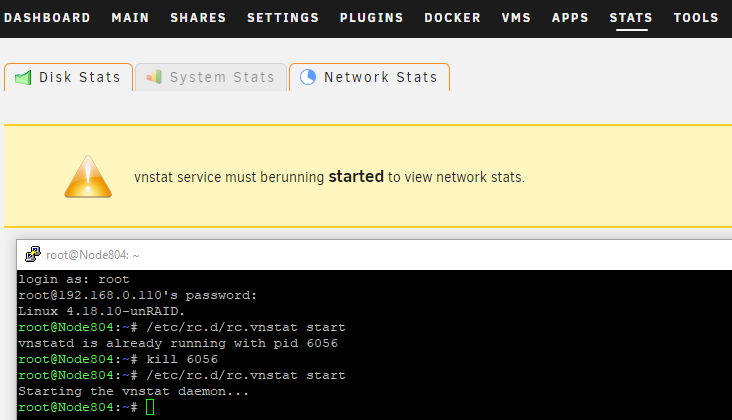
Still not working. See the screenshot for more details.
-
Thanks for the suggestion to update the BIOS. Updated v2.1a to v2.2 on Supermicro X11SSM-F.
-
As I had already mentioned I had tried that already without success - Still same issue - Plex not reachable from local network. Anyone ? Ideas/Solutions?
-
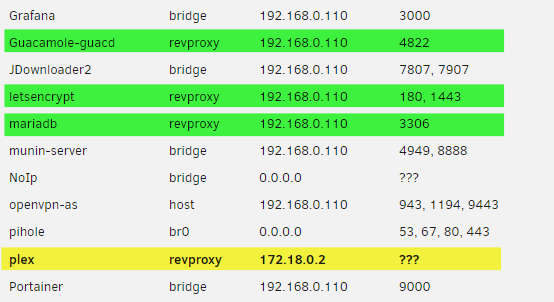
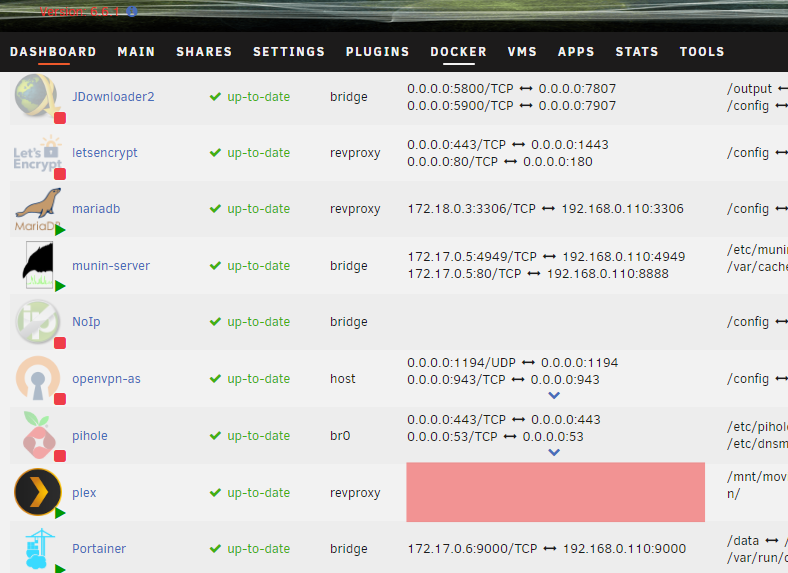
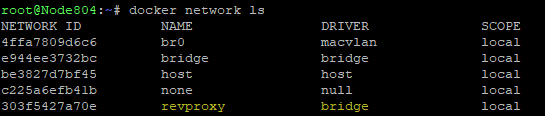
After following up the setup described here linuxserver/plex docker IP:Port is not transated/mapped to the Uraid IP:Port. Plex is reachable over the public web address, but not from my internal LAN. Here are some print screens: Docker tab: No address/port mapping for Plex. Docker allocations: the revproxy network ip is displayed, however there is no port mapping. SSH Shell: docker network list So far I had tried the following, without success: - Changed the network of the docker to Bridge, as it was initially. - Uninstalled Plex and reinstalled it from the custom templates. - Rebooted Unraid server. Notice that for the others docker containers which are in the custom docker network revproxy there is no issue. Diag archive attached: node804-diagnostics-20181004-0146.zip
-
EdgeRouterX working GUI behind NGINX Reverse Proxy. In case there is anyone else interested into this I have found the solution. Here my config: #Ubiquiti EdgeRouter-X Reverse Proxy #Source: https://community.ubnt.com/t5/EdgeRouter/Access-Edgemax-gui-via-nginx-reverse-proxy-websocket-problem/td-p/1544354 #Adapded by Florin Butoi for docker linuxserver/letsencrypt on 02 Oct 2018 server { listen 80; server_name edgex.*; return 301 https://$host$request_uri; } upstream erl { server 192.168.22.11:443; keepalive 32; } server { listen 443 ssl http2; server_name edgex.*; include /config/nginx/filterhosts.conf; include /config/nginx/ssl.conf; client_max_body_size 512m; location / { proxy_pass https://erl; proxy_http_version 1.1; proxy_buffering off; proxy_set_header Upgrade $http_upgrade; proxy_set_header Connection "Upgrade"; proxy_set_header Host $host; proxy_set_header X-Real-IP $remote_addr; proxy_set_header X-Forward-For $proxy_add_x_forwarded_for; } } include /config/nginx/filterhosts.conf; #allow from this ip allow 212.122.123.124; #temporary internet ip on my router allow 178.112.221.111; #deny all others deny all;
-
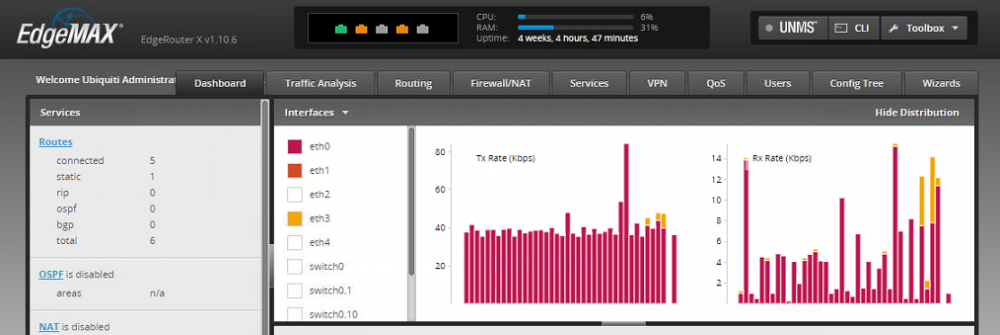
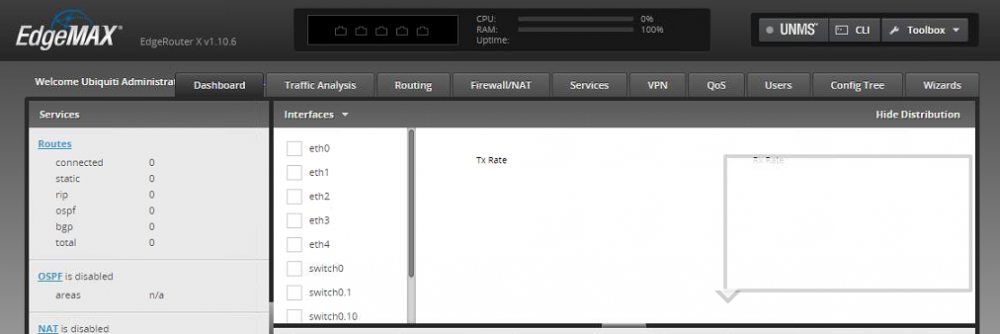
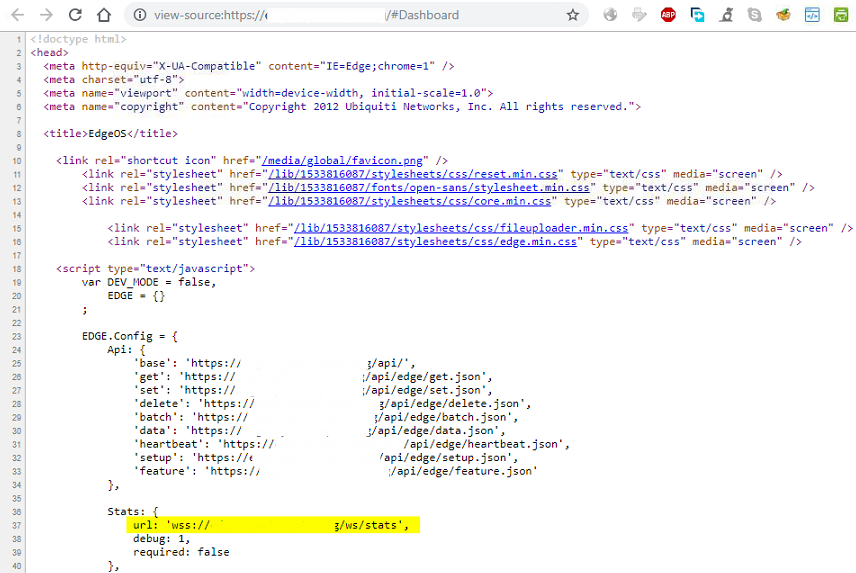
Anyone can help me with configuration websockets (wss:// ) over reverse proxy? I have a EdgeRouterX and I have created the following configuration in linuxserver/letsencrypt docker container: #Ubiquiti EdgeRouter-X Reverse Proxy server { listen 80; server_name edgex.*; rewrite ^ https://$host$request_uri? permanent; } server { listen 443 ssl; server_name edgex.*; include /config/nginx/ssl.conf; client_max_body_size 0; location / { include /config/nginx/proxy.conf; resolver 127.0.0.11 valid=30s; set $upstream_edgex 192.168.0.10; proxy_pass https://$upstream_edgex; proxy_set_header Range $http_range; proxy_set_header If-Range $http_if_range; proxy_set_header Upgrade $http_upgrade; proxy_set_header Connection "upgrade"; proxy_buffering off; } } I can login into the GUI, but i do not see any graphs, interface status or CPU/RAM usage. This is what I see from LAN: This is what I see over NGINX reverse_proxy: In the source code of the page you can see that is using websockets (wss://) : I could not found a working way to forward the wss as well, so any help would be appreciated.
-
When i change the CPU Mode for a VM from Host Passthrough to Emulated (QEMU64) this is updated into the XML config and not saved correctly when UPDATE is clicked. Steps to reproduce: 1. Initial state CPU Mode Passthrough 2. Change the CPU Mode to Emulated 3. CPU Mode changed to Emulated 4. Click on UPDATE button 5. Edit again VM configuration to see the changes 6. Changes are not updated




