






openam
Members
-
Joined
-
Last visited
Everything posted by openam
-
I'm still in safemode, so I have 0 plugins.
-
I have docker disabled, I don't have any vms. I was trying to think what would be writing to disk 6, turns out disk 6 has time machine. Cancelled the backup from my laptop. Is there an easy way to figure out what else may be writing to the disk?
-
New diagnostics attached. palazzo-diagnostics-20231106-0825.zip
-
I just sat down by my unraid server, and I can hear a drive doing the occasional click. I got a warning the other day about disk 3 seek errors, and picked up a renewed drive. Is there a way to tell if that's the drive that's making the clicking noise?
-
I cancelled the original sync. It had shown 0 correction written. I have started a new one in safe mode. Still showing a long time. I have also closed the browsers windows that I had open.
-
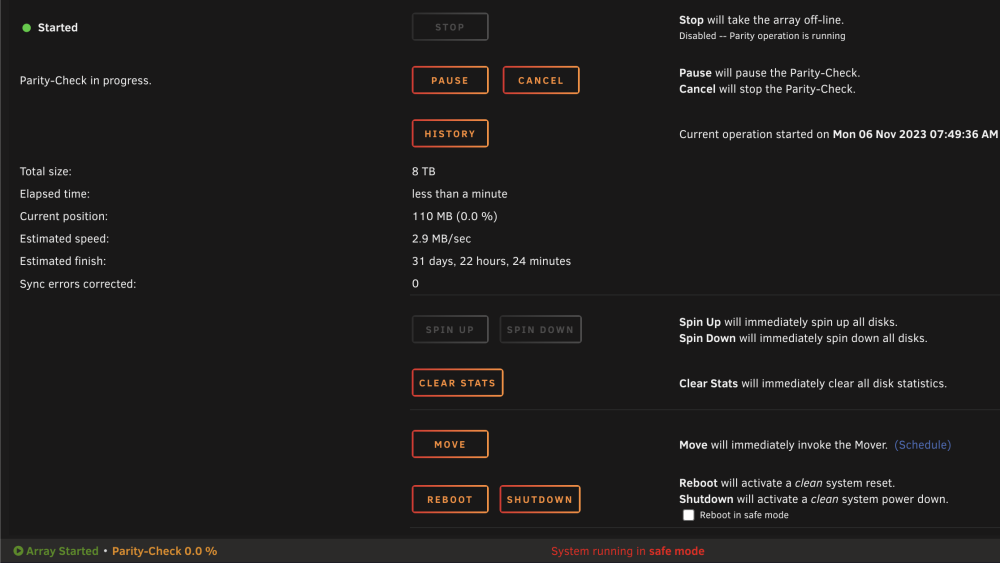
Well it said it detected a dirty shutdown. I just clicked the reboot button in the UI. Now it says it's doing a parity check and it's going to take 30+ days. Guess I'll see if it's running any faster in the morning. Also attaching some diagnostics from after the reboot. palazzo-diagnostics-20231105-2132.zip
-
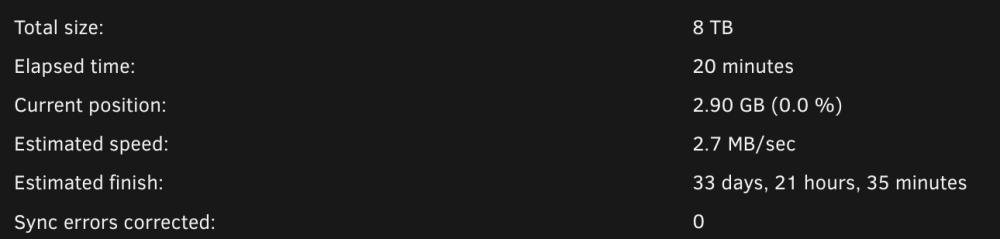
I tried to pull diagnostics, but it just seems to hang. I was able to copy syslog to a separate share, and zip it up. I do have nerd pack installed, but it is not installing 'atop'. I'm gonna give it a reboot like suggested in fix common problems. 202311-05-syslog.zip

-
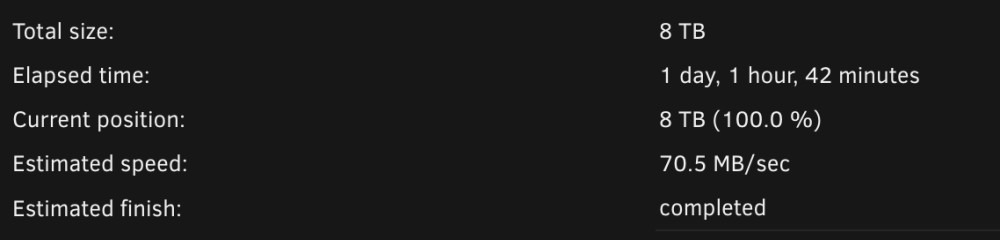
Awesome thank you! I'm back up and running.
-
Man there are some scary prompts going through that. palazzo-diagnostics-20231024-1257.zip
-
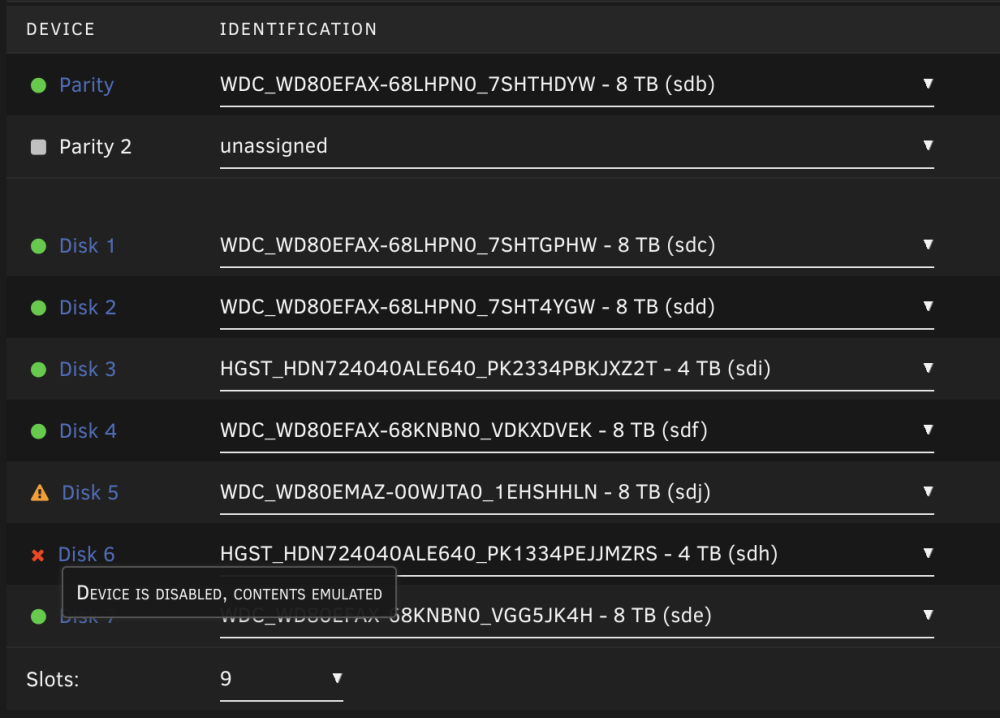
Shut down the server, pulled that disk, and re-seated it again. It came back up, and I was able to get the smart info for it. The UI is showing the disk as disabled. Is there a way to make that disk be re-enabled, so I can continue trying to sync disk 5, or am I just going to have to start over? That disk 6 is in a iStarUSA BPN-DE350SS-BLUE enclosure. I've ordered a new case that'll just fit the devices without this extra housing unit. When you say power/connection problem, could it have to do with an under powered PSU? I do just have a CORSAIR CX Series CX500 PSU in there. palazzo-diagnostics-20231024-0743.zip palazzo-smart-20231024-0742.zip
-
Well I got a new UPS yesterday, and got it charged up, and started running the sync again, and I just had another disk (disk 6) throw an error. Not sure what I do at this point. palazzo-diagnostics-20231023-1509.zip

-
Well my UPS died, and the system is powered off. It wasn't even a power failure from the grid. The UPS just is non-responsive at this point. (╯°□°)╯︵ ┻━┻ Guess I'll be going to the store tomorrow morning to get a new one, and starting over...
-
palazzo-diagnostics-20231020-1504.zip
-
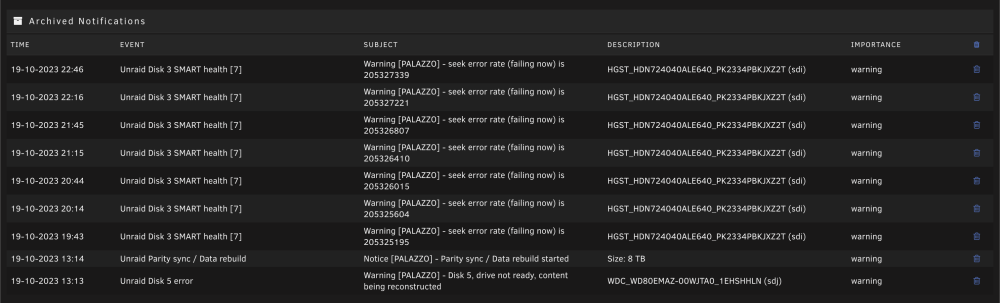
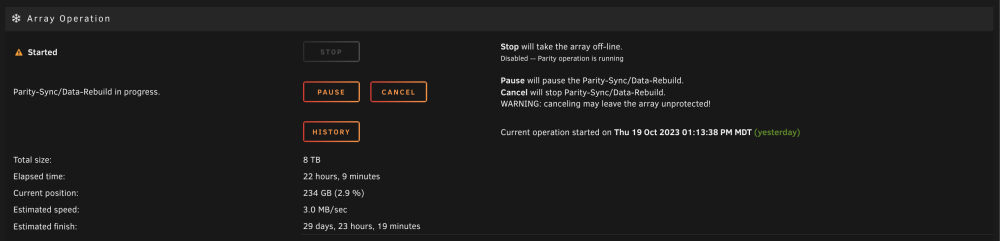
It appears that my disk 3 is having seek issues, and the rebuild is going to take forever. I'm guessing I'll just need to wait this out, and likely replace disk 3 when it's done. Is there any way to figure out what is slowing this all down? Would pause / resume help at all?
-
I just ran `kill 31637` and it let the array stop. Going to continue on...
-
It's having a hard time stopping the array. I'm seeing the following in the syslog Oct 19 12:57:01 palazzo emhttpd: shcmd (8162): umount /mnt/disk5 Oct 19 12:57:01 palazzo root: umount: /mnt/disk5: target is busy. Oct 19 12:57:01 palazzo emhttpd: shcmd (8162): exit status: 32 Oct 19 12:57:01 palazzo emhttpd: Retry unmounting disk share(s)... Oct 19 12:57:06 palazzo emhttpd: Unmounting disks... Oct 19 12:57:06 palazzo emhttpd: shcmd (8163): umount /mnt/disk5 Oct 19 12:57:06 palazzo root: umount: /mnt/disk5: target is busy. Oct 19 12:57:06 palazzo emhttpd: shcmd (8163): exit status: 32 Oct 19 12:57:06 palazzo emhttpd: Retry unmounting disk share(s)... Looking to see if I could figure out what was causing it shows this root@palazzo:/mnt# fuser -vc /mnt/disk5/ USER PID ACCESS COMMAND /mnt/disk5: root kernel mount /mnt/disk5 root 31637 ..c.. bash root@palazzo:/mnt# Should I just kill the 31637 PID? I think I was ssh'd in there looking at it when I started the shutdown, but cd'ing out and disconnecting ssh session didn't resolve it.
-
It looks like it finished with the xfs_repair. Phase 1 - find and verify superblock... Phase 2 - using internal log - zero log... ALERT: The filesystem has valuable metadata changes in a log which is being destroyed because the -L option was used. - scan filesystem freespace and inode maps... agf_freeblks 257216, counted 257217 in ag 0 agi_freecount 95, counted 98 in ag 0 finobt sb_ifree 684, counted 778 sb_fdblocks 899221751, counted 901244387 - found root inode chunk Phase 3 - for each AG... - scan and clear agi unlinked lists... - process known inodes and perform inode discovery... - agno = 0 imap claims a free inode 161821052 is in use, correcting imap and clearing inode cleared inode 161821052 imap claims a free inode 161821053 is in use, correcting imap and clearing inode cleared inode 161821053 imap claims a free inode 161821054 is in use, correcting imap and clearing inode cleared inode 161821054 - agno = 1 - agno = 2 - agno = 3 - agno = 4 - agno = 5 - agno = 6 - agno = 7 - process newly discovered inodes... Phase 4 - check for duplicate blocks... - setting up duplicate extent list... - check for inodes claiming duplicate blocks... - agno = 0 - agno = 4 - agno = 6 - agno = 2 - agno = 5 - agno = 1 - agno = 7 - agno = 3 entry "The.redacted.filename" at block 11 offset 3336 in directory inode 4316428006 references free inode 161821052 clearing inode number in entry at offset 3336... Phase 5 - rebuild AG headers and trees... - reset superblock... Phase 6 - check inode connectivity... - resetting contents of realtime bitmap and summary inodes - traversing filesystem ... rebuilding directory inode 4316428006 - traversal finished ... - moving disconnected inodes to lost+found ... Phase 7 - verify and correct link counts... resetting inode 4316428006 nlinks from 644 to 643 Maximum metadata LSN (1:1078445) is ahead of log (1:2). Format log to cycle 4. done I started the array, and it looks like things are there. I don't see a `lost+found` folder looking through the unRAID ui, nor do I see it while ssh'd in, and running `ls -al /mnt/disk5`. Is there some some other place the lost+found folder is supposed to be located? The logs indicated "moving disconnected inodes to lost+found" but I can't see anything like that. Shall I just continue with steps 3-8 in my earlier post?
-
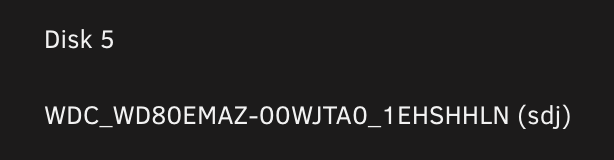
Just tried running xfs_repair with out the `-n` flag and got the following error Phase 1 - find and verify superblock... Phase 2 - using internal log - zero log... ERROR: The filesystem has valuable metadata changes in a log which needs to be replayed. Mount the filesystem to replay the log, and unmount it before re-running xfs_repair. If you are unable to mount the filesystem, then use the -L option to destroy the log and attempt a repair. Note that destroying the log may cause corruption -- please attempt a mount of the filesystem before doing this. How do I go about mounting the drive? Should I start the array not in maintenance mode? Looks like it's sdj, should I just ssh in, and run `mount /dev/sdj /mnt`, actually it looks like they are normally mounted to /mnt/disks, what would the command be, and then what's the command to unmount, and when do I do that? Does it just need to be mounted for a short time?
-
Thanks for your reply. I re-seated the HBA card, and all the sata connectors when I rebooted it initially, so that the disks would come back up, and I was able to get the SMART reports. My mobo only has one PCIe slot, so I just re-seated it. Maybe I should double check disk 5 connections, it might be the one disk that I didn't re-seat. It requires me to pull the case apart. Is there anything I should do with that disk 5 with the `Inode allocation btrees are too corrupted` error, or does rebuilding it on top correct all those issues? Sounds like next steps are:? Restart the array and let it emulate disk 5 Check the contents of disk 5 to make sure they look alright Stop the array Remove disk 5 from the array Restart the array without disk 5 Stop the array Re-add disk 5 to the array Restart it to have it start rebuilding Steps 3-6 is how I originally had it rebuild disk 6, Is that the correct procedure? Was there anything else I should with xfs_repair before, after, or in the middle of those steps?
-
I ended up running the check again with the `-nv` option, because the docs indicated that I should. The docs indicate that it should recommend an action: Here is the output of the `-nv` check, and it still doesn't appear to have a recommended command. Phase 1 - find and verify superblock... - block cache size set to 699552 entries Phase 2 - using internal log - zero log... zero_log: head block 1078458 tail block 1078430 ALERT: The filesystem has valuable metadata changes in a log which is being ignored because the -n option was used. Expect spurious inconsistencies which may be resolved by first mounting the filesystem to replay the log. - scan filesystem freespace and inode maps... agf_freeblks 257216, counted 257217 in ag 0 agi_freecount 95, counted 98 in ag 0 finobt sb_ifree 684, counted 778 sb_fdblocks 899221751, counted 901244387 - found root inode chunk Phase 3 - for each AG... - scan (but don't clear) agi unlinked lists... - process known inodes and perform inode discovery... - agno = 0 imap claims a free inode 161821052 is in use, would correct imap and clear inode imap claims a free inode 161821053 is in use, would correct imap and clear inode imap claims a free inode 161821054 is in use, would correct imap and clear inode - agno = 1 - agno = 2 - agno = 3 - agno = 4 - agno = 5 - agno = 6 - agno = 7 - process newly discovered inodes... Phase 4 - check for duplicate blocks... - setting up duplicate extent list... - check for inodes claiming duplicate blocks... - agno = 0 - agno = 3 - agno = 7 - agno = 6 - agno = 4 - agno = 2 - agno = 5 - agno = 1 entry "The.redacted.filename" at block 11 offset 3336 in directory inode 4316428006 references free inode 161821052 would clear inode number in entry at offset 3336... No modify flag set, skipping phase 5 Inode allocation btrees are too corrupted, skipping phases 6 and 7 No modify flag set, skipping filesystem flush and exiting. XFS_REPAIR Summary Wed Oct 18 22:28:36 2023 Phase Start End Duration Phase 1: 10/18 22:25:38 10/18 22:25:38 Phase 2: 10/18 22:25:38 10/18 22:25:38 Phase 3: 10/18 22:25:38 10/18 22:28:36 2 minutes, 58 seconds Phase 4: 10/18 22:28:36 10/18 22:28:36 Phase 5: Skipped Phase 6: Skipped Phase 7: Skipped Total run time: 2 minutes, 58 seconds
-
I just ran the check on disk 5, here's the entry from syslog Oct 18 21:20:00 palazzo ool www[20601]: /usr/local/emhttp/plugins/dynamix/scripts/xfs_check 'start' '/dev/md5' 'WDC_WD80EMAZ-00WJTA0_1EHSHHLN' '-n' Here's the output from the UI Phase 1 - find and verify superblock... Phase 2 - using internal log - zero log... ALERT: The filesystem has valuable metadata changes in a log which is being ignored because the -n option was used. Expect spurious inconsistencies which may be resolved by first mounting the filesystem to replay the log. - scan filesystem freespace and inode maps... agf_freeblks 257216, counted 257217 in ag 0 agi_freecount 95, counted 98 in ag 0 finobt sb_ifree 684, counted 778 sb_fdblocks 899221751, counted 901244387 - found root inode chunk Phase 3 - for each AG... - scan (but don't clear) agi unlinked lists... - process known inodes and perform inode discovery... - agno = 0 imap claims a free inode 161821052 is in use, would correct imap and clear inode imap claims a free inode 161821053 is in use, would correct imap and clear inode imap claims a free inode 161821054 is in use, would correct imap and clear inode - agno = 1 - agno = 2 - agno = 3 - agno = 4 - agno = 5 - agno = 6 - agno = 7 - process newly discovered inodes... Phase 4 - check for duplicate blocks... - setting up duplicate extent list... - check for inodes claiming duplicate blocks... - agno = 0 - agno = 4 - agno = 1 - agno = 7 - agno = 5 - agno = 3 - agno = 2 - agno = 6 entry "The.redacted.filename" at block 11 offset 3336 in directory inode 4316428006 references free inode 161821052 would clear inode number in entry at offset 3336... No modify flag set, skipping phase 5 Inode allocation btrees are too corrupted, skipping phases 6 and 7 No modify flag set, skipping filesystem flush and exiting. Does this mean I should re-run without the `-n` flag, so that it can try to fix?
-
I had disk 6 become detached a couple days ago. I forgot to grab diagnostics before that situation, but I was able to get it back by, disabling docker, removing disk 6 from the array, starting the array, stopping the array, and then re-adding disk 6. Then when I restarted the array it rebuilt disk 6 from the parity. I re-enabled docker the next day, and my applications seemed like they were working fine. Then I got home from work, and noticed I had several errors. - Alert [PALAZZO] - Disk 5 in error state (disk dsbl) - Warning [PALAZZO] - Cache pool BTRFS missing device(s) - Warning [PALAZZO] - array has errors Array has 3 disks with read errors After stopping the array this time disk 3, 5, and 6 all showed as missing, so I needed to reboot to get SMART reports on them. The zip included diagnostics.zip, smart reports for 3, 5, and 6, and some screenshots. I rebooted it a couple times, and disk 5 still shows as "Device is disabled, contents emulated". Should I update before trying to rebuild the array this time? What should I do in the future to stop having the disks get detached? Server Logs and Screenshots.zip





