





Soldius
Members
-
Joined
-
Last visited
Everything posted by Soldius
-
Hello, I was able to get this to work on my NVIDIA GPU. But both the CPU and NVIDIA version is giving me these logs: WARNING:docling_jobkit.convert.manager:artifacts_path is set to an invalid directory. The system will download the model weights at runtime. The container still works with anything I uploaded to it, just odd that i see this message each time. Thank you, ahead.
-
Thank you, JorgeB! This was the solution! Good catch lol. I never knew that the shares were saved in the flash drive, especially that the name doesn't get updated when you do it in the unraid shares UI. Anyway, thank you again!
-
ntserver-diagnostics-20250924_0331_safemode.zip
-
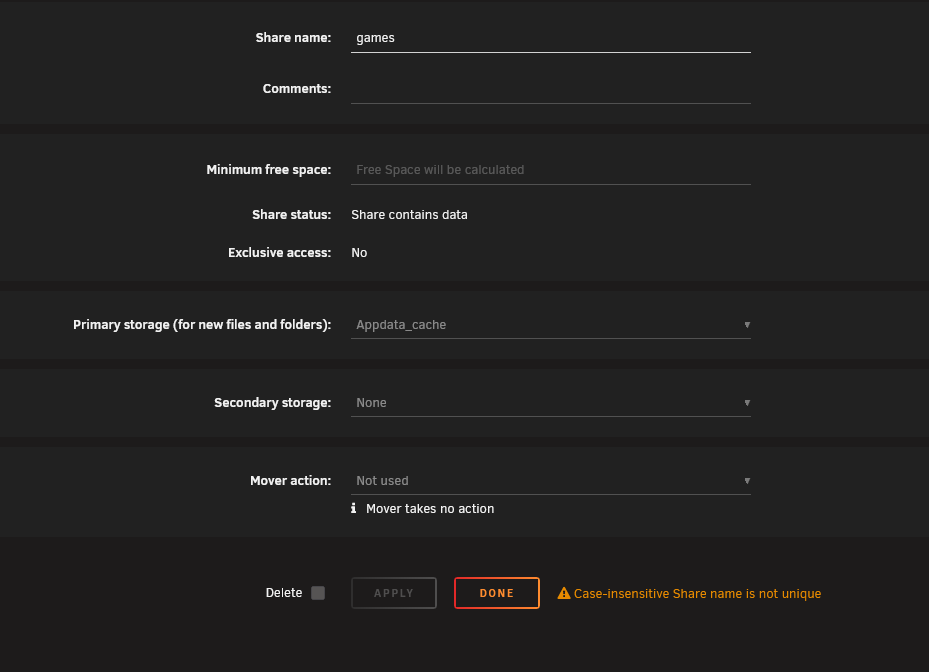
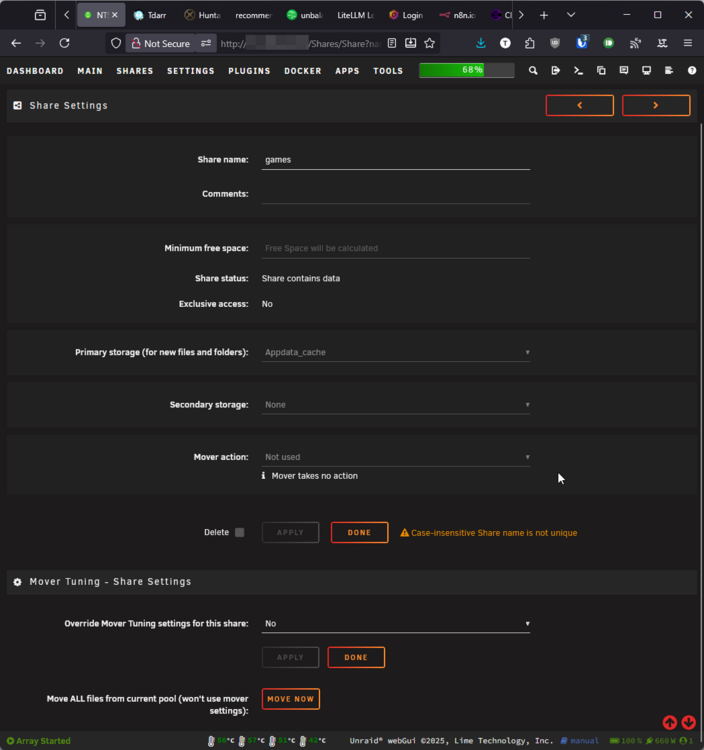
Hello All, A bunch of my shares are not showing up in my explorer like usual. I went into the shares settings and I see that most of the settings are missing. I could still navigate it using that small arrow on the left and see all the files are there. Not exactly sure what is happening, this is the first time I see this issue. I also noticed that on the main "shares" page, the "Storage" column is labeled wrong. For example: my "games" share is array only, but the main page shows "Appdata_cache" This share is also not showing up in my Windows 11 machine. It is set to export: public (always been). So i'm not sure what the issue is. Should I just downgrade back to 7.1.4? Thank you ahead of time. ntserver-diagnostics-20250923_0329.zip


-
Hello All, That's not good news. I just got mine and was hoping to just pop it in my unraid system and use it lol. I did expect some problem due to being brand new but was hoping the ARC series is out long enough that there isn't any major problem. Can we assume that unraid 7.1.4 is still not ready for the Intel Pro B50?
-
I removed 2 dynamix plugins and the rclone plugin and that seems to resolve the dead webui issue. No clue why they became problems. Just an FYI for anyone else that may have this issue.
-
Thank you for the safe mode suggestion. I didn't want to turn it off again unless it is absolutely necessary, as I may not be able to even get it to start my array next time... shortly after the array started, i got this alert sent to my email: "Timed out waiting for /boot/changes.txt!". In addition, i caught a line in the logs before I lost WebUI: "👋 Farewell. UNRAID API shutting down!". This is really odd :(. I really hope someone can help.
-
My server was working perfectly until I decided to give it a restart. The WebUI stopped working after a few minutes whether I start the array or not. I read around the forum and decided to upgrade to the latest version using CLI. It worked and I was able to get back into the WebUI long enough to start my encrypted array. After that, the WEBUI crashed again and I was locked out. SSH'ing still works, and I was able to see that all my shares and dockers are up. I could use NGINX to my dockers without any issues. I restarted the webui using a command but did not help. I'm a little stump because I don't know what is causing this... reading around it sounds like there is something using port 80... but I don't recall installing anything new that uses port 80. I did not make any changes to my network either. But again, everything else seems to work so... This happened after my restart. Not sure what is causing it. I attached my diagnostics files. I hope someone can shed some light for me on this. ntserver-diagnostics-20231009-1224.zip
-
Which branch are you using? I'm using the preview branch.
-
Nevermind, I figured it out. Apparently it is using the dir /temp to download the images files and then putting it into the nzb in the "library" folder. This leaves all the images inside the temp folder without cleaning them up afterwards 😑 Anyway, I mapped those dir temp like this (remember to change the permission of the folders using Krusader or tachidesk won't be able to write downloads in there): I may end up just mapping the whole temp folder, since it seems to be creating other things in there. Another thing i notice is that each time i restart the container, the download list disappeared resulting in me having to re-add the downloads in the GUI. Not sure if this is related.

-
Unfortunately, turning the debug log off did not help. Any clue on how to trace down what exactly is filling my docker img? "docker system df: only gives an overview and spaceinvader's scripts gives more detail but only that the container is taking up a large amount of space and not what the space actually is. I also went into the container's console to look at the structure and not able to see any folder with large sizes. I'm stump 🤔
-
Ohhhhhh, I didn't think the logs were the culprit. Good catch! I will turn it off and try. Thank you!😂
-
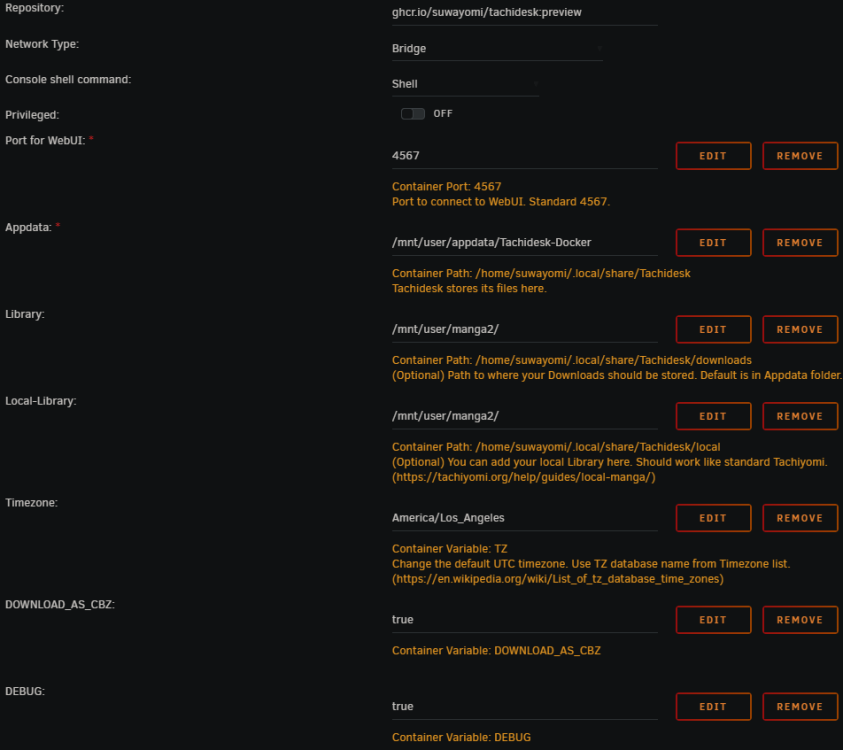
Hmm I notice that this is leaking data into my Docker img. My docker went from 32-ish percent to 100% overnight. Here is my mapping: I don't think I miss anything looking at their documentation. I am using the "preview" channel.
-
I did! But for some strange reason, nothing loaded. I wiped the appdata and the container data and tried it again but same issues. The webui was not loading for some reason. I gave up after that lol 😆
-
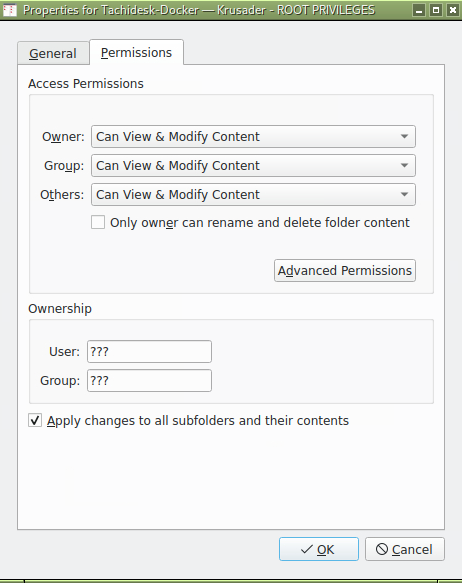
I followed up on this with a roundabout fix. I switched the docker to "preview container" and used Krusader to go into appdata and change permission of the whole "Tachidesk-Docker" to: Basically i just right-click and went into Properties > Permissions. I also did the same thing for the destination download folder to make sure the docker can write into it. This seems to work for me as I am downloading chapters in cbz just fine. Hope this helps someone.
-
This fix works for me, but even though I added the environment variable DOWNLOAD_AS_CBZ to true, it does not download into cbz. It keeps the structure as Manga Series > Chapter > images files. Does anyone know of a fix for this? Thank you.

-
Just in case anyone want to get meta data for the downloads. I tried the recommended Manga-Tagger but did not like how it uses the original language's title. So I switched to Komga to server my manga needs and the docker version of Komf, the metadata agent. FMD-WINE + Komga + Komf is perfect for hosting your own manga 😀
-
Hi, I am trying to install FFMPEG inside the OS using the terminal but I cannot login using the password "Docker!" Is there another password that I can use for the sudo command? Thank you
-
Hi binhex and unRAID community, I just wanted to confirm something regarding this config. I am using binhex-plexpass and does have a plex pass subscription. So i just want to confirm if I have to do this still, in order to encode to ram instead of cache. Or does it know enough to automatically does that with the default /config/transcode setting? Please let me know. I have been searching for a while but not too clear on this. Thank you very much ahead of time.
-
Hello Binhex, There is a new version of Jackett that fixes the tracker Horrible Subs. Do you know when you will be able to update the docker? The reference fix is here: https://github.com/Jackett/Jackett/issues/3957 Thank you for your hard work.



