





Xuvin
Members
-
Joined
-
The Mover is currently running and is trying to move data to one specific disk. That disk is throwing errors in the GUI - 50k and rising - and now I am not sure how to proceed. I am not able to stop the Mover and it is continously trying to move the data to the failing disk. On my second guess, maybe not because it is not the disk with the most free space available. But it clearly makes no progress. Hope somebody is able to enlighten me.
-
Hey just a quick question. Couldn't find the answer. what does it mean if the dataset/snapshot icon is yellow instead of blue ?
-
Had the issue with 6.11.5 and this has been a working fix. But since updating to 6.12.0 had a crash after round about a day.
-
Thanks. All is fine now.
-
Must the cache pool be emptied beforehand in relation to data preservation or am I doing it just as it is right now ?
-
Hey guy, I recently swapped my 2 x 256 SSDs of my cache pool. By following the steps below: disabled Docker/VM emptied out the Cache Pool via Mover stopped Array swapped SSD assigned new SSDs to Cache Pool started Array moved data back enabled Docker/VM Everything seemed fine. Today I added a new HDD to the array and I noticed the following: The WD SSDs have been 250 GB and not 500 GB and if I hover over the X it is saying, that the device is disabled and contents emulated. How can I fix this ?

-
Got any updates on it ? I'm experiencing the same, but I can open the console and run the update script via cmd within the container just fine.
-
There should be a "Delete Tunnel" Button in the lower right corner, after you have enabled advanced view..?
-
Hey I've been playing with the plugin and came across limiting the peer devices access to my local networks. It nice to have a "Local tunnel firewall" option to give just access to speciffic ip addresses. But is there a simple way via the plugin to limit that access even more ? e.g. Local tunnel network pool devices can only connect to local ip with port x
-
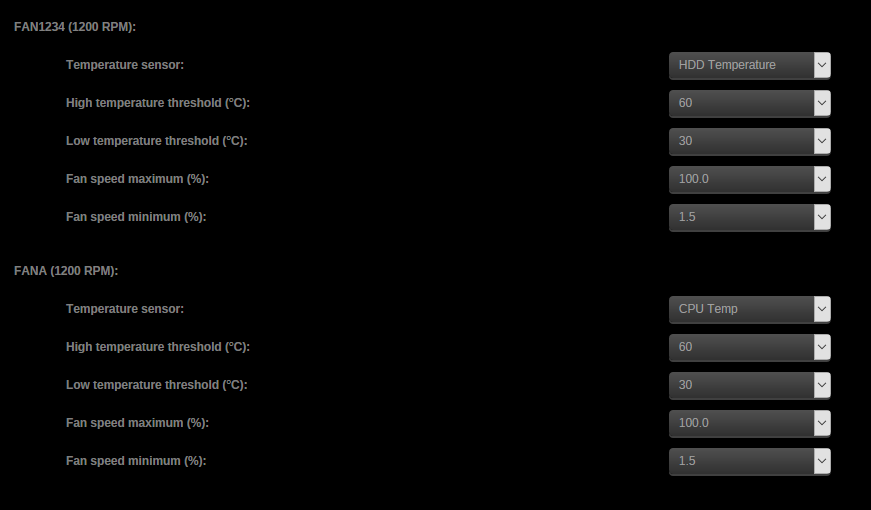
Did you set the fan thresholds with the sensor config editor? As followed:

-
Hey, I've got a problem and I can not get on with the solution. I am using a X11SSH-CTF as MB and want to toggle the fan speed automatic, depending on CPU and/or HDD temperature. So I installed the ipmitools via the Nerd Tools Plugin and afterwards the IMPI Plugin. I am getting RPM of the fans and a bunch of other values, but after enabling the Fan Control, nothing happens and the fans keep spinning at full speed. This is the generated log: 2018-06-17 10:53:36 Starting Fan Control 2018-06-17 10:53:36 Setting fans to full speed 2018-06-17 10:53:36 Fan:Temp, FAN1234( 2%):HDD Temp(28°C), FANA( 2%):HDD Temp(28°C) I have selected the shortest polling time intervals in the drop down so this log should update every 10sec/1min, but nothing happens.


