





dalben
Members
-
Joined
-
Last visited
Everything posted by dalben
-
I was having the same problem with my server. The advice I got was to remove the CoreFreq plugin. After removing CoreFreq the server hasn't crashed for about 2 months now. plugin: installing: /boot/config/plugins/corefreq.plg
-
Thanks. Correct, I didn't have any issues but just thought I'd report the alerts.
-
I need to replace my parity drive. It's a single parity. Which method is recommended? The new drive is in the server as an unassigned drive at the moment. 1. Unassign current parity drive and and then assign the new drive, letting Unraid rebuild parity 2. Add new parity drive as Parity 2, once parity is rebuilt, remove and forget Parity drive 1 3. Is there another recommended method? I prefer the 2nd option but I have only seen references to forgetting Parity 2 when in dual parity mode. Is it right to assume you can forget Parity 1 just as easily?
-
Found these errors in my syslog. At the time I was just checking the User Scripts plugin script logs. I don't remember seeing any errors on the console. Not even sure if what I was doing triggered the errors to be honest. Feb 11 21:25:29 tdm webGUI: Successful login user root from xx.xx.xx.xx Feb 11 21:25:43 tdm emhttpd: cmd: /usr/local/emhttp/plugins/user.scripts/showLog.php tdmrsync init Feb 11 21:25:43 tdm emhttpd: spinning down /dev/sdg Feb 11 21:25:43 tdm emhttpd: spinning down /dev/sdf Feb 11 21:26:10 tdm emhttpd: cmd: /usr/local/emhttp/plugins/user.scripts/showLog.php modprobe Feb 11 21:26:26 tdm unassigned.devices: PHP Warning: count(): Parameter must be an array or an object that implements Countable in /usr/local/emhttp/plugins/unassigned.devices/include/lib.php on line 126 Feb 11 21:26:26 tdm unassigned.devices: PHP Warning: count(): Parameter must be an array or an object that implements Countable in /usr/local/emhttp/plugins/unassigned.devices/include/lib.php on line 126 Feb 11 21:26:26 tdm unassigned.devices: PHP Warning: rename(/var/state/unassigned.devices/unassigned.devices.ini-,/var/state/unassigned.devices/unassigned.devices.ini): No such file or directory in /usr/local/emhttp/plugins/unassigned.devices/include/lib.php on line 168 Feb 11 21:26:49 tdm emhttpd: shcmd (2330269): /usr/local/sbin/update_cron Feb 11 21:27:13 tdm emhttpd: shcmd (2330420): /usr/local/sbin/mover |& logger & Diagnostics attached tdm-diagnostics-20220211-2133.zip
-
2 Parity/Disk rebuilds seems to be the bare minimum to swap an array disk into the parity slot. If anyone can thinking of a quicker way, I'm all ears. Disk4 is the disk I want to move into the Parity slot in this example 1. Remove Disk4 from array so that Disk4 is now emulated 2. Add new Disk4 to array triggering a Parity/Disk rebuild of Disk4 3. When complete, remove parity drive leaving Unraid unprotected 4. Add old Disk4 as new Parity triggering a parity rebuild All done.
-
It turns out my fastest drive, an Ironwolf Pro, is not set as my parity but one ofg the 6 array disks. My parity is a slower Ironwolf. I'd like to move the 7200rpm drive t parity to improve the servers performance. Both drives are 4tb. I will have another 4Tb drive unassigned that can be used for this swap. As long as the Ironwolf Pro ends up as parity, I'm not too fussed which of the other 2 drives ends up back in the array. What would be the sequence to minimise parity rebuilds and checks?
-
Thanks @trurl It hasn't come back after a cold restart and cable reseating. Guess it's time to retire the disk. 5.3 years uptime isn't too bad.
-
One of my disks went offline with disk read errors during a parity test. Diagnostics attached. I have run an XFS system check but can't see any errors. Went through the process to re-enable the drive (stop the assignment/start array/stop array/reassign) but it's come back with Read errors and disabled again. Will start re-checking all connections and cables but if someone who knows what they are looking for can see if the errors look terminal, I'll just replace it and save time. tdm-diagnostics-20220201-0958.zip
-
Done. Thanks.
-
My server has the hard occasional lockup. Replaced RAM, CPU, cables etc but it can run fine for a week, or lockup a couple of times a day. In every instance there is never any indication on the syslog of what caused it. It locked again today. Looking at syslog I see some entries I've never started before. it's either an unraid triggered dump/trace, or something else. I've attached the portion here in the hope someone can translate it into english. It all starts with: Dec 18 09:53:38 tdm kernel: ------------[ cut here ]------------ And there's about 15ming of these entries before stopping. syslog_extract.txt
-
No, never got it working but to be honest I gave up fairly quickly.
-
Not sure if the title explains my issue well. My server randomly reboots or hard lockups every now and again (something I've been fighting for a while now, but regardless). I've noticed recently (either RC1 or RC2) that on an unsafe reboot I cannot access the server via the primary IP address (10.10.0.10), but I can via the second NIC and IP address(10.10.3.10) which is there for my docker containers. Dockers work, but anyone trying to access the server via it's hostname or primary IP fails. If I restart the server it all comes back correctly. Two diagnostics files attached, one after an unsafe reboot where I can only access the server via the eth1, and a second diagnostics after a safe reboot and the server comes back on eth0. eth0 / 10.10.0.10 is the main NIC for the server. eth1 / 10.10.3.10 is there for the docker network where each container has their own IP tdm-diagnostics-20211124-0653-PriLANup.zip tdm-diagnostics-20211124-0646PriLANdown.zip
-
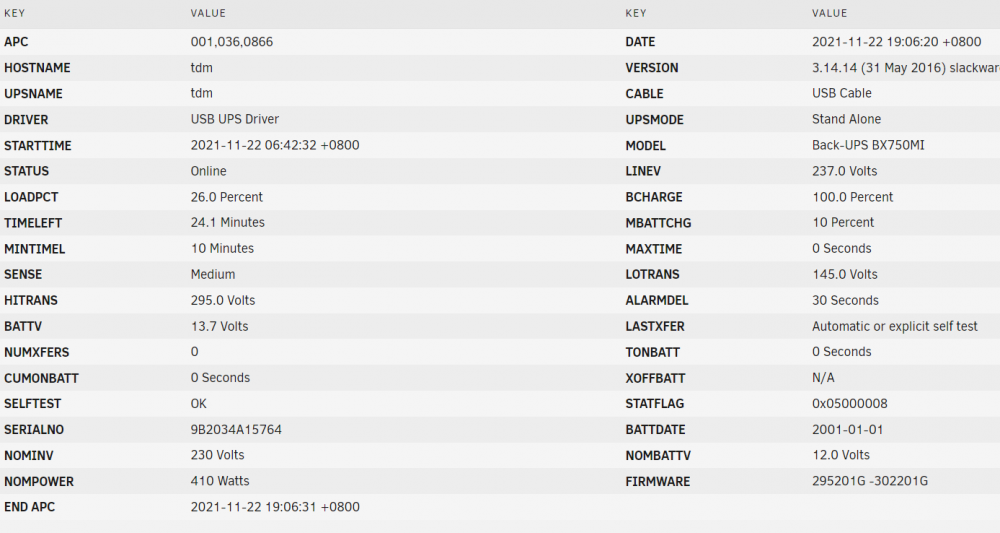
I recently swapped over from my trusty but now dead APC 650cs to an APC MODEL Back-UPS BX750MI. NET detects it fine and starts monitoring. After a few hours (twice in 24 hours), it disconnects with the following error: Nov 22 03:41:15 tdm usbhid-ups[18835]: nut_libusb_get_report: Input/Output Error. Nov 22 03:41:17 tdm usbhid-ups[18835]: device->Product is NULL so it is not possible to determine whether to activate max_report_size workaround Nov 22 03:41:17 tdm upsd[18990]: Data for UPS [ups] is stale - check driver Nov 22 03:41:18 tdm upsmon[18994]: Poll UPS [[email protected]] failed - Data stale Nov 22 03:41:18 tdm upsmon[18994]: Communications with UPS [email protected] lost Nov 22 03:41:19 tdm usbhid-ups[18835]: device->Product is NULL so it is not possible to determine whether to activate max_report_size workaround Nov 22 03:41:21 tdm usbhid-ups[18835]: device->Product is NULL so it is not possible to determine whether to activate max_report_size workaround Nov 22 03:41:23 tdm usbhid-ups[18835]: device->Product is NULL so it is not possible to determine whether to activate max_report_size workaround Repeating every second or so and spamming the syslog. I pull out the USB cable and replug it in, and all works fine: Nov 22 06:04:04 tdm kernel: usb 1-8: USB disconnect, device number 5 Nov 22 06:04:08 tdm upsmon[18994]: Poll UPS [[email protected]] failed - Data stale Nov 22 06:04:13 tdm upsmon[18994]: Poll UPS [[email protected]] failed - Data stale Nov 22 06:04:16 tdm kernel: usb 1-8: new full-speed USB device number 6 using xhci_hcd Nov 22 06:04:16 tdm kernel: hid-generic 0003:051D:0002.0006: hiddev98,hidraw3: USB HID v1.10 Device [American Power Conversion Back-UPS BX750MI FW:295201G -302201G ] on usb-0000:00:14.0-8/input0 Nov 22 06:04:17 tdm upsd[18990]: UPS [ups] data is no longer stale Nov 22 06:04:18 tdm upsmon[18994]: Communications with UPS [email protected] established Until it crashes again. I moved over to the Unraid default UPS setting instead of NUT and it's now been solid without any disconnection. While I don't *need* the Network feature, it was handy to have. And I enjoyed the UPS status in the status bar. Any ideas of what could be the issue, or what I can do to resolve it? here's the UPS Details page for the UPS Settings tab
-
OK, I deleted the lot and started again. It works with latest. Thanks. I did see these warnings come up: fpcalc could not be found. Audio fingerprinting disabled. Please upgrade to the .NET Core version of Lidarr Everything seems to work fine though
-
I pulled down your Lidarr docker and tried to fire it up but it keeps failing on the first install. here's a copy of the log. FWIW I installed your Sonarr yesterday without any issues. ---Checking if UID: 99 matches user--- ---Checking if GID: 100 matches user--- ---Setting umask to 0000--- ---Checking for optional scripts--- ---No optional script found, continuing--- ---Starting...--- ---Version Check--- ---Lidarr not found, downloading and installing v1.0.0.2255...--- ---Successfully downloaded Lidarr v1.0.0.2255--- mkdir: cannot create directory ‘/lidarr/Lidarr’: File exists tar: This does not look like a tar archive gzip: stdin: not in gzip format tar: Child returned status 1 tar: Error is not recoverable: exiting now ---Preparing Server--- ---Starting Lidarr--- /opt/scripts/start-server.sh: line 116: /lidarr/Lidarr/Lidarr: No such file or directory ---Checking if UID: 99 matches user--- usermod: no changes ---Checking if GID: 100 matches user--- usermod: no changes ---Setting umask to 0000--- ---Checking for optional scripts--- ---No optional script found, continuing--- ---Starting...--- ---Version Check--- ---Lidarr not found, downloading and installing v1.0.0.2255...--- ---Successfully downloaded Lidarr v1.0.0.2255--- mkdir: cannot create directory ‘/lidarr/Lidarr’: File exists tar: This does not look like a tar archive gzip: stdin: not in gzip format tar: Child returned status 1 tar: Error is not recoverable: exiting now ---Preparing Server--- ---Starting Lidarr--- /opt/scripts/start-server.sh: line 116: /lidarr/Lidarr/Lidarr: No such file or directory ---Checking if UID: 99 matches user--- usermod: no changes ---Checking if GID: 100 matches user--- usermod: no changes ---Setting umask to 0000--- ---Checking for optional scripts--- ---No optional script found, continuing--- ---Starting...--- ---Version Check--- ---Lidarr not found, downloading and installing v1.0.0.2255...--- ---Successfully downloaded Lidarr v1.0.0.2255--- mkdir: cannot create directory ‘/lidarr/Lidarr’: File exists tar: This does not look like a tar archive gzip: stdin: not in gzip format tar: Child returned status 1 tar: Error is not recoverable: exiting now ---Preparing Server--- ---Starting Lidarr--- /opt/scripts/start-server.sh: line 116: /lidarr/Lidarr/Lidarr: No such file or directory ---Successfully downloaded Lidarr v1.0.0.2255--- mkdir: cannot create directory ‘/lidarr/Lidarr’: File exists tar: This does not look like a tar archive gzip: stdin: not in gzip format tar: Child returned status 1 tar: Error is not recoverable: exiting now ---Preparing Server--- ---Starting Lidarr--- /opt/scripts/start-server.sh: line 116: /lidarr/Lidarr/Lidarr: No such file or directory ---Checking if UID: 99 matches user--- usermod: no changes ---Checking if GID: 100 matches user--- usermod: no changes ---Setting umask to 0000--- ---Checking for optional scripts--- ---No optional script found, continuing--- ---Starting...--- ---Version Check--- ---Lidarr not found, downloading and installing v1.0.0.2255...--- ---Successfully downloaded Lidarr v1.0.0.2255--- mkdir: cannot create directory ‘/lidarr/Lidarr’: File exists tar: This does not look like a tar archive gzip: stdin: not in gzip format tar: Child returned status 1 tar: Error is not recoverable: exiting now
-
I need to refine my "Doesn't work". It's not a geo block or vpn range block scenario. It's latency. I did get to some sites straight out of the box(container) eventually. But most were failing with a timeout. speedtest.net eventually loaded. Ping test of 175ms. That must be why a lot of sites were failing with a timeout. When I changed to a server closer to me (SE Asia), ping were 4ms and all of my sites loaded fine. In summary, using the Amsterdam endpoint when in SE Asia will cause some issues with websites timing out.
-
No errors but I couldn't reach any website when wet to PIA and Wireguard. Flip it over to OpenVPN and it worked fine. This was after a couple of re-installs. I've edited my post. I wiped the container and config directory then reinstalled everything again. Same thing. All the sites I needed to reach were just timing out. I then compared the new config with the working one I had. Only difference was the wireguard server being used. I replaced the default amsterdam with one closer to me and things started working again. Pings on speedtest.net went from 175ms to 4ms. Websites are reachable.
-
I've been struggling to get PIA and Wireguard working with this Docker. PIA's lack of an easy Wireguard config file maker has been a pain. I managed to get @binhex's PrivoxyVPN script working with PIA and Wireguard by using @Dor's PIA Wireguard config script found HERE by dumping the script generated config files into the Wireguard folder. When I try that with this container it still doesn't work. Not sure where to go from here. Openvpn works fine.
-
For anyone struggling to get PIA & Wireguard working together with this container (as I was), Edit: Try changing the default PIA Wireguard server from Amsterdam to something closer. Firing up speedtest.net showed a ping response of 175ms. That caused most of the sites I was trying to reach to timeout and fail. I'm not sure if there is a cleaner way to do it but I ended up editing the wg0.conf file manually and replacing the amsterdam server with one closer to me. Seems to be working a lot better now.
-
Hi, tried running it and hit an error ./get_region.sh: line 242: ./setup_wireguard_with_token.sh: Permission denied This was after it auto-selected the nearest server for me Edit: Made it executable and all good now.
-
Thanks. Yes, I've looked at the others but this offers 2 way syncing natively which the others don't seem to do.
-
There's a bit of talk about 2-way synching for rclone online. There doesn't seem to be much drive from the rclone devs but there are a couple of add-on scripts to rclone that can achieve 2-way. Don't waste too much time on a fix though, my use case is probably an edge case.
-
My use case is where 3 people share a OneDrive on laptops and mobiles, where as I am fixated on saving to my unraid server. Hence the need for 2 way syncing between unraid and OneDrive. Dropbox and Gmail are just additional backups
-
OK, not me then. Thanks. I did think of adding another share name so that /data and /media are the same directory. But I since realised rclone only offers 1-way sync to that doesn't address what I need. I might still use it for 1-way synching for Google Drive and Dropbox. https://hub.docker.com/r/driveone/onedrive This looks like it has 2-way synching for OneDrive, but trying to get it working in UnRaid has proven beyond my capabilities.
-
rclone is great, but offers only 1-way sync, which doesn't meet my requirements. I found a dedicated OneDrive sync tool that offers two-way sync. https://github.com/abraunegg/onedrive/blob/master/docs/Docker.md is the github page. Has anyone ported this container to UnRaid by any chance? I tried configuring using the CA templates and failed. About as badly as when I tried to set it up using portainer.

