





comet424
Members
-
Joined
-
Last visited
Everything posted by comet424
-
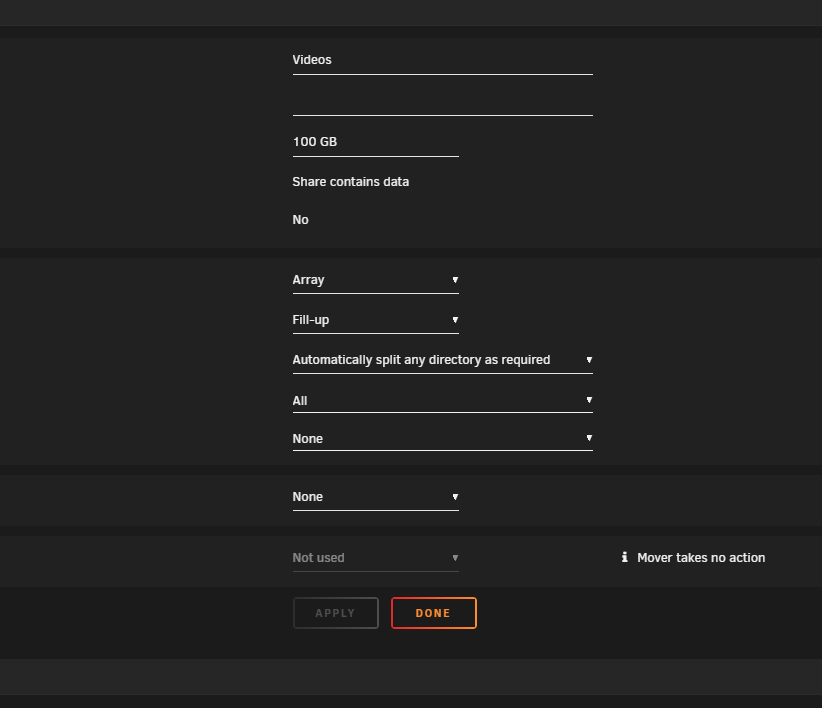
no cache no include exclude its set to all... its my backup media server i had done a ``` for /r %A IN (*.*) do ( "C:\Program Files\MKVToolNix\mkvpropedit.exe" -d title --tags all: "%~A") ``` to fix all my videos i have some dont fix but thats ok... and then i wanted to re sync to my backupserver of the media videos so i figured it delete the old file and re copy over the new one updated with that --delete option it keeps filling the one drives and then rsync craps out with error always same file till i move files to a free drive of more space then it starts resumming fine almost better wipe all the the folders and let it re sync but that wasnt the purpose figured it could rysnc fine i figured setting limit from 50gb to 100gb and moving more files off each drive would help nope still gets stuck mitchflix-diagnostics-20241222-0938.zip
-
its set to the default automaticlly split any directory as required... doesnt the --delete option on the rsync also fix that so it can delete files and move them too so i should set it to automatically split any directory as required.... i never know the right option for these so ive always left them at default
-
im having trouble rsyncing over to another server i have my 2nd server set to "Fill up " on the share and the one drive is like 1gb free its supposed to be 50 gb free the error log shows ``` [sender] io timeout after 60 seconds -- exiting rsync error: timeout in data send/receive (code 30) at io.c(200) [sender=3.2.7] Rsync failure. Backing off and retrying... ``` when rsyncing does the rsyncing bypass rules of the share like when you go through a root share when you make it it bypass's the rules of the minimum disk space of the share... so if you set it to 50gb it will go down to like 200kb so my code to rsync is while [ 1 ] do # rsync -avz --timeout=60 --partial source dest rsync -avzue ssh --exclude-from='/boot/config/plugins/user.scripts/scripts/exclude1.txt' -s --stats --numeric-ids --progress '/mnt/user/Videos/' root@$serverip:'/mnt/user/Videos/' --delete --timeout=60 --partial if [ "$?" = "0" ] ; then echo echo "Rsync Of The Videos Completed Normally.. Ready To Take Back Home" echo exit else echo echo "Rsync failure. Backing off and retrying..." echo sleep 180 fi done so is it bypassing the rules and its trying to write to the 1 drive thats outta disk space if i change to high water seems to still have same issue keeps writting to the same drive it will not move to the next drive i even changed to 100gb free.. it keeps restarting rsync but it drops down to 100kb diskspace free or 1gb free why is it bypassig the gb rules
-
so no matter what i do i moved the SSD from the LSI to SATA slot if i pull it out it goes green in the historical section when i shove back in it either doesnt show up or when it does it tells me to Reboot is there anything in my diagnostics in the configuration in Plugins in something that does it i dont seem to have this issue with USB hard drives just with hot swap SSDs i use i dont have a hot swap hard drive today to test maybe tommmorow to test but is there anything that could be doing this issue this is been going on for months for me tardis-diagnostics-20241130-2007.zip
-
@dlandon just recently updated the bios yesterday and yes i set them all sata drives to Enabled and Hot Swapable the SSD is connected to a LSI HBA card though
-
@dlandon i used another ssd and it also keeps it online doest shut it down when i pull it out of my server is there something i need to add to my GO file or something so i no longer get those errors and it disconnects properly tardis-diagnostics-20241130-0605.zip
-
@Squid ok great thanks helps me narrow it down to work on it tommorow ill try cables to it tomorrow
-
@bmartino1 so i upgraded to the latest motherboard bios for the board... i forgot to disable the bluetooth but you mentioned not a big deal the igb errors warnings still there... but then i dont use that to copy just use it to be able to WOL the server when needed or backdoor to get in when the 10gb isnt working i changed my rsync to yours you modified... i havent had a chance to watch the youtube video yet.. currently rsyncing so we shall see how it goes
-
hi on my one unraid server i get this error ata6 and ive checked it multiple times but i dont see hard drive problems i googled and a reply on here mentioned sata cable or so.. but ata6 isnt telling me the specific hard drive its attached to does the diagnostic say specifically which hard drive so i know what i looking for or just a guessing game rambo-diagnostics-20241129-0823.zip
-
hi i constantly have issues with SSDs and the hot swapping i always get sd 12:0:1:0: [sdl] Synchronize Cache(10) failed: Result: hostbyte=0x01 driverbyte=DRIVER_OK i cant seem to stop it i even do spin down for the sdd before i slide it out.. doesnt matter and then it leaves it powered on in the historical section how do i fix it so it properly disconnects from unraid when you unplug it and it wasnt even mounted and then when i re plug that SSD back in then i cant mount it as it will say REBOOT so this happens with both SSDS i got there i swap with my sister tardis-diagnostics-20241128-1331.zip

-
@bmartino1 here new diganostic with more kill pids i currenty doing scrub /repair on all my array disks i did the sys log server it says it save to my local share but i saw nothing there but here is the diagnostic tardis-diagnostics-20241125-2318.zip
-
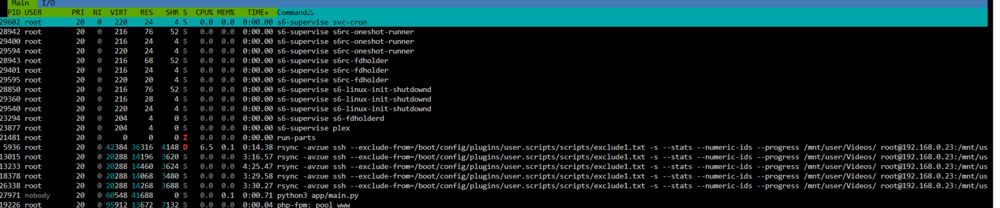
so rsync shut down paused whatever you wanna call it. i have the htop running i was able to sort and scroll it looks like rsync is inthere multiple times i guess each time it crashes and i re run and they go idle here is screen shot somestimes the red D turns to a green R whatever D and R mean

-
also you mention error: mdcmd, 4184: Invalid argument (22): write: nocheck cancel retval: -1 does it say what hardrive.. and when you said array is that the actual array or any of the other pools whats also frustrating me the unassigned devices when i unmount a device and pull out the drive.. it stays ON and i get this hostbyte warning.. its driving me mad as i have to reboot unraid just to put it back in.. even when i unmounted it and even spun down a SSD drives me mad and on both servers i get this stupid error ive never found help for and google never helped i dont know how to fix Interface "tunl0" added. Warning: no bandwidth limit has been set. does that also cause issues i have
-
also shinobi screws up the disk space.. right now it says 1191.5GB used of the 2 TB yet the actual disk space used in unraid is 167GB of 2 TB and the shinobi diskspace keeps counting up yet its actually not saving that to the hard drive like its supposed to why is that happening?
-
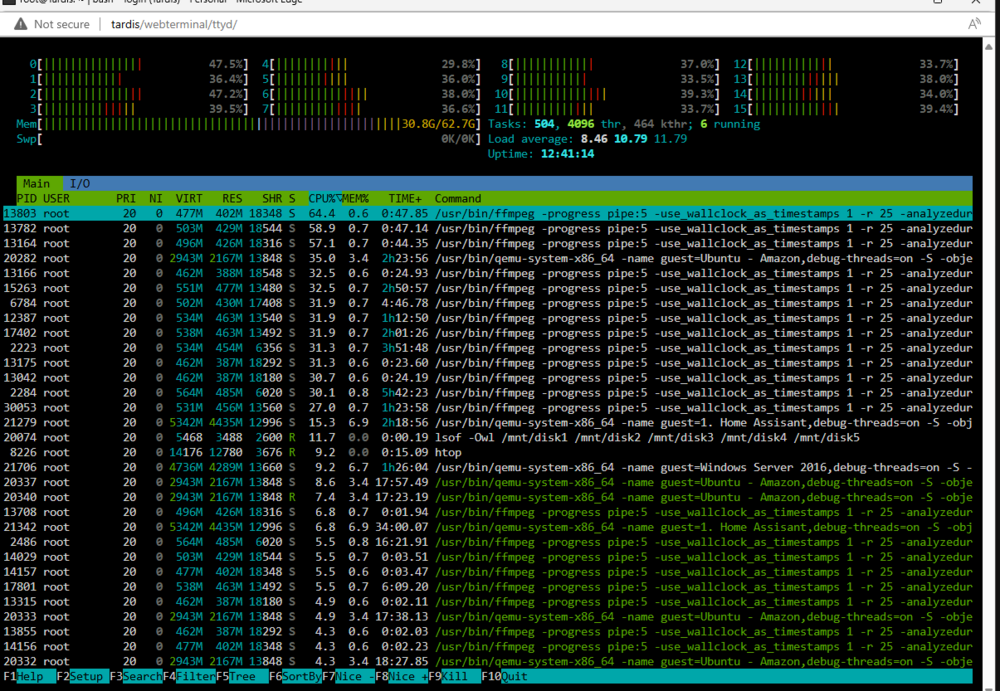
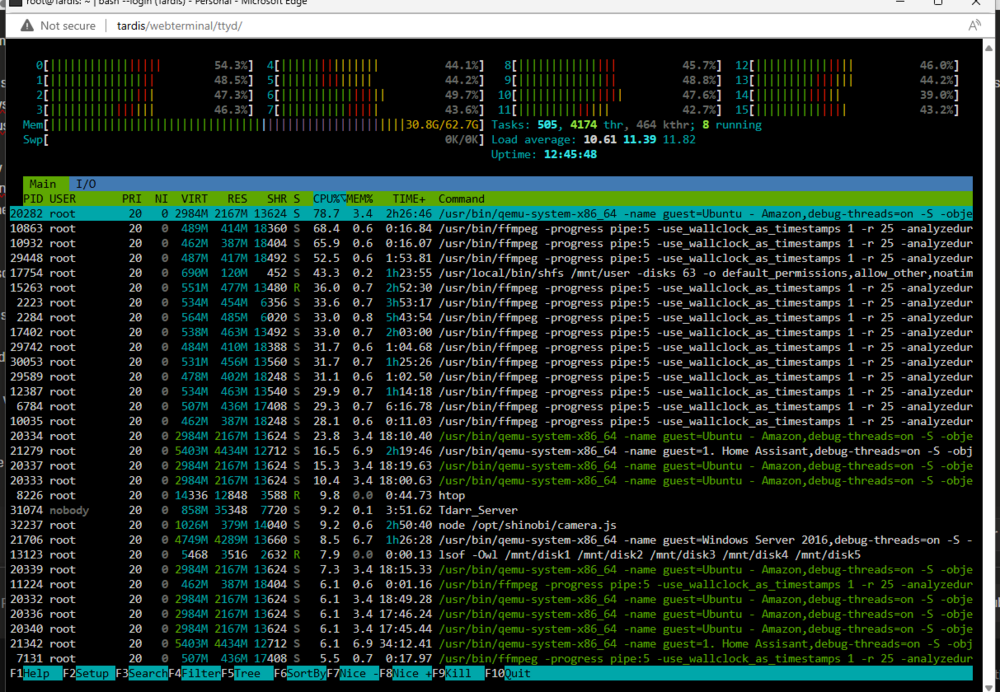
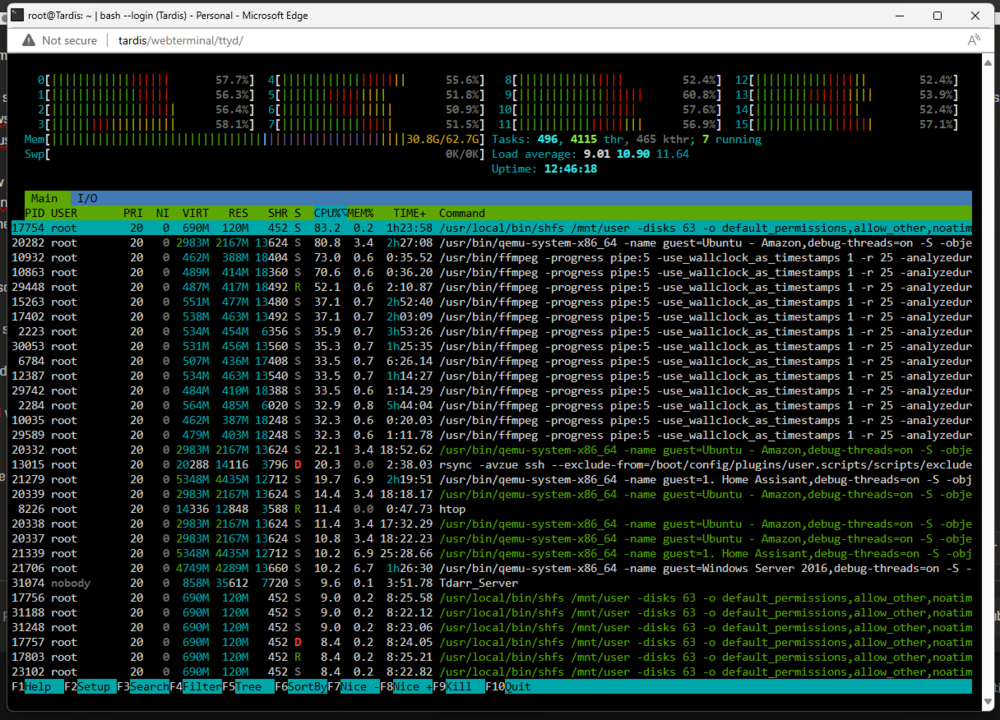
@bmartino1 ive never been able to fix those igb and bluetooth ive googled. ive asked for help on here nothing has helped... the igb i guess thats the 10gb fiber nic? as for the rsync command i use rsync -avzue ssh --exclude-from='/boot/config/plugins/user.scripts/scripts/exclude1.txt' -s --stats --numeric-ids --progress '/mnt/user/Videos/' root@$serverip:'/mnt/user/Videos/' --delete as memory it shows right now 82% used of the 64gig and i re restarted the rsync not sure how u adjust power level for disks.. for spin down.. when i look at the user script log it says its copying a a file.. but its not as its hanged at least 15 min.. as the spin dowsn are 15 min of no activity so both servers shut down there hard drives after 15 min... yet user script says its still running... so userscript /rysnc says its still running yet its no longer running now i dont know how to do half the things you mentioned... i dont know how to get that igb driver i need more help i can do that disable the bluetooth if the igb is the onboard network card i not using it i use it as a mangement port but there is a new motherboard bios update i can try ok so i enabled syslog server.. doesnt offer full capture unless thats what it does.. not sure how to "Add swap space or adjust rsync parameters to minimize resource demands." Hard drive do you mean run scrub and repair and what smartmon here is a screen capture currently as i rysnc i took 3 screen shots of the htop does it show anything it doesnt help me see i wish it showed like Windows Task manager but i guess its the best
-
i been rsync ing files to one of my back up servers and its crashed a few times and user script says its rysncing yet the drives are powered down i did see this Nov 25 11:34:30 Tardis root: Kill pid: 7969 Nov 25 19:55:13 Tardis root: Kill pid: 602 is it saying in the diagnostics whats causing these errors crashes as i know shinobi crashes and looses the videos it records... so i going to make a new unraid server just for shinobi but do these pids killing rsync yet say its still syncing tardis-diagnostics-20241125-1959.zip
-
anyone know why shinobi randomly wipes all the videos off the drive its happened multiple times now i use a 2TB drive set the size to 2e+6 and i have set it for auto delete after 60 days not after shinobi has issues or unraid right now it wont let me log in the gui except the super user log errors show ____ ___ ___ /'\_/`\ __ /\ _`\ /\_ \ /\_ \ /\ \ /\_\\ \ \L\_\ ___\//\ \ \//\ \ __ _ __ \ \ \__\ \\/\ \\ \ \L_L / __`\\ \ \ \ \ \ /'__`\/\`'__\ \ \ \_/\ \\ \ \\ \ \/, \/\ \L\ \\_\ \_ \_\ \_ /\ __/\ \ \/ \ \_\\ \_\\ \_\\ \____/\ \____//\____\/\____\\ \____\\ \_\ \/_/ \/_/ \/_/ \/___/ \/___/ \/____/\/____/ \/____/ \/_/ is starting ... \n 2024-11-24T12:08:56: PM2 log: Launching in no daemon mode 2024-11-24T12:08:56: PM2 log: App [Camera-App:0] starting in -fork mode- 2024-11-24T12:08:56: PM2 log: App [Cron-App:1] starting in -fork mode- 2024-11-24T12:08:56: PM2 log: App [Camera-App:0] online 2024-11-24T12:08:56: PM2 log: App [Cron-App:1] online No "ffbinaries". Continuing. Run "npm install ffbinaries" to get this static FFmpeg downloader. No "ffmpeg-static". Available Hardware Acceleration Methods : vdpau, vaapi Shinobi : cron.js started FFmpeg version : 4.2.4 Node.js version : v12.14.1 Shinobi : Web Server Listening on 8080 2024-11-24T12:08:58-05:00 FTP Server running on port 21... 2024-11-24T12:08:58-05:00 Current Version : e7ad11e5f9e930378d04f9adbe40dab2f6d00e3e !!!!!!!!!!!!!!!!!!!!!!!!!!!!!!!!!!!!!!!! 2024-11-24T12:08:59-05:00 This Install of Shinobi is NOT Activated !!!!!!!!!!!!!!!!!!!!!!!!!!!!!!!!!!!!!!!! https://licenses.shinobi.video/subscribe 2024-11-24T12:08:59-05:00 [email protected] : Checking Disk Used.. 2024-11-24T12:08:59-05:00 [email protected] : /opt/shinobi/videos2/ : 0 2024-11-24T12:08:59-05:00 Starting Monitors... Please Wait... 2024-11-24T12:09:17-05:00 Orphaned Videos Found and Inserted : {"RZxrEdHBoH":{"CAM1":0,"CAM2":0,"CAM4":0,"BACKROOM_CAM":1,"EAST_CAM":1,"WORKSHOP_CAM":0,"CAM5":0,"NORTH_CAM_1":0,"GARAGE_CORNER_CAM_2":1,"RAT_CAM_2":0,"RAT_CAM_1":0,"REC_ROOM_CAM":0,"GARAGE_CORNER_CAM_1":0,"BIRD_CAM":0,"CAM3":0}} 2024-11-24T12:09:17-05:00 Shinobi is ready. client-error Error: read ECONNRESET at TCP.onStreamRead (internal/stream_base_commons.js:200:27) { errno: 'ECONNRESET', code: 'ECONNRESET', syscall: 'read' } as its frustrating every few days all the videos are wipped i only store like 200gb and then it whipes it by morning like whats going on tardis-diagnostics-20241125-0857.zip
-
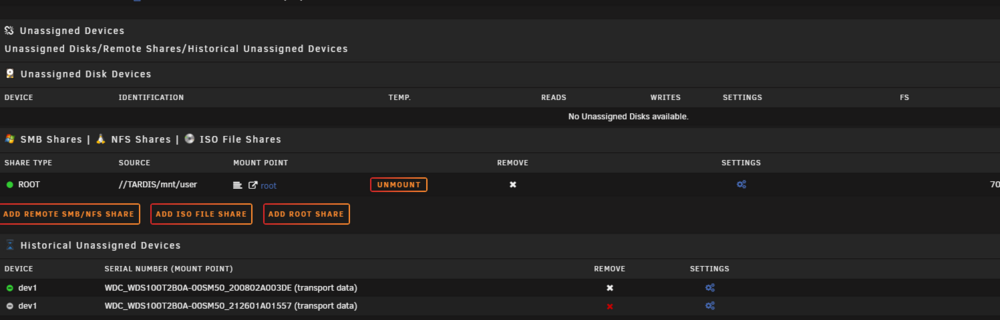
that drive was removed yesterday morning.. i do notice unraid keeps throwing me error hostbyte if i unmount the drive... and pull it out... i even try spin down the ssd and remove i get the hostbyte and i get that error... so unraid then isnt hot swap removing the drive properly then? i do notice its green in the historical unassigned devices... is that was caused shinobi to whip videos or the memory issue too
-
can someone tell me what my sdm1 drive is? dont have one.. i left the browser open accidently again and i got memory errors plus again leaving the browser open causes shinobi i guess to delete videos when this happens too.. but does logs show anything wrong with file system or about leaving the browser open that caues files to delete by shinobi as its set for 60 days and when this happens it randomly deletes files off the drive off my cctv_drive which is sdi tardis-diagnostics-20241122-0807.zip
-
does it show that if a drive has ata issues that it corrupts the SSH ive shut down the server since thursday i guess the drive has a loose hot swap as no issues with the actual hd..
-
ah ok thanks
-
i was looking at the disk.cfg but didnt see what i wanted to do i have 2 partity 2 data 3 data (videos) i wanna add additional data disk so disk 1 ,2 is data,,, i wanna insert it into 3 shoving 3,4,5 to 4,5,6 for video i dont wanna append it.. as i wanna move it in my computer case to to match so i keep the data together and the data videos together... but if you select more 1 disk to adjust you cant mount.. is there an easy way to shove it down one so parity 1 partiy 2 1 data 2 data 3 video 4 video 5 video to parity 1 partiy 2 1 data 2 data 3 <blank new data> 4 video 5 video 6 video is there a easy way to do that
-
i cant tell by looking at the system log it doesnt tell me what program just shows alot of increase memory can someone tell me what caused the out of memory if its shinobi doing it tardis-diagnostics-20241115-0859.zip
-
@itimpi ok its back.. i noticed my server was still on.. and i cant ssh in.. here is diagnostic i see its having some ata issue but hard drives are online and ssh should be working but maybe the ata disables the SSH? rambo-diagnostics-20241114-0904.zip
-
@PetabyteLDA your welcome.. hope it works well for you



