





comet424
Members
-
Joined
-
Last visited
Everything posted by comet424
-
@PetabyteLDA ok ya then the plugin well my steps above doesnt even use a plugin anymore just installs etherwake application so it can wake up other pcs but ya for you if you just want to be able to wake your Unraid up say from Pfsense router or another app so your unraid is always off all you do is edit the go file add ethtool -s eth0 wol g eth0 if its your only nic or the nic you want to use it on but you cant wake up on a fiber cable so youll want to set it to one your using as a regular ethernet cable and then each time unraid boots up it will set unraid to be wakeable when you shut down... now if power goes out it will loose that unless on ups... so youll want to set in your computers BIOS enable Wake on lan... this will set it least if power goes out or you unplug it.. hope that helps
-
your welcome hope it helps you both i had to get help myself as i was frustrated it be nice they have the etherwake installed with unraid when you install it... as i was stuck once i had uninstalled the plugin as it was depreciated...
-
@PetabyteLDA the etherwake lets you wake up other computers so etherwake <mac address> if you want to be able to set your unraid to wake up after you shut down go in your "GO" file in the /boot/config ethtool -s eth1 wol g i use eth1 as i set the 10gig fiber on eth0 but if you just use eth0 ethtool -s eth0 wol g so that allows your unraid to be able to be woken up say from pfsense or another unraid etc but the etherwake.. i use in user scripts to wake up 4 other unraid boxes and do nightly backups to them and then i shut them down in the user script
-
@PetabyteLDA @Rayman uninstall the plug in then go into the terminal cd /boot/extra if doesnt exist mkdir /boot/extra cd /boot/extra then run these 2 commands wget https://raw.githubusercontent.com/dmacias72/unRAID-WOL/master/packages/etherwake-1.09-x86_64-5cf.txz installpkg etherwake-1.09-x86_64-5cf.txz once you run those 2 commands you will be able to use etherwake from the command line
-
ok so a few things i fixed the go file.. to change the eth0 to eth1 for wake on since i swapped that in the network as for blacklist r8169 you mention dunno what you mean.. i did have the 2 realtek drivers installed i remember having that done cuz of the 4 card nic but i just uninstalled both.. as for the modprobe nt sure the modprobe i have in the go file was for temperature issues and the bluetooth... but it doesnt seemed to helped i rem'ed them both at at the moment my pcie ac over ride i have it set to BOTH not multifunction.. its been set to both like 4 yrs ago so unless something changed since i did all that stuff i dunno dont have multi function i did it per a space invader video long ago and which line do you change on the flash gui page for kernel /bzimage append initrd=/bzroot pci=noaer pcie_aspm=off pcie_acs_override=downstream,multifunction vfio_iommu_type1.allow_unsafe_interrupts=1 is it the Unraid OS GUI Mode or Unraid OS and where is this syslinux? and where is the command line for BOOT_IMAGE=/bzimage initrd=/bzroot pcie_acs_override=downstream,multifunction vfio_iommu_type1.allow_unsafe_interrupts=1 you mentioned do i save under vm manager from Both to Multi-Function? also i notice when i reboot server.. if i even stop the array and reboot... it boots up but like the /boot/ is not there the gui is not there i cant run the diagnostics as it cant write to the boot... this is me ssh'ing in.. i have to reboot a 2nd time just to get it back up.. for whatever glitch is going on and u had helped me in summer for drivers for the bluetooth but nerd tools and drivers never helped that i also uninstalled the drivers for the bluetooth it still shows up a warning in the logs this improper syslinux does that also glitch the boot ups too then why now it takes 2 reboots to boot up once?
-
so the 10gig nic is my main it routes all the traffic.. i only use the onboard nic to be able to access unraid or wake on lan it... but all traffic all vms dockers all now go through the 10giger so is my 10 gig nic firmware up to date can you tell? and i went to the plugin for the mellenox it doesnt show any info about this intel card probably cuz its not a mellenox card as for the diagnostic i did upload another diagnostic with the error where you see the error logs but ill post a new diag i took the diganostic like an hour ago and u want me to try to unbind and bind now what does it do? does that disconnect the network card so should i connect to the 192.168.30.3 then on my on board.. and does the shim- go away that seems to be the duplicates is that where the error for the duplicates these shims where werever they came from tardis-diagnostics-20241027-1716.zip
-
there doesnt seem to be firmware updates for this nic from googling etc read about only has a ROM and cant upgrade.. so i not sure??? only found drivers... and i installed the mellanox but dunno how to use it as its command line so far i only installed it
-
and is the nvm non violioate memory what does that all do... is it a serious thing? ill look that up your steps and try i have updated the bios and that seems to keep coming up but ill try the other steps
-
spoke too soon got basiclly same error... is it do do with the shim-br what is a shim in the routes? Oct 26 13:21:20 Tardis root: Error response from daemon: network with name br0 already exists Oct 26 13:21:21 Tardis root: Error response from daemon: network with name br0.10 already exists Oct 26 13:21:21 Tardis root: Error response from daemon: network with name br0.20 already exists Oct 26 13:21:21 Tardis root: Error response from daemon: network with name br0.40 already exists tardis-diagnostics-20241027-1531.zip
-
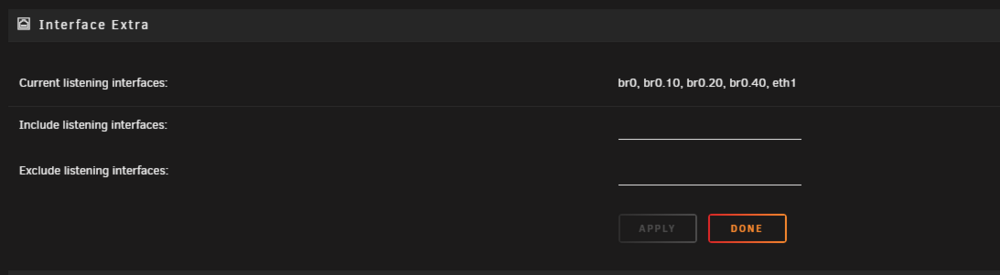
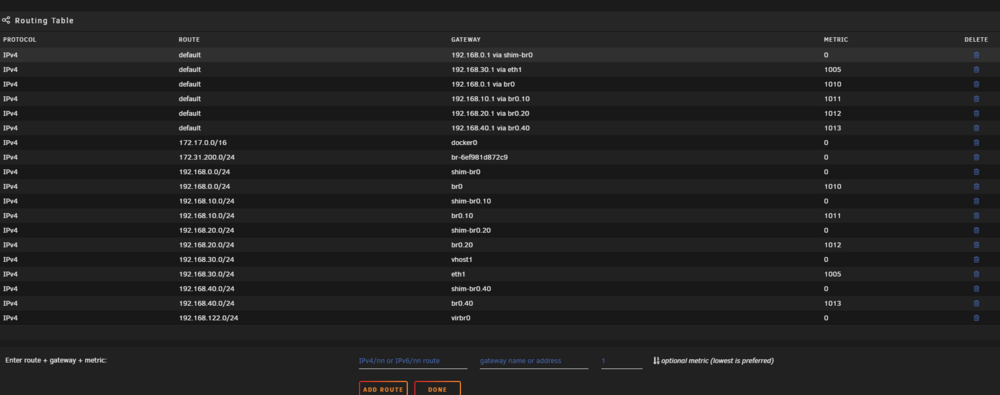
ok that seemed to fix the issue... i dont have that big list.. i had to google what a LXC is not 100% sure what it is some linux container or something but i blew out the network configs and re did and adjusted the order and thats seemed to fix it... i still get this warning and i not sure is there a way to fix it? Oct 26 11:52:08 Tardis kernel: igb 0000:08:00.0: The NVM Checksum Is Not Valid Oct 26 11:52:08 Tardis kernel: igb: probe of 0000:08:00.0 failed with error -5 ive seen this before i tried googling i never found how u fix it.. is there a way to fix this? and these routes look better now least seem to be i appreciate the help so far... as that was frustrating and didnt know what was going on
-
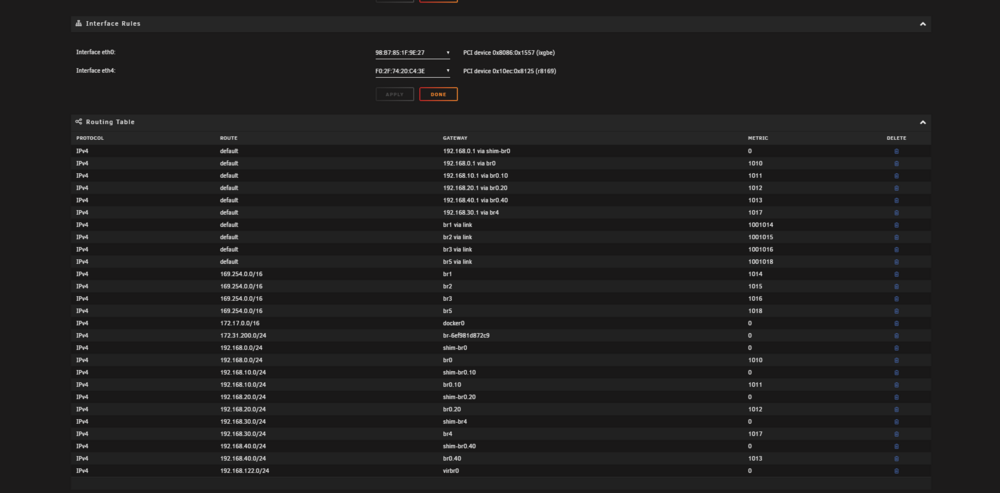
like i try clicking the garbage can to delete routes that does nothing... i tried looking in the flash drive under network.cfg to see if there was old card that i moved from i didnt see i didnt get this error till after i unplug the card so what i did was i had the 4 port card in that had Iot Cameras Dmz and then i made the vlans on the 10gig made sure it got that working... and then i i modified the network cfg to point from the network 4 card to point to the 10gig to fix the bridge issues i had... and no issues but now i decided to pull the 4 port card out to use it in another comp... and when i boot up thats how i noticed now i getting this error and i not able to delete any routes from that routing table hope that helps
-
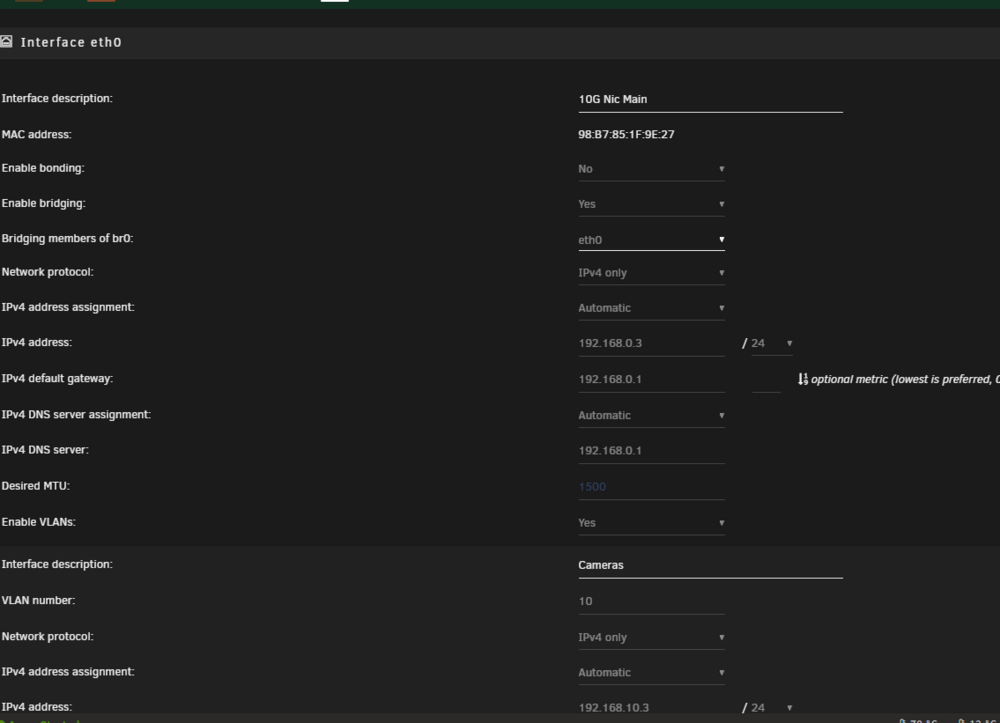
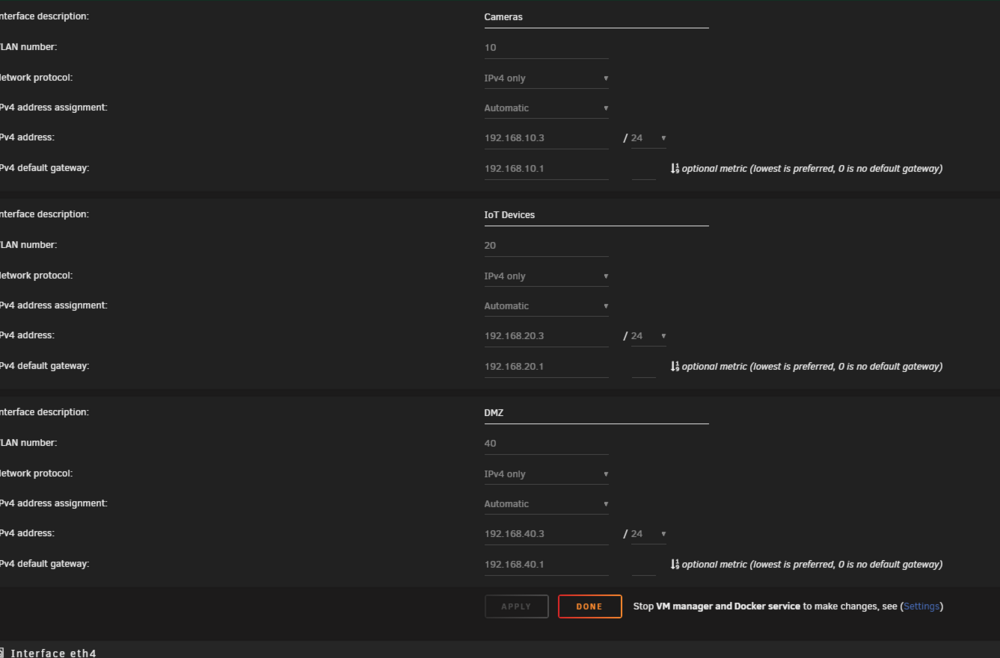
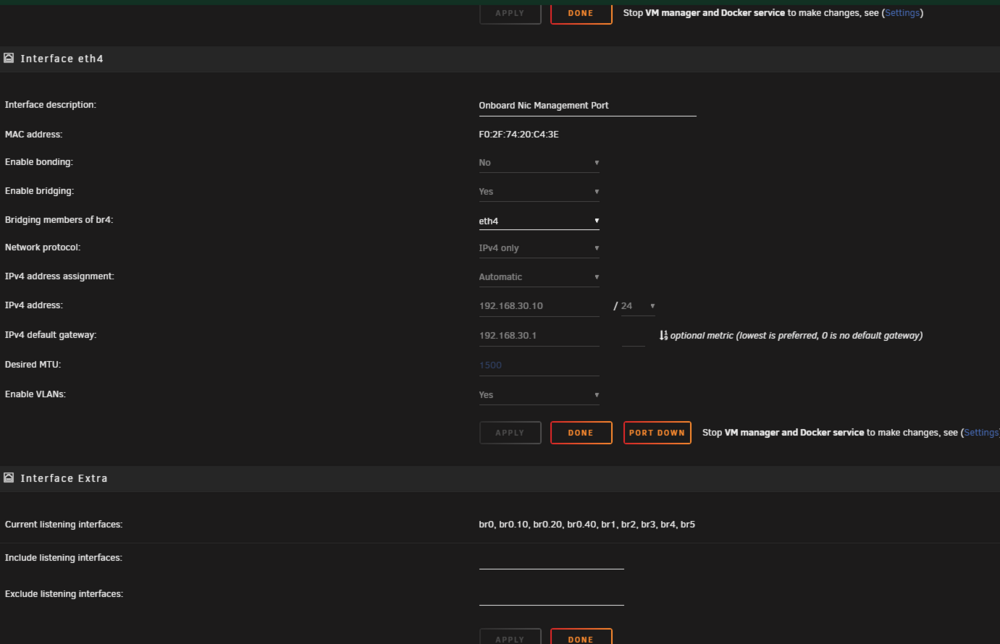
ill have to read the links later but from the pics above.. show i only have 2 network interfaces i use 1 10gig 1 1gig interfaces i used bridge on the 10gig to do that 3 Vlans Lan (br) br0 or whatever you call main 192.168.0.0 br10 = Cameras Vlan 192.168.10.0 br.20 = IoT Vlan 192.168.20.0 br.40 = DMZ Vlan 192.168.40.0 and then on the 1 gig is the management port 192.168.30.0 now the 169. isnt that for when an ip address doesnt work anymore? here is the diagnostic now can you see if it still thinks the old card is in there? where would there be... as there is br1 br2 br3 br4 br5 and maybe thos are pointing to the oild card and the br.10 br.20 br.40 are pointing to the new 10 gig card? tardis-diagnostics-20241025-1342.zip
-
i did a new reboot and finally got fix common issues to work it didnt hang and its giving this ip address issue... but dunno how to fix it do u ignore it button or is there a proper way to fix it? i tried deleting this ip under network settingss they the br1 - br5 but it wont let me delete this ip from the routing table

-
i been using the 10gig for a bit... but here is some screen shots and i left the fix common issues running it still stuck more then 12 hours on the screen 00:00.0 Host bridge: Advanced Micro Devices, Inc. [AMD] Starship/Matisse Root Complex 00:00.2 IOMMU: Advanced Micro Devices, Inc. [AMD] Starship/Matisse IOMMU 00:01.0 Host bridge: Advanced Micro Devices, Inc. [AMD] Starship/Matisse PCIe Dummy Host Bridge 00:01.1 PCI bridge: Advanced Micro Devices, Inc. [AMD] Starship/Matisse GPP Bridge 00:01.2 PCI bridge: Advanced Micro Devices, Inc. [AMD] Starship/Matisse GPP Bridge 00:02.0 Host bridge: Advanced Micro Devices, Inc. [AMD] Starship/Matisse PCIe Dummy Host Bridge 00:03.0 Host bridge: Advanced Micro Devices, Inc. [AMD] Starship/Matisse PCIe Dummy Host Bridge 00:03.1 PCI bridge: Advanced Micro Devices, Inc. [AMD] Starship/Matisse GPP Bridge 00:03.2 PCI bridge: Advanced Micro Devices, Inc. [AMD] Starship/Matisse GPP Bridge 00:04.0 Host bridge: Advanced Micro Devices, Inc. [AMD] Starship/Matisse PCIe Dummy Host Bridge 00:05.0 Host bridge: Advanced Micro Devices, Inc. [AMD] Starship/Matisse PCIe Dummy Host Bridge 00:07.0 Host bridge: Advanced Micro Devices, Inc. [AMD] Starship/Matisse PCIe Dummy Host Bridge 00:07.1 PCI bridge: Advanced Micro Devices, Inc. [AMD] Starship/Matisse Internal PCIe GPP Bridge 0 to bus[E:B] 00:08.0 Host bridge: Advanced Micro Devices, Inc. [AMD] Starship/Matisse PCIe Dummy Host Bridge 00:08.1 PCI bridge: Advanced Micro Devices, Inc. [AMD] Starship/Matisse Internal PCIe GPP Bridge 0 to bus[E:B] 00:14.0 SMBus: Advanced Micro Devices, Inc. [AMD] FCH SMBus Controller (rev 61) 00:14.3 ISA bridge: Advanced Micro Devices, Inc. [AMD] FCH LPC Bridge (rev 51) 00:18.0 Host bridge: Advanced Micro Devices, Inc. [AMD] Matisse/Vermeer Data Fabric: Device 18h; Function 0 00:18.1 Host bridge: Advanced Micro Devices, Inc. [AMD] Matisse/Vermeer Data Fabric: Device 18h; Function 1 00:18.2 Host bridge: Advanced Micro Devices, Inc. [AMD] Matisse/Vermeer Data Fabric: Device 18h; Function 2 00:18.3 Host bridge: Advanced Micro Devices, Inc. [AMD] Matisse/Vermeer Data Fabric: Device 18h; Function 3 00:18.4 Host bridge: Advanced Micro Devices, Inc. [AMD] Matisse/Vermeer Data Fabric: Device 18h; Function 4 00:18.5 Host bridge: Advanced Micro Devices, Inc. [AMD] Matisse/Vermeer Data Fabric: Device 18h; Function 5 00:18.6 Host bridge: Advanced Micro Devices, Inc. [AMD] Matisse/Vermeer Data Fabric: Device 18h; Function 6 00:18.7 Host bridge: Advanced Micro Devices, Inc. [AMD] Matisse/Vermeer Data Fabric: Device 18h; Function 7 01:00.0 Non-Volatile memory controller: Samsung Electronics Co Ltd NVMe SSD Controller PM9A1/PM9A3/980PRO 02:00.0 PCI bridge: Advanced Micro Devices, Inc. [AMD] Matisse Switch Upstream 03:01.0 PCI bridge: Advanced Micro Devices, Inc. [AMD] Matisse PCIe GPP Bridge 03:02.0 PCI bridge: Advanced Micro Devices, Inc. [AMD] Matisse PCIe GPP Bridge 03:03.0 PCI bridge: Advanced Micro Devices, Inc. [AMD] Matisse PCIe GPP Bridge 03:04.0 PCI bridge: Advanced Micro Devices, Inc. [AMD] Matisse PCIe GPP Bridge 03:05.0 PCI bridge: Advanced Micro Devices, Inc. [AMD] Matisse PCIe GPP Bridge 03:08.0 PCI bridge: Advanced Micro Devices, Inc. [AMD] Matisse PCIe GPP Bridge 03:09.0 PCI bridge: Advanced Micro Devices, Inc. [AMD] Matisse PCIe GPP Bridge 03:0a.0 PCI bridge: Advanced Micro Devices, Inc. [AMD] Matisse PCIe GPP Bridge 04:00.0 Non-Volatile memory controller: Samsung Electronics Co Ltd NVMe SSD Controller PM9A1/PM9A3/980PRO 05:00.0 Serial Attached SCSI controller: Broadcom / LSI SAS2008 PCI-Express Fusion-MPT SAS-2 [Falcon] (rev 03) 06:00.0 Network controller: Intel Corporation Wi-Fi 6 AX200 (rev 1a) 07:00.0 Ethernet controller: Realtek Semiconductor Co., Ltd. RTL8125 2.5GbE Controller 08:00.0 Ethernet controller: Intel Corporation I211 Gigabit Network Connection (rev 03) 09:00.0 Non-Essential Instrumentation [1300]: Advanced Micro Devices, Inc. [AMD] Starship/Matisse Reserved SPP 09:00.1 USB controller: Advanced Micro Devices, Inc. [AMD] Matisse USB 3.0 Host Controller 09:00.3 USB controller: Advanced Micro Devices, Inc. [AMD] Matisse USB 3.0 Host Controller 0a:00.0 SATA controller: Advanced Micro Devices, Inc. [AMD] FCH SATA Controller [AHCI mode] (rev 51) 0b:00.0 SATA controller: Advanced Micro Devices, Inc. [AMD] FCH SATA Controller [AHCI mode] (rev 51) 0c:00.0 Ethernet controller: Intel Corporation 82599 10 Gigabit Network Connection (rev 01) 0e:00.0 Serial Attached SCSI controller: Broadcom / LSI SAS2308 PCI-Express Fusion-MPT SAS-2 (rev 05) 0f:00.0 Non-Essential Instrumentation [1300]: Advanced Micro Devices, Inc. [AMD] Starship/Matisse PCIe Dummy Function 10:00.0 Non-Essential Instrumentation [1300]: Advanced Micro Devices, Inc. [AMD] Starship/Matisse Reserved SPP 10:00.1 Encryption controller: Advanced Micro Devices, Inc. [AMD] Starship/Matisse Cryptographic Coprocessor PSPCPP 10:00.3 USB controller: Advanced Micro Devices, Inc. [AMD] Matisse USB 3.0 Host Controller 10:00.4 Audio device: Advanced Micro Devices, Inc. [AMD] Starship/Matisse HD Audio Controller
-
i recently upgraded to 10g fiber network so i dont need my 4 port network card i was using for IoT, Lan, DMZ, etc i use my on board nic as Management port and the fiber port as for the others using them as Vlans 10 cameras 20 IoT etc Oct 24 11:38:10 Tardis root: Fix Common Problems: Error: Multiple NICs on the same IPv4 network Oct 24 11:38:10 Tardis root: Fix Common Problems: Error: Multiple NICs on the same IPv4 network Oct 24 11:38:10 Tardis root: Fix Common Problems: Error: Multiple NICs on the same IPv4 network but i getting error nows I got multiple nics on the same nic.. i cant see nothing under network settings they all seperated ok what can i do to fix that? and i ran the fix common problems and all it does it hang on the scanning part sits there 15 min+ and nothing happens just hangs tardis-diagnostics-20241024-2056.zip
-
here is the current diagnostic ill post the diganostic when it fails again now i told it to reboot.. but i not sure if it rebooted or not as it says its been up for 5 hours so maybe the glitch still in there in the diagnostic and it looks like my other 2 unraid back up servers are sshing fine as there user scripts logs shows it wakes up rsyncs and then shuts the unraid servers down... its just this current one that having the issue rambo-diagnostics-20241021-1116.zip
-
it may not give logs as when it works.. after the rsync is done.. it shuts down the remote computer.. here is the logs i noticed the first error i havent seen before this one keeps popping up... i can get you diagnostic logs but it didnt see issue but here is what the warnings show Oct 21 06:07:11 Rambo kernel: x86/split lock detection: #AC: crashing the kernel on kernel split_locks and warning on user-space split_locks Oct 21 06:07:11 Rambo kernel: ACPI: Early table checksum verification disabled Oct 21 06:07:11 Rambo kernel: floppy0: no floppy controllers found Oct 21 06:07:22 Rambo mcelog: failed to prefill DIMM database from DMI data Oct 21 06:07:28 Rambo root: Interface "tunl0" added. Warning: no bandwidth limit has been set. Oct 21 06:07:54 Rambo kernel: BTRFS info (device loop2): using crc32c (crc32c-intel) checksum algorithm Oct 21 06:07:56 Rambo kernel: BTRFS info (device loop3): using crc32c (crc32c-intel) checksum algorithm ill keep an eye and try to see if i can do multiple wake ups shut downs to recreate the error the reason i notice the problem is when the remote computer is still on during the day when it should be off then i know the rsync didnt work and the ssh to shut down the pc didnt work either
-
so all my unraid servers are running 6.12.13 each night my main server wakes up the mulitple unraid backup servers and then rsyncs over but ive noticed a few times... rsync error.. and when i manually do it.. the port 22 basiclly turned off so on the one back up server what i do is under mangement networks i disable ssh save.. it logs me out to the login in screen then i re log in and i re goto management networks and re enable ssh.. and then im able to rsync again... this lasts so many days and then ssh is disabled again i gotta do the repeat above disable re login in the gui re enable.. and then rsync works again is there a reason why ssh is breaking down is there a way to force it to stay working fine or something? is this a known problem or something?
-
hi i like to know if this is causing my shinibio not working ever to record... and why is it popping up multiple times i seen this before... and i not out of memory either Sep 30 16:26:29 Tardis nginx: 2024/09/30 16:26:29 [crit] 12922#12922: ngx_slab_alloc() failed: no memory Sep 30 16:26:29 Tardis nginx: 2024/09/30 16:26:29 [error] 12922#12922: shpool alloc failed Sep 30 16:26:29 Tardis nginx: 2024/09/30 16:26:29 [error] 12922#12922: nchan: Out of shared memory while allocating message of size 19083. Increase nchan_max_reserved_memory. Sep 30 16:26:29 Tardis nginx: 2024/09/30 16:26:29 [error] 12922#12922: *3938534 nchan: error publishing message (HTTP status code 500), client: unix:, server: , request: "POST /pub/disks?buffer_length=1 HTTP/1.1", host: "localhost" Sep 30 16:26:29 Tardis nginx: 2024/09/30 16:26:29 [error] 12922#12922: MEMSTORE:00: can't create shared message for channel /disks Sep 30 16:26:30 Tardis nginx: 2024/09/30 16:26:30 [crit] 12922#12922: ngx_slab_alloc() failed: no memory Sep 30 16:26:30 Tardis nginx: 2024/09/30 16:26:30 [error] 12922#12922: shpool alloc failed Sep 30 16:26:30 Tardis nginx: 2024/09/30 16:26:30 [error] 12922#12922: nchan: Out of shared memory while allocating message of size 19083. Increase nchan_max_reserved_memory. Sep 30 16:26:30 Tardis nginx: 2024/09/30 16:26:30 [error] 12922#12922: *3938547 nchan: error publishing message (HTTP status code 500), client: unix:, server: , request: "POST /pub/disks?buffer_length=1 HTTP/1.1", host: "localhost" Sep 30 16:26:30 Tardis nginx: 2024/09/30 16:26:30 [error] 12922#12922: MEMSTORE:00: can't create shared message for channel /disks Sep 30 16:26:31 Tardis nginx: 2024/09/30 16:26:31 [crit] 12922#12922: ngx_slab_alloc() failed: no memory Sep 30 16:26:31 Tardis nginx: 2024/09/30 16:26:31 [error] 12922#12922: shpool alloc failed and Oct 3 10:49:25 Tardis kernel: sd 12:0:3:0: [sdn] Synchronize Cache(10) failed: Result: hostbyte=0x01 driverbyte=DRIVER_OK Oct 3 19:14:02 Tardis kernel: sd 14:0:0:0: [sdo] Synchronize Cache(10) failed: Result: hostbyte=0x01 driverbyte=DRIVER_OK tardis-diagnostics-20241004-0827.zip
-
@SimonF thank you i followed the last third post and that fixed it i didnt need the wol plugin just the etherwake and the unraid docs dont have that they talk about installing MiniWOL v.2 on linux but they dont talk about how to install it on unraid it should be installed by default.. when you install unraid... thank you
-
i used to use the eitherwake cli to wake up unraid servers to rsync but then unraid said the wol plug has been depreciated and needed to be removed... and since i removed it i found i can no longer user etherwake i tried googling how you install it or apt install wakeonlan but it wouldnt work how do i install the wakeonlan command line or etherwake command line program or does unraid have a build in cli that does etherwake already in the OS
-
i posted in general topic last week. but i see i not only one. my experience is server locks up 100% you can only ping the server... the hard drive light is running but non of the array or USD drive lights are accessing so i guessing its the unraid files either the flash or the system, appdata which is on an nvme thats taking 100% or what not you loose gui smb... i have poor smb copying. i should get close to 500mb/s going from SSD to SSD i get like 30mbs and thats using windows copy or in krusader and just copying from one ssd to another for big files i get alot Sep 1 09:23:53 Tardis php-fpm[12953]: [WARNING] [pool www] child 25893 exited on signal 9 (SIGKILL) after 25.152652 seconds from start Sep 1 09:23:55 Tardis php-fpm[12953]: [WARNING] [pool www] child 25971 exited on signal 9 (SIGKILL) after 21.084949 seconds from start Sep 1 09:24:14 Tardis php-fpm[12953]: [WARNING] [pool www] child 25972 exited on signal 9 (SIGKILL) after 40.885417 seconds from start Sep 1 09:24:38 Tardis php-fpm[12953]: [WARNING] [pool www] child 27165 exited on signal 9 (SIGKILL) after 24.018489 seconds from start here is a couple of my last diagnostics... i going to be downgrading back to 6.12.11 tommorow and hope i can copy fast again at least tardis-diagnostics-20240808-1344.zip tardis-diagnostics-20240902-0737.zip
-
i did leave my 1 server running the latest.. and i get all these errors she glitchy as hell ep 1 09:23:55 Tardis php-fpm[12953]: [WARNING] [pool www] child 25971 exited on signal 9 (SIGKILL) after 21.084949 seconds from start Sep 1 09:24:14 Tardis php-fpm[12953]: [WARNING] [pool www] child 25972 exited on signal 9 (SIGKILL) after 40.885417 seconds from start Sep 1 09:24:38 Tardis php-fpm[12953]: [WARNING] [pool www] child 27165 exited on signal 9 (SIGKILL) after 24.018489 seconds from start Sep 1 09:25:01 Tardis php-fpm[12953]: [WARNING] [pool www] child 27974 exited on signal 9 (SIGKILL) after 23.044698 seconds from start Sep 1 09:25:39 Tardis unassigned.devices: Warning: shell_exec(/bin/lsblk -b -n -o NAME,SIZE,TYPE | /bin/awk '$3 == 'disk' {print $1 ',' $2}' 2</dev/null) took longer than 0s! Sep 1 09:25:55 Tardis php-fpm[12953]: [WARNING] [pool www] child 29392 exited on signal 9 (SIGKILL) after 26.722472 seconds from start Sep 1 09:25:57 Tardis php-fpm[12953]: [WARNING] [pool www] child 29460 exited on signal 9 (SIGKILL) after 28.007264 seconds from start Sep 1 09:26:13 Tardis php-fpm[12953]: [WARNING] [pool www] child 28672 exited on signal 9 (SIGKILL) after 71.674685 seconds from start Sep 1 09:26:17 Tardis php-fpm[12953]: [WARNING] [pool www] child 30225 exited on signal 9 (SIGKILL) after 19.778683 seconds from start Sep 1 09:26:19 Tardis php-fpm[12953]: [WARNING] [pool www] child 30242 exited on signal 9 (SIGKILL) after 21.155927 seconds from start Sep 1 09:26:30 Tardis php-fpm[12953]: [WARNING] [pool www] child 30860 exited on signal 9 (SIGKILL) after 12.227188 seconds from start Sep 1 09:27:08 Tardis php-fpm[12953]: [WARNING] [pool www] child 30881 exited on signal 9 (SIGKILL) after 49.048186 seconds from start Sep 1 09:27:10 Tardis php-fpm[12953]: [WARNING] [pool www] child 31133 exited on signal 9 (SIGKILL) after 28.466605 seconds from start Sep 1 09:27:39 Tardis php-fpm[12953]: [WARNING] [pool www] child 761 exited on signal 9 (SIGKILL) after 29.191487 seconds from start Sep 1 09:27:49 Tardis php-fpm[12953]: [WARNING] [pool www] child 3400 exited on signal 9 (SIGKILL) after 21.934981 seconds from start tardis-diagnostics-20240902-0737.zip
-
ah ya for me i have the smart plug plugged in the ups.. so the ups keeps the computer on but i can still reboot the computer with the cell phone app when i connect to the network.. so it helps that way.. so i go ups ---> smart plug ---> unraid box but ya i thinking going raspberry pi maybe for HA i use 1 but its jjust to run a sump pump... but ya i just letting it do its parity and downgrade.. i did check 6.12.13 is a stable release i thought i might have downloaded a beta by accident.. but apparently its stable.. so it shouldnt be glichty.... gonna wait till 6.12.14 ... what you use for your dedicated HA
-
ah ok ya what i do for my server i use TP link plugs wifi and i can just tell kasa app to turn on off so i can force the server power off and on.. comes in handy for the dsl modem and pfsense box time to time..... but ya i know i was able to see diagnostics some time out thing but they were warnings didnt make much sense then not long i lost all access... i dont think i upgraded to a beta version i thought 6.12.13 was stable. but ill downgrade.. but i have to do it tommorow as now array doing parity check and that always takes 25 hours 72tb and 2 parity disks.. and still slow lol even with cache drives... but it is frustrating cuz i notice last night home assistant was down all night and it had crashed i was able to vnc to see... i guess unraid went nuts or took 100% cpu last night released it kinda by morning... but then did it again... and had to hit reset button... hopefully it doesnt try to delete the files this weirdness.. i working on transfering files to 2 backup servers of unraid so i have 3 copies of files.. dont need it deleting due to wonkieness






