comet424
Members
-
Joined
-
Last visited
Everything posted by comet424
-
i apparently have warning from nvida in my system logs my system log says Feb 7 08:19:38 Tower root: | WARNING - WARNING - WARNING - WARNING - WARNING - WARNING - WARNING - WARNING Feb 7 08:19:38 Tower root: | WARNING - WARNING - WARNING - WARNING - WARNING - WARNING - WARNING - WARNING tower-diagnostics-20220207-0840.zip
-
ah ok thats not what the system log says for me so thats why i didnt know where its from.. but ill post in there
-
so i rebooted my server and i got this error... but it tells me nothing.. what is it? Feb 7 08:19:38 Tower root: | WARNING - WARNING - WARNING - WARNING - WARNING - WARNING - WARNING - WARNING Feb 7 08:19:38 Tower root: | WARNING - WARNING - WARNING - WARNING - WARNING - WARNING - WARNING - WARNING it doesnt tell me anything what would be really nice is if these system logs would say date time tower root: <ud plugin> <error> date time tower root: <dynamic fan> <error> etc least youd be able to narrow it down tower-diagnostics-20220207-0840.zip
-
ok thanks
-
so i updated to the latest ud on my other 2 unraid servers.. 1 seems ok and my main one.. i dont know if it s a ud issue or not can you tell? all i get is Feb 7 08:19:38 Tower root: | WARNING - WARNING - WARNING - WARNING - WARNING - WARNING - WARNING - WARNING Feb 7 08:19:38 Tower root: | WARNING - WARNING - WARNING - WARNING - WARNING - WARNING - WARNING - WARNING it doesnt tell me anything what would be really nice is if these system logs would say date time tower root: <ud plugin> <error> date time tower root: <dynamic fan> <error> etc least youd be able to narrow it down tower-diagnostics-20220207-0840.zip
-
ok that seems to fixed it.. i did include 2 diagnostics.. incase there is anything else you see now but so far the dups are gone.. 1st diagnostic is with the Level 1 Log 2nd diagnostic is with the Level None Log set least you were able to solve that issue... hopefully doesnt come back in next version of unraid i bet your relieved 🙂 mitchflix-diagnostics-20220207-0800.zip mitchflix-diagnostics-20220207-0807.zip
-
its not working still the 8 dups running 06 version installed 06.. did a reboot i included 2 diagnostic.. the first one.. is the diagnostics with Log level to none... and then i set it to Log Level 1.. and did a reboot and saved the diagnostic mitchflix-diagnostics-20220206-2148.zip mitchflix-diagnostics-20220206-2155.zip
-
ah ok.. ya i tried multiple times to uninstall install the 05.. just the unassigned.devices.plg keeps saying its the 04 version it actually wont change over.. and it wont save the tgz to the directory .. like it di for the 04b i found in there well i glad you know whats going on.. i dont even know linux much.. i used to know it 22+ yrs ago and Redhat at the time annoyed me the way to use a cdrom i said forget this crap and i stuck with windows.... sometimes i feel i should stuck with it.. but i liked windows better lol i guess this error only affects btrfs not xfs or ntfs but least you know what the disks are doing.. or what not.. but do enjoy your plugin since it really helps working in added a drive like windows plug and play.. instead of needing command lines...
-
sorry i didnt realize file was sooo long in both pastes
-
ok so i 1... uninstalled UD from Plugins 2.. went to the Flash Folder and copy and pasted the ud.plg file 3. deleted the tgz file v5 from the unassigned devices folder 4.. went to the Apps Page 5.. installed Unassigned Devices Plugin 6.. went to the u..d.plg file and it is below.. and i didnt bother doing a reboot plugins page says 2022.02.05 <deleted> i didnt do a diagnostic i figured u were sick of diagnostics today
-
so not working or i didnt do the outline right soo what i did now i did couple other ways but this is the last procedure i deleted the 2 tgz files 04b and 05 from the unassigned devices folder 1... uninstalled the ud plugin.. 2.. checked the flash.. the unassigned.devices.plg is still there and file reads inside as 2022.02.04 from when i changed it from 04b to 04 3.. went to CA.. and installed UD Plugin 4.. went to check the flash folder unassigned devices folder... it doesnt have the tgz file 5.. copied the 05v file you saved me and i copied it to the flash folder 6.. the unassigned.deivces.plg still says 2022.02.04 7.. plugins page still says 2022.02.05 up to date 8.. did a reboot 9.. still error. 10.. unassigned.devices.plg still points to 2022.02.04.... 11... Checked Plugins main page says 2022.02.05 11... pasted you the current diagnositcs guessing i missed a step in ur outline.. as i didnt get it to work 😞 mitchflix-diagnostics-20220205-1454.zip
-
i also tried removing that .tgz file v05 from the ud plugin folder leaving the 04b and the plg to 04 as version i goto the plugins page and re scan for updates.. but the plugins page still says 2022.02.05 thats already installed even though the plg file says 04 the tgz file is the 04b and a reboot doesnt help with the v05 removed from that folder still says its up to date when its not and the 8 errors still there so there must be another file that records all the plugin versions to say its up-to-date and wont change
-
couldnt do it.. i didnt have to overwrite... i edied the plg. but didnt need to change it to 4.. as i still have 2022.02.04b in there so gave it a shot but i have run into a problem 1... then i went to Plugins 2.. the UD version already 2022.02.05 3.. Press Check for Updates.. as it didnt automaticlly show.. and says its already up to date.. 4.. I recheck you PLG file and ist still 2022.02.04b. so i change it to 04 and repeat 1-3 5.. i reboot 6.. i check plugins it says 2022.02.05 7.. i check unassigned.devices.plg file its version says 2022.02.04 from where i changed it from 04b to 04 8.. i run check updates does nothing here is diagnostiscs is there a file maybe called plugsin.yaml or plugins.plg that records all these versions to cross the version of the actual plugins? so i failed to be able downgrade and then update mitchflix-diagnostics-20220205-1217.zip
-
sounds good its just like any thing.. if things are working and then someone finds a bug by just stumbling over it that you never checked in a long time.. it happens happens to best of us... so not a problem... been there myself... its like intel didnt know they had a issue in all those cpus for years as it never came up. till it was found.. i feel special beta testing now lol... 🙂
-
your welcome.. hope it helps
-
ah not a problem id help program but my programming days over stopped at Visual Basic 6/net and dable with python here and there.. so glad you know what your doing 🙂 ah ok i figured maybe you keep your old version in a folder so you can jsut go back and see each build you made.. not a problem here is the log file 1. i updated your plugin. 2.. set to Log Level to 1 3. Saved it 4.. Installed UD Plus as i uninstalled it before 5.. rebooted computer 6.. checked logs 8 dups back 7.. saved diagnostics those the steps i do mitchflix-diagnostics-20220205-0830.zip
-
i dont think i noticed the issue when you changed the the plugin when i mention the drives disappeared on my main server.. they were physically there but UD showed they werent even plugged in.. i think it didnt have the error then but i cant 100% say if there is a way i can install the older plugins version like one from xmas and the one they day you said install it.. i could try that and see if it happens as i only doing it to my sisters 1 server.. as i wanna keep the other running and i dont wanna test it on my tower main server.. but if there is a few vers i can copy to the flash and reboot and test
-
i didnt have a problem around christmas if that helps i didnt notice an error as i setup my sisters servers back then i re built her servers and there wasnt errors then so before dec 24th well there is always errors/warrnings but not the duplicate.. i havent been checking... i only checked when i mentioned my Tower(main server) lost the UD drives it was running those days and i mentioned like 25 days ago they were gone.. they were physically there but they disappeared.. and the uninstalling Plus didnt work.. and here is the current file... i dont dare touch my tower as its working but it has a Parity and its been idling 24 25 days and that other guy said it could bugger up parity drive and array.. so i dont wanna reboot it.. as i use your UD plugin its a great feature and i appreciate this program you wrote 🙂 and i cant see if the error happened with my Main Tower server.. due to it had alot of other errors i forget which one.. and for some reason it has no more errors or warnings its actually just black.. but i know u never have a perfect boot mitchflix-diagnostics-20220204-2130.zip
-
didnt work still showing up and 2022.02.04a is installed should i try uninstalling Plus and see if that causes it? Feb 4 19:42:25 MitchFlix kernel: Warning: PCIe ACS overrides enabled; This may allow non-IOMMU protected peer-to-peer DMA Feb 4 19:42:25 MitchFlix kernel: ACPI: Early table checksum verification disabled Feb 4 19:42:25 MitchFlix kernel: floppy0: no floppy controllers found Feb 4 19:42:25 MitchFlix kernel: random: 6 urandom warning(s) missed due to ratelimiting Feb 4 19:42:35 MitchFlix rpc.statd[1927]: Failed to read /var/lib/nfs/state: Success Feb 4 19:42:38 MitchFlix kernel: ACPI Warning: SystemIO range 0x0000000000000295-0x0000000000000296 conflicts with OpRegion 0x0000000000000290-0x0000000000000299 (\AMW0.SHWM) (20200925/utaddress-204) Feb 4 19:42:39 MitchFlix root: Interface "tunl0" added. Warning: no bandwidth limit has been set. Feb 4 19:42:39 MitchFlix root: Interface "gre0" added. Warning: no bandwidth limit has been set. Feb 4 19:42:39 MitchFlix root: Interface "gretap0" added. Warning: no bandwidth limit has been set. Feb 4 19:42:39 MitchFlix root: Interface "erspan0" added. Warning: no bandwidth limit has been set. Feb 4 19:42:39 MitchFlix root: Interface "ip_vti0" added. Warning: no bandwidth limit has been set. Feb 4 19:43:22 MitchFlix kernel: BTRFS warning (device <unknown>): duplicate device /dev/sdg1 devid 1 generation 231191 scanned by udevd (7680) Feb 4 19:43:22 MitchFlix kernel: BTRFS warning (device <unknown>): duplicate device /dev/sdb1 devid 1 generation 1589 scanned by udevd (7676) Feb 4 19:43:22 MitchFlix kernel: BTRFS warning (device <unknown>): duplicate device /dev/sdf1 devid 1 generation 297322 scanned by udevd (7683) Feb 4 19:43:22 MitchFlix kernel: BTRFS warning (device <unknown>): duplicate device /dev/sdd1 devid 1 generation 25146375 scanned by udevd (7685) Feb 4 19:43:22 MitchFlix kernel: BTRFS warning (device <unknown>): duplicate device /dev/sdc1 devid 1 generation 23808 scanned by udevd (7682) Feb 4 19:43:22 MitchFlix kernel: BTRFS warning (device <unknown>): duplicate device /dev/sde1 devid 1 generation 662416 scanned by udevd (7674) Feb 4 19:43:22 MitchFlix kernel: BTRFS warning (device <unknown>): duplicate device /dev/sdh1 devid 1 generation 822278 scanned by udevd (7678) Feb 4 19:43:22 MitchFlix kernel: BTRFS warning (device <unknown>): duplicate device /dev/sdi1 devid 1 generation 12870 scanned by udevd (7658)
-
so i did it for the 1 server that has the 8 dup warnings 1.. uninstalled the pluggin.. rebooted computer..... and dup errors didnt show 2.. then i reinstalled UD plugin and UD Plus Plugin.... i checked the logs no issue 3.. then i rebooted the Server and the dup errors are back in the system log so it seems it happens at bootup???
-
for the old plugin you had me remove the plugin on both servers and i rebooted in the other topic.. and it removed the Duplicate issue.. but then when i reinstalled the Plugin and rebooted it was back as for Pool Devices in UD i not sure what you mean i have Array Drives, and I have Pool Device Drives, which is for Downloading and VMs and Unraid Files appdatas stuff... i dont have a Pool Device UD.... as i dont know how you could make a Pool Device be a Pool Device and a UD... but ill re uninstall Plugins and do a reboot and check
-
no didnt solve it for me.. updated then re booted the 2 servers.. but those duplicate errors back i used btfrs for all my arrays and hot swaps.. i know my other server needs a reboot been going 30 days.. it has a couple ntfs hot swaps but i use all btrfs i kept it to 1 kind as basiclly i read btrfs supposed to be better then xfs server with 1 array drive (mitchsserver) has 1 Duplicate server with 8 array drives (mitchflix) has 8 duplicates right now these 2 servers dont use a parity drive.. but i do use it on my main server that is basiclly a backup server to my sisters 2 servers mitchsserver-diagnostics-20220204-1313.zip mitchflix-diagnostics-20220204-1313.zip
-
ah ok figured i could find someething for ya that could be causing it.. wasnt 100% sure if important or not i didnt notice the error around xmas time maybe an update did something but i dont know but figured throw my 2 cents in 🙂
-
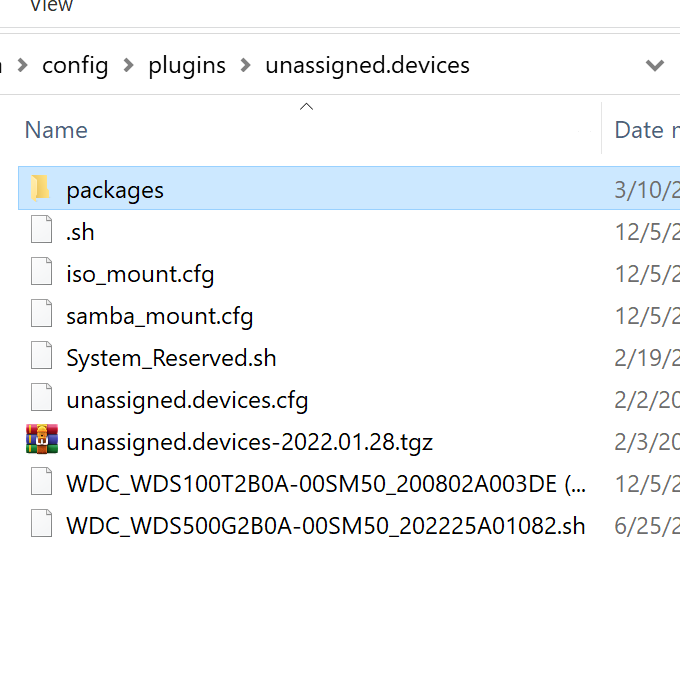
oh ok... so that blows that idea of the dup uknown error figured that was the issue.. those 2 files can you see anything in the diagnostics that keeps bringing that error? ill delete the 2 files and do a reboot so deleting.. and doing a reboot.. doesnt fix the unknown error. if there is anything you want me to look for let me know so from what i noticed.. not sure if it matters? mitchserver = 1 array drive ===> 1 duplicate unknown error mitchflix server = 8 array drives ===> 8 duplicate unknown errors
-
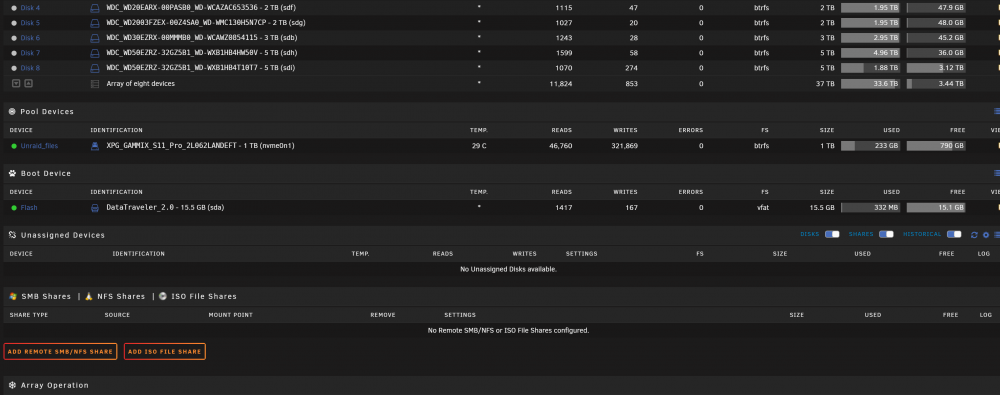
here ill make it clearer this one is getting the dup errors but has 0 historical 0 ud so i was thinking maybe the dup error unknown is.. that when i clicked X to remove teh historical drives.. it never deleted it off the Flash and the UD plugin is conflicting those files with the whatever.. i didnt delete it off the flash just incase need it for debugging mitchflix-diagnostics-20220203-1306.zip