





comet424
Members
-
Joined
-
Last visited
Everything posted by comet424
-
why what dlandon said run the latest so i am sorry for my disliexa i read the wrong one but i running latest

-
@dlandon havent tried to your steps yet.. i did do a reboot of the server.... and i dont have phyiscal access i access for my sister so its a remote location... but i did a reboot no issues with the drive smart shows no errors... and it mounted and syncing her data to the drive she gives me can u see the smart info? and so you shouldnt reboot a computer with the usb hard drive plugged in? and ya its a usb ssd 1tb and a 500tb she hot swaps to exchange in a external 2.5 extneral hd bay and i running 2021.05.01a version mitchflix-diagnostics-20211204-1343.zip
-
i keep getting errors with extneral hot swap .. when i have a ssd swapped in and out.. i keep getting errors for mounting and the only fix is to reboot.. and the unassigned plugin will auto mount.. but any other time it will fail lots... been happening for a while mitchflix-diagnostics-20211203-2315.zip
-
i also checked i dont have usb2.0 ports all ports are USB 3.2 gen ports there is internal header for usb 2.0 ill have to see about a cable and make the usb drive inside the case did it say its over currented again? if so i think it might me being using ESP32 devices on the usb ports on the back of my motherboard.. to program them with ESP Home... in Home assistant.. i think maybe its drawing too much current? gonna try to get internal usb cable to port and hopefully that solves that tower-diagnostics-20211128-0854.zip
-
ah ok..... maybe thats the problem... ill make sure all my sure all pools and the shares least have 10gb free or 20gb free then hopefully no issues then thanks 🙂
-
i dont think i have a usb 2 port anymore its all 3.0 3.1 on this board does the over current mean its getting too much power? i use the bios flash usb port on the motherboard...... is me using the other ports causing it to over current... as it happened again... maybe i need to use inside usb port need one of those adapters
-
bump
-
bump
-
so i letting it run parity check.. after this second time it having issues with the flash.. and having to reboot its gone into parity checking.. so didnt wanna touch it... i use the detacth attach usb device for home assistant would that done it? as i use ESP Home devices to program them but i only attach the esp device nothing else to home assistant
-
ya thats what i noticed... i know i tweaked things but may to tweak things more.. just 1 drive for my music i download and exclude my videos and documents from that drive... least it wont fill up for a while then... learn something new everyday... i appreciate it... and maybe if you got time you can tell me i have other post on flash error i dont know what caused it to mess up twice now.. and reboot doesnt fix it.. had topull all the drives then reboot.. but if you dont have time or know.. thats ok i just wait till soemone can tell me.. as i not sure whats causing it thanks for the info so far it helps least i know why i dont get the notifications
-
ah ok i thought i had min setting so i set it now to 10gb as long as Unraid knows what the file size is when downloading using Internet explorer or google chrome.. i figured unraid didnt know the file size from the internet.. so that bypass's the min safetly limits reason it went to 65.5k free on the drive.. i only found out cuz i couldnt figure out why Failed Downaload error was causing things.. and found it under common fixes and thats why i never got noticies cuz it dodnt go below the limit as u forget these things and when the drive goes totatlyl empty you find it out.. now to figure out my flash error issue ... learning something new everyday
-
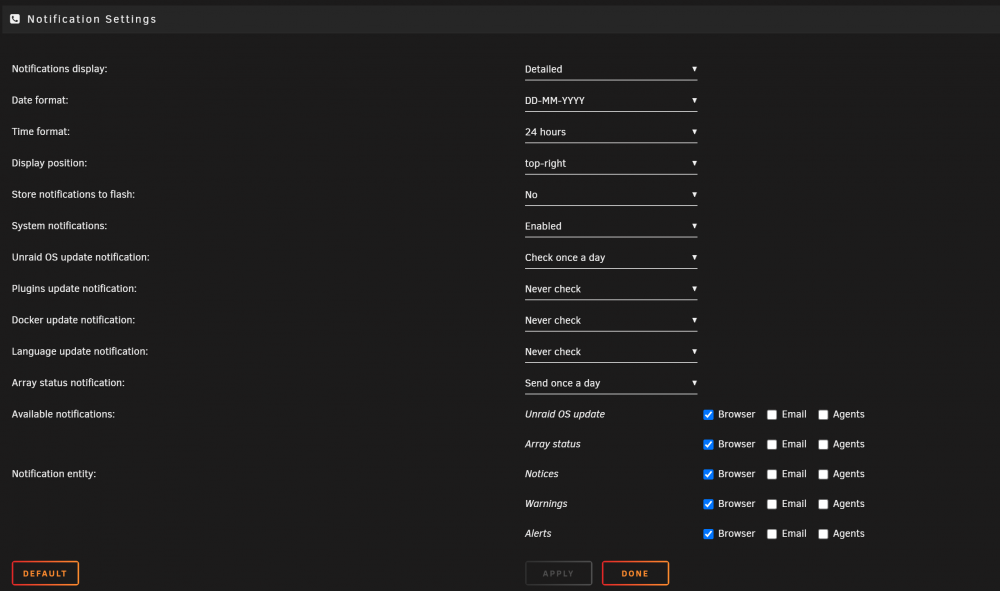
i havent been getting notifications for a long time where you have the array says its getting full the warnings .. i only get a green that the array is ok as i found myself again with 65.5k diskspace free on the one drive.. thought i had min sets but i guess i didnt as i download from the website to that drive.. so is there another place it tells u the drive space
-
it happened again.. is my usb port failing or usb or is it i plugging things into the computer? tower-diagnostics-20211119-2139.zip
-
here is another diagnostic... i was moving 1 folder had least 20 gig in it at like 2 gig a file or so and it kept craping out tower-diagnostics-20211119-1239.zip
-
and i find it happens all the time if u moving a group of files. if i moving music. pictures, videos, documents and not only if its just 1 move command or if its 4 or so they give me that unexpected error.. been dealing with that a long time but i figured id ask if maybe its my unraid not tunned just right
-
does it say how the flash drive got corrupted? as i didnt pull nothing out
-
ok here it is tower-diagnostics-20211119-1212.zip
-
so i not sure is it unraid or is it windows.. or is there tweaks i find if i try moving several files from 1 unraid share to another using windows move.. and i have like 4 or so different instances of move happening i get the error an unepected error is keeping you from moving the file..... and so on is that a windows problem.. that i cant transfer lots of files.. is it an unraid thing so i can tweak a setting ... or would this error happen on say a Freenas.. where its built for more speed... i not sure 100% how to prevent it etc.. and would this happen if mulitiple computers were moving back and forth on the network to the unraid server
-
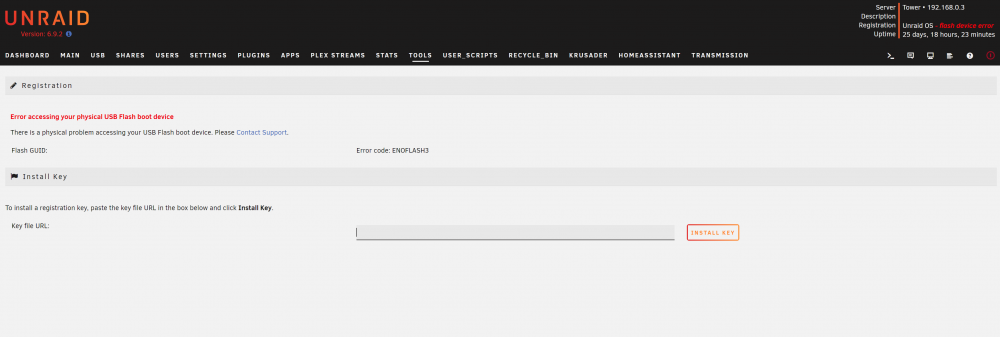
can you guys tell me what went wrong.. i didnt unplug the flash drive but i wasnt able to copy to the array and i checked my server and it was down.. flash drive was corrupt.. so that makes the Array unusable i have suggestion if unraid has to run on a usb it be nice.. only the OS and the key be on the USB.. and the configs run on a SSD so ur files cant get corrupted... another thing i found be nice.. if you put a 2nd unraid usb in the server to check files.. that unraid doesnt read 2nd unraid usb as its own.. and ot corrupts things too.. i found that out by accident when i was using it to check with un assigned devices at the time or another option be is Unraid could be installed on a SSD the key only be on the USB and then only has to be plugged in.. and then unraid just runs on a SSD and no writting to usb ... least usbs would last longer too .. this way the OS doesnt break if the USB breaks.. and if the usb gets unplugged your OS could say the key is missing please plug back in.. without the OS breaking.. it would still keep running and u just need to replace the key or shove it in and out or what not just a thought but here is the diagnostic maybe you can tell me where it went wrong tower-diagnostics-20211118-1059.zip
-
ok so thats 2 different issues happening then.. so brave is the traps error? or the mounting dismounting the drive? and is the mounting and dismounting drives for just the unassigned devices.. ill have to post later and then ill unlinstall brave thanks
-
anyone have any idea what these errors are i still get them.. to mount an external ssd i have to have it plugged in and reboot.. as its stuck in an endless loose of mounting and i get these errors same with unmounting drive will not unmount mitchflix-diagnostics-20211113-1258.zip
-
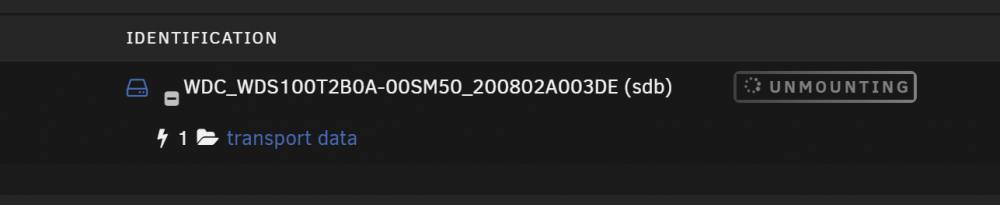
i have my sister pull her hard drive out swap with another one and its stuck in running.. and i get those traps again what does the lightning bolt mean beside the drive.. and is it hte plug in issue or something else? mitchflix-diagnostics-20211030-1355.zip

-
i tried googling not much help i find on my 1 unraid server.. if i have on my sisters unraid she plugs in a unassigned drive i have it auto mount and then use mv command to move any files to the hard drive.. sometimes works sometimes not or its stuck running or mounting or unmounting but i get this error traps: brave[14653] trap invalid opcode ip:560b200a77f9 sp:7ffe5cfa2710 error:0 in brav can you guys tell me if its the unassigned pluggin that causes this error or causing the unassigned drive to have issues.. i usually do a reboot to fix the issues.. but was wondering if this error is caused by the unassigned drives plugin mitchflix-diagnostics-20211030-1303.zip
-
hi have a asus tuf x570 board with a amd 5600g cpu with intergrated video card i try space invader user script to dump the bios but i cant.. wont work says use stub whatever that is or bind i play with the binds etc doesnt work how can i ulitize the graphics to export for a windows 10 VM
-
so i having issues setting this up right i have 2 Lan caches running on my server so my unraid is 192.168.0.3 and dns is 192.168.0.1 now lan cahce (no vpn) i se to 192.168.0.32 upstream 1.1.1.1 now lancache 2 (vpn users) i set it to 192.168.0.33 upstream 192.168.0.1 and they both point to the same directory but it doesnt like to work i reboot my pfsense router.. i think the 192.168.0.32 uses 192.168.0.1 as its dns from unraid i tried in pfsense to tell it 192.168.0.32 would use dns 1.1.1.1 and 192.168.0.33 would use 192.168.0.1 but it just doesnt work right.. how u get it lancache to read it i set the upstream 1.1.1.1 for lan cache no vpn and 192.168.0.1 for the lancache vpn users... but doesnt 100% work right i think both lancaches use the DNS of tower(unraid) and i dont want that also i tried cache ip 192.168.0.32 bind dns ip 1.1.1.1 192.168.0.33 bind dns ip 192.168.0.1 but doenst work right


