comet424
Members
-
Joined
-
Last visited
Everything posted by comet424
-
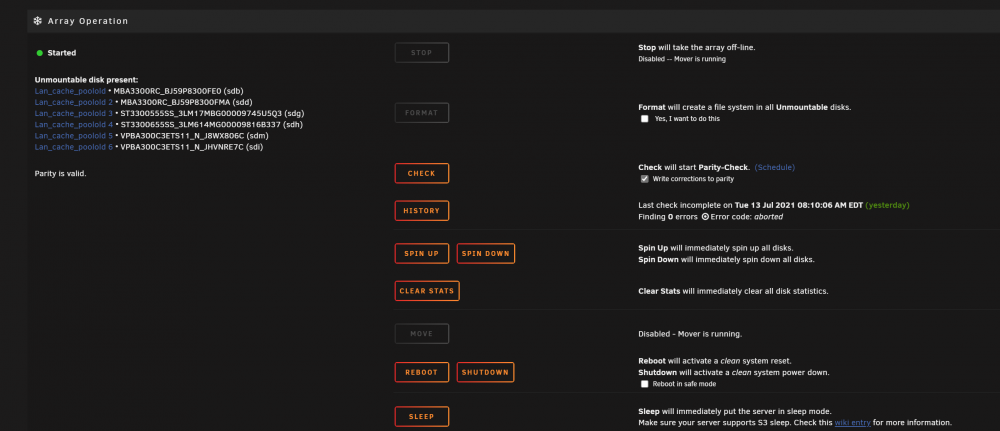
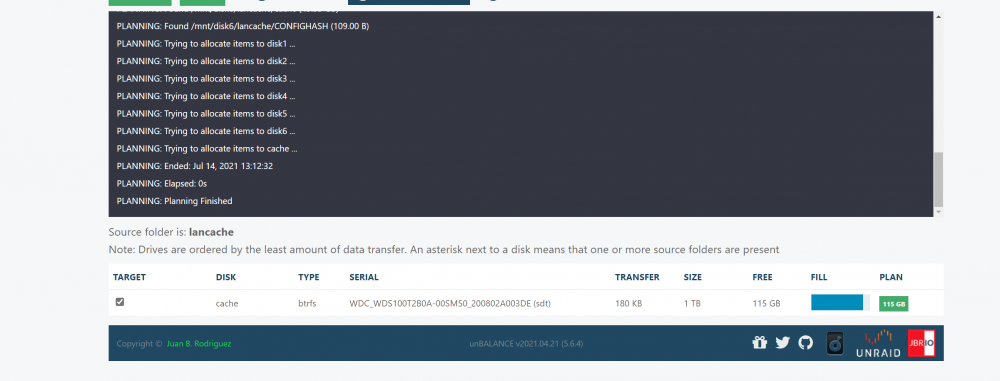
@Squid so for unbalance i dont know how you map to say /unraid i did post in unblance plugin forum asking for help how to get it to see the other cache drives i posted pics as for the Main. you cant hit STOP it wont let you reason i was saying i gotta reboot unraid to stop it so krusader is the best bet then.. so not sure what symlinks are.. but is it better for me to move the cache then with mover? or krusader.. as i gotta reboot unraid to stop mover.. as its been over an hour and half and i only moved 56gb

-
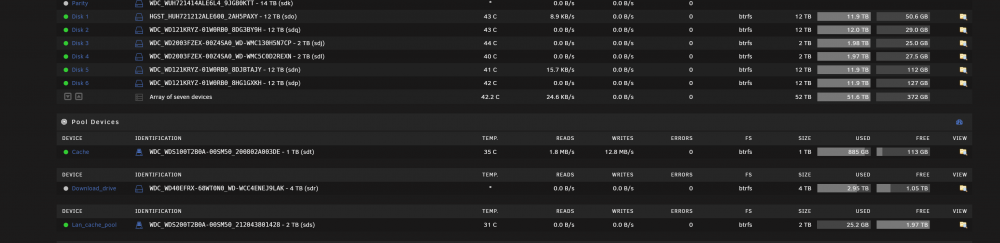
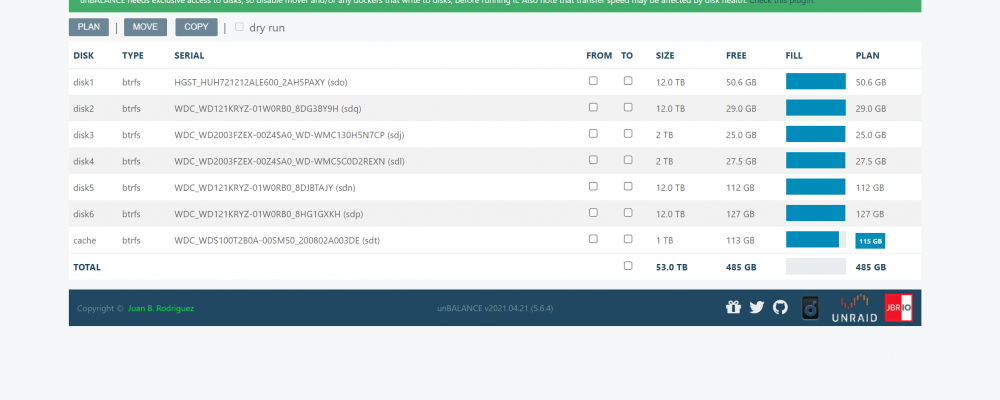
i just got a 2TB drive to replace my lancache .. i been using the lancache on my array but using mover .. to move the files off the array is going 5-13mb/s i got like 1TB of cache to move over.. how do you speed it up.. i tried unbalance but it cant see past 1 cache drive as i have multiple and is there a way to stop Mover command other then a reboot.. be nice to click Stop so i can unmount drive or what not... as i think i guess i need to use Krusader to move the folders off the array to ssd.
-
how do you get unbalance to see more then 1 cache drive.. i find Mover is very slow i have a lancache drive.. but unbalance can not see past the array disks plus 1 cache drive is there a fix to let it see all cache drives? or is there a way to get it to see it. like a check box that i dont know of
-
has anyone tried a Gen 4 running at the 7000mb/s noticed much difference in loading dockers vms etc.. over a sata or a Gen 3 3500mb/s?
-
ah ok thank you.. guess i moving the lancache to the array juggle some files to other hard drives then and get 2 2tb sata ssds and mirror it wouldnt be so bad but epic games drives you nuts with there launcher makes u download the games every time cant simply copy
-
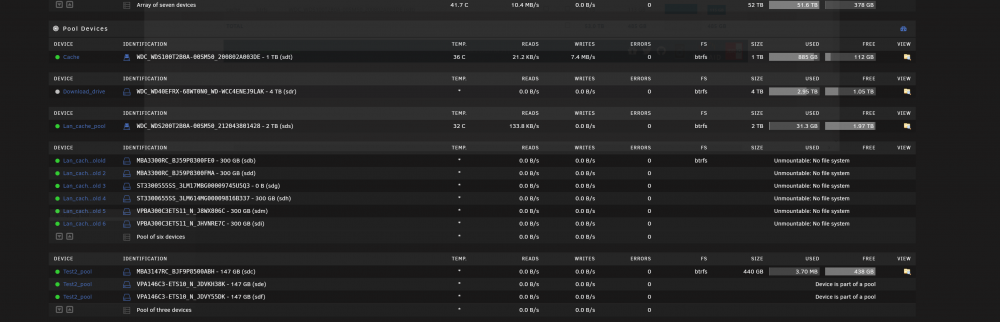
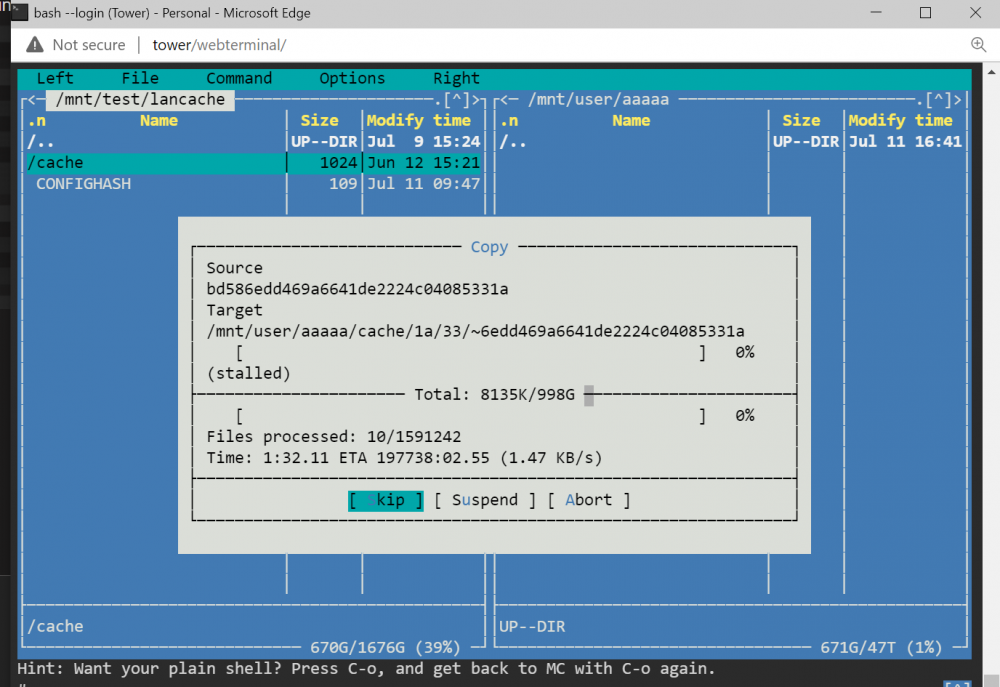
ive tried mount -t btrfs -o noatime,nodiratime /dev/sdb1 /mnt/test/lancache it mounts but when you copy with midnight commander i get errors and i get sooo manyhours to copy am i mounting things wrong how do i mount all those disks minus the one that failed in blue.. so i can move/copy the files off it to the array how do i mount each drive individuallly and move the files off each drive to the array into a single folder maybe better as i had to choose skip all it didnt like things
-
since i have that other post about issues with the lost lancache i still need help with my question is does unraid optimize for Gen 4 nvmes does plex load faster over the network when reading the thumb nails.. do windows vms load faster.. do copying ... etc is it worth getting gen 4 over gen 3 vs sata?
-
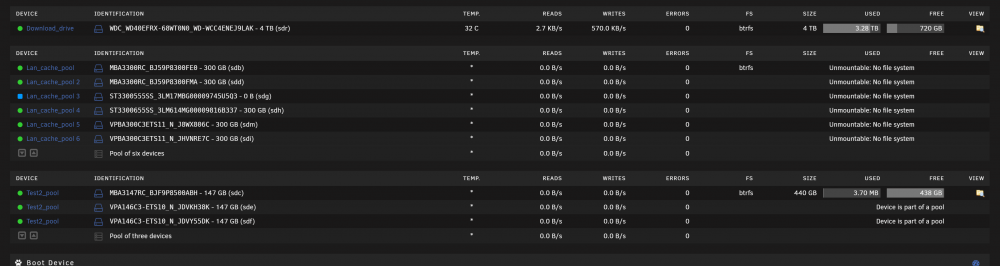
so i been playing with having a 2nd cache.. i use like 6 300gb hard drives for my lancache now the 1 drive failed.. and i did the turn off array change the drive shove back in and fire it up for the new drive instead of letting it format the single drive the whole 6 drives broken i swapped back the old drive.. but its still unmountable. i set the drives up as non mirror just the single drive use.. so i should be able to mount the 5 drives and access the files indvidually per disk how can i as ill just move to the array for now file system is BTRFS i need to save my files off the lancache. for epic games its takeen me more then a month 24/7 to download around 800gb for the games as my internet is not as good as others.. and i need to save the lancache i downloaded.. so need help or how do i renable the filesystem so i can then krusader it to the array.. but its unmountable but u didnt format them tower-diagnostics-20210711-1205.zip
-
ah crap i had to uncheck it because i was dealing with a different vm and was having issues.. ill re try that enable the check marks probably amd x570 doesnt like windows 10vm as it works ok in Volumio no poping you heard in that videos maybe you can only pass pci sound card or a Video card hdmi audio and not a USB audio i dunno the tribulations of vms right lol
-
a request be for the system logs.. sometimes be nice if some of the things could be have a better label so anyone can understand.. or a section or something that says These Warnings or These Errors they are ok dont worry about them.. like i think its that Token error i think where you get the error if you have more then 1 Browser open with Unraid running i get the Same Red error 1000 times.. be nice condense or put it in a sub heading "This Error Means....." or "This Warning....."and or under Sub Heading things not to worry about just an Idea this way just us joe blows can see ok nothing to worry about.. or this error maybe should ask the community
-
id have severals times where i hit STOP array.. and because there is a glitch somewhere Unraid stays in an endless loose of "retrying to unmount array" or "retrying to stop services" or retrying to start services there should be FORCE STOP ARRAy.. not just a Forceful stop array in disk settings for doing a reboot after graceful didnt work.. sometimes be nice to keep Unraid running but force the Array offline when it wont shut down normally.. and another feature be able to Display whats causing the Array to hang.. What is exactly running thats stopping the array to go offline. there must be that you guys can see that say File this is mounted but shouldnt be and its holding resources so the Array wont go offline.. be nice to see a feature to display it.. etc when mounting Vdisks and then having to do new permissions when you unmount the drive it still doesnt allow things to work smoothly and then array cant unmount.. i found out kinda frustrating there.. when i follow space invaders video guide
-
but ok ill post in the features request why not right (0: dont work too hard 🙂
-
@ljm42 ya like in the 80s and then 90s we had our own Community apps.. but it was on diskette.. and we called it Public Domain. and youd get sets of disks you buy.. so i do like community apps aka public domain as it doesnt break the bank for the home user.. like some apps u need cost you a fortune and ur not a business os you cant just write it off.. ya sometimes for the array.. i dunno if it can be changed but you know the system logs it be nice if the programmers or whoever could make it easier to understand like i try to trouble shoot my own before bothering you busy guys.. but sometimes things are labled so that i dont even know what the heck is going on . like the Warnings and Errors.. be nice if there was a chart that said these warnings dont worry about them but this warning you should same with Home Assistant there error logs tell you nothing and you gotta find it.. like working ona car it throws your an error and you gotta figure what caused it but doesnt tell you look in this area lol.. ya i hear ya you dont want unsafe shut downs.. i also wish the system logs would show why will the array not shut down.. what resources are hogging it what is saying down shut down there must be something that says this is holding the shut down command etc.. now is there plugin for for that? or would that be a feature request... as sometimes no one knows what causes it lol and thats fine i was figuring maybe you knew which plugins to keep which ones are doubles .. i try to follow space invaders videos but following them all you add alot i just wish for a video for 2021 what be the best settings, best plugins to run your unraid the fastest you can as i know it wont run that fast as its not raid and you run on only hte speed of the hard drives and thats ok as i used to that for 30 yrs lol.. hated raid if that controller card fails ur screwed lost lot of data that way.. software raid was better but only worked kinda on windows server and even then hated it from the plugins you see i have are there any you can think of since your more expert then me.. but are there any that have know issues any that slow stuff down.. windows used to use a program Tweak It found things to help speed up your windows etc but unraid doesnt have that or does it?
-
wish unraid was here 20 yrs ago .. i was soo sick of redhat and the loop holes u had to get stuff to work i went the windows route.. if unraid was here back in 99 2000 sure would been great (:.. i also like how unraid is now power hungry like windows memory hog etc
-
@ljm42 for the force shut down issue i found that Windows 2016 Server will not shut down and it will cause the parity checking.. i ran that qemu-guest i guess thats what thats for but that has never really helped.. just doesnt like the server but when i was doing the trying to do space invaders mount a vdisk i ran into lot or issues and when i had to get some work arounds i had to figure out on my own.. when i did mount it.. you cant copy files to a Vdisk mounted you had to do the new permissions for vms directoriy so i could write to the vdisk. to try to repair my home assistant.... so maybe its not unmounting properly.. but i mean it be nice when you click "STOP ARRAY" if it wont shut down the arrary while you wanna keep Unraid still running.. there should be a button "FORACE ARRAY OFFLINE" like forcing Unraid to reboot.. but when you do not want unraid to reboot but you want Force it Offline... is what i mean.. as for the deleting the pluging where i deleted was /boot/config/plugings/dynamix.my.server something like that i rm -r that directory and rebooted it and came back .. i didnt know of the other directory you mentioned.. plus when i looked under apps to check it as i thought i may have 2 my servers i deleted the dynamix but when you goto apps its limetech but its 2 different ppl.. i figured maybe i wrote my question in the wrong forum.. i should have wrote in the dynamix forum as i know it seems all the apps from dynamix all go into 1 group.. which isnt the greatest.. as i found some issues with like the Fan Speed plugin but it never gets addressed as other ppls issues for the other apps gets addressed.. so i get confused now if limetech is dynamix or are they seperated.. but i didnt mind the array coming on as i reboot. but i remember when i first started with unraid like 2 yrs ago with a few hard drives.. the Gui would populate before the hard drives were fully mounted.. it would say mounting array.. but you had the gui to still do stuff while array was mounting... now in last few updates.. its the Gui only is functional after the array is fully mounted.. but in the past the gui was fully operation before the array was fully mounted... as for the plugins.. ya i have alot installed.. i installed all the dynamix when i first learned it i stumbled across it learning pfsense also stumbled on it.. but i found this spaceinvader.. and such and all those pluggins i installed them all i dunno which are good which are bad or which like maybe 1 pluggin has now 2 of ther others in one.. its great the open community as its alot better from where i was coming from a Windows Home Server 2003 which worked well for me.. but i wouldnt know which pluggins to get rid of.. and do you think any of the plugins clash with your program... to be honest i really dont know what the my server truly does.. i just watched the video and he said its a great plugin and helps for performance and secureity .. so i installed it... but then i learned its beta so not fully.. and since this is my main setup i guess i shouldnt run beta.. let others that have a spare unraid test it not on your main setup... i do like the options of the community apps better then windows where you gotta google things.. here people written stuff.. but i also find things could be fixed like on the MAIN page in unraid that button that switchs between writes and megs/s they have 1 button for each array.. yet that button any of them controls the whole page it should only change that section.. if not why bother having like 4 or more toggle switchs.. and then add a feature to swich how much it has copied.. so Drive 4 writed 1.5TB of data instead of just writes or writes mb/s but i nobody and i mention it but hey i enjoy the product i just wish i found unraid years ago instead of just a couple years.. i wouldnt struggled with newer windows server when they stopped supported WHS 2003 and the 1 Folder name spanned acrross multi disks.. and ill check out that link for the unclean shutdowns.. but id still like an option where you do not reboot or shut down unraid but when you hit the STOP array button and it wont shut down the array its stuck in an endless loop of retrying unmount there is no button to FORCE STOP ARRAY.. it just stuck in endless loop.. thats why i mentioned there should be a stop array timer like in Disk Settings i see i have it set 420seconds to force shut down if graceful didnt work.. there needs to be one for graceful STOP array button and when it doesnt work.. hit "FORCE ARRAY OFFLINE" but ya hope my diagnostic help u somewhat... probably an AMD X570 thing as i finding more issues with amd then i guess intel lol
-
@ljm42 so i havent uninstalled the plug in from the gui.. all i did was i noticed it there and just says sign in.. i have never gone past of installing the plugin in.. i had gotten busy and never did the website authentication or anything.. i only installed it from the App store like 2 weeks maybe 3 weeks ago.. and because i had other things on the go i forgot about this plugin.. when you got too many things to do and when a windows reboots you never get your browser tabs to populate again normally so i forgot about the plugin so i never even setup a Sign In.. hope that helps too.. so App Store ===> installed the my server app. and never did anything with it forgot i even had it lol. and that was like 2 3 weeks ago.. or so whenever Space Invader posted his video and showed up on unraid page or something.. so hopefully you can find whatever went wrong.. or add a Timer like i mentioned something that if it times out.. its like a Do Loop back when i used to write software and if there is no break out way it just runs forever but you guys are smarter at this coding then i was at it VB 6 and prior Programming softwares 🙂
-
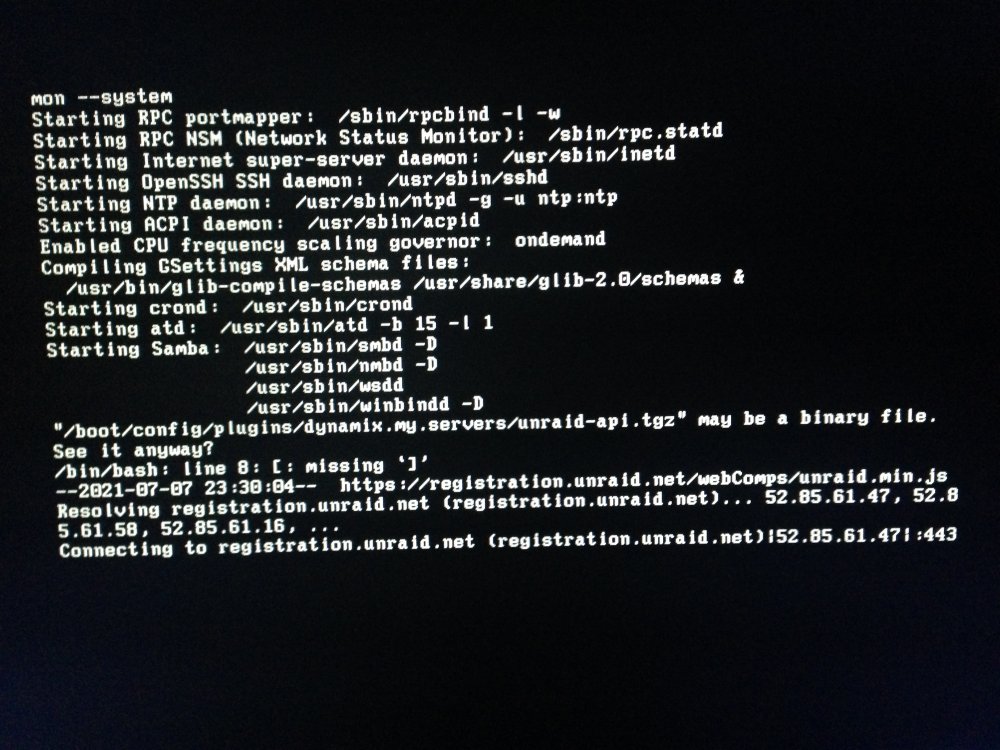
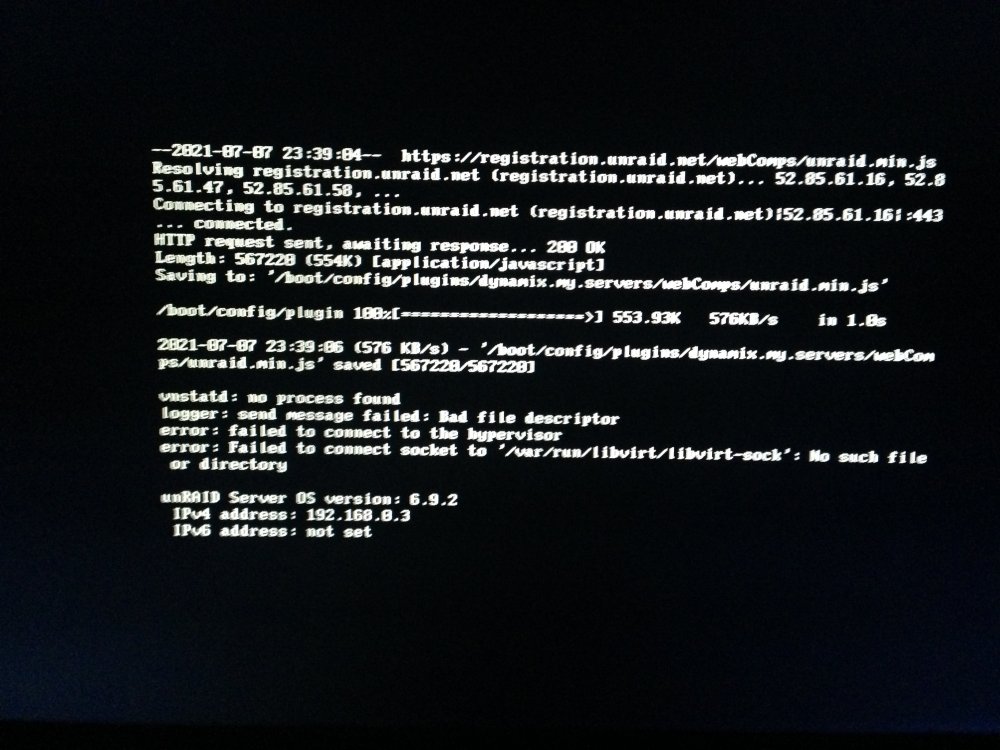
@ljm42 ok i dealing with other issues i posted about and wish there was a Force Shut Down array instead of you gotta force a reboot to shut down an array.. when its stuck retrying to unmount array as for the internet.. no internet issues i was using it fine all i did was Reboot unraid i been having Home Assistant issues i was posting Vdisk issues in General Forums and VM forums.. no one could help me i guess as no one replied.. but all i did was do a reboot. and im used to slow boot up mounting the array.. and i used to non correcting parity checks.. its always something to do with the Windows VMS it seems not wanting to shut down.. also i never got to use that plug in i did partial setup from Spaceinvaders video i installed the Plugin in couple weeks ago.. all i ever done.. sooo when i rebooted.. after 1700 seconds unraid screen in my browswer.. i was able to ssh into my tower and i checked my /mnt directory nothing mounted.. it was blank i tried a couple times where you do reboot -n nothing worked still /mnt nothing i pulled all the drives out.. hoping to boot up like when the array wont mount.. still wouldnt come up waited 10 -15 min so i had to pull a video card out of another computer and shove it in my unraid box.. and then you seen the first screen shot i let it sit 45 min or so.. so i ssh in and looked in the boot and plugins and see that my server.. so i did rm -r folder name i rebooted with the drives still all unpluigged and i got the screen shot you see now but thw Gui finally popped up.. and i shoved the drives back in and was able to mount.. but i see the plugin is back even though i deleted it from the /boot location it came back after a reboot i figured there be a timer when i saw that error so if its trying to connect to the server it only last 1 min say.. i didnt know that the my server plugin booted up.. i was just following space invaders video for better improvements but i didnt know it happens at bootup. but it seems it will brick you from the gui when it gets stuck like i mentioned looks like line 8 if you need it to come on at boot up be nice a timer.. so if whatever your doing takes longer then 1 min exit out and allow unraid to boot up and retry on its own later like a delayed timer.. or an option of my servers plugin runs after the array is online or on after the gui boots up .. as i dont like it i have to wait for the Array to come online before the Gui is working.. i wish you could get the Gui up and running before the Array is mounted.. but here is diganostic. hope it helps tower-diagnostics-20210708-1159.zip
-
is there a Disk Setting for Force Shutdown of Array while still on there only seems to be a Force Shutdown to reboot the unraid but nothing just to take Force the array offline to stop that Retrying i had to terminal and then reboot -n just to get it to reboot and get out of this loop least the VMS came back online.. was trying to do it without a reboot.. i dunno why i didnt get no Cache Warning full i always get Array is Full or Disk x is 98% full say but i didnt get nothing for the cache
-
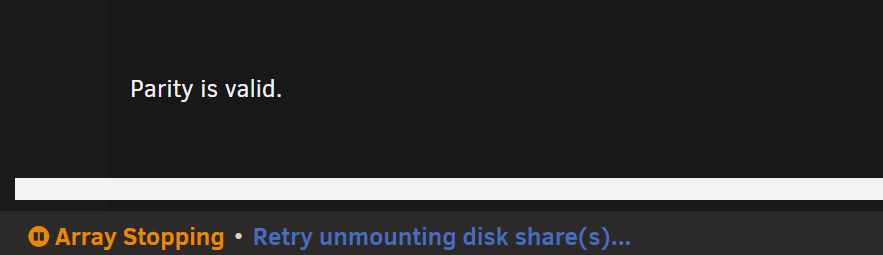
so i got 100gb off i was able to resume the Windows VMS i can not get HA or Volumio to run still stuck in Read Only so i figured stop the array then restart the array. instead of a reboot takes so god awful long but all i get is this repeated constantly in the bottom.. i stuck in endless loop i guess i gotta wait for the grace time i set like 700 seconds i forget where one time
-
@JorgeBdidnt know my cache was full.. ill look thanks i didnt get no warning
-
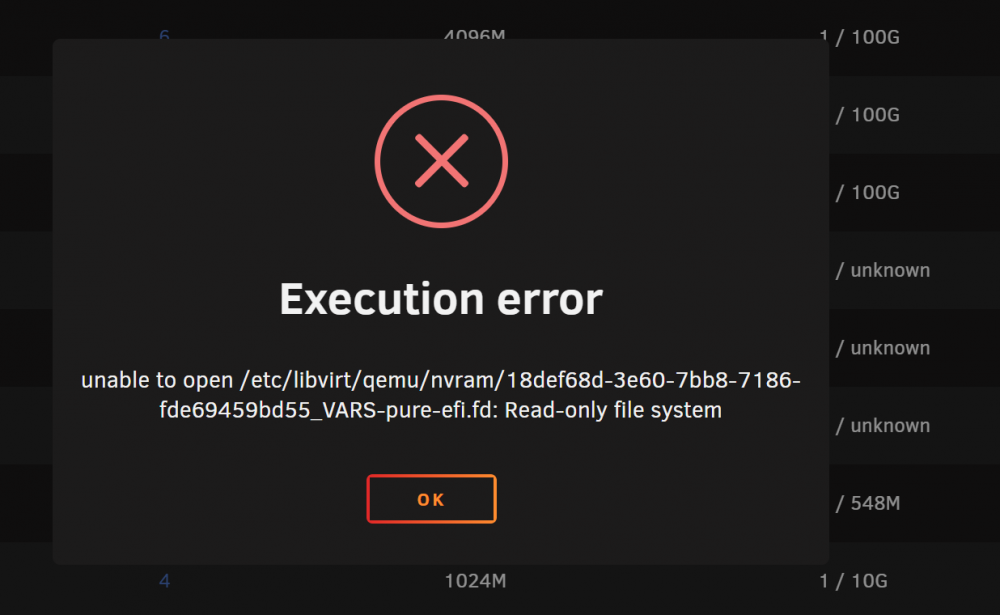
so i did a reboot 2 VMS i force stopped and rebooted.. when i get the non correcting parity after the boot up i cancel it the 2 VMS i force stopped stay stopped.. but the 2 VMS paused boot up Paused when i try to to start either of the VMS i get if I start any Stopped VM's that i didnt have running they automaticlly go Paused.. whats going on? is it from the issue i posted about the My Servers Plugin bricking unraid from booting and had to delete the pluggin in to get it to boot up
-
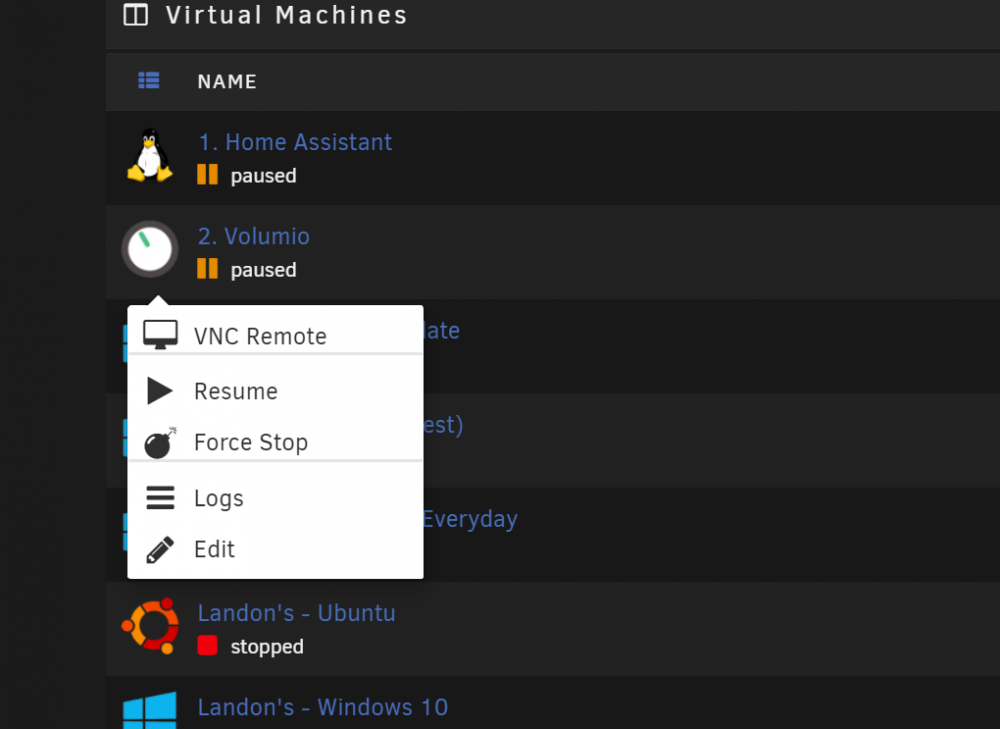
i was in the middle of using some VMS.. and they shut down on me,,, i found out they all went to Pause i didnt do anything Vm backup isnt running can you see anything in the logs? i guess i gotta do a reboot.. wen you do Resume it stays in PAUSE i have to FORCE STOP then Start to get it out of Pause its also paused my Windows VMs too cant get those started.. Update: if I force Stop Then Start it automaticllys goes back to Pause ill include a 2nd Diaganostic tower-diagnostics-20210708-1032.zip tower-diagnostics-20210708-1038.zip
-
@SpaceInvaderOne anyway you can add/make the Home Assistant Icon to your database..
-
@ghost82 so i ended up rma my nvme as i having flaky issues and then my Home assistant VM broke spent all day on that.. but i tried my usb sound card i use for Volumio that i set to 24bit 44hz to get out the crackly as it runs as a VM if i use the same soundcard for windows 10 machine so i can use it to play to a projector.. it still stops and starts using VLC player using a tv and my usb as the audio as you can see in the videos i posted.. i didnt do a video of the Mixer as and the DJ software as i was just testing the sound card.. i set all the MSI util when i ran it i check boxed them all.. but hopefully you can hear the audio cut out i used my cell.... video play back seems ok just not the audio... i also have problems trying to pass the Onboard Audio you can check it for sound card in VM but windows cant see it if you do the onboard in the VM for Volumio it actually wont boot up the VM for some reason but here is my Onedrive link https://1drv.ms/u/s!AkZ74ugB21knumJX1YGm9TE0vcVR?e=iRPBvW
-
anyone deal with this plugin tonight bricking Unraid? i rebooted unraid and it no longer came online.. had to plug a video card in and boot up and it hung 45 min before i ssh into unraid and deleted the my servers plugin. in the plugins folder and rebooted.. it still part of the plugins and somewhere in unraid its keeping the plugin but i was able to boot back up so the first image is it hung 45 min.. the 2nd one is after i booted back up are ssh and deleting the plugin but its still in Plugins