





xtrap225
Members
-
Joined
-
Last visited
Everything posted by xtrap225
-
i have many computers(windows, mac, linux) and have tried all their respective browsers, chrome, firefox, edge, safari. i can't just bring down the server to try safe mode? not sure i have used safe mode on unraid, is that an option when it boots? or is that like maintenance mode? i will have to plan that sort of shutdown.
-
same issue.
-
roger that, and i am not. the window pops up just fine, its the result that is no good.
-
my log button on my unraid webpage hasn't worked for several versions. that is http://X.X.X.X/webterminal/syslog since syslog is working both internally; meaning it works from command line of course, but also from the browser at http://X.X.X.X/Syslog and externally(but really internal) to an observium docker. Since that is the case it has meant that i haven't bothered to open forum post for help. I thought it would be nice to fix this issue now. if anyone can help it would be appreciated. UNRAID-diagnostics-20221212-1418.zip

-
i want to add some tangential information for others that are reading this thread. i reinstalled the dynamix file integrity plugin again and it slowed my parity right back down. its running blake3 btw. my cpu is Intel® Xeon W-2235 so it has the proper avx extensions for it. so i excluded the time-machine backup shares from its check, which is the only place i ever had so-called bitrot, but i am sure those were false positives. as i have used them for restores more than a few times and never had any issues. i am unsure if you are not supposed to check time-machine shares anyway or not, but i don't think it works properly with those. if someone else thinks otherwise and has the same issue, you may wish to go over to the support for that plugin and report it. but once i excluded those, my parity is running ~150MBps on the newer drives and ~115MBps on the older drives. it has increased my average system load to around 4, but that is just while it catches up i assume. also i am re-enabling spectre mitigations and removing that plugin. (mainly cause i didn't see any difference with them enabled and the newer 6.11.0 has even more mitigations built in) and i will updates to 6.11.0 from 6.10.3 once this parity check i haven't gotten in so long is done. however i am now a little concerned, yesterday when i ran the upgrade assistance it said i was all good to go, now something has changed and it says nerdpack and devpack aren't compatible and should be uninstalled. so i might need to wait for an update on those, assuming that happens. i am pretty sure i need those, so i don't want to just rip them out. i am lucky i didn't get the upgrade notification while i was doing my maintenance yesterday cause i probably would have just done it, and had major issues. i hope those packs (nerd & dev), aren't being abandoned and that they get an update soon that makes them compatible. so i don't want to reboot again until parity is done, and its about 50% done now, which is sooooooo much faster than it was running.
-
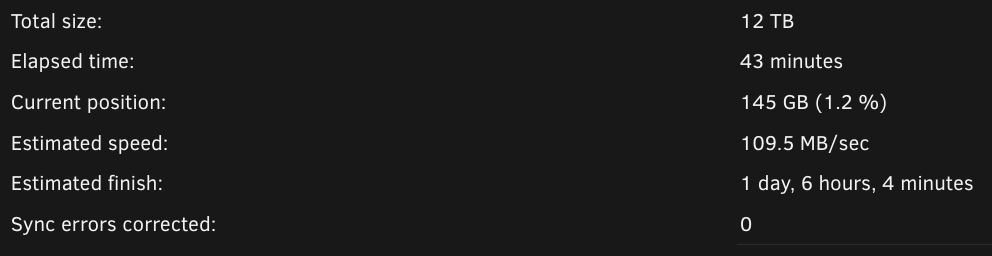
i think i got it. all previously posts were with docker disabled. i have removed the dynamix file integrity plugin, and started up docker. so far so good. load average is floating around ~2.4 to ~3 ,, ah gone down to 2.2 and lower ~1.71 so that is ~12 dockers running and the parity check so thank you for your help but i believe all is well again, i guess that plugin is broken or defunct now, or not and i just need to rework it better if its still useful.
-
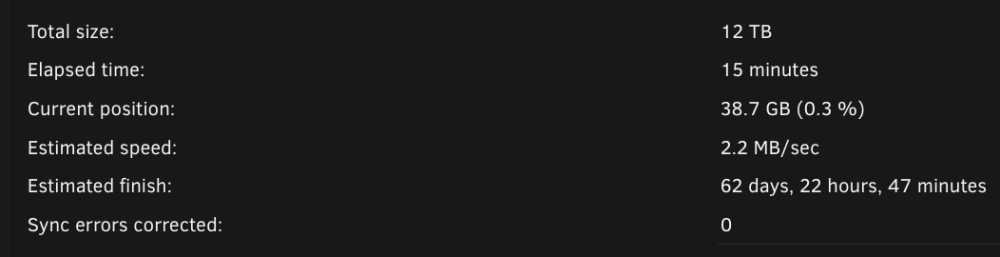
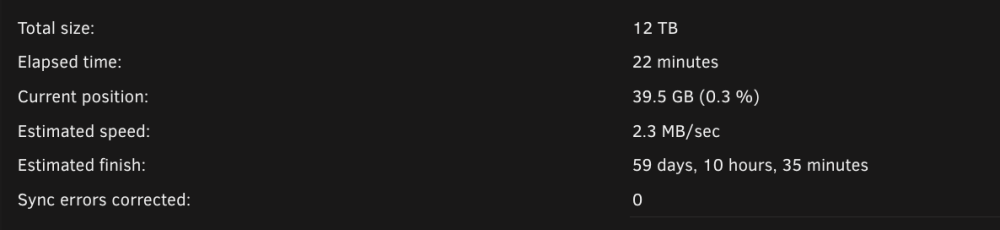
i know i said i would wait but with just SMB and VM service enable (none actually on), after 15min of parity check i really thought it would be something to do with docker i stopped automatic timemachine backups cause i found that had kicked off and cancelled it. i stopped my sonarr, radarr, and lidarr services on another machine which could cause network traffic to the unraid server's array. it didn't help my load average has jumped back up to ~26 and possibly rising. dell-pc-diagnostics-20220924-1654.zip
-
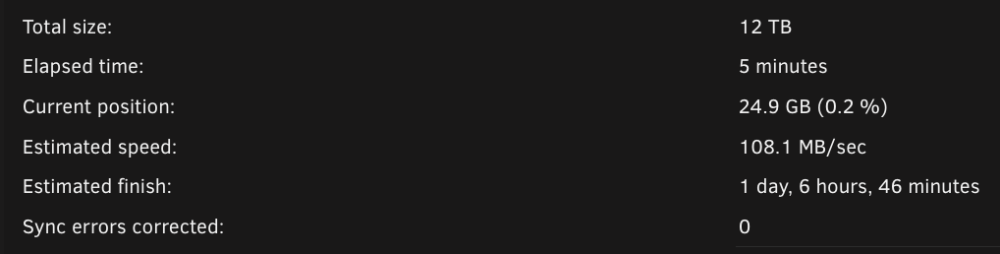
disabled spectre (cpu) mitigation and kept all three major services off(SMB,VMS,Docker) and started array in normal mode load average is ~2 and parity check looks good. i am going to start enabling things again, and keep testing along the way, i won't upload anything else unless you ask me to. or if i figure it out. dell-pc-diagnostics-20220924-1616.zip
-
same as before . array started normal, no docker service, no vm service, this time also stopped SMB service let it run a little longer but load average is ~2.72 dell-pc-diagnostics-20220924-1558.zip
-
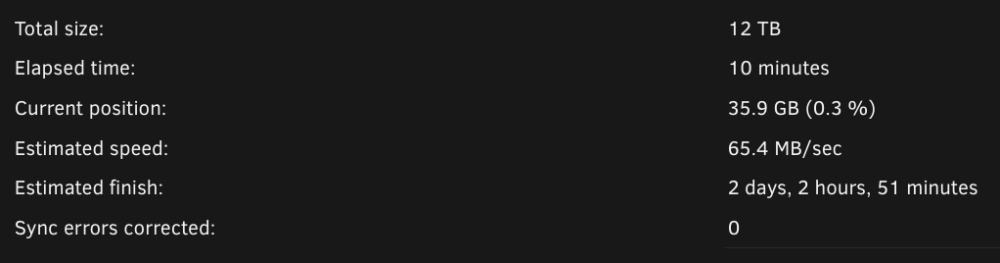
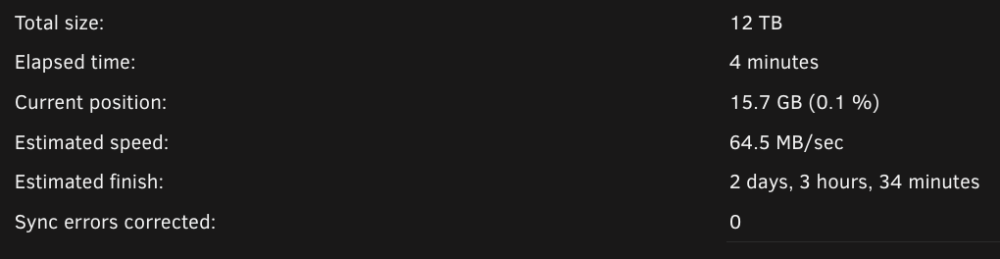
load average after reboot, nothing running array stopped = 0.15 to 0.3 maint-mode parity started normally = 1.88 also parity looks good. array started normal (SMB still enabled), docker service disabled, vm service disabled. = ~3.02 downloaded the diag after it was running like this for a little bit. gonna stop it again and disable SMB and start it and see what happens, while eagerly await your replydell-pc-diagnostics-20220924-1536.zip. dell-pc-diagnostics-20220924-1536.zip
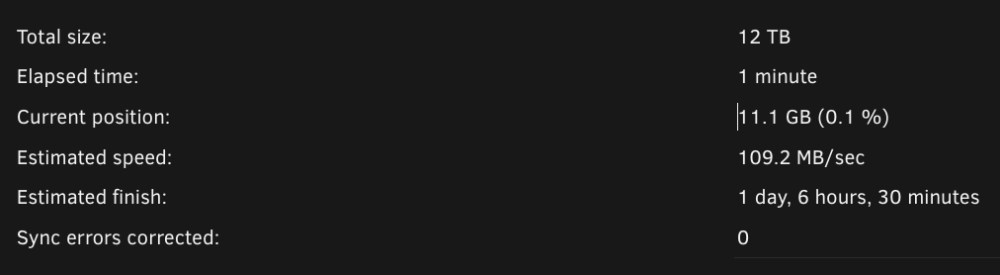
-
okay i stopped the docker service and no significant change still over 30 load average. stopped the vm service (even though there only one vm and it wasn't on) same, still over 30 load average. i not just paused but cancelled the currently running parity and still no change. turned off auto start the array in prep for reboot. when it reboot and it comes back, should i start in maint-mode? or just leave off those services and start the array normal and run a parity for a while before uploading? how long is a while? did i miss turning off any other services? like smb or whatever(i guess i would have to stop the array so it might as be after the reboot if you want it stopped) ? i checked and no time-machine backups are running (really there is only one anyway, on the laptop i am writing this from.
-
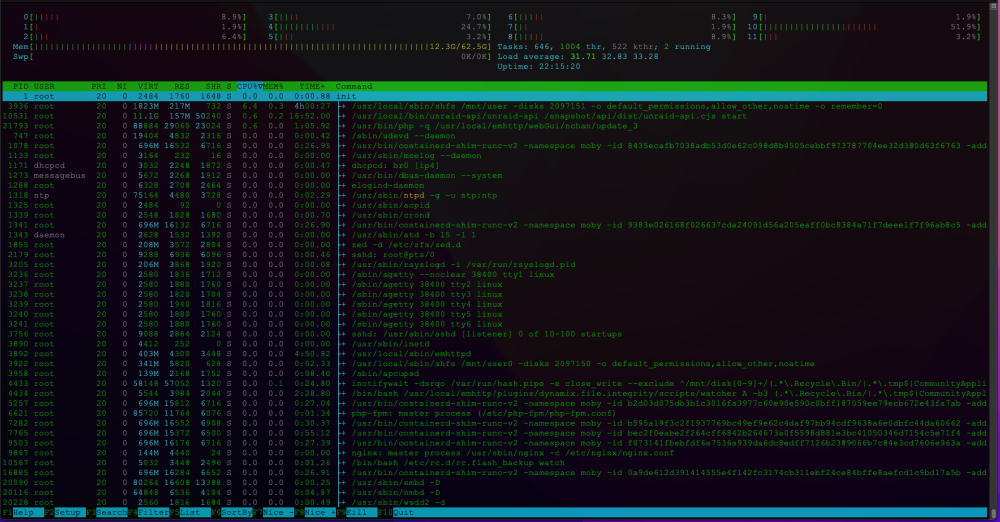
i will do that but i can't right now, i did however pause and then resume the parity here is a screenshot of the htop running sorted heavy cpu to the top, doesn't seem too bad.
-
i have recently migrated to a new server and added two new parity drives they are 12TB WD RED plus nas. they are internal to the server on the 'Intel Corporation C600/X79 series chipset SATA RAID Controller' the rest of the array besides the nvme cache and one for passthrough to a vm, which was off during the time the diag was taken. anyway the rest of the array is 22 disks via a 'Broadcom / LSI SAS2308 PCI-Express Fusion-MPT SAS-2 (rev 05)' which is connected to a NetApp DS4246, with IOM6 modules, (just using one). the drives are all seagate 3TB ST3000NM0033 except, 3 are 8TB WD RED NAS WD80EFAX drives. previously about a month ago after switching to this server already i was getting ... Parity-Check 2022-07-06, 00:28:08 8 TB 21 hr, 28 min, 7 sec 103.5 MB/s OK 0 but that was before adding the new 12 TB parity on another internal controller. here is the parity sync for that. Parity-Sync 2022-08-05, 08:18:10 12 TB 1 day, 6 hr, 30 min, 13 sec 109.3 MB/s OK 0 but since then i have had super slow parity can't finish it cause it will take half a year. Total size:12 TB Elapsed time: 18 hours, 44 minutes Current position: 126 GB (1.0 %) Estimated speed: 1.2 MB/sec Estimated finish: 115 days, 7 hours, 58 minutes Sync errors corrected: 0 i thought maybe my vm was slowing it down so i turned that off, which crashes the whole system but thats a different issue. and since then i have not turned on the vm. how can i troubleshoot my slow parity what should i look at. i can't find any issues with the drives or their speeds or their controllers or speeds. not sure where to look or test next. any help would be appreciated. dell-pc-diagnostics-20220924-1019.zip





