





johnyb
Members
-
Joined
-
Last visited
-
Thanks for confirming. For piece of mind I'll take Option1
-
I'm looking to move a couple of 4tb drives from a OLD server to add to my NEW servers existing array. Don't need to preserve the data (nor bothered about the old server array afterwards), looking for advice on the best way of achieving this. From my limited understanding I'm thinking these are a couple of my options..... (As the Old server drives are a few years old, might it be best practice to take Method 1, and preclear before moving ? As this will ensure the Old server drives are integrity checked before I move them?) I've looked here before posting, but would still appreciate advice before I take the plunge.... Clear vs. Pre-Clear Method 1 Old server data drives, delete the partitions & pre-clear the disks before physically moving to the New server & adding into the array, then format. Will this mean as I've precleared the will be quicker to add to the new array once moved & less downtime on the array? Method 2 Old server data drives, delete the partitions (for drives excluding parity). Then physically move to New server & format. Can these drives then be added to the array or would they still need to be precleared first? Because if its the later this would mean more array downtime. Not sure if the Old server parity drive could be moved over in this way (as wouldn't want unraid getting confused if New server recognised the drive as a parity drive and messed things up?) New server Existing array (1 x 12tb parity drive, 2 x 12tb data drives - xfs) Old server Existing array (1 x 4tb parity drive, 3 x 4tb data drives, 1 x 3tb data drive - xfs)
-
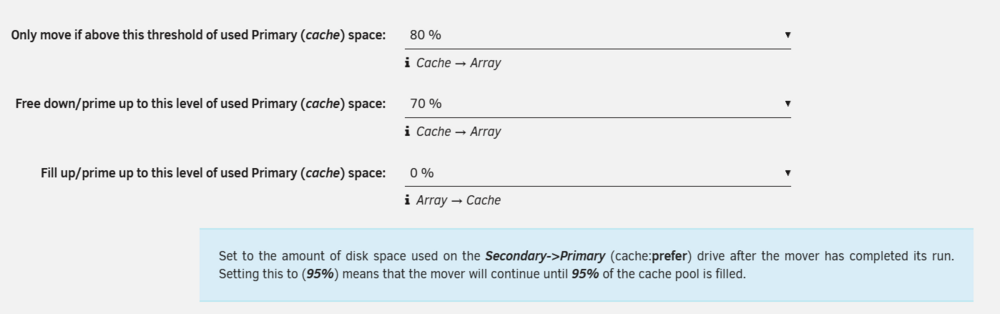
My current config, mover allows cache to fill up to 80%, then moves data to the array until the cache has 70% utilisation. But it's unclear to me what the 3rd option does (bellow configured to 0%). I think because the helper is using the legacy terminology it's confusing me more (doesn't take a lot!) How I read interpret this setting, is that is moves data from array > cache (until the cache hits this threshold of used space?) But under what circumstance? What's use case is there for moving files form the array > cache (until x% of cache is full)? And in my case, where I don't want to move anything from array to cache , is 0% the right setting? I susspect I'm missunderstanding the use case / purpose of this setting, hence would appreciate anyone who's able to help. Thanks
-
What's the impact of upgrading to unraid 7.2.1+ on the current operation of this plugin? Does it stop working or misfunction? Do you advise to delay upgrading until you've had a chance to update? Thanks.
-
I think there will be users who wont immediately update to the latest version when they become available, as they'll wait a while to ensure the new version doesn't inadvertently break something in their current (working) setup. That said if there are potentially breaking changes (to your pluggin) within 7.2.1, to save you maintaining two versions (unmanageable) you could mandate users need to update to minimum unraid version (7.2.1) in order for the pluggin to work.
-
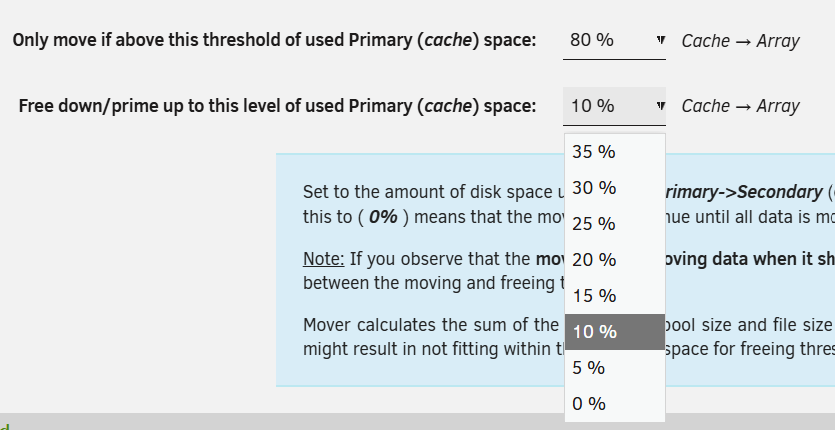
Newly installed this plugin however I'm unsure how to configure my use case (apologies in advance if this is my misunderstanding of configuration) Unraid V7.2.0 / CA Mover Tuning 2025.10.31 Pool Drives : Cache 1TB Share: TV (Primary: Cache / Secondary: array / Mover: Cache>array) I want to keep as much of the above share content on the cache pool, nothing moved until it reaches say 80%. But when this threshold is reached I only want to move oldest files back to the array so were back to say 70% utilisation. But the addon currently only allows me to select a max of 35% free space. (Which would means effectively 45% would be moved to array in stead of my required 10%). I'm reading this as 'free down/prime up to' moves data UNTIL it's reached this usage threshold, rather than make that much more free space. Advice appreciated. This also prompts another question, if my 'appdata' share is using say 20% of the cache space, I assume this would be included in the 'move above threshold' calculation, but since its 'cache only' & couldn't be moved, that its excluded from the 'free down / prime up' calculations?
-
Take a look at the ‘Extra Parameters:’ within the docket configuration (you’ll need to enable advanced view to see this). From recollection there’s a restart tag set in here, which you can remove.

