





CombatMedic
Members
-
Joined
-
Last visited
-
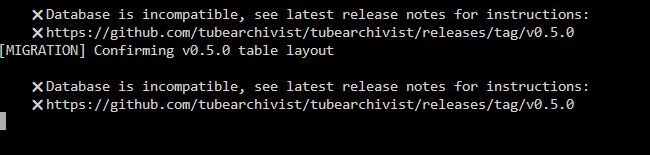
Hello, I am brand new to the docker and originally got some issues with the ES not connecting, but with the help of this thread was able to get that working, now I have a new issue: I have read through the link provided, and done what I can, but this is a new install, never used before so I have no old one to change from. I am using port 6380 instead of 6379 due to another container using that port, but I made the appropriate changes as needed when setting up the 3 dockers. I am sure I am doing something wrong, just having a heck of a time figuring it out.
-
That did it thank you!
-
Hello! I just recently noticed an issue with one of my Windows 10 VMs where programs where unable to write to the Unraid share drive they had been pointed to. Things like qbtorrent unable to download files, File Juggler unable to move files from the downloads section of the VM to the correct share drive, and even manual copying of files from the VM to the shares resulted in the windows copy progress bar hanging for a few minutes, then throwing up an error. I checked my other computers, even made a brand new VM, and they all work fine, able to copy data to the shares as expected, but my existing VM is unable to move data. I have tried small 2 MB files with no luck, and tried moving files directly from one share to another (that for some reason works). This all seems to have occurred after updating from 6.12.6 to 6.12.13. No idea if its the cause of it, but that's when the issue seems to have started as everything has been humming along fine for years. Attached is the diag file, hopefully I did everything correctly, and look forward to any support I can get on this. Thanks! medic-server-diagnostics-20240828-1938.zip
-
Hello, Had a weird one where I moved some folders around onto a new Cache drive, and Plex just kinda deleted its self. So I re-downloaded the docker, set up the extra variables for my Nvidia card to handle transcoding, and then the docker wouldn't start, gave me an Execution Error: Server Error. Nothing will populate in the docker logs so can't check there. I took out the Nvidia transcoding entries one at a time and when I take out the Extra Parameter: --runtime=nvidia the docker works fine, but no hard GPU transcoding. I don't really know where to go from here and didn't see anything related to my issue in this thread. Thoughts? PS: Hope I did the diag file right, first time really having a major issue like this. medic-server-diagnostics-20220331-2202.zip
-
Bless you kind sir. I was pulling my hair out trying to find out what I had screwed up on a docker that had been working fine for months.
-
CombatMedic changed their profile photo
-
Having the same issue as others where I can't log in to the UI. The container is working, in privileged mode, and have gone through all the recommended checks and troubleshooting tips found in this thread. admin/adminadmin just is not working for me.

