Koenig
Members
-
Joined
-
Last visited
Everything posted by Koenig
-
Thank you! I can confirm removing the lockfile gets the WebUI on 5.2 to load.
-
I managed to roll back to 5.1.4 + I found a month old appdata-backup, this got me into the UI again, there must be issues with 5.2. In 5.1.4 the log for the docker says "WebUI will be started shortly after internal preparations. Please wait..." and then "To control qBittorrent, access the WebUI at: http://localhost:8080", neither of these lines appears in the 5.2 log, so to me it seems the 5.2 docker never starts the WebUI....
-
I tried to roll back to 4.6 but the the docker disappeared, after that I reinstalled it from "Apps" but I can still not get to the UI and now it seems all my torrents are gone, the sites says I'm seeding 0 torrents, this was not the case before, what do I do now? (I seeded 600+ torrents, that'll be much work adding back...)
-
+1, Accessed the GUI some week ago, bout no luck today, just says "connection refused"...
-
Hi! I'm planning on setting up "Daily-driver" Windows 11 VM and I'm wondering a bit about disk-performance, what would be best? I have a pool with 4 2TB Samsung 980 NVME SSD's in a raidz1 setup (also used for appdata), wich I'm planning to use for the VM-disk, with a disk-size of 512-768GB, what would be the the best option performance-wise? 1. qcow on ZFS on a dataset without compression LZ4? 2. qcow on ZFS on a dataset with compression LZ4? 3. RAW on a separate dataset without compression? 4. RAW on a separate dataset with compression? Or are there better options? I'm villing to trade som of the performance for beeing able to use a "sparse" image, or is this idea a bad one? /Koenig
-
I never found a solution to this, so I have lived with it up until today when I updated the "unraid-api-plugin", so I guess that was the culprit somehow. Now everything is snappy again and I'm happy!
-
Will try. The thing is it ran just beatifully until I had a powerout (I wrote crash earlier, but it was actually a powerout), after it rebooted it was starting to go slow, it's like 15-25 seconds after I push anything or change tab, sometimes the browser (chrome) opens a popup that says the website has become unresponsive ans ask if I wish to wait or something else. VM's and dockers works just fine anyway, it just annoying when it is that slow you know....
-
Hi! My servers web-UI became very slow after a crash and I can't figure out why, I have tried rebooting it several times with no luck. It's been like this for a couple of weeks everything else works so due to lack of time it has just been running anyway, until today I also noticed that it won't respond to me manually invoking the mover (via the button) thinking it might be related. It might also be 2 issues. Anyway I attched my diagnostics and hope this great community can come up with what my problem is. unraid-diagnostics-20231023-1706.zip
-
It will eventually get updated, but probably not until there´s a 6.12.1 stable. If that is the only course of action we have to wait, it is not like I will forget the issue anyway as there's plenty to remind me in the log
-
Unfortunately me changing this so the setting says "ToK" on both servers didn't help, lines like the ones below continue to come frequently: May 4 02:28:55 Unraid kernel: CIFS: VFS: \\192.168.8.25\Backups Close unmatched open for MID:1182285 May 4 02:54:55 Unraid kernel: CIFS: VFS: \\192.168.8.25\Backups Close unmatched open for MID:1291108 May 4 02:57:00 Unraid kernel: CIFS: VFS: \\192.168.8.25\Backups Close unmatched open for MID:1299810 May 4 02:58:02 Unraid kernel: CIFS: VFS: \\192.168.8.25\Backups Close unmatched open for MID:1304178 May 4 03:17:17 Unraid kernel: CIFS: VFS: \\192.168.8.25\Backups Close unmatched open for MID:1384761
-
Nice catch, changed it too see if it matters.
-
Yeah, the screenshot is from a unraid-server running 6.11.5 that is the one that contains the share that I'm mounting on one with unraid 6.12.0-rc5, wich is the one that is throwing CIFS-lines in the log. Attaching diagnostics from both servers. "unraid" runs RC5, "nas" runs 6.11.5 (stable) A courious thing here is that "nas" (stable) also have a mounted SMB-share from "unraid" but is not throwing those errors into the log, while "unraid" (RC5) has a mounted share and thows a lot of those lines in the log EDIT: Fixed the quote. nas-diagnostics-20230503-2019.zip unraid-diagnostics-20230503-2019.zip
-
Hi! Is it possible to change the flashdrive while the server is online? Just got a dreadded message that a key is missing and that the flash-drive probably are corrupt, but the array and everything is working as is should for now. So is there a way to change the flash-drive while the system still is "live"?
-
No that diagnostics was the second thing I did with the server after the reboot. (the first thing was to start the VM "Daily-driver", via my mobile phone, wich is my "daily-use-computer")
-
Yes, I was aware of this and was thinking of mentioning it, I just hadn't rebooted due to an ongoing parity-check. The parity-check was on 96% or something like that so I "forced" it, and I have now rebooted. Guess what.... It now works to create the diagnostics via the "Tools". EDIT: I would like to give a big thanks to you guys, this community is amazing!! unraid-diagnostics-20220727-2024.zip
-
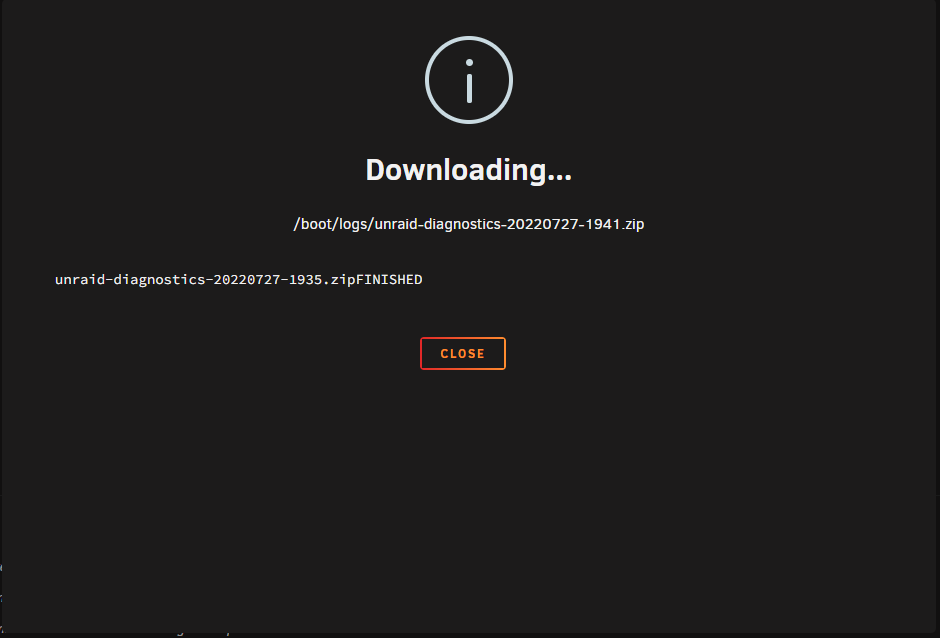
Via the web-terminal it creates a diagnostics-file, but if I use the the "tool" it doen't create a file. The file ending in 35 is the one created via web-terminal, the one ending in 41 just doesn't get created. unraid-diagnostics-20220727-1935.zip
-
Now I'm able to login. So that looks OK, but I still cannot create a diagnostics... Though that might be anothr matter.
-
root@Unraid:~# /etc/rc.d/rc.unraid-api install API has been running for 1s and is in "production" mode! -----UNRAID-API-REPORT-----> SERVER_NAME: Unraid ENVIRONMENT: production UNRAID_VERSION: 6.10.3 UNRAID_API_VERSION: 2.49.2 (running) NODE_VERSION: v14.15.3 API_KEY: invalid MY_SERVERS: signed out CLOUD: API key is missing RELAY: disconnected MINI-GRAPH: disconnected ONLINE_SERVERS: Unraid OFFLINE_SERVERS: HAS_CRASH_LOGS: no </----UNRAID-API-REPORT----->
-
root@Unraid:~# ls -al /usr/local/sbin/unraid-api lrwxrwxrwx 1 root root 36 Jul 27 18:31 /usr/local/sbin/unraid-api -> /usr/local/bin/unraid-api/unraid-api root@Unraid:~# ls -al /usr/local/bin/unraid-api/ /bin/ls: cannot access '/usr/local/bin/unraid-api/': No such file or directory
-
Well it says the same for me, but if you check the logs I attached you can see that the installation was completed.
-
root@Unraid:~# unraid-api report -v bash: unraid-api: command not found root@Unraid:~# php /usr/local/emhttp/plugins/dynamix/include/UpdateDNS.php -v (Output is anonymized, use '-vv' to see full details) Unraid OS 6.10.3 with My Servers plugin version 2022.07.26.1609 ⚠️ Not signed in to Unraid.net Use SSL is auto ✅ Rebind protection is disabled for myunraid.net Response (HTTP 406): null Error: Nothing to do And I can't sign in to unraid.net, it just never gets to any login page....
-
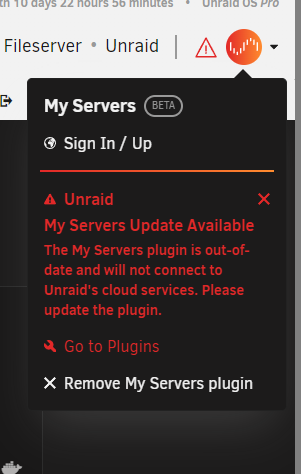
Hope this helps. EDIT: The image is taken after uninstall/reinstall. Install log.txt Uninstall log.txt
-
Same for me. + I can't create a diagnostics to attach to this post, it just says "Downloading" but nothing happens and this file - "/logs/unraid-diagnostics-20220727-1817.zip" does not exist on the flash.
-
As an update to this thread: I ran a memtest, only one pass, and it was OK. So I went ahead and updated the BIOS again, and right now I am at 15 days uptime, which is a record, lets hope I didn't jinx it with this post At the same time as I updated the BIOS I also changed a setting that disabled the system from booting from one of the disks attached to my HBA-card (this also cut boot-times as the HBA card does not do it's own boot-thing any more) So I'm not sure wich of this actually was causing my issues, but hopefully this issue is solved now.
-
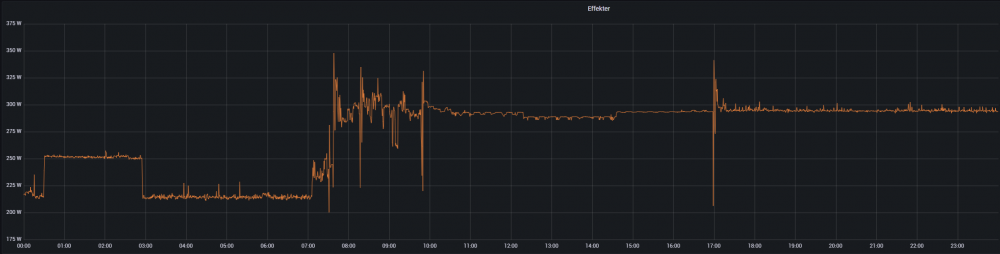
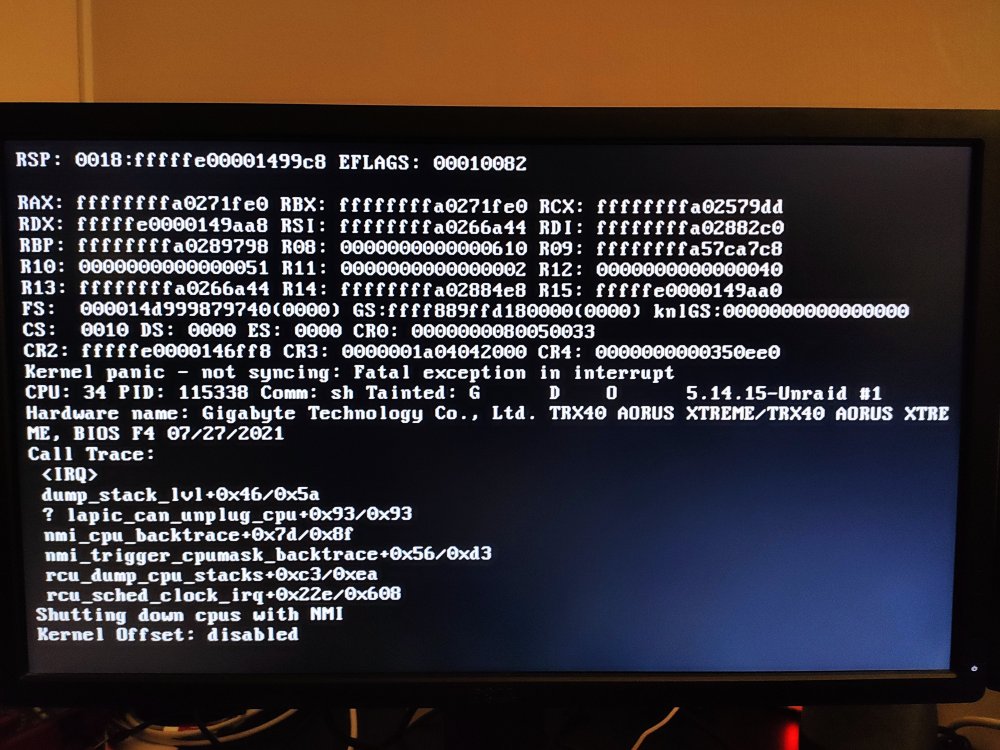
But it didn't, and yes when i changed the setting to what was recommended in that post you linked to, I had the latest BIOS (I updated just prior to changeing that setting), although now there's a newer BIOS. But I realized today that disabling the C-states is not really an option, the power consumption of the server vent up like a 100W when I disabled the C-states, I think from the attached image you can determine the time pretty accurate as to when I reboot with the C-states disabled. I took a photo of the screen at one of the crashes as well if that could of any help I'll atttach that as well.