





Niklas
Members
-
Joined
Everything posted by Niklas
-
Not good https://product.unraid.net/p/7-4-b2-file-moves-across-shares-pools-delete-files-in-unraid-7-4-beta-2
-
Looking good here. Only plugin related problems like the missing icon for Apprise notification (open() "/usr/local/emhttp/plugins/dynamix/icons/apprisenotificationagent.png" failed (2: No such file or directory)" and fix common problems not working. Btw, the blog post link gives 404. Missing a zero.
-
I think it checks for updates for all the plugins at the same time now. So it will be faster.
-
I never post diagnostics in the open, will they only be available to devs?
-
I sort my plugin page by status. It does not move the ones with updates available to the top when the update check completes. I need to scroll down to find if there is any updates or click "STATUS" twice to move them to the top after the check is done. No Power Button-setting and fix common problems doesn't work. Other than that its working fine. Edit This error when going to notification settings (Apprise plugin installed). nginx: 2026/08/18 04:34:47 [error] 3365734#3365734: *127646 open() "/usr/local/emhttp/plugins/dynamix/icons/apprisenotificationagent.png" failed (2: No such file or directory) while sending to client, client: 192.168...
-
Maybe the goal is to be able to dismiss the window and the update will continue in the background?
-
I don't have that "Power Button"-tab. Too old machine? ;) Pressing once does the clean power off at least.
-
Your logs fills with the question.png missing bug I just mentioned in this thread. Temp fix in my post. Yes, the HDCP log line also happens but not as big of a problem.
-
The missing question.png bugfix takes too long to be released. ;) @flurec Known bug in Unraid. We need to wait for it to be fixed in 7.3.3. Reboot will fix it until next time you delete containers using the question.png default icon. You can install the PR with the bugfix from here if you don't wan't to wait: https://github.com/unraid/webgui/pull/2693#issuecomment-5072886036
-
It works great but you have to install it manually via Plugins - the tab "Install Plugin". Paste https://raw.githubusercontent.com/dlandon/file.activity-next/master/file.activity-next.plg In fix common problems, press ignore for it when it complains.
-
FWIW, I modded my bios to add ReBar and the mb is ~14 years old (Ivy Bridge CPU, Z77 chipset era). ;) But I'm on A380 and i915 (mostly transcoding and immich machine learning). https://github.com/xCuri0/ReBARUEFI Found it already done for my mb there but made som more mods before flashing it.
-
Yes. It has been reported before to occur in mainly Chromium based browsers. I use Brave Origin with Shield disabled for Unraid.
-
Visiting Settings -> Management Access -> Unraid API Status show: API Service Status Status: Not Running (but it is) and log say "Jul 9 01:17:40 Server webGUI: error: /plugins/dynamix.my.servers/include/unraid-api.php - wrong csrf_token" Pressing "Refresh Status", it shows up as running but revisiting that page gives not running with the wrong csrf_token error. I really don't want red errors in the logs. I could ignore the wrong csrf_token but why does it happen?
-
Looking good. Now I see the "UNRAID"-logo. Thanks!
-
Way too big Unraid logo in the e-mail notifications from the forums. More than half the mail is logo only before you see the important stuff, the text in the mail. ;)
-
I added my scripts to this FR (works on 7.3): https://product.unraid.net/p/optimize-boot-backup-by-disabling-compression-or-adding-a-toggle Quite easy to add notifications if you'd wan't that.
-
Official plugin spotted. ;) You can find it in Apps now. "Installs the apprise-go CLI as /usr/bin/apprise and adds an Apprise target under Settings > Notifications > Notification Agents."
-
Looking good! The freq stops at the last value it reads under load but that's what qmassa say so..
-
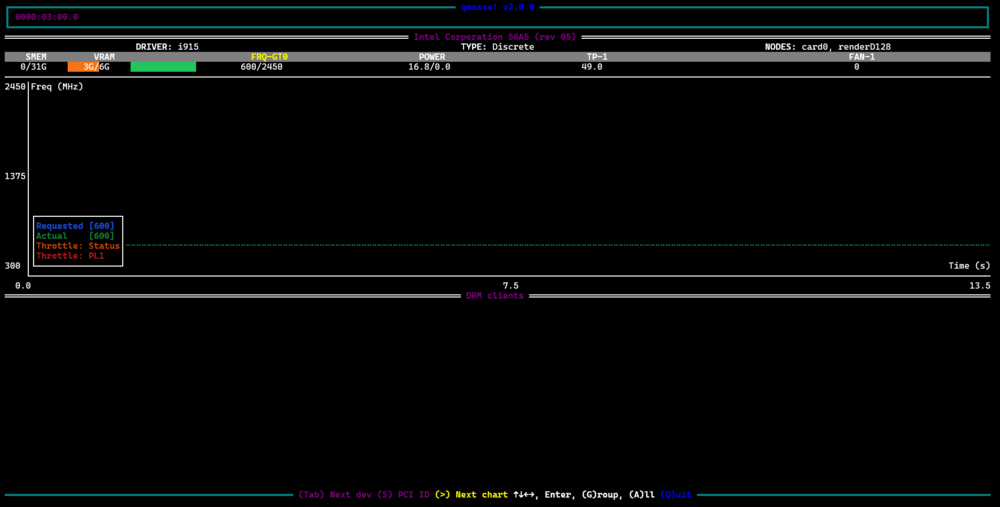
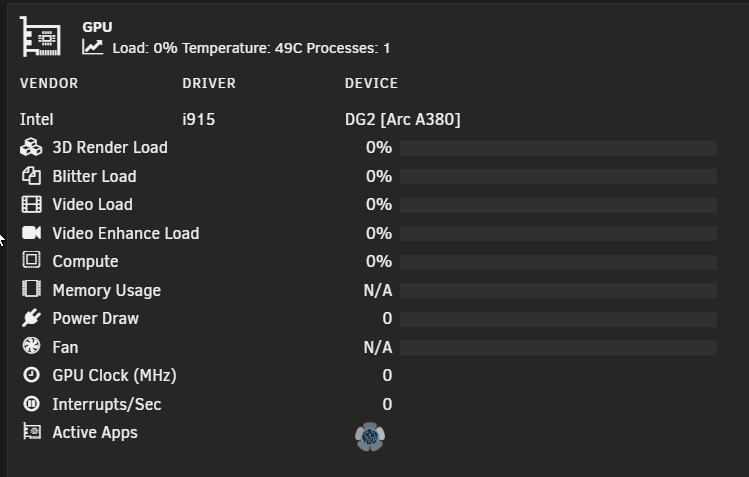
When using intel_gpu_top + qmassa the "GPU Clock (MHz)" show 0 when the card has no work. Only showing values over 0 under load. When using qmassa only it shows a frequency at idle, and thats probably correct. In my case it will never be 0 as my hw is too old to get the card down in the lowest power saving state. Could FRQ-GT0 from qmassa be used in intel_gpu_top + qmassa mode too? Right now qmassa show FRQ-GT0 1000/2450 (this is probably correct, 2450 is my card max) and intel-gpu-top show 0/ 0 MHz. In qmassa only mode it seem to use FRQ-GT0 but then I lose other stats ofc. Edit: Under load, intel_gpu_top shows 864/1279 MHz with both values jumping around, qmassa looks correct with ~2100/2450 (snapshotted just now), only the first number changes. Like 2100 of max 2450. My frequency will never be 0. At the same time qmassa has FRQ-GT0 and also requested and actual. Unraid 7.3.0-rcs qmassa: FRQ-GT0: 800/2450 Requested [767] Actual [800] intel_gpu_top: 0/ 0 MHz /sys/kernel/debug/dri/0000:03:00.0# cat i915_frequency_info PM MASK=0x00000000 pm_intrmsk_mbz: 0x00000000 RPSTAT1: 0x00018103 RPNSWREQ: 767MHz Lowest (RPN) frequency: 300MHz Nominal (RP1) frequency: 600MHz Max non-overclocked (RP0) frequency: 2450MHz Current freq: 767 MHz Actual freq: 800 MHz Min freq: 300 MHz Boost freq: 2450 MHz Max freq: 2450 MHz efficient (RPe) frequency: 600 MHz But the frequency seems to stop at what it was at when the load was removed so idk. ;) Yeah, it stays on the last reading when it goes back to idle so the freq is probably not updating as it should with no load..
-
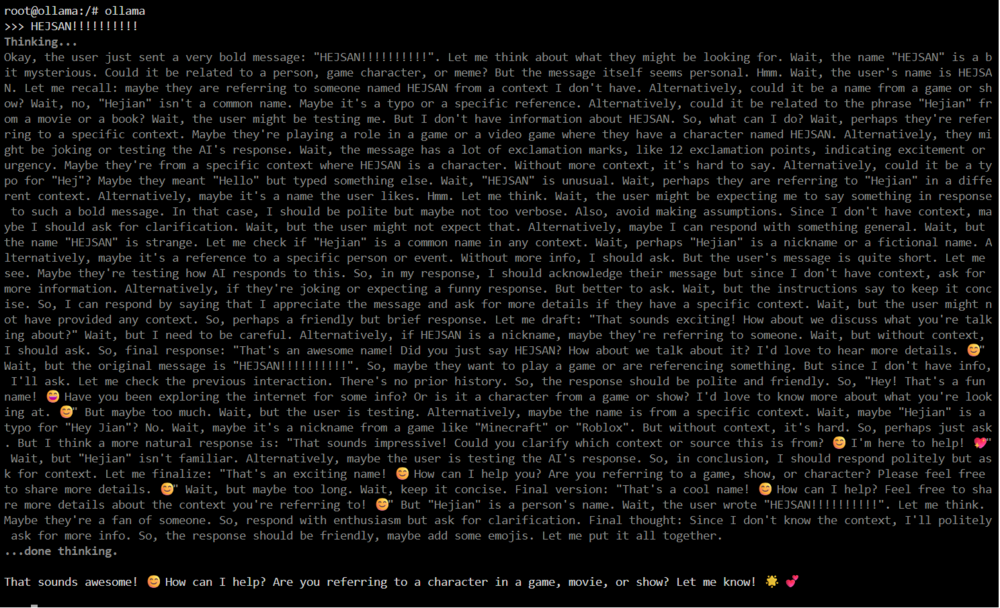
Working! Very nice. Thanks! It could be mentioned that the numbers report "rpm" but that's not important. Edit: This is what I said to qwen3.5:0.8b to get the fan to turn on. Lots of thinking there. Hejsan means like a friendly "Hi" in Swedish. ;)
-
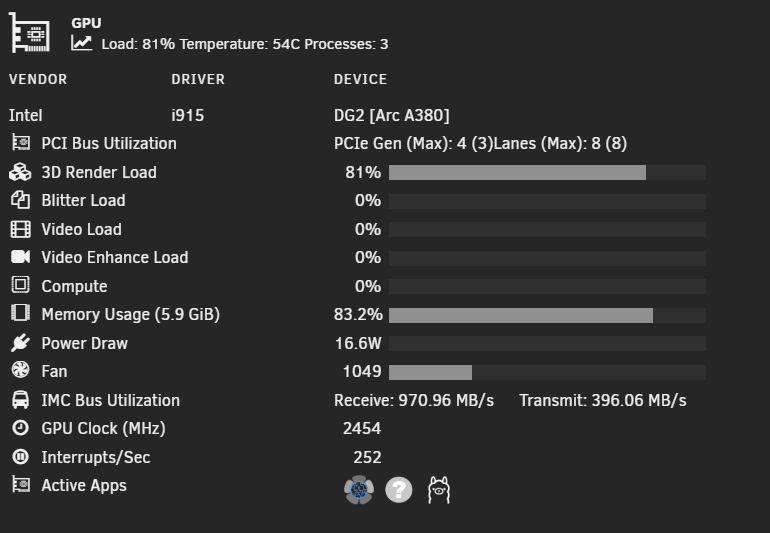
Thanks @SimonF! PCIe Gen (Max): 3 (4)Lanes (Max): 8 (8), looking good. Just a missing space/delimiter before Lanes. Fan still shows N/A at 0.
-
Looking good! PCI bus utilization shows more (not stuck on 1 as usual with Linux and Arc). Fan show N/A when qmassa show 0. When it spins, it shows up but then back to N/A when it stops. Provoked the fan to turn on with some local ollama ai work. The ?-active app is qmassa. GPU Clock (MHz) show 0 when not under load but that's normal maybe?
-
0 is probably correct right now. Also, vram looks correct. It also shows power. Power draw in the plugin does not work (always 0 and has not worked before but looks to show there?) What I see:
-
Memory usage works with the xe-driver (but some containers does not like xe so back to i915, maybe in the future). Fan shows N/A on both. Worked on i915 on old release.
-
Is this my usb flash drive "spinning down"? emhttpd: spinning down /dev/sdk emhttpd: sdspin /dev/sdk down: 1 Does it save power/wear? 😁 Using USB for license (my hardware is too old to have or add TPM). sdk = usb drive, old boot.




