





Niklas
Members
-
Joined
Everything posted by Niklas
-
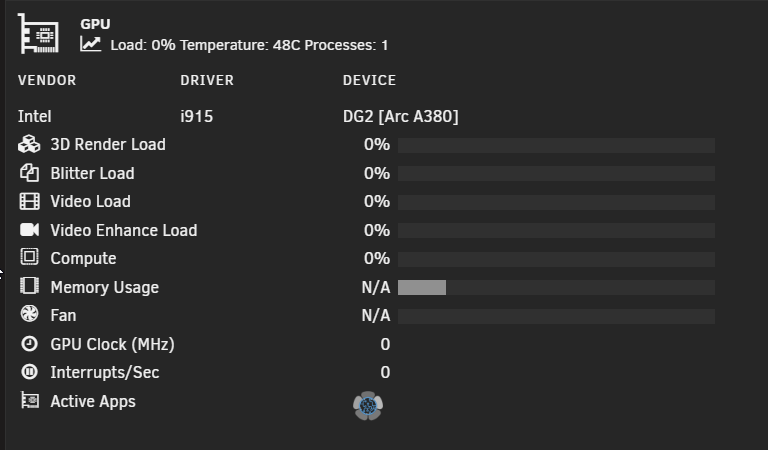
I usually use dev tools (F12) and do empty cache with hard reload. Did it now and at least the memory usage bar fill went away, fan and memory usage N/A but memory usage may not be available on Arc A380 but fan is. Edit: The fan maybe needs to turn on at least once for it to not show N/A? I'll keep my eyes on it.
-
After the update, my fan show N/A instead of 0 (it almost never spins up). Memory usage I think is new, at least that bar.
-
It's a bit cpu intensive, yes?
-
No. We had beta 2 and now https://forums.unraid.net/topic/198402-unraid-730-rc1-now-available
-
We on rc.1 now?
-
Select "Unraid OS Releases (Next Branch)" as this is a release candidate.
-
My server did that from time to time when rebooting. Just showing a blinking cursor after post when the boot menu was supposed to load. Had to push reset when that happened. Haven't seen that happening with internal boot.
-
Nice! Up and running with the random mac-problem solved (I have added fixed macs to my containers).
-
So this thing with random mac's generated at docker or server restart is present in this version too I guess. https://product.unraid.net/p/7-3-0-beta-1-containers-start-with-random-mac In my case I added --mac-address to all my containers but then I got hit with extremely slow docker service start as containers fully rebuilds every time with --mac-address present. https://product.unraid.net/p/docker-containers-extrememly-slow-to-start So I had to remove my --mac-address's but now my router is flooded with random macs that I manually have to remove from the offline list (you could ask how often i reboot but it does happen and every time it adds ~25 new macs as offline). Updating a container generates a new random mac and the router see traffic from the same ip but also the same ip used by several macs (I set "Fixed IP address" for my containers) creating a mess. I mention this here because I got pm:ed by another user looking for a solution as this also happens in 7.2.5-rc.1 but I'm on 7.3.0 beta. I understand this has changed in later docker versions. I don't know enough about how docker works to fix it myself. Before it was fine with the generated macs as docker remembered and reused them but now it's some type of random every time-thing. ;)
-
I have a couple of these: /mnt/user/appdata/app123 → /config pool-only share · Share appdata is pool-only on ssd, but the app still goes through /mnt/user. This is not a problem anymore (for me at least, I always use /mnt/user) with exclusive access/shares (6.12+).
-
That ai-answer mentioned RST. Not relevant for Unraid (Intel Rapid Storage technology is Windows only and you don't need to activate it?) Inconsistent behavior? As in what? The conclusion reads more like faster options exists and Optane is "obsolete". Optane is cheap, absolutely fast enough, and reliable for this kind of use.
-
Possible to get mptcp support added to the kernel (could be used by proxies like npmplus)?
-
I know what it is, doh! It is when I have --mac-address="02:42:xx:xx:xx:xx" set in extra parameters. It rebuilds every container on every start of docker if that is set. It takes time and for big containers it can delay start for minutes. Removed all my set mac's and now back to normal (but router sees random macs for my containers again). Back to internal boot.. 😅
-
Thanks. Back on usb for now. I emptied my split pool, blkdiscarded the drives until going internal boot later. No change for the start time of docker service at boot or array start/stop. "Server rc.docker: rebuild container abc123" for all containers take a lot of time. Big containers make it taking a very long time, up to 10 minutes. The container at the top fails to start (AdGuard Home with tailscale hook) (it tries but fails for some reason), no problem starting it manually when docker service is done with whatever its doing.
-
I'm having big problems with docker service since going to internal boot (I switched with beta2). Yes, posted about it in the bugs forum (slow docker start thread). I have done some changes since so I can't just go back to the older usb backup. Would it work to backup internal boot, put back on USB, skip grub-folder and make sure to copy only the EFI-folder from older backup to USB? No tpm migration as my server doesn't have tpm. Edit I can't say for sure it will make any difference going back to USB but I'm open to try.
-
Works here. I'm on 7.3.0-beta1. Worked fine on stable too, I haven't noticed anything recent.
-
USB boot is also something that often gets brought up as a problem. Especially in discussion where people claim that running Unraid from a USB drive is an issue without really understanding how it actually works (the running from RAM thing). Now there is an option to use internal boot instead, which removes what is honestly a somewhat imagined barrier to run Unraid and it lines up with other systems. It also comes with a more robust filesystem, using ZFS instead of FAT, and the option to run a mirrored setup for added reliability.
-
Yep. Stable for me too. Just waiting for some fixes in beta 2. Then i'll try internal boot (no tpm, old harware).
-
I don't care what the boot partition is as long as the rest can be zfs stripe and encrypted. 😉 Thanks
-
Boot can be mirror but I want the data part to be zfs stripe. And encrypted. Possible?
-
No. It's ZFS.
-
So a bug then. Saw SimonF reply to someone with the same question on Discord. Edit: https://product.unraid.net/p/pool-status-of-unknown Encrypted ZFS pools here. :)
-
Whats this? Unknown for both of my ZFS pools. One mirror (2 ssd drives) and one stripe (2 ssd drives). Nothing fancy or special. ;)

-
This function is built in to Unraid. Settings -> Disk Settings.
-
I don't find this updated or supported (just haven't seen answers in this thread or updates to the plugin) really. Didn't work that great for me and the ui is a bit confusing. Personally I now use Automatic Disk Unlock (by EDACerton here). Works great and well documented.


