





Niklas
Members
-
Joined
Everything posted by Niklas
-
The point was just to try if the "other one" showed the activity, also I gave a suggestion to turn atime off. Unraid tries to do that at mount time but it does not work. I just have some things I would like to have if to switch fully. Saving of sort order and # of events to show (I always want "All"). And a clear all button easily accessible in the list (I check almost every day and press "clear all" when done or when I active monitor the list). But that's just personal preferences. Knowing what is doing the access more granular would be golden of course. But the other thing, about the activity not showing up at all is absolutely on me. I should have posted about it but I was thinking about me doing something wrong and it was easy to just switch back. Sorry about that. Edit: Just do add to this. I can hear the drives spin up in the distance at home. Usually I check file activity to see like "what's going on now?" and the list is just blank sometimes (with this one). When it works I check, see that "ok, that's why" and then clear all. I also use the clear button when I'm doing big operations to see, like the on going progress. ;-)
-
I know. I switch from time to time because I like to try both. Not advertising. What would i gain from that? Some kind of competition? I will keep quiet. Sorry. What I noticed from the latest version is that almost all activity is by shfs anyways (as I only care for the hdd array) and sometimes it does not show activity at all even if there is. Don't know if it is when changing the settings, rebooting or something.
-
"Advertising". Ok.
-
I have noticed this version not always works. Stops logging in some case I don't know. Still using file.activity-next.plg (enable for open file events and make sure "Status: Running" if trying that one out). With ZFS in the array, set atime=off to prevent that sort of spin up too (that won't show up in these tools)
-
I find that one strange too. 😆
-
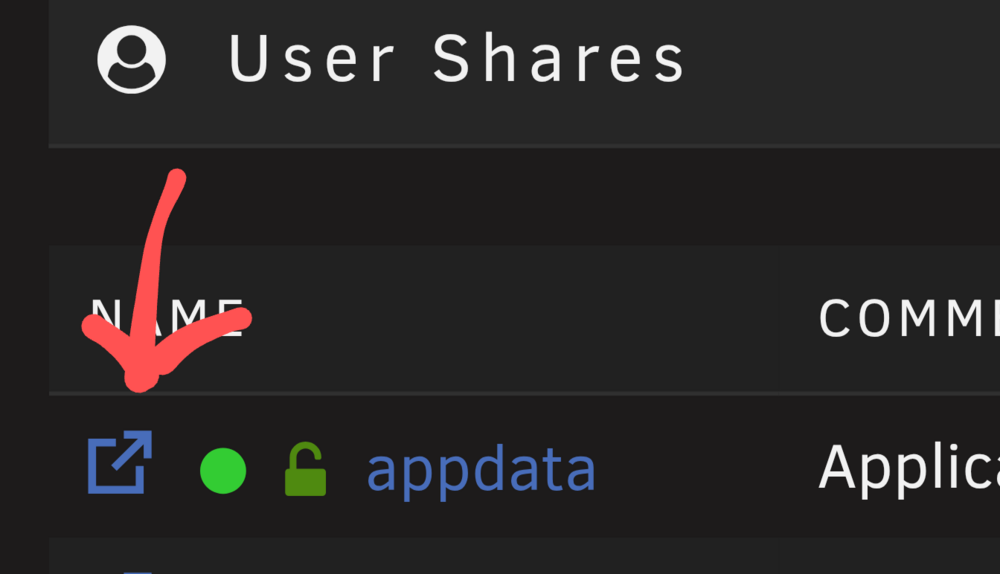
Yes. You can only delete empty shares (folders). You can use the built in file manager in the ui. Edit This strange icon will open it (I would like to see something like a file cabinet). Don't forget the files placed directly in /mnt/cache. It should only have folders, no files.
-
Unraid will add every folder it finds in the root of your mounts as shares if you haven't set them up as shares. So docker has created all of them in /mnt/cache and Unraid finds them and adds them automatically with default share settings. Because you shouldn't have any stray folders (and no files) there without matching shares. :) That's good if you lost your usb-drive or config for the share. The folders will show up as shares for you to easily find them and set them back to your own settings.
-
Yes. You have it set to /mnt/cache and that's directly on your cache pool root, no share. You need at least /mnt/cache/sharename Better to create a share named "docker" with cache as primary, no secondary and change the docker folder path from /mnt/cache to /mnt/user/docker (/mnt/cache/docker would also work, it will be the same share but could cause problem in the future if you want to move the docker share). I edited my first answer, you need to clean up the docker files and folders, se my edited answer. After deleting the folders (and the three files) you may need to delete the shares with the same names in the gui that Unraid created because it found all those folders not connected to any shares under /mnt/cache/*. Btw, you will lose all your docker containers after this but you can easily add them back by using Apps - Previous Apps or click "ADD CONTAINER" on the Docker-tab and find your template in the list under "[ User templates ]", don't change anything and click APPLY. All settings remembered. NEVER set any paths with no share. Like /mnt/cache or /mnt/user. There needs to be a corresponding share, like /mnt/cache/myshare or /mnt/user/myshare. Easiest way is to always use /mnt/user/myshare (name as you wish). Unraid will handle and keep track of where the data goes. Following your specific share settings ofc.
-
Changed this post after more info. You have told docker to write directly to the root of your pool cache (/mnt/cache) without defining any share (like /mnt/cache/sharename) You need to stop docker and remove all files and folders created by docker and change the path to the actual share you want. Create a share named "docker". Set cache as primary, no secondary. Change Docker directory from /mnt/cache/ to /mnt/user/docker These has to be removed. Folders: /mnt/cache/buildkit/ /mnt/cache/containerd/ /mnt/cache/containers/ /mnt/cache/image/ /mnt/cache/network/ /mnt/cache/overlay2/ /mnt/cache/plugins/ /mnt/cache/runtimes/ /mnt/cache/swarm/ /mnt/cache/tmp/ /mnt/cache/unraid/ /mnt/cache/volumes/ Files: /mnt/cache/unraid-autostart /mnt/cache/unraid-update-status.json /mnt/cache/engine-id
-
The user is doing something wrong when we get warnings in syslog? Nah. This just started to happen very frequently compared to before. I have the same use pattern since years. Something has changed. I use one session at a time as usual. Then sure, you could open two tabs in some cases when needed (like copying data between templates etc) but it should absolutely be able to handle that. I don't buy the "You're holding it wrong"-thing. 😉
-
I'm not getting that warning anymore. Don't know what changed but I like it. ;) I do have Unraid Connect plugin installed. Edit: Jinxed it... Jan 4 04:26:20 Server php-fpm[9243]: [WARNING] [pool www] server reached max_children setting (50), consider raising it
-
Set log open file events to yes.
-
You can't find it there. Plugins - Install Plugin. Enter URL https://raw.githubusercontent.com/dlandon/file.activity-next/master/file.activity-next.plg Install.
-
I noticed a minor cleanup issue after renaming my ZFS "cache" pool. I had a scheduled scrub set up on the old pool name before the rename. It seems the system didn't clean up the old scheduler tasks, as /config/plugins/dynamix/scrub_cache.cron is still present on the flash drive. I also checked dynamix.cfg and the [scrub_cache] entry with the schedule settings is still there. It likely doesn't cause any adverse effects since the pool name is gone, but I thought it was worth reporting so it can be handled cleanly in future updates (if it doesn't already).
-
Working fine here but I see this frequently when poking around in the webgui. I think it started with 7.2 maybe. Seen it sporadically in the past but not as frequent as now. I try to remember if I have added something but just Unraid Connect plugin comes to mind (I don't use any Connect feature but bugs in Unraid releases and updated api made me add it). Dec 19 19:46:30 Server php-fpm[9071]: [WARNING] [pool www] server reached max_children setting (50), consider raising it snip Dec 19 20:12:39 Server php-fpm[9071]: [WARNING] [pool www] server reached max_children setting (50), consider raising it snip Dec 19 20:29:50 Server php-fpm[9071]: [WARNING] [pool www] server reached max_children setting (50), consider raising it snip Dec 19 21:38:25 Server php-fpm[9071]: [WARNING] [pool www] server reached max_children setting (50), consider raising it snip Dec 19 21:58:35 Server php-fpm[9071]: [WARNING] [pool www] server reached max_children setting (50), consider raising it Dec 19 22:02:51 Server php-fpm[9071]: [WARNING] [pool www] server reached max_children setting (50), consider raising it
-
Yes. New name i see with "next" in the name. I updated the url. https://github.com/dlandon/file.activity-next But don't use both at the same time.
-
You can install it from the Plugins tab - Install plugin Paste https://raw.githubusercontent.com/dlandon/file.activity-next/master/file.activity-next.plg Uninstall this one first.
-
Whoops. I'm in the wrong thread. I'm on the original version from the original author of this plugin. Sorry.
-
Works fine here. Make sure it says "Status: Running" to the right.
-
After the latest update, FCP warns about this plugin: "Fix Common Problems: Warning: The plugin file.activity.plg is not known to Community Applications and is possibly incompatible with your server"
-
You can get ping in the container like this: Add these two variables to duplicati template Key: DOCKER_MODS Value: linuxserver/mods:universal-package-install Key: INSTALL_PACKAGES Value: iputils-ping This will install ping in the container. Example for multiple packs: INSTALL_PACKAGES=iputils-ping|rsync|git|nginx
-
The white background in notifications need to be fixed. Couldn't read my notifications today (you can if you can select the text).
-
Could the sort order and entries per page be saved so it's the same next visit? Also, just a personal FR, add clear all data button in the listing. My use case is look (almost every day) and clear all data. Next time I look, I know all is fresh and new. Now its there but "hidden" away in Settings. ;) Extra clicks. Thanks!
-
Ok, I have no use for the cache dirs plugin. I make sure to really keep an eye on whats happening. So if some service spins up our drives because dir creation, we wouldn't know. ;-)
-
Ah. Hadn't noticed it like that before. The other plugin is using other names for the actions. Open, create, write, rename, chmod etc. Switched temporary. Edit: Switched back. This one does not show when creating or deleting dirs. Not for me at least. :)



