





Niklas
Members
-
Joined
Everything posted by Niklas
-
Would be nice to see when it creates dirs too.
-
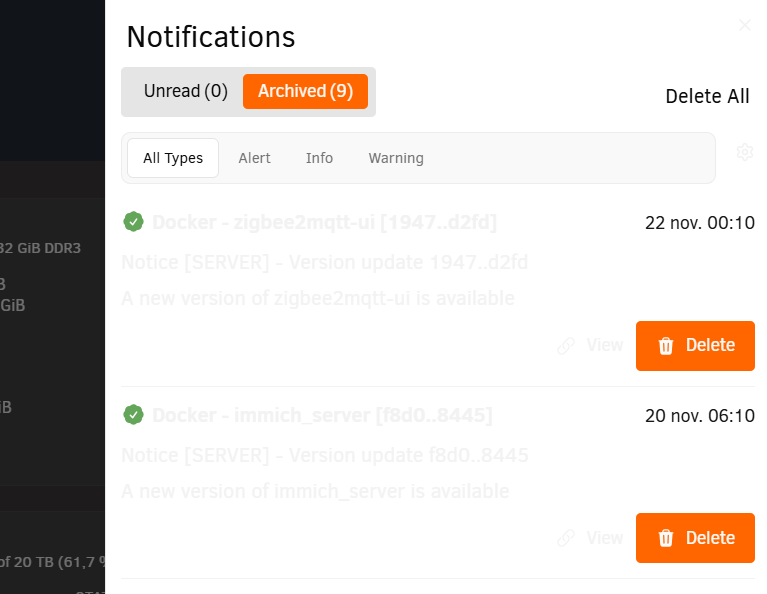
So I would like to "open" this FR again. Regression with the new notification system. This option is removed and they auto close again making me miss notifications. Please add back the option to keep them open indef. When we close them, they should be ack:ed.
-
Tried that and now its almost always white. :/ Random times it shows dark as it should but mostly white with unreadable text. I don't like the new notifications at all either but each to their own. Extra clicks, new notifications can't stay open indef, extra clicks to get them acked. I miss and forget notifications all the time now (yes, I use agents). I remember the FR where we asked about the option to have them on screen until acked/closed. We got that as an option but then, regression again. And now this. (Connect installed but not used, I just want to keep the api updated)
-
This happens randomly for me now...
-
Thanks, I upgraded to 7.2.2 too. Depends on what you mean with "a lot" but I have 30. ;) This started happening some versions ago (I also run RCs) but more often now.
-
White flashing stopped after Connect install. Btw, what's this? Nov 20 00:32:19 Server php-fpm[7925]: [WARNING] [pool www] server reached max_children setting (50), consider raising it snip Nov 20 02:46:42 Server php-fpm[7925]: [WARNING] [pool www] server reached max_children setting (50), consider raising it snip Nov 20 05:09:22 Server php-fpm[7925]: [WARNING] [pool www] server reached max_children setting (50), consider raising it snip Nov 20 17:34:09 Server php-fpm[7925]: [WARNING] [pool www] server reached max_children setting (50), consider raising it snip Nov 21 14:00:27 Server php-fpm[8081]: [WARNING] [pool www] server reached max_children setting (50), consider raising it Nov 21 14:00:43 Server php-fpm[8081]: [WARNING] [pool www] server reached max_children setting (50), consider raising it snip Nov 21 19:48:38 Server php-fpm[8081]: [WARNING] [pool www] server reached max_children setting (50), consider raising it
-
The "other" plugin has it so I need to switch without it. I look and clear long before it becomes noisy. I only monitor the array, no SSDs, no pools. I solved the unnecessary spin ups years ago with the help of this plugin (thanks!). Now I use it to keep an eye on whats happening and early detection if I add something that open files and spins disks up. I don't have the need for sorting, filters and stuff like in "v2". It's also more clicks to reach the "Clear data" button in the other one. ;)
-
I don't have much activity on the array but I look several times per week to see what has been accessed and that my scheduled tasks that reads from the array is running as they should. After checking I clear everything. Sometimes I find some disk spun up and go check file activity to see why. That's mostly "open" operations.
-
So the latest update removed "OPEN" activity? That's not good.
-
As I said. Didn't see it in RC1. How could it be hardware? Theme black. No banner, custom bg color black, custom text white. No Connect plugin that had that bug for a short while pre 7.2.1. Edit I also experience slow gui so the white flash is relatively long.
-
Header flashing white when switching tabs again (dark/black theme). Did not see this on rc1 and I do not have the connect plugin installed.
-
It's down. https://www.githubstatus.com/incidents/5q7nmlxz30sk
-
Shloud be fixed. Warnings gone for me. Try scanning again.
-
All dynamix plugins got an update now with this changelog 2025.11.14 Migrate repository to Unraid after update, fcp check warns about all of them (not known).
-
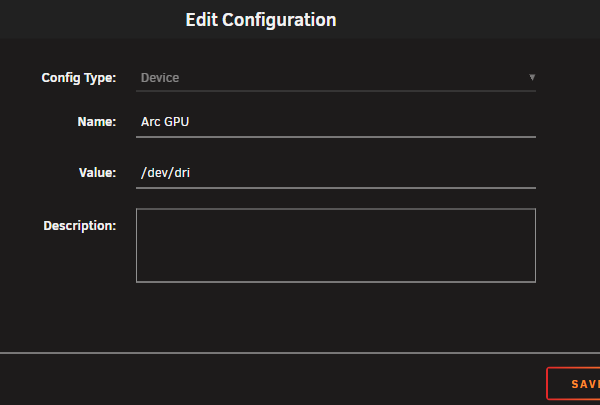
No problem. Name can be what you want, just set the value to /dev/dri and yes, you can do it for multiple containers at the same time. You can use extra parameters too but this just looks better and could be easier to troubleshoot when not hidden away behind the advanced view, IMHO.
-
No plugin needed. You pass the device /dev/dri (not drv). You can click the option "Add another Path, Port, Variable, Label or Device" at the bottom of the template for each container, select "Device" and enter /dev/dri as value.
-
I tried to explain this when you asked in the release thread for 7.2.0. 😉 Red means "please look at this, something could eventually be wrong" and then we need to evaluate if there is something to care about, in this case you can ignore it. Nothing is wrong. It just highlights the line in red because of the word "error".
-
You can create a Windows To Go installation on some USB-stick with Rufus. Put the Intel installer on the same drive, boot it on the Unraid server and run the install. It will update the firmware in your Arc card during installation. Fan curve should be better in newer firmware. Not solved, but better. Latest release from Intel: https://www.intel.com/content/www/us/en/download/785597/intel-arc-graphics-windows.html You can also update the fw from Unraid but that's much more involved and all manual work in terminal.
-
I'm on 7.2.0 since beta, very stable. Not seen any of those problems.
-
Because it tells you the location of the error log for graphql-api. Not an error per se. But that's my interpretation (that could be wrong).
-
Is this really an error? It does highlight lines red if they contain the word error as far as I know. I have the same line at boot but that's just info from the api (I have Unraid Connect installed) Nov 1 22:45:24 Server rc.local: +--- unraid-api Nov 1 22:45:24 Server rc.local: namespace : default Nov 1 22:45:24 Server rc.local: version : 4.25.3 Nov 1 22:45:24 Server rc.local: pid : 3190 Nov 1 22:45:24 Server rc.local: pm2 id : 0 Nov 1 22:45:24 Server rc.local: status : online Nov 1 22:45:24 Server rc.local: mode : fork Nov 1 22:45:24 Server rc.local: restarted : 0 Nov 1 22:45:24 Server rc.local: uptime : 6s Nov 1 22:45:24 Server rc.local: memory usage : 204.6mb Nov 1 22:45:24 Server rc.local: error log : /var/log/graphql-api.log Nov 1 22:45:24 Server rc.local: watching : no Nov 1 22:45:24 Server rc.local: PID file : /var/log/.pm2/pids/unraid-api-0.pid Nov 1 22:45:24 Server rc.local: Unraid API service started
-
I like this plugin. Not good if it just fades away. :/
-
Nice changelog for us testers. Much appreciated! Running fine. 17h uptime.
-
Good points. I'll stay with my current solution to fetch the keyfile from another device in the network.
-
The original key will work, yes. It's in the linked docs.



