





Niklas
Members
-
Joined
Everything posted by Niklas
-
Looks cool. This in the install log Encrypted Drive Manager version &plugin_version; has been installed. I would like to use the mac from another device in the network (hidden, not as easy to access as the router). Edit Btw, my serial number is MB-1234567890. ;)
-
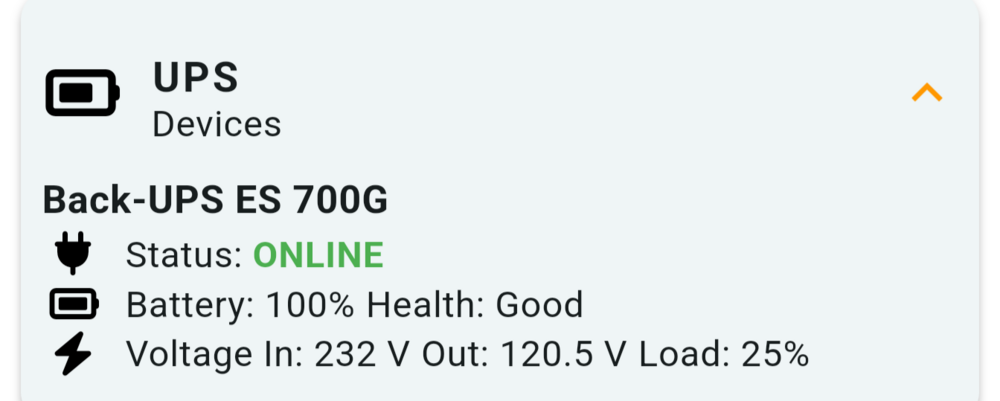
This is wrong. Out 120,5V? (EU) Can't find 120,5 anywhere in the "UPS Details" in the web gui.
-
Up and running. Thanks. Just want to mention this. Maybe not something that needs a separate bug report. Seen in beta.2 too. Brave browser. Shields down. Tooltips get misaligned if I scroll down on the page. No scrolling, they show correcly. Capture_ServerShares_–_Brave_2025-09-20_01-19-59_22051583.mp4
-
Unraid Connect latest update messed my server up. The docker tab froze (the loading animation stopped) for a couple of seconds (like up to 5) each time I did any action like going to the docker tab, stop or start any container. I had to uninstall and the docker tab started to work immediately but at reboot, the server did not come back up correctly after 2 reboots. It just stopped loading just before mounting the array (after api stuff in the logs), web ui worked but I couldn't do anything and the cpu-stats and other "widgets" on dash showed 0, not updating. To fix I added the plg back (the older one before the latest) to the flash and the server booted after another reboot but it was scary. Reported on Discord.
-
Connect plugin coming with updates maybe, if you have that installed and updated that plugin? Just guessing.
-
Yes
-
I prefer your version. It gives me what I need. Thanks!
-
I have a couple of suggestions: Change the icon on the left to something like a file cabinet or something more representative (the box with the arrow) when browsing shares. It’s not obvious that you can browse the shares by clicking there, and I’ve lost count of how many times I’ve clicked the share name and ended up in the share settings instead of the file listing, they look the same and I forget I'm not in the share "browsing mode". In the Docker listings, could the “Update all” button show the number of available updates? Something like “Update all (4 of 23)”, “Update all (4/23)” or just "Update all (4)" would be great, so I don’t have to scroll through the entire list to see what’s going to update. If I know it's just 1, I can stop when I find the 1. I have 30+ and advanced view on so the list is quite long. (edit: Hover over "Update all" could also list the names for the containers with updates, that would be nice) Just a couple of QOL improvements. 😉 Btw, the 7+ versions runs great on my hardware. Thanks!
 It's more or less unusable for me at this stage. Went back to dlandon's latest release from github. Last update was today actually.Thanks! In the new version, too much space between the lines for my taste. Could the time and date be formatted as set in Unraid settings? No clear button? Thanks! Edit: My laptop screen is not that big so like half the page is menus and wasted space before I reach the important info. ;) Went back to dlandon's latest release from github, at least for now.
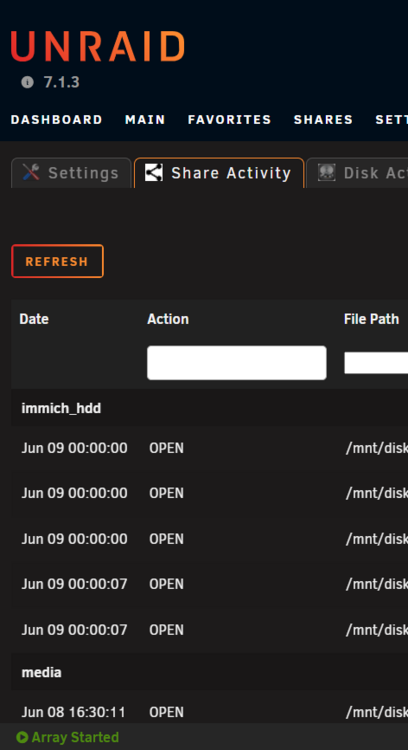 It's under the "Tools" tab.Getting file activity logged on pool. Also got some logging of things happening on the domain share (that is cache/pool only and SSD) I only want things happening on the array (HDD) logged. Nothing else. tempdata is pool device (HDD). tempdrive is the share. Latest EDACerton version.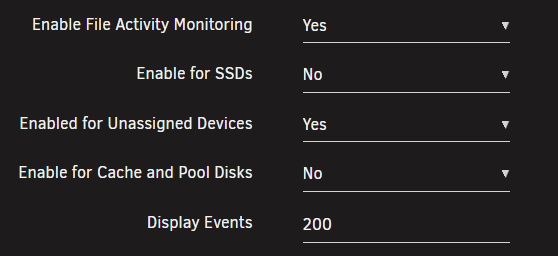
 Ui broke for me with last update (2025.05.22). Thanks for keeping this plugin alive!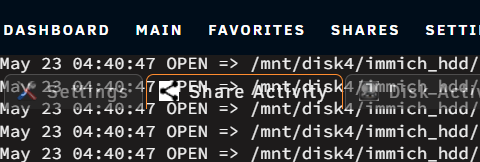
 Correct. The only thing that changes in about two weeks (this thread is 1+ year old) is the price for upgrading the legacy licenses (that have lifetime updates) to higher tiers.Ok, thanks. All people that reboot (or scan smart) will probably get this alert if on latest plugin until this is fixed. There's one report in the bug reports part of the forum.Got this when rebooting today. There's nothing wrong with sda. Edit: Force SMART or SMART+DB will repeat the alert. Checking devices, please wait until it is completed... SMART: /dev/sg0 FAILED () done in 2430ms.If on 7.1.0+ Patch plugin https://docs.unraid.net/unraid-os/release-notes/7.1.0/#rolling-back "Rolling back We are making improvements to how we distribute patches between releases, so the standalone Patch Plugin will be uninstalled from this release. If rolling back to an earlier release we'd recommend reinstalling it. More details to come."It's docker creating them. You can hide them (discussed plenty of times in this thread). You can also switch to image or keep the docker dir with overlay2 and it will stop.They can have it? I don't want to troubleshoot my problem here in this thread. It's just what helped me in the same position and I can't see the harm in just trying it out I guess.Sometimes I need to unplug the usb-stick from the port or pull the power plug to really reset the server (make sure to pres the power button to drain the last bit of power left in the ps so it's really off. After that it detects and boos as nothing has happened. I have a feeling this started with Unraid 7. Sometimes also having trouble reading some of my ttyUSB-dongles after fresh reboot too, like the ones I use for my home automation.Like this:
 Won't show update available. Just "not available". I guess we'll need to use the url to upgrade?Thanks. FYI, it reads "not available" as status when checking for updates too.Same for me. Using CA. Started after updating to 2025.02.06 - 2024-edition






