





NightOps
Members
-
Joined
-
Last visited
Everything posted by NightOps
-
Sounds like this might be an issue others are experiencing... but I don't see a specific solution:
-
Do you have a Windows 10 VM running?
-
unRAID 6.10.0 rc2, 12600k, Prime Z690-P D4 mobo, 64GB G.Skill 3200, unRAID loaded via Samsung Bar 32GB USB drive I have a feeling it has something to do with my dockers... Web UI was loading, but no longer responds. Attaching syslog, server is remote so I will have to manually shut it down and start it back up before I can get the diagnostics. unraid_syslog.txt
-
Running 12600k, and I've been able to get it running by the following: Using unRAID 6.10-rc2 Install Intel GPU Top Reboot Blacklist i915 in modprobe.d Reboot (just to be safe) Then run the intel gpu top command to verify that it's working. chmod -R 777 /dev/dri stop Plex docker Add device /dev/dri to Plex docker start Plex docker enable hardware acceleration voila!
-
Finally got my system stabilized. Asus Prime Z690-P D4, i5-12600k. I was having Plex/Handbrake docker instability that would inevitably take down the entire server. Web UI hung, monitor connected to server was showing lots of errors, CPU pegged.... Ended up being a combination of issues: 1. Bad RAM stick. 1 of 4.. and yes, it's always the last one you check. 507 errors across 4 scans and all 13 Memtest tests. Go figure. 2. XMP enabled. Disabling seemed to smooth things out, and even speed things up? I may try flipping this back for fun, but I doubt it. 3. Corrupted docker image, from what I believe was caused by the faulty RAM stick. I can't explain it, but based on the issue with the RAM and the repeated system hangs/parity check and rebuilds.. I think it somehow corrupted my docker image. 4. Plex having HDR tone mapping enabled. My understanding is that this is a known issue, and requires some Linux-side support in the kernel for the kernel to properly handle it through the iGPU? Dunno, but definitely an issue. Been running for about a week straight with no issues. Hopefully that's the last of them, but I couldn't have made it this far without existing community info and support. Thanks to all!
-
Not trying to resurrect a dead thread... but did you ever figure out what was going wrong? Having the same issue, and I started running Memtest across 4 sticks. All passed a total of 16 scans, but with 4 sticks in it becomes unstable. 2 sticks seem fine...
-
Ok, there seemed to be an underlying permissions issue somewhere, so I think I've got that fixed. When trying to encode a video to H.265, I'm now getting this in the logs: 22/12/2021 14:32:18 destroyed xdamage object: 0x40002d [autovideoconverter] Change detected in watch folder '/watch'. [autovideoconverter] Processing watch folder '/watch'... [autovideoconverter] Waiting 5 seconds before processing '/watch/Nash Bridges (2021)/Nash.Bridges.2021.mkv'... [autovideoconverter] Skipping '/watch/Nash Bridges (2021)/Nash.Bridges.2021.mkv': currently being copied. [autovideoconverter] Watch folder '/watch' processing terminated. [autovideoconverter] Change detected in watch folder '/watch'. [autovideoconverter] Processing watch folder '/watch'... [autovideoconverter] Waiting 5 seconds before processing '/watch/Nash Bridges (2021)/Nash.Bridges.2021.mkv'... [autovideoconverter] Skipping '/watch/Nash Bridges (2021)/Nash.Bridges.2021.mkv': currently being copied. [autovideoconverter] Watch folder '/watch' processing terminated. [autovideoconverter] Change detected in watch folder '/watch'. [autovideoconverter] Processing watch folder '/watch'... [autovideoconverter] Waiting 5 seconds before processing '/watch/Nash Bridges (2021)/Nash.Bridges.2021.mkv'... [autovideoconverter] Skipping '/watch/Nash Bridges (2021)/Nash.Bridges.2021.mkv': currently being copied. [autovideoconverter] Watch folder '/watch' processing terminated. [autovideoconverter] Change detected in watch folder '/watch'. [autovideoconverter] Processing watch folder '/watch'... [autovideoconverter] Waiting 5 seconds before processing '/watch/Nash Bridges (2021)/Nash.Bridges.2021.mkv'... [autovideoconverter] Starting conversion of '/watch/Nash Bridges (2021)/Nash.Bridges.2021.mkv' (58cbfa8938ff15ea7a82f993d71a257e) using preset 'General/myH265'... [autovideoconverter] 1 title(s) to process. Encoding /watch/Nash Bridges (2021)/Nash.Bridges.2021.mkv: task 1 of 1, 0.22 % Encoding /watch/Nash Bridges (2021)/Nash.Bridges.2021.mkv: task 1 of 1, 0.37 % (96.33 fps, avg 94.62 fps, ETA 00h20m48s) Encoding /watch/Nash Bridges (2021)/Nash.Bridges.2021.mkv: task 1 of 1, 0.43 % (32.33 fps, avg 73.33 fps, ETA 00h26m49s) Encoding /watch/Nash Bridges (2021)/Nash.Bridges.2021.mkv: task 1 of 1, 0.49 % (32.79 fps, avg 62.93 fps, ETA 00h31m14s) Encoding /watch/Nash Bridges (2021)/Nash.Bridges.2021.mkv: task 1 of 1, 0.54 % (28.23 fps, avg 54.77 fps, ETA 00h35m52s) Encoding /watch/Nash Bridges (2021)/Nash.Bridges.2021.mkv: task 1 of 1, 0.59 % (23.39 fps, avg 50.63 fps, ETA 00h38m47s) [autovideoconverter] Conversion ended successfully. [autovideoconverter] Removed /watch/Nash Bridges (2021)/Nash.Bridges.2021.mkv'. [autovideoconverter] Removed directory '/watch/Nash Bridges (2021)'. [autovideoconverter] Watch folder '/watch' processing terminated. [autovideoconverter] Change detected in watch folder '/watch'. [autovideoconverter] Processing watch folder '/watch'... [autovideoconverter] Watch folder '/watch' processing terminated. conversion.log and diagnostics attached legion-diagnostics-20211222-1438.zip conversion.log
-
@Djoss any thoughts on as to why the conversion.log file isn't getting created?
-
So I got the Intel expander in... and at first it was doing the same thing as the HP one... no drives were seen... And then I went ahead and plugged into the molex power on the Intel expander board, and all the drives came right up on the next boot. So it appears that possibly newer gen slots don't supply enough power on their own?? Either way, it's working now! 🙂 Thanks @JorgeB!
-
I ended up having a corrupt docker image.. Deleted and recreated, seems like things are running without crashing everything now. However, when Handbrake picks up a file to transcode it errors out with: [autovideoconverter] Starting conversion of '/watch/movies/Nash Bridges (2021)/Nash Bridges.mkv' (0315ba4551bf2d83613ab40563962bee) using preset '/General/myh265'... [autovideoconverter] 1 title(s) to process. mktemp: failed to create directory via template ‘/mnt/user/Downloads_Postprocessing/complete//.XXXXXX’: No such file or directory [autovideoconverter] ERROR: Failed to create temporary directory under '/mnt/user/Downloads_Postprocessing/complete/'. [autovideoconverter] Conversion failed. [autovideoconverter] For more details about the failure, see /config/log/hb/conversion.log. When I go to the Handbrake console and look for /config/log/hb, the directory exists, but the conversion.log file does not exist...?? The directory definitely exists. Attaching diagnostics. legion-diagnostics-20211220-1255.zip
-
I'm not seeing any files in the hb subdirectory..??
-
Yuck... not worth it to buy a supported HP controller, lol. So here's what I'm finding: LSI HBA SAS port1: all 4 WD Red drives always detected correctly SAS port2: pushed to HP SAS Expander HP Expander connected to Norco Backplane -- 1 Seagate and 1 HP branded Seagate drive always show up (always the same ones...) -- 6 HP branded Seagate drives always show up as missing Since all drives are in hot swap caddies, if I remove them and plug them back in, then the other 6 get detected! Also, if I stick another WD Red 4TB drive in a caddy connected to the expander and unplug/plug in, it gets detected as well... This seems like something akin to the 3.3v WD issue...but the Norco backplane is molex-powered, so I would have though that would have fixed it.
-
Encoding keeps failing. I have yet to try other files, but here's the Activity Log: ErrorWarningSystemArrayLogin [s6-init] making user provided files available at /var/run/s6/etc...exited 0. [s6-init] ensuring user provided files have correct perms...exited 0. [fix-attrs.d] applying ownership & permissions fixes... [fix-attrs.d] done. [cont-init.d] executing container initialization scripts... [cont-init.d] 00-app-niceness.sh: executing... [cont-init.d] 00-app-niceness.sh: exited 0. [cont-init.d] 00-app-script.sh: executing... [cont-init.d] 00-app-script.sh: exited 0. [cont-init.d] 00-app-user-map.sh: executing... [cont-init.d] 00-app-user-map.sh: exited 0. [cont-init.d] 00-clean-logmonitor-states.sh: executing... [cont-init.d] 00-clean-logmonitor-states.sh: exited 0. [cont-init.d] 00-clean-tmp-dir.sh: executing... [cont-init.d] 00-clean-tmp-dir.sh: exited 0. [cont-init.d] 00-set-app-deps.sh: executing... [cont-init.d] 00-set-app-deps.sh: exited 0. [cont-init.d] 00-set-home.sh: executing... [cont-init.d] 00-set-home.sh: exited 0. [cont-init.d] 00-take-config-ownership.sh: executing... [cont-init.d] 00-take-config-ownership.sh: exited 0. [cont-init.d] 00-xdg-runtime-dir.sh: executing... [cont-init.d] 00-xdg-runtime-dir.sh: exited 0. [cont-init.d] 10-certs.sh: executing... [cont-init.d] 10-certs.sh: exited 0. [cont-init.d] 10-cjk-font.sh: executing... [cont-init.d] 10-cjk-font.sh: exited 0. [cont-init.d] 10-nginx.sh: executing... [cont-init.d] 10-nginx.sh: exited 0. [cont-init.d] 10-vnc-password.sh: executing... [cont-init.d] 10-vnc-password.sh: exited 0. [cont-init.d] 10-web-index.sh: executing... [cont-init.d] 10-web-index.sh: exited 0. [cont-init.d] 95-check-optical-drive.sh: executing... [cont-init.d] 95-check-optical-drive.sh: looking for usable optical drives... [cont-init.d] 95-check-optical-drive.sh: no usable optical drive found. [cont-init.d] 95-check-optical-drive.sh: exited 0. [cont-init.d] 95-check-qsv.sh: executing... [cont-init.d] 95-check-qsv.sh: Processor: 12th Gen Intel(R) Core(TM) i5-12600K [cont-init.d] 95-check-qsv.sh: exited 0. [cont-init.d] handbrake.sh: executing... [cont-init.d] handbrake.sh: generating machine-id... [cont-init.d] handbrake.sh: core dump file location: core [cont-init.d] handbrake.sh: core dump file size: 0 (blocks) [cont-init.d] handbrake.sh: exited 0. [cont-init.d] done. [services.d] starting services [services.d] starting s6-fdholderd... [services.d] starting certsmonitor... [services.d] starting nginx... [services.d] starting xvfb... [nginx] starting... [certsmonitor] disabling service: secure connection not enabled. [xvfb] starting... [services.d] starting autovideoconverter... [services.d] starting logmonitor... [services.d] starting statusmonitor... [logmonitor] no file to monitor: disabling service... [services.d] starting openbox... [statusmonitor] no file to monitor: disabling service... [openbox] starting... [autovideoconverter] starting... [autovideoconverter] Processing watch folder '/watch'... [autovideoconverter] Skipping '/watch/movies/Nash.Bridges.2021.1080p.WEBRip.x265-RARBG/afe9d1760c774b4eb53cb91622710205.mp4' (b4dfa29506c3c3e33fffb32c27a89593): already processed with failure. [autovideoconverter] Watch folder '/watch' processing terminated. [services.d] starting x11vnc... [services.d] starting app... [x11vnc] starting... [app] starting HandBrake... [services.d] done. 16/12/2021 17:39:07 passing arg to libvncserver: -rfbport 16/12/2021 17:39:07 passing arg to libvncserver: 5900 16/12/2021 17:39:07 passing arg to libvncserver: -rfbportv6 16/12/2021 17:39:07 passing arg to libvncserver: -1 16/12/2021 17:39:07 passing arg to libvncserver: -httpportv6 16/12/2021 17:39:07 passing arg to libvncserver: -1 16/12/2021 17:39:07 passing arg to libvncserver: -desktop 16/12/2021 17:39:07 passing arg to libvncserver: HandBrake 16/12/2021 17:39:07 x11vnc version: 0.9.14 lastmod: 2015-11-14 pid: 1010 16/12/2021 17:39:07 Using X display :0 16/12/2021 17:39:07 rootwin: 0x43 reswin: 0x400001 dpy: 0xb347bb40 16/12/2021 17:39:07 16/12/2021 17:39:07 ------------------ USEFUL INFORMATION ------------------ 16/12/2021 17:39:07 X DAMAGE available on display, using it for polling hints. 16/12/2021 17:39:07 To disable this behavior use: '-noxdamage' 16/12/2021 17:39:07 16/12/2021 17:39:07 Most compositing window managers like 'compiz' or 'beryl' 16/12/2021 17:39:07 cause X DAMAGE to fail, and so you may not see any screen 16/12/2021 17:39:07 updates via VNC. Either disable 'compiz' (recommended) or 16/12/2021 17:39:07 supply the x11vnc '-noxdamage' command line option. 16/12/2021 17:39:07 X COMPOSITE available on display, using it for window polling. 16/12/2021 17:39:07 To disable this behavior use: '-noxcomposite' 16/12/2021 17:39:07 16/12/2021 17:39:07 Wireframing: -wireframe mode is in effect for window moves. 16/12/2021 17:39:07 If this yields undesired behavior (poor response, painting 16/12/2021 17:39:07 errors, etc) it may be disabled: 16/12/2021 17:39:07 - use '-nowf' to disable wireframing completely. 16/12/2021 17:39:07 - use '-nowcr' to disable the Copy Rectangle after the 16/12/2021 17:39:07 moved window is released in the new position. 16/12/2021 17:39:07 Also see the -help entry for tuning parameters. 16/12/2021 17:39:07 You can press 3 Alt_L's (Left "Alt" key) in a row to 16/12/2021 17:39:07 repaint the screen, also see the -fixscreen option for 16/12/2021 17:39:07 periodic repaints. 16/12/2021 17:39:07 GrabServer control via XTEST. 16/12/2021 17:39:07 16/12/2021 17:39:07 Scroll Detection: -scrollcopyrect mode is in effect to 16/12/2021 17:39:07 use RECORD extension to try to detect scrolling windows 16/12/2021 17:39:07 (induced by either user keystroke or mouse input). 16/12/2021 17:39:07 If this yields undesired behavior (poor response, painting 16/12/2021 17:39:07 errors, etc) it may be disabled via: '-noscr' 16/12/2021 17:39:07 Also see the -help entry for tuning parameters. 16/12/2021 17:39:07 You can press 3 Alt_L's (Left "Alt" key) in a row to 16/12/2021 17:39:07 repaint the screen, also see the -fixscreen option for 16/12/2021 17:39:07 periodic repaints. 16/12/2021 17:39:07 16/12/2021 17:39:07 XKEYBOARD: number of keysyms per keycode 7 is greater 16/12/2021 17:39:07 than 4 and 51 keysyms are mapped above 4. 16/12/2021 17:39:07 Automatically switching to -xkb mode. 16/12/2021 17:39:07 If this makes the key mapping worse you can 16/12/2021 17:39:07 disable it with the "-noxkb" option. 16/12/2021 17:39:07 Also, remember "-remap DEAD" for accenting characters. 16/12/2021 17:39:07 16/12/2021 17:39:07 X FBPM extension not supported. Xlib: extension "DPMS" missing on display ":0". 16/12/2021 17:39:07 X display is not capable of DPMS. 16/12/2021 17:39:07 -------------------------------------------------------- 16/12/2021 17:39:07 16/12/2021 17:39:07 Default visual ID: 0x21 16/12/2021 17:39:07 Read initial data from X display into framebuffer. 16/12/2021 17:39:07 initialize_screen: fb_depth/fb_bpp/fb_Bpl 24/32/5120 16/12/2021 17:39:07 16/12/2021 17:39:07 X display :0 is 32bpp depth=24 true color 16/12/2021 17:39:07 16/12/2021 17:39:07 Listening for VNC connections on TCP port 5900 16/12/2021 17:39:07 16/12/2021 17:39:07 Xinerama is present and active (e.g. multi-head). 16/12/2021 17:39:07 Xinerama: number of sub-screens: 1 16/12/2021 17:39:07 Xinerama: no blackouts needed (only one sub-screen) 16/12/2021 17:39:07 16/12/2021 17:39:07 fb read rate: 2849 MB/sec 16/12/2021 17:39:07 fast read: reset -wait ms to: 10 16/12/2021 17:39:07 fast read: reset -defer ms to: 10 16/12/2021 17:39:07 The X server says there are 10 mouse buttons. 16/12/2021 17:39:07 screen setup finished. 16/12/2021 17:39:07 The VNC desktop is: e0dcaa02855b:0 0 ****************************************************************************** Have you tried the x11vnc '-ncache' VNC client-side pixel caching feature yet? The scheme stores pixel data offscreen on the VNC viewer side for faster retrieval. It should work with any VNC viewer. Try it by running: x11vnc -ncache 10 ... One can also add -ncache_cr for smooth 'copyrect' window motion. More info: http://www.karlrunge.com/x11vnc/faq.html#faq-client-caching 16/12/2021 17:39:11 Got connection from client 127.0.0.1 16/12/2021 17:39:11 other clients: 16/12/2021 17:39:11 Got 'ws' WebSockets handshake 16/12/2021 17:39:11 Got protocol: binary 16/12/2021 17:39:11 - webSocketsHandshake: using binary/raw encoding 16/12/2021 17:39:11 - WebSockets client version hybi-13 16/12/2021 17:39:11 Disabled X server key autorepeat. 16/12/2021 17:39:11 to force back on run: 'xset r on' (3 times) 16/12/2021 17:39:11 incr accepted_client=1 for 127.0.0.1:33264 sock=10 16/12/2021 17:39:11 Client Protocol Version 3.8 16/12/2021 17:39:11 Protocol version sent 3.8, using 3.8 16/12/2021 17:39:11 rfbProcessClientSecurityType: executing handler for type 1 16/12/2021 17:39:11 rfbProcessClientSecurityType: returning securityResult for client rfb version >= 3.8 16/12/2021 17:39:11 Pixel format for client 127.0.0.1: 16/12/2021 17:39:11 32 bpp, depth 24, little endian 16/12/2021 17:39:11 true colour: max r 255 g 255 b 255, shift r 16 g 8 b 0 16/12/2021 17:39:11 no translation needed 16/12/2021 17:39:11 Enabling NewFBSize protocol extension for client 127.0.0.1 16/12/2021 17:39:11 Enabling full-color cursor updates for client 127.0.0.1 16/12/2021 17:39:11 Using image quality level 6 for client 127.0.0.1 16/12/2021 17:39:11 Using JPEG subsampling 0, Q79 for client 127.0.0.1 16/12/2021 17:39:11 Using compression level 9 for client 127.0.0.1 16/12/2021 17:39:11 Enabling LastRect protocol extension for client 127.0.0.1 16/12/2021 17:39:11 rfbProcessClientNormalMessage: ignoring unsupported encoding type Enc(0xFFFFFECC) 16/12/2021 17:39:11 Using tight encoding for client 127.0.0.1 16/12/2021 17:39:11 client_set_net: 127.0.0.1 0.0000 16/12/2021 17:39:11 created xdamage object: 0x40002c 16/12/2021 17:39:12 copy_tiles: allocating first_line at size 41 16/12/2021 17:39:13 client 1 network rate 1531.8 KB/sec (105037.7 eff KB/sec) 16/12/2021 17:39:13 client 1 latency: 0.5 ms 16/12/2021 17:39:13 dt1: 0.0019, dt2: 0.0181 dt3: 0.0005 bytes: 30309 16/12/2021 17:39:13 link_rate: LR_LAN - 1 ms, 1531 KB/s 16/12/2021 17:39:21 created selwin: 0x40002d 16/12/2021 17:39:21 called initialize_xfixes() libdvdread: Can't open file VIDEO_TS.IFO. 16/12/2021 17:40:37 got closure, reason 1001 16/12/2021 17:40:37 rfbProcessClientNormalMessage: read: Connection reset by peer 16/12/2021 17:40:37 client_count: 0 16/12/2021 17:40:37 Restored X server key autorepeat to: 1 16/12/2021 17:40:37 Client 127.0.0.1 gone 16/12/2021 17:40:37 Statistics events Transmit/ RawEquiv ( saved) 16/12/2021 17:40:37 ServerCutText : 1 | 8/ 8 ( 0.0%) 16/12/2021 17:40:37 FramebufferUpdate : 405 | 0/ 0 ( 0.0%) 16/12/2021 17:40:37 LastRect : 311 | 3732/ 3732 ( 0.0%) 16/12/2021 17:40:37 tight : 1934 | 1574182/ 41172520 ( 96.2%) 16/12/2021 17:40:37 RichCursor : 1 | 1374/ 1374 ( 0.0%) 16/12/2021 17:40:37 TOTALS : 2652 | 1579296/ 41177634 ( 96.2%) 16/12/2021 17:40:37 Statistics events Received/ RawEquiv ( saved) 16/12/2021 17:40:37 PointerEvent : 2066 | 12396/ 12396 ( 0.0%) 16/12/2021 17:40:37 FramebufferUpdate : 406 | 4060/ 4060 ( 0.0%) 16/12/2021 17:40:37 SetEncodings : 1 | 56/ 56 ( 0.0%) 16/12/2021 17:40:37 SetPixelFormat : 1 | 20/ 20 ( 0.0%) 16/12/2021 17:40:37 TOTALS : 2474 | 16532/ 16532 ( 0.0%) 16/12/2021 17:40:37 destroyed xdamage object: 0x40002c 16/12/2021 17:40:38 Got connection from client 127.0.0.1 16/12/2021 17:40:38 other clients: 16/12/2021 17:40:38 Got 'ws' WebSockets handshake 16/12/2021 17:40:38 Got protocol: binary 16/12/2021 17:40:38 - webSocketsHandshake: using binary/raw encoding 16/12/2021 17:40:38 - WebSockets client version hybi-13 16/12/2021 17:40:38 Disabled X server key autorepeat. 16/12/2021 17:40:38 to force back on run: 'xset r on' (3 times) 16/12/2021 17:40:38 incr accepted_client=2 for 127.0.0.1:33266 sock=10 16/12/2021 17:40:38 Client Protocol Version 3.8 16/12/2021 17:40:38 Protocol version sent 3.8, using 3.8 16/12/2021 17:40:38 rfbProcessClientSecurityType: executing handler for type 1 16/12/2021 17:40:38 rfbProcessClientSecurityType: returning securityResult for client rfb version >= 3.8 16/12/2021 17:40:38 Pixel format for client 127.0.0.1: 16/12/2021 17:40:38 32 bpp, depth 24, little endian 16/12/2021 17:40:38 true colour: max r 255 g 255 b 255, shift r 16 g 8 b 0 16/12/2021 17:40:38 no translation needed 16/12/2021 17:40:38 Enabling NewFBSize protocol extension for client 127.0.0.1 16/12/2021 17:40:38 Enabling full-color cursor updates for client 127.0.0.1 16/12/2021 17:40:38 Using image quality level 6 for client 127.0.0.1 16/12/2021 17:40:38 Using JPEG subsampling 0, Q79 for client 127.0.0.1 16/12/2021 17:40:38 Using compression level 9 for client 127.0.0.1 16/12/2021 17:40:38 Enabling LastRect protocol extension for client 127.0.0.1 16/12/2021 17:40:38 rfbProcessClientNormalMessage: ignoring unsupported encoding type Enc(0xFFFFFECC) 16/12/2021 17:40:38 Using tight encoding for client 127.0.0.1 16/12/2021 17:40:39 client_set_net: 127.0.0.1 0.0000 16/12/2021 17:40:39 created xdamage object: 0x40002e 16/12/2021 17:40:41 client 2 network rate 4040.0 KB/sec (157083.5 eff KB/sec) 16/12/2021 17:40:41 client 2 latency: 0.5 ms 16/12/2021 17:40:41 dt1: 0.0981, dt2: 0.0016 dt3: 0.0005 bytes: 402043 16/12/2021 17:40:41 link_rate: LR_LAN - 1 ms, 4040 KB/s 16/12/2021 17:46:15 idle keyboard: turning X autorepeat back on. 16/12/2021 17:46:15 idle keyboard: turning X autorepeat back on. [services.d] stopping services [services.d] stopping app... [services.d] stopping x11vnc... caught signal: 15 16/12/2021 17:52:52 deleted 40 tile_row polling images. [services.d] stopping openbox... [services.d] stopping statusmonitor... [services.d] stopping logmonitor... [services.d] stopping autovideoconverter... [services.d] stopping xvfb... [services.d] stopping nginx... [services.d] stopping certsmonitor... [services.d] stopping s6-fdholderd... [cont-finish.d] executing container finish scripts... [cont-finish.d] done. [s6-finish] syncing disks. [s6-finish] sending all processes the TERM signal. [s6-finish] sending all processes the KILL signal and exiting. legion-diagnostics-20211216-1811.zip
-
New expander should be in on Monday. I've been testing things out and it seems that Seagate drives are working fine, but HP branded Seagate drives seem to periodically require me to (after bootup) pull the drive and re-insert it before they initialize. I may also try this with the WD Red drives I have once I get some to test with.
-
I'm leaning towards a problem with the expander. I've tried 2 HP expanders (468405-001 and 468405-002). Do you know of any expanders that do not have this incompatibility?
-
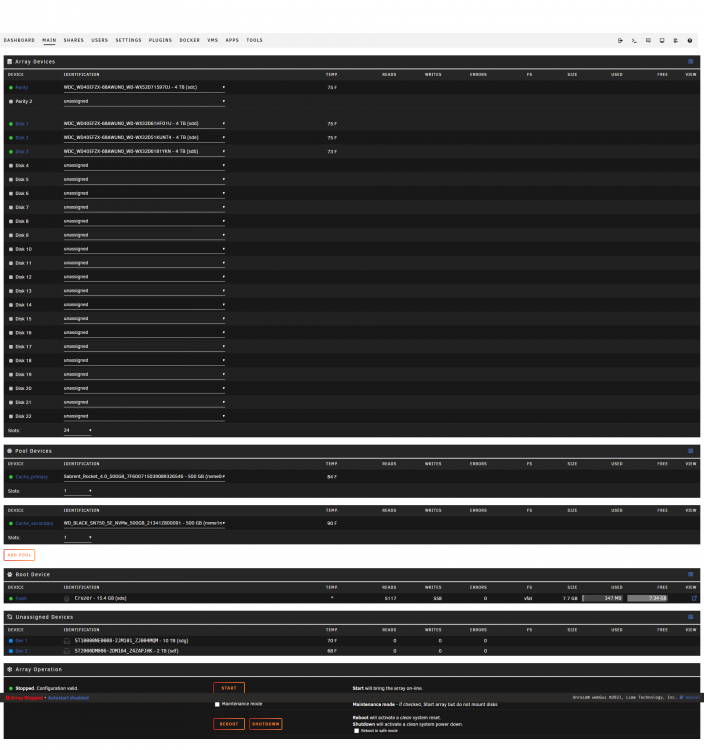
My Norco RPC-4220 has a molex-driven backplane...so I decided to throw it in the case and see if that took care of things. Unfortunately no drives are being detected... So I switched the WD drives to being ran off of the LSI HBA, and then I have my remaining slots being ran from the expander. I can hot plug in Seagate 2TB and 10TB drives, and they get recognized immediately within unRAID and show up in the Unassigned Devices immediate.
-
Upon a restart, the disks now all show as missing
-
Not sure if I still have any molex to SATA power adapters around, but do you think it might be related the WD drives and the issue with 3.3v? ( )
-
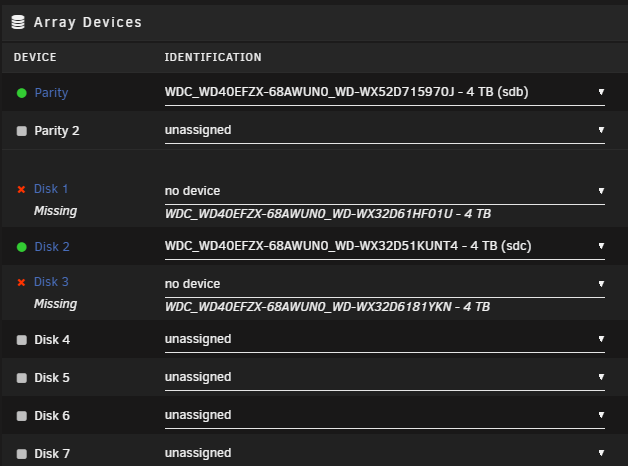
Oh now I'm really confused. I just booted after switching the PCIe slot to run at Gen3 mode, and 2 of the 4 drives are showing up...
-
These are WD Red Plus 4TB drives that work fine when connected to the LSI card. I have some other seagate 2TB drives that I’ll check. I’ll also try swapping out the 8087 to 8087 cable that connects the HBA to the expander if you think that’s a possibility???
-
LSI 9207-8i using 8087 to breakout SATA cables works fine. When running it through the expander unRAID reports that the disks are missing. However, my BIOS can see the drives connected through the PCIe slot that the expander is connected to. This same expander worked fine on a Windows Server 2022 box I just decommissioned when connected to an LSI 9750-4i card I was running. I just picked up the 9207-8i card, and it is supposedly running in IT mode. When I look in the BIOS it shows the card as "LSI SAS2 MPT Controller SAS2308" with Version 7.27.04.00 Physical Disk Count: 4 Firmware Type: IT Firmware Version: 20.0.7.0 So it appears that the LSI card is seeing the disks on the expander... what am I missing? legion-diagnostics-20211215-0604.zip
-
Thanks Like I said... Newbie, lol. Have a good one!
-
6.10.0 rc2, running Win10 using OVMF. Make sure you have the latest VertIO drivers downloaded - it comes with a "guest tools" application. Run it, and it will take care of the rest
-
I ended up setting the unRAID settings to "Enable SSL/TLS" to Yes, and leaving the HTTP port at 80, and the HTTPS port at 443, then forwarding both from my router to my unRAID box, and now it works fine. Evidently the LE script isn't checking against the ports specified for the unRAID box?
-
6.10.0 rc2. I'm running a UDM Pro for my router, with DNS set to 1.1.1.1 and 1.0.0.1 in the UDM Pro. I have 11443 set as my HTTPS port, Use SSL/TLS set to Yes, both 11443 and 443 forwarded to 11443 on my unRAID box. I even tried setting the DNS on unRAID to 1.1.1.1 and 1.0.0.1, but still nothing. There is no error displayed in the UI, but just "Error: Server was unable to provision SSL certificate" in logs. Thanks in advance! ## Edit ## If this needs to be moved to another subcategory, feel free to do so. legion-diagnostics-20211212-0641.zip



