





madejackson
Members
-
Joined
-
Last visited
-
Basically the title. I added a L2ARC cache to my ZFS-disk in the array (zpool add [pool name] cache [disk identifier]) Upon restarting the array, the disk goes unmountable. Removing the cache disk fixes the issue (zpool remove [pool name] [device name])
-
Not sure exactly what you're saying but yeah, you cannot have one single L2ARC for all ZFS-pools. You can partition an ssd into multiple smaller L2ARC-caches though. One partition for every ZFS-Disk. Of course, this wastes some space, but that's how L2ARC works right now and I don't think that is gonna change anytime soon. Even though there is a commit on github to make L2ARC unified for multiple pools.
-
So this is probably the same issue as the other posts. First disable ZFS Master or close the main-tab. If this does not solve the issue, see my solution I just found out:
-
I think I found the issue leading to this thread and I explained my solution here:
-
So after recognizing that WD does not use SATA in their external HDD's, I now realized, that the 5TB WD Drives i got out from an external intenso HDD is dogshit as well. The WD50NPZZ that i took out of the intenso case has write speeds below 5MB/s after a brief amount of constant writing to it. TLDR: Avoid WD / Western Digital and Intenso at all cost when shucking external 2.5" drives.
-
I just realized that diskspeed does not test write-speed on HDD's. This led me to believe that the WD50NPZZ (WD disk sold from intenso) is a good disk for use in unraid because its read-speed are at about 75-150MB/s. I now realized, it's write speed slows down to <5MB/s after a very brief amount of constant writes to it. Hence it's more or less completely useless. For comparison: the ST5000LM000 (seagate) has constant write speeds of about 40MB/s for the same files. >8x times as fast. Everything was tested inside the array.
-
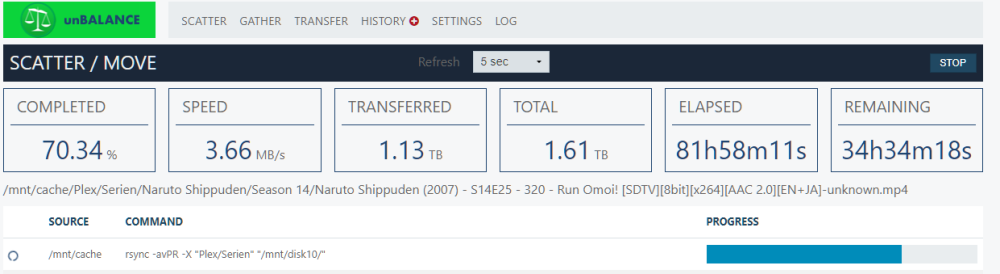
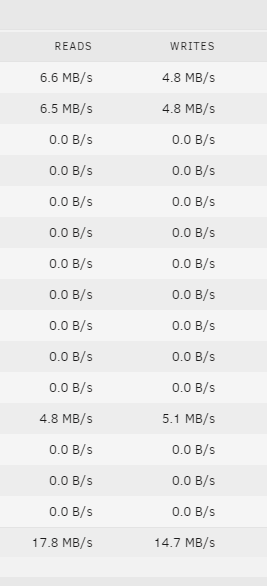
Edit: solved. I was able to find the culprit: It's the hard-drives from WD (WD50NPZZ). I can write to my Toshibas and Seagate ST5000LM000 with about 35Mbit/s, but the WD (WD50NPZZ) is stuck at <5MB/s. I'm on 6.12.2 now and suddenly have some very slow speeds (<4MB/s), when trying to copy from btrfs pool to my newly zfs formatted array disk. I am 100% sure that nothing else is accessing my disks (fresh reboot, docker+VM stopped). Any Idea what this could be? In the last couple of transfers on 6.12.1 from xfs disk to zfs disk I usually got 20-30MB/s. Speed Fluctuate a bit. Sometimes it goes up to 25MB/s for a short time only for then to fall back down to 3MB/s, grinding to a complete halt and then speed up again. The Files are regular sized MP4's and maybe some .srt subtitels. There are no errors in the logs. Diskspeed lists the speed of this particular WD disk at about 90-150MB/s unbalance.log
-
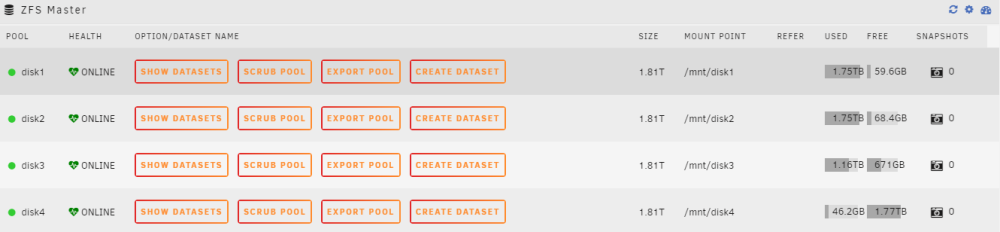
Free Space calculation is fine as far as i can see. It's just the total size that's wrong. Updated screenshots, unRAID and ZFS-Master as comparison:


-
So as with isvein discussed on reddit (here and here), unBALANCE does not create the nececcary datasets in advance of moving the files over (unlike core unRAID functions like mover that do work as they should). But I also experienced another issue with zfs and unBALANCE: unBALANCE is unable to read the size of a zfs-formated disk correctly. As soon as there is some data filled onto the zfs formated disk, it just shows the remaining free space as "size":

-
Yeah this is insane. But this only works for 7mm drives, so for 5tb HDD's this would only be 12x2.5" (15mm). At the moment you'd still have more usable TB's with 5x22tb than 12x5tb. When you go 7mm 24x8tb ssd's though
-
Interestingly, i bought 3x Intenso 5tb last year which featured regular WD50NPZZ with SATA inside. So I was under the full impression buying a WD drive is a "safe" bet. It isn't that much of a difference actually. cheapest 3.5" are going for $13/tb in my region, so about 20% less than cheapest 2.5". But I'd need to upgrade my parity drives and cages which could get costly fast. I like to keep it 2.5" for my server as I have 2x 8x2.5" hot-swap cages and 2x5tb parity. In the process of replacing the last old 2tb ones, getting to a final size of 80TB (70TB usable) until i can omit 3.5 completely and switch to an SSD-Only Solution in the next 5-10 Years (hopefully). SSD's are going for $34/tb right now. I expect them to be on par with HDD's in the next couple of years.
-
I've been shucking 2.5" HDD's since the beginning of my unraid days as the same internal only drives are always at a significant upcharge. Recently I bought 5 TB WD Elements for under $16/TB. To my surprise they do not feature a SATA-Port anymore. The installed HDD has a Controller with USB directly. Last time I bought Western Digital. From now on, it's seagate only (usually ST5000LM000).
-
Unfortunately, with 6.12 it is not possible anymore to replace a drive while keeping parity intact. The corresponding script or the manual command "dd bs=1M if=/dev/zero of=/dev/mdX status=progress" does nothing in regard of writing zeros to the drive. The script doesn't recognize the error and "thinks" it has finished correctly. corresponding docs entry: https://docs.unraid.net/de/legacy/FAQ/shrink-array#the-clear-drive-then-remove-drive-method Log of script: *** Clear an unRAID array data drive *** v1.4 Checking all array data drives (may need to spin them up) ... Found a marked and empty drive to clear: Disk 2 ( /mnt/disk2 ) * Disk 2 will be unmounted first. * Then zeroes will be written to the entire drive. * Parity will be preserved throughout. * Clearing while updating Parity takes a VERY long time! * The progress of the clearing will not be visible until it's done! * When complete, Disk 2 will be ready for removal from array. * Commands to be executed: ***** umount /mnt/disk2 ***** dd bs=1M if=/dev/zero of=/dev/md2 You have 60 seconds to cancel this script (click the red X, top right) Unmounting Disk 2 ... Clearing Disk 2 ... dd: error writing '/dev/md2': No space left on device 1+0 records in 0+0 records out 0 bytes copied, 0.000486246 s, 0.0 kB/s A message saying "error writing ... no space left" is expected, NOT an error. Unless errors appeared, the drive is now cleared! Because the drive is now unmountable, the array should be stopped, and the drive removed (or reformatted). Script Finished Jun 19, 2023 09:22.50 Full logs for this script are available at /tmp/user.scripts/tmpScripts/Shrink Array/log.txt
-
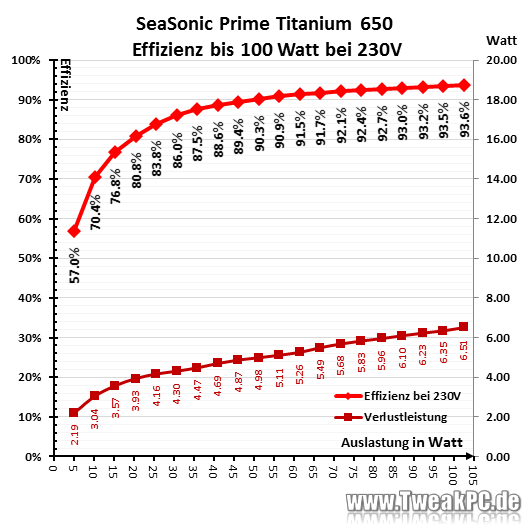
I have the Seasonic PRIME TX-650 (80+ Titanium) installed in my unraid-server. I'm pretty sure, it's more efficient than the 2021 rm550x in the usual power range of low power unraid sytems (20-30W). In higher load scenarios, the TX-650 blows the rm550x out of the water. Source: https://www.tweakpc.de/hardware/tests/netzteile/seasonic_prime_titanium/s03.php
-
With 6.12 and its ZFS-Introduction, this script could get much more interesting. In Theory, it should be possible to cache the beginning of every single movie and episode into L2ARC, hence onto an SSD-Cache. So we should be able to use much more space as cache than just 50% of free RAM. As soon as 6.12 is released I'm gonna try it and see if it's possible in practice.


