





scubieman
Members
-
Joined
-
Last visited
Everything posted by scubieman
-
Hey dee, Wondering is there a notification when recordings converter is finished?
-
Ok, well its more of me backing up to b2. There is 150 GB to go. So I only want it going at night. I have to find process then kill pid. Unless you have easy way to find the pid? AKA search for pid including name rclone
-
When I click abort scripts it doesnt kill the script from running. Any ideas? Or how to troubleshoot ?
-
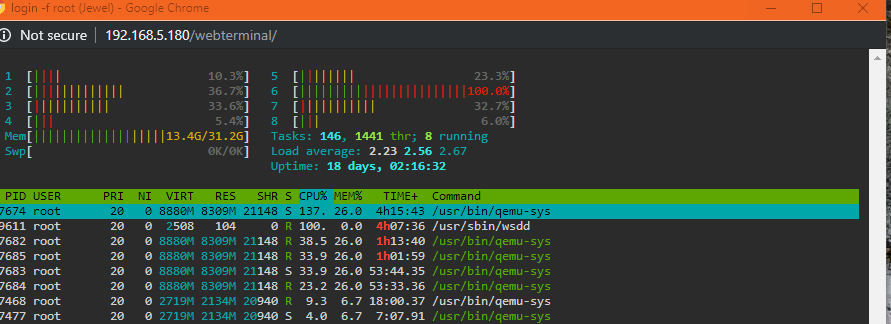
wsdd was running 100%. I was backing up to backblaze via the VM through SMB. I shut down all dockers and vm's and it was still running high. Wondering how do i restart the service wsdd? I believe it was at 100% because of the backup happening at that time.
-
It appears that was the gold. I never ran after upgrade. But that i did it works perfect. Thank you.
-
My appdata ran as of this morning. Its set to daily. The appdata i can access fully. Move/delete/copy etc
-
It says im up to date.

-
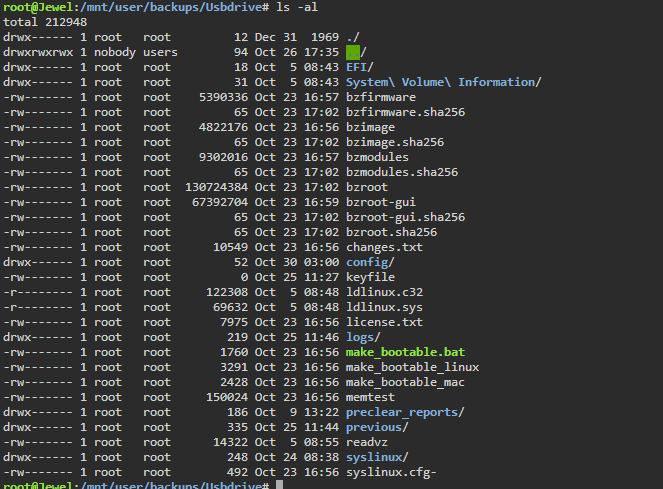
I have this docker run nightly. I'm only have issues with the "USBBackup" section. It backs up. However I dont have permissions to do anything with the files that are backed up. I try to copy files to another machine. Then back up online. I am getting access denied error.
-
Can i run user scripts remotely? even from different computer or phone inside network? I want to move items from one folder to another. but i want to control when it happens.
-
I believe there is two types. One that uses a keyfile such as an image. The other is just text file containing passphrase. Sent from my Pixel 2 XL using Tapatalk
-
With auto-comskip does that use the same settings as recording_converter to get it to use the IGPU?
-
From what I know. Keyfile is wrote each time array is started. That's why you you must edit go file to copy over each time on boot Sent from my Pixel 2 XL using Tapatalk
-
Not sure sorry. Worked for me Sent from my Pixel 2 XL using Tapatalk
-
Did you start array before copying keyfile? Sent from my Pixel 2 XL using Tapatalk
-
I do it. I'm on rc4 Sent from my Pixel 2 XL using Tapatalk
-
Video will tell you how to get keyfile. Sent from my Pixel 2 XL using Tapatalk
-
If you could PM me when you do. So then i can update. otherwise I get lots of notifications. Probably not as much as you though
-
ugga... failed_conversionsYou are helping me... So certainly. If you wanna work on it I will gladly test.deleted both failed_confailed_conversionsversions and successful_conversions. Rename docker repositary. Added :dev and this is what I got. postProcess.25-10-2019-1434.logI certainly can. Let me know when livedocker logs.txt There you go ErrorWarningSystemArrayLogin [s6-init] making user provided files available at /var/run/s6/etc...exited 0. [s6-init] ensuring user provided files have correct perms...exited 0. [fix-attrs.d] applying ownership & permissions fixes... [fix-attrs.d] done. [cont-init.d] executing container initialization scripts... [cont-init.d] 00-app-niceness.sh: executing... [cont-init.d] 00-app-niceness.sh: exited 0. [cont-init.d] 02-setvariables.sh: executing... [cont-init.d] 02-setvariables.sh: exited 0. [cont-init.d] 04-adduser: executing... ------------------------------------- Big thanks to these projects: Visit them on www.github.com/ /jlesage/docker-handbrake /ffmpeg/ffmpeg /CCExtractor/ccextractor /linuxserver/docker-baseimage-ubuntu /jellyfin/jellyfin-ffmpeg /jrottenberg/ffmpeg ------------------------------------- GID/UID ------------------------------------- User uid: 99 User gid: 100 ------------------------------------- [cont-init.d] 04-adduser: exited 0. [cont-init.d] 10-autoconvertor.sh: executing... [cont-init.d] 10-autoconvertor.sh: core dump file location: core [cont-init.d] 10-autoconvertor.sh: core dump file size: (blocks) [cont-init.d] 10-autoconvertor.sh: exited 0. [cont-init.d] done. [services.d] starting services [services.d] done. [autovideoconverter] starting... [autovideoconverter] Processing watch folder '/watch'... [autovideoconverter] Watch folder '/watch' processing terminated. [autovideoconverter] Change detected in watch folder '/watch'. [autovideoconverter] Processing watch folder '/watch'... [autovideoconverter] Waiting 5 seconds before processing '/watch/The Kelly Clarkson Show 2019_10_25_13_00_00.ts'... [autovideoconverter] Skipping '/watch/The Kelly Clarkson Show 2019_10_25_13_00_00.ts': currently being copied. [autovideoconverter] Watch folder '/watch' processing terminated. [autovideoconverter] Change detected in watch folder '/watch'. [autovideoconverter] Processing watch folder '/watch'... [autovideoconverter] Waiting 5 seconds before processing '/watch/The Kelly Clarkson Show 2019_10_25_13_00_00.ts'... [autovideoconverter] Starting conversion of '/watch/The Kelly Clarkson Show 2019_10_25_13_00_00.ts' (983666211f85b8055cd6840b46410ca9) using preset 'intel.sh'... [autovideoconverter] 1 title(s) to process. [autovideoconverter] Conversion failed. [autovideoconverter] Watch folder '/watch' processing terminated. [autovideoconverter] Change detected in watch folder '/watch'. [autovideoconverter] Processing watch folder '/watch'... [autovideoconverter] Skipping '/watch/The Kelly Clarkson Show 2019_10_25_13_00_00.ts' (983666211f85b8055cd6840b46410ca9): already processed with failure. [autovideoconverter] Waiting 5 seconds before processing '/watch/The Kelly Clarkson Show S01E35.ts'... [autovideoconverter] Skipping '/watch/The Kelly Clarkson Show S01E35.ts': currently being copied. [autovideoconverter] Watch folder '/watch' processing terminated. [autovideoconverter] Change detected in watch folder '/watch'. [autovideoconverter] Processing watch folder '/watch'... [autovideoconverter] Skipping '/watch/The Kelly Clarkson Show 2019_10_25_13_00_00.ts' (983666211f85b8055cd6840b46410ca9): already processed with failure. [autovideoconverter] Waiting 5 seconds before processing '/watch/The Kelly Clarkson Show S01E35.ts'... [autovideoconverter] Skipping '/watch/The Kelly Clarkson Show S01E35.ts': currently being copied. [autovideoconverter] Watch folder '/watch' processing terminated. [autovideoconverter] Change detected in watch folder '/watch'. [autovideoconverter] Processing watch folder '/watch'... [autovideoconverter] Skipping '/watch/The Kelly Clarkson Show 2019_10_25_13_00_00.ts' (983666211f85b8055cd6840b46410ca9): already processed with failure. [autovideoconverter] Waiting 5 seconds before processing '/watch/The Kelly Clarkson Show S01E35.ts'... [autovideoconverter] Starting conversion of '/watch/The Kelly Clarkson Show S01E35.ts' (c7599e905a0bf4647a4a011bbd950b7a) using preset 'intel.sh'... [autovideoconverter] 1 title(s) to process. [autovideoconverter] Conversion failed. [autovideoconverter] Watch folder '/watch' processing terminated. postProcess.25-10-2019-1432.logpostProcess.25-10-2019-1434.logSadly not working... its the docker enabled, but not picking anything up
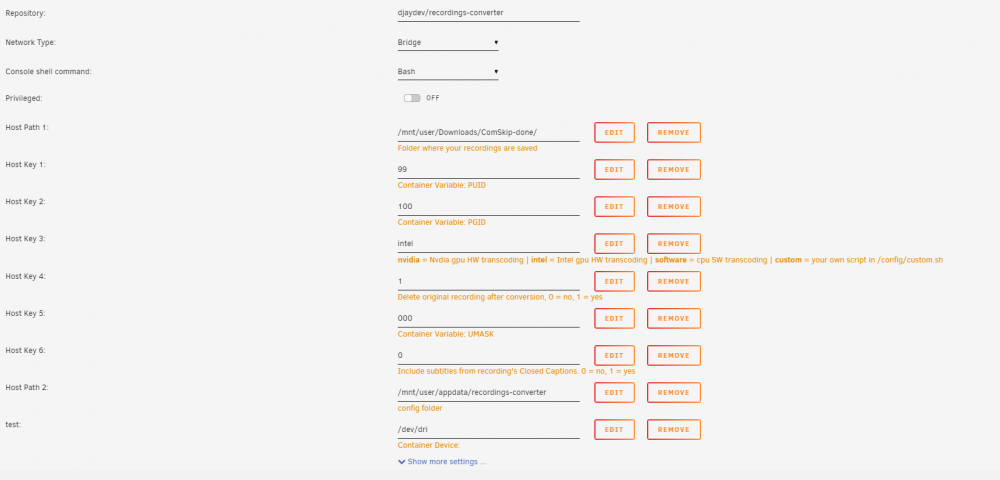
 I'm assuming its not being used?


