





gnickdog
Members
-
Joined
-
Last visited
-
Yes that is how I delete the file. I did that, disabled/enabled VM, and that's when I get this error. I also have lots of issues getting USB devices to work with the one W10 VM I have but I can't get the VM to start at the moment.
-
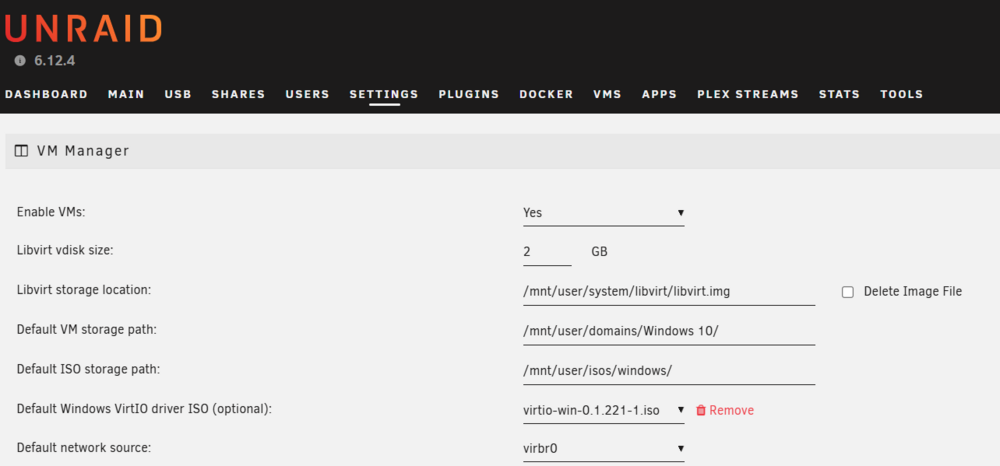
Hello, I'm getting the same "Libvirt Service failed to start." message. This seemed as good as place as any to post this. If I'm wrong, please correct me. I deleted the libvert.img file, rebooted the server and I get this message. I rebooted because VMs were not working and I disabled/enabled the service but that did nothing. LIbvert storage location points to the .img file and the VM and ISO paths are legitimate. So I'm not sure what I'm missing. I've attached the diagnostics -- thank you for your help. tower-diagnostics-20241230-2017.zip
-
After looking into files that were modified recently it seems that the docker.img was causing this. I had it in a share /mnt/user/docker/docker I believe) that was set to only live on the array. I moved it to /mnt/user/system/docker which is on the cache and no more array disks spinning up. I may be backwards on these two locations but I got the idea to try moving it from one of Spaceinvaders videos. What has stumped me is why I had it in this array-only folder to begin with. I believe it was due to one of his videos I had watched a while ago so I put it there. With where it is living now all my dockers work and I don't have unnecessary disk spin up, so I believe I have the image file in the right place. Thanks for the assistance!
-
Hello! That sentence was a bit of a typo. Should have read "If so are there any folder(s) I should move off the array...". I'm not aware of any folders being on the array...I haven't had a chance to look through the folders and verify where they all live - on the cache or the array. Spent most of this time setting up Nextcloud. I would think (am still learning) Nextcloud or Nginx dockers would not need to be writing if no one is accessing them. So it may be something else. I'll keep reading up on it though. Thanks for the reply trurl.
-
Did anyone have any thoughts on this? Maybe I posted in the wrong area...
-
Hello, I am having an issue where disk 1 in my array and my parity disks always seem to be writing a very small amount of data. This started around the time I got Nginx Proxy Manager set up and running for use with Nextcloud. I stopped all my dockers for a day and none of the 3 disks spun up, so I started Nginx Proxy Manager and within seconds the 3 disks started up again. Does Nginx read/write constantly even when no one is accessing my tower? If so should I move the applicable folder(s) off the array and onto the cache drive? Nextcloud for the last week has been working well outside of this issue. I've attached the zip file. If anyone can figure out what data is being written and why it would be much appreciated. tower-diagnostics-20230424-2133.zip
-
thanks mgutt that is very helpful. Not sure what I will do at this time. Think I'll watch some more videos and weigh the options.
-
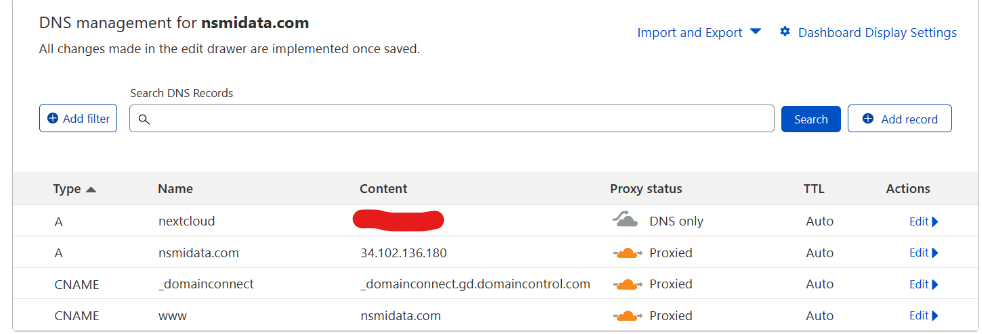
Hello everyone, I'm a noob and trying to learn about setting up nextcloud on unraid. I've followed Spaceinvader's "Installing Nextcloud on Unraid 2022 pt1" to a tee and cannot get it to work. All the steps worked just fine except for setting up a CNAME in cloudflare - I am instead setting up a type A record and plugging in my static IP address. In my simple mind that should work. I've opened port 443 so I don't think that is the issue (I may be wrong though). My bigger question is this: I've been reading all the issues folks are running into regarding setup and nextcloud breaking after updates, etc. I would like to understand the need for cloudflare, what is going on in the background, what we actually need to set up remote access securely, etc. I know there are different methods of setting up nextcloud but what are the pros and cons with each? Are there any videos that describe this? Are there descriptions/recommendations on the unraid forums? I appreciate everyones support on this stuff, I have been using unraid for years and have been very happy, this forum has been very helpful.
-
Hello, I hope I'm putting this entry in the right spot, if not please let me know. I've been reading about this and have not found anything that fixes my problem. I've had a working W10 VM for a while, I don't use it much and I recently booted it up and it never got past the Tiano Core logo screen. Actually after about 3 min of the TIano Core logo being up, it goes away, screen stays black and I see a small horizontal line in the top left corner of the screen. Can't do anything at that point, just need to force stop the VM. I've tried different vdisks and changed around all kinds of settings with no luck. I've had this sort of thing happen over the last year and it takes more time to fix than what I actually use the VM for. Not sure if VMs aren't stable in unraid or what...or if my Windows iso went bad. I did redownload a new one and saw no change. I'm attaching my xml file. If any other data is needed please let me know and I can send. Unraid array works fine otherwise. Thank you for your help! This forum has always been helpful for squawks I've had with Unraid. W10 VM xml.txt
-
Good evening, I recently updated my cache drive to an nvme and I rebuilt it by moving everything over to the array, swapping cache disks, then moving everything back. The original cache hard drive was bad and I had some trouble with this process. Mainly I was not able to move the libvirt.img off the old cache. I rebuilt the cache drive and the array seems to work fine but a couple of problems: 1) I reinstalled my two dockers; Tonido works fine but I cannot open the webgui for Plex. 2) My W10 VM won't open correctly. Meaning I can start it, I get the loading screen (Tianocore logo) but then it goes to a page that it gets stuck on. I have a feeling this may have to do with the libvirt.img. I do have a libvirt.img located in \\TOWER\cache\system\libvirt but I'm not sure if it's the same one. Is there something I can do here, or do I need to go back to my old cache and get that libvirt.img off of it? I've attached my diagnostics. Thanks. tower-diagnostics-20220803-2230.zip
-
Thank you. I shut down the mover which worked fine - I'll start copying everything off then pull the cache drive out.
-
Hello, I'm in the middle of the mover command and it's going extremely slow. I do the move command automatically once a week and it seems to work fine but I'm doing it now to move all the data off my cache drive so I can replace it. I believe the drive is not healthy and now with this mover working so slow, I believe the drive is bad. The read speeds off the disk fluctuate between 0KB/s and 8.2KB/s. I don't mind letting it run but I don't think it's working. I looked at the log and there is a lot of red showing up. I'm attaching my logs to see if someone here can help. Can I stop the mover and do it in smaller chunks? I've never moved this much data at once before that I can remember (~180GB). Thanks, Nick tower-diagnostics-20220801-2212.zip
-
Thanks that looks easy enough to follow. I'll give it a shot this week.
-
Hello, I am in need of replacing my cache drive and have struggled finding instructions on how to do it. There are lots of forum topics for specific scenarios but I would think the Unraid manual would provide an overview of what files need to be backed up and what tools to use to do it. The most helpful thing I've seen is Spaceinvaders' video from 5 years ago using the Krusader docker but I'm struggling to get that method to work. Is there anything from Limetech that is more recent for version 6.10?
-
Never mind -just checked it again and they seem to work remotely. Thank you for your help!

