





sempervirens
Members
-
Joined
-
Last visited
-
I'd like to 3rd this request
-
So I turned off PiHole-Template on the 9th, as it was my only docker using br0 as the network (everything else was bridge or host), and I've been up and stable since then. Appears to have been the culprit somehow (since it's been running for months, I actually hadn't changed anything with it at all). I'll update this if something changes, but that seems to be the cause of the issue.
-
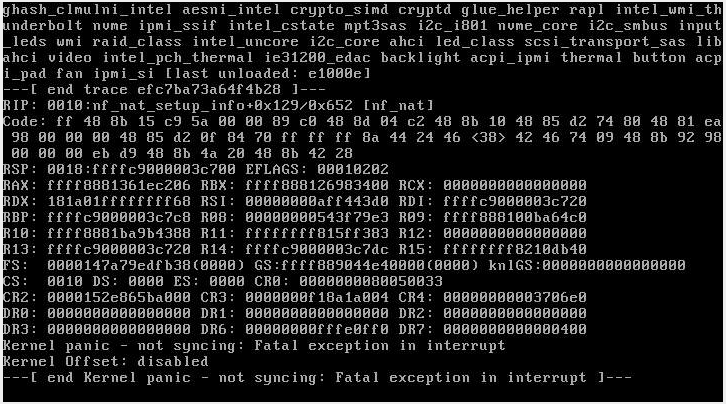
A few weeks ago I had a power outage, my UPS turned off my server cleanly and when I came back to turn it on I decided to upgrade to 6.9.2. It was up for a day or two, then crashed with a "Kernel panic - not syncing: Fatal exception in interrupt". I rebooted, and a few days later it crashed again. So I downgraded back to 6.9.1 which I had had multiple multi-month uptimes on, but the kernel panics are still coming (always the same, I've had 4 crashes total now). I did 2 passes of Memtest after the 3rd crash and it found no errors. I can still reach the server via IPMI, so I've attached a screenshot from the iKVM screen showing the panic; 'mirror syslog to flash' has been on so after rebooting I zipped the syslog and attached that. Diagnostics also attached in case it's helpful, but the log there is just of a new boot.
-
I recently changed my network around and have a new IP for my server, and since then I can't open Grafana. For a little while it was giving me the following error: If you’re seeing this Grafana has failed to load its application files This could be caused by your reverse proxy settings. If you host grafana under subpath make sure your grafana.ini root_path setting includes subpath If you have a local dev build make sure you build frontend using: npm run dev, npm run watch, or npm run build Sometimes restarting grafana-server can help I'm not using any reverse proxy, and I've tried restarting Grafana a number of times, no help. Now it fails because it redirects too many times, with the URL looking like this: http://10.0.0.10:3000/10.0.0.10/10.0.0.10/10.0.0.10/10.0.0.10/10.0.0.10/10.0.0.10/10.0.0.10/10.0.0.10/10.0.0.10/10.0.0.10/10.0.0.10/10.0.0.10/10.0.0.10/10.0.0.10/10.0.0.10/10.0.0.10/10.0.0.10/10.0.0.10/10.0.0.10/10.0.0.10/10.0.0.10/10.0.0.10/10.0.0.10/10.0.0.10/10.0.0.10/10.0.0.10/10.0.0.10/10.0.0.10/10.0.0.10/10.0.0.10/10.0.0.10/10.0.0.10/10.0.0.10/10.0.0.10/10.0.0.10/10.0.0.10/10.0.0.10/10.0.0.10/login Besides the network setup, all I've changed is Key 1, GF_SERVER_ROOT_URL, to my new IP (10.0.0.10, changed from 192.168.1.10). I guess I've also added Tautulli & Varken, but I haven't really done anything with them since I can't open Grafana.
-
thanks, I updated it and it's working now
-
I installed par2 earlier tonight (running 6.6.7) but when I try to use it I just get "par2: error while loading shared libraries: libgomp.so.1: cannot open shared object file: No such file or directory". Do I need to install another package to go along with it?
-
@MrMoosieMan, your vCenter URL is the reason for that. The page only wraps lines on certain characters it seems, so if you have a long URL there's a good chance that there will be a sequence in it without those characters (dashes for sure, and forward slashes from the looks of it in your case) that is long enough to push the edit and delete buttons out of sight. To fix it without going nuclear: view the source in your web browser and you'll find that the edit link is in there. click it and then either shorten the url or delete it.
-
https://github.com/linuxserver/Heimdall/issues/180 I tried with bridge, host, and custom br0 and none worked. So unfortunately maybe it's just not meant to be, on unraid at least.
-
I just updated my BMC (and now I'm having trouble getting to BIOS – which is especially annoying because somehow IOMMU got disabled and now I can't pass my GPU to my Windows VM, but that's a different issue – but I checked that when I first got my board and I'm pretty sure it's the latest). Under 'Global Available' I have everything checked except for FAN2-4 and Chassis Intru (because those 4 are "N/A" for me). I don't know enough about the underlying tech to really understand how to figure out my fan thresholds, what the different options for it mean, or how any of the posts from when X9 control was implemented can help me. Do you happen to have a link to some intro material for that or something? Because I do want to learn. Also, does it matter what my BIOS fan settings are?
-
Is there a guide to setting up fan control somewhere in this thread? I read through the first 5 pages but didn't see anything. I have a X9SCM-F and am trying to set up separate CPU and HDD fans, but have run in to several problems while stumbling through the settings. I can't get it to actually control anything, the fans are just running full speed. Also, the 'Fan Settings' section is only displaying FAN1234 (FAN1 is my CPU cooler, 2-4 aren't used) options. FANA is 2 Noctua's on my HDD's connected via a splitter, and it's detected but I can't set anything up for it.
