Skip to content
View in the app

A better way to browse. Learn more.

Unraid

A full-screen app on your home screen with push notifications, badges and more.

To install this app on iOS and iPadOS
  1. Tap the Share icon in Safari
  2. Scroll the menu and tap Add to Home Screen.
  3. Tap Add in the top-right corner.
To install this app on Android
  1. Tap the 3-dot menu (⋮) in the top-right corner of the browser.
  2. Tap Add to Home screen or Install app.
  3. Confirm by tapping Install.

eviln

Members
  • Joined

  • Last visited

  1. @ich777 Thank you for the quick response. I'm an idiot.. Set the GPU to vfio at boot and made a vm with both virtuel and the gpu. At boot the VM showed "Connect the PCIe power cables for all graphic cards". Then i remembered my PCIe extender cables were not connected in the other end... Now its working again.
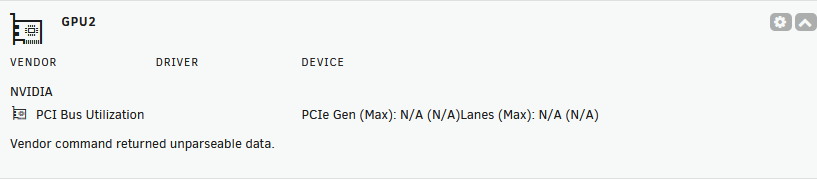
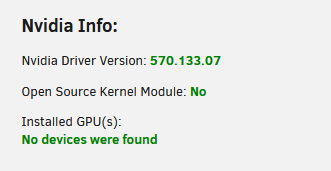
  2. Hi I've been having a strange issue the last 2 weeks, trying to get my RTX 2080 working in my server. Until 2 months ago, it was used for my vm. Then took the card out for egpu purpose, and now regret it. I can se my card in system devices, but nvidia-smi shows no devices. The card is quite hot and one of the two fans are spinning at maximum. unraid-diagnostics-20250403-2157.zip

Account

Navigation

Search

Search

Configure browser push notifications

Chrome (Android)
  1. Tap the lock icon next to the address bar.
  2. Tap Permissions → Notifications.
  3. Adjust your preference.
Chrome (Desktop)
  1. Click the padlock icon in the address bar.
  2. Select Site settings.
  3. Find Notifications and adjust your preference.