





.jpg.d757706408bd5d9cc2d812316893081e.jpg)
Unraid-arr
Members
-
Joined
Everything posted by Unraid-arr
-
Thanks for explaining guys. It makes much more sense to me now. I can understand the limitations of WireGuard. Cheers! 🍻
-
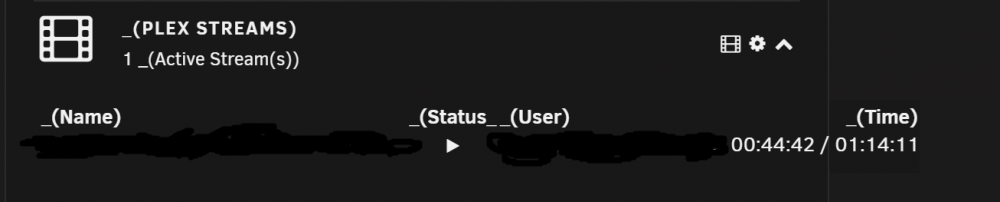
Thanks @dorgan for the nice Plugin. I stumbled upon this looking for dashboard widgets. I do see an issue on the PLEX_STREAMS tab when I open the details by clicking on playing media name. Image👇 Although below this the media info is still displayed. Not sure what is needed here. Also, using SSL seems a bit slower than otherwise. Also, the dashboard widget text goes outside the bounds. Image 👇 Cheers!

-
This works like a charm, just allocated 96g to /tmp/sab-ramdisk/ 👇 You are the best, my friend @binhex! Stay Safe & Cheers! 🍻

-
Thanks @ljm42, I completely understand your explanation. I think it is a wonderful add-on to have the widget on the Dashboard. To me however, what the more relevant question is "Which device is currently connected and since how long?" And a second follow up to that is "If a device is disconnected, then when was it last connected?" - this is partly vaguely answered by the current "Last Handshake Time" on Dashboard which is essentially last connection initiation time. If the Dashboard can be modified by me or developers to see this, then it will be more relevant, as I have provided access to friends & family as well. Cheers! and Be Safe.
-
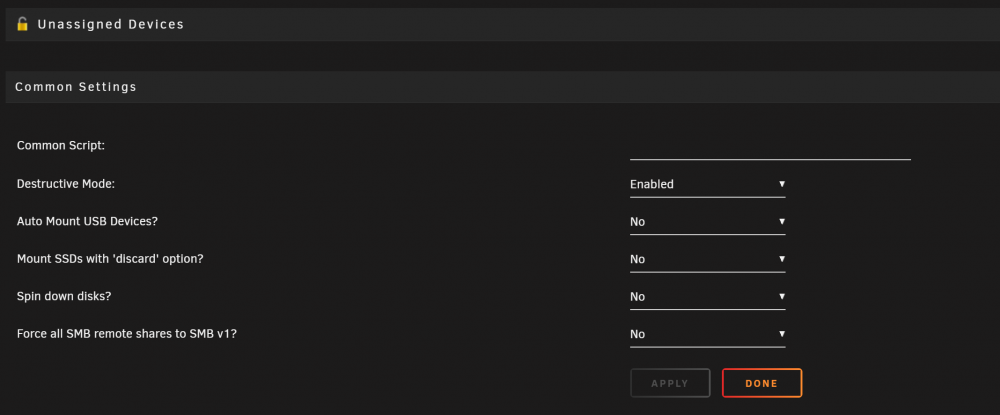
This seems to have worked! Can advise this to other with similar issue. Thanks and Stay Safe Everyone!
-
Hey, I already did that, the same port was working beautifully for my regular spinning SATA drive. It is a R720xd Drive Bay on the back! Just Changed the settings to stop spin down. Will let you know if that works.
-
Hi @binhex/@Squid, Thanks for both of yours' excellent work around the community. 👏 I actually am running 128GB RAM in my R720xd. I have been able to use RAM as /tmp directory. Problem is I cannot download file larger than half the ram size - 61.6GB Free Space. I was looking at sabnzbd docs and internet, people have mentioned ArticleCache in (NZBget) setting to be a better way of doing this. Is there something similar for sabnzbd, as I do not see any setting in the container myself. Thanks in Advance. Cheers!
-
Hi @dlandon - Thanks for the UD/UD+ Plugins. Need some help! I just installed 3 SSDs simultaneously to Unraid. - SanDisk z400s as cache drive that works good. - Also installed Samsung 960 pro nvme as Auto-Mount Unassigned Drive (plex_appdata) working ok upto now. - SSD with Issue: >>>Added Crucial MX500 1TB SSD as Auto-Mount Unassigned Drive (download folder) and after a few minutes it spins down and stops working and goes to Historical Drive after a few minutes.<<< Any pointers for me? Thanks in Advance. Cheers!
-
Did you get any answer to this? I have same issue. If it is an issue that is. TIA!
-
@itimpi, @limetech - Posting here as recommended. Also, new logs attached. I have had to restart once in the day today due to Drives being disconnected. Sorry about that. Since upgrading from version 6.6.6 (~110Mbps) to 6.7.2(~80Mbps) and now to 6.8.0(~20Mbps) the write speeds on transfers between internal drives have really gone to the gutter. Even after removing my parity drives the results are same. One file transfer halts the complete system and everything from UI to Dockers is unresponsive to the extent that I have to leave it for the transfer to complete. Plex stops streaming and starts screaming. I have no Idea, if someone has any clue please HELP! Also, same is true for transfers between my PC to Server over Gigabit LAN. No Shares have Cache enabled where the transfer are happening, there is no parity drives while I am struggling with this. Rest of the build is in my signature below. Thanks in Advance! -SS zeus-diagnostics-20191217-0055.zip
-
I have been moving a few files from cache to drives after the reboot using Krusader, that is how I realized the issue and it has been a pain. This is just after the first reboot from upgrading to 6.8.0 couple of hours ago. I can send some logs your way tomorrow evening if you would be ok waiting. -Shomil
-
@itimpi - Thanks for chiming in, here you go with the diagnostic zip. I hope this helps narrow down the issue. Thanks, Shomil zeus-diagnostics-20191216-0450.zip
-
Since upgrading from version 6.6.6 (~110Mbps) to 6.7.2(~80Mbps) and now to 6.8.0(~20Mbps) the write speeds on transfers between internal drives have really gone to the gutter. Even after removing my parity drives the results are same. One file transfer halts the complete system and everything from UI to Dockers is unresponsive to the extent that I have to leave it for the transfer to complete. Plex stops streaming and starts screaming. I have no Idea, if someone has any clue please HELP! Also, same is true for transfers between my PC to Server over Gigabit LAN. No Shares have Cache enabled, there is no parity drives while I am struggling with this. Rest of the build is in my signature below. Thanks in Advance! -SS
-
So, I'm using reverse proxy with letsencrypt - duckdns setup. Don't know if that has something to do with this. I'll try Plex and see today if I get similar result like you. Only reason I wanted DLNA was to try and get lossless dolby atmos(truehd) playback, which I figure by my research is not possible anyhow over current HDMI 2.0 CEC and arc. I guess we have to wait for eArc updates for TV firmware or get a new TV. Other than that HDR works with DD5.1+ with native plex app on my 65" LG OLED C8. Bit disappointed but nothing that could be done for now. Cheers! Sent from my SM-N960W using Tapatalk
-
So, this is my log. Maybe someone can let us know what is going on here since it says no version information available. 2019-02-11 19:32:51,611 DEBG 'plexmediaserver' stderr output: /usr/lib/plexmediaserver/Plex DLNA Server: /usr/lib/plexmediaserver/lib/libcrypto.so.1.0.0: no version information available (required by /usr/lib/libssl.so.1.0.0) /usr/lib/plexmediaserver/Plex DLNA Server: /usr/lib/plexmediaserver/lib/libcrypto.so.1.0.0: no version information available (required by /usr/lib/libssl.so.1.0.0) /usr/lib/plexmediaserver/Plex DLNA Server: /usr/lib/plexmediaserver/lib/libcrypto.so.1.0.0: no version information available (required by /usr/lib/libssl.so.1.0.0) /usr/lib/plexmediaserver/Plex DLNA Server: /usr/lib/plexmediaserver/lib/libcrypto.so.1.0.0: no version information available (required by /usr/lib/libssl.so.1.0.0) 2019-02-11 19:32:51,612 DEBG 'plexmediaserver' stderr output: /usr/lib/plexmediaserver/Plex DLNA Server: relocation error: /usr/lib/libssl.so.1.0.0: symbol ENGINE_init version OPENSSL_1.0.0 not defined in file libcrypto.so.1.0.0 with link time reference
-
Hi Guys, any thought on why minidlna is not starting? Here is the generate log file. Created by... ___. .__ .__ \_ |__ |__| ____ | |__ ____ ___ ___ | __ \| |/ \| | \_/ __ \\ \/ / | \_\ \ | | \ Y \ ___/ > < |___ /__|___| /___| /\___ >__/\_ \ \/ \/ \/ \/ \/ https://hub.docker.com/u/binhex/ 2019-02-11 19:10:58.669054 [info] System information Linux Tower 4.18.20-unRAID #1 SMP Fri Nov 23 11:38:16 PST 2018 x86_64 GNU/Linux 2019-02-11 19:10:58.687740 [info] PUID defined as '99' 2019-02-11 19:10:59.132531 [info] PGID defined as '100' 2019-02-11 19:10:59.939410 [info] UMASK defined as '000' 2019-02-11 19:10:59.959945 [info] Permissions already set for volume mappings 2019-02-11 19:10:59.976632 [info] SCAN_ON_BOOT defined as 'no' 2019-02-11 19:10:59.994948 [info] SCHEDULE_SCAN_DAYS defined as '06' 2019-02-11 19:11:00.016028 [info] SCHEDULE_SCAN_HOURS defined as '02' 2019-02-11 19:11:00.034358 [info] Starting Supervisor... 2019-02-11 19:11:00,262 INFO Included extra file "/etc/supervisor/conf.d/minidlna.conf" during parsing 2019-02-11 19:11:00,262 INFO Set uid to user 0 succeeded 2019-02-11 19:11:00,264 INFO supervisord started with pid 8 2019-02-11 19:11:01,265 INFO spawned: 'start' with pid 63 2019-02-11 19:11:01,266 INFO spawned: 'crond' with pid 64 2019-02-11 19:11:01,266 INFO reaped unknown pid 9 2019-02-11 19:11:01,315 DEBG fd 8 closed, stopped monitoring <POutputDispatcher at 23220399460008 for <Subprocess at 23220399001256 with name start in state STARTING> (stdout)> 2019-02-11 19:11:01,315 DEBG fd 10 closed, stopped monitoring <POutputDispatcher at 23220399064704 for <Subprocess at 23220399001256 with name start in state STARTING> (stderr)> 2019-02-11 19:11:01,315 INFO success: start entered RUNNING state, process has stayed up for > than 0 seconds (startsecs) 2019-02-11 19:11:01,315 INFO exited: start (exit status 0; expected) 2019-02-11 19:11:01,315 DEBG received SIGCLD indicating a child quit 2019-02-11 19:11:02,316 INFO success: crond entered RUNNING state, process has stayed up for > than 1 seconds (startsecs)
-
Hi Michael, I do have same error which I found 2 days back going through logs and stuff and I tried looking up on internet but didnt find any solution. But I might have to do more research on this. I believe this happens when we add binhex-plexpass docker under custom network or bridge instead of host. I'm willing to see if someone has arrived at any solution yet. Although I did try binhex-minidlna but that worked once and after server restart stopped working so I gave up on that. If I find something I'll post here. Please do the same if you find something too. Cheers!
-
As always, You're awesome @binhex !! That seems to work. Although I understand this is a temporary solution, is there a way we can make it permanent. As I have seen people being able to move Profiles and libraries on a big Media Library migration as well as modifying DLNA and Chromecast profiles is quite common. I can live with this for now though. Many thanks @binhex Have a good weekend.
-
@binhex - Ok, so I was able to find the path in running processes directory (I believe) from Krusader Search : //proc/5063/task/5069/root/proc/132/task/153/root/proc/132/task/153/root/proc/132/task/153/root/proc/132/task/153/root/proc/132/task/153/root/proc/132/task/153/root/proc/132/task/153/root/proc/132/task/153/root/proc/132/task/153/root/proc/132/task/153/root/proc/132/task/153/root/proc/132/task/153/root/proc/132/task/153/root/proc/132/task/153/root/proc/132/task/153/root/proc/132/task/153/root/proc/132/task/153/root/proc/132/task/153/root/proc/132/task/153/root/proc/132/task/153/root/proc/132/task/153/root/proc/132/task/153/root/proc/132/task/153/root/proc/132/task/153/root/proc/132/task/153/root/proc/132/task/153/root/proc/132/task/153/root/proc/132/task/153/root/proc/132/task/153/root/proc/132/task/153/root/proc/132/task/153/root/proc/132/task/153/root/proc/132/task/153/root/proc/132/task/153/root/proc/132/task/153/root/proc/132/task/153/root/proc/132/task/153/root/proc/132/task/153/root/proc/132/task/153/root/usr/share/licenses/plex-media-server-plexpass file:///ROOT/proc/5063/task/5069/root/proc/132/task/153/root/proc/132/task/153/root/proc/132/task/153/root/proc/132/task/153/root/proc/132/task/153/root/proc/132/task/153/root/proc/132/task/153/root/proc/132/task/153/root/proc/132/task/153/root/proc/132/task/153/root/proc/132/task/153/root/proc/132/task/153/root/proc/132/task/153/root/proc/132/task/153/root/proc/132/task/153/root/proc/132/task/153/root/proc/132/task/153/root/proc/132/task/153/root/proc/132/task/153/root/proc/132/task/153/root/proc/132/task/153/root/proc/132/task/153/root/proc/132/task/153/root/proc/132/task/153/root/proc/132/task/153/root/proc/132/task/153/root/proc/132/task/153/root/proc/132/task/153/root/proc/132/task/153/root/proc/132/task/153/root/proc/132/task/153/root/proc/132/task/153/root/proc/132/task/153/root/proc/132/task/153/root/proc/132/task/153/root/proc/132/task/153/root/proc/132/task/153/root/proc/132/task/153/root/proc/132/task/153/root/usr/lib/plexmediaserver/Resources/Profiles/Chromecast.xml However If I go manually inside the folders one by one in Krusader, I can reach via this path : /ROOT/proc/5063/task/5069/root/lib/plexmediaserver/Resources/Profiles/Chromecast.xml So, I believe it is getting that data at run-time from somewhere... Not sure where only thing I can think of is Docker.img. I am not sure how to get to that file to edit the source of that. Please Help!!! @binhex Cheers!!
-
Hi @binhex Thanks for the plexpass unraid docker container. Really appreciate your work on all the other repos as well. However, I was going to customize my plex - chromecast.xml for obvious reasons of audio and video passthrough and such and couldn't find that anyhow. Could you please let us know the path to that folder. Typically it is /usr/lib/plexmediaserver/Resources/Profiles/Chromecast.xml in standard ubuntu linux installs or at /mnt/HD/HD_a2/Nas_Prog/plexmediaserver/binaries/Resources/Profiles/Chromecast.xml on WD NAS PR4100 or such devices. Your help would be highly appreciated as always. Cheers!
.thumb.jpg.d74871f2737d625ddd6091e019824d83.jpg)



