





jimrummy101
Members
-
Joined
-
Last visited
-
Try following this for the Coturn configuration: https://github.com/element-hq/synapse/blob/develop/docs/setup/turn/coturn.md#configuration Also the "Empty uri" bit seems like maybe you've input a field wrong. I'd double check and make sure everything is correct. My understanding is you should be able to do this using the various clients. Element Web should definitely have it for example. The major problem is that this is on a room basis, not instance wide. If you want better moderation you need to use an appservice like mjolnir or Draupnir. See below: https://matrix.org/docs/communities/moderation/ https://github.com/the-draupnir-project/Draupnir https://github.com/matrix-org/mjolnir In theory as long as you have the reverse proxy configured correctly then you should be able to connect with whatever client. Make sure you're inputting the address into nheko correctly as well. Does Nheko give an error message? And have you tried other clients?
-
I've put it here now too: https://github.com/dannymate/unraid-templates/blob/master/docs/Netbird-Server Unraid.pdf
-
NetBird does have some solid docs, if you haven't seen already they have a section on Authentik: https://docs.netbird.io/selfhosted/identity-providers#authentik. It may worth cross-referencing with the values in the Keycloak section above. The `setup.env` it mentions isn't relevant to you but you can maybe figure out where the values are supposed to end up based on my guide. These are the routes you need to support for your reverse proxy: https://docs.netbird.io/selfhosted/selfhosted-guide#configuration-for-your-reverse-proxy. I have no experience with traefik so I can't help further there. Maybe someone else can provide a working config for it if you're lucky. Feel free to post the log output with any sensitive information censored and I'll see what I can figure out from it.
-
In regards to the `management.json` it says in the guide: "Once you've changed all the variables place the JSON to the location of the container's config variable, which by default is `/mnt/user/appdata/netbird-server/management/management.json`. If there's a folder there called management.json delete that)." I provide an example `management.json` here: https://github.com/dannymate/unraid-templates/blob/7c79534002ce1d2116b9d2ec33ce0cccd372b0df/Conf Samples/NetBird/management.json.sample. There's also one one a previous users comment that may function better for your purposes/be more up to date: In the guide on "Step 5" I list which lines you need to change by line number. If you're not using my example "management.json" then you should be able to map across to the other one. I can't help with the setup of the Coturn so much. A previous member has asked for something similar but it's just not in my wheelhouse as of yet beyond what is in the guide. When I get around to learning more I'll be sure to talk more about it. Beyond that though I recommend just getting a functional Coturn server running, there's probably many guides for that and modifying the turnserver.conf as required after. Same thing with Authentik. At the time I created the guide Netbird only support Keycloak so that's what I wrote for. Please feel free to ask any other questions or further explanation
-
I think you can probably get rid of the Secret line if you're not using it. Otherwise I'm honestly not sure. I'm not a Coturn expert sadly, I got mine working as I mentioned in the guide and in a previous comment. I wouldn't recommend using the Unraid WebGUI as a test as it can be finicky. Though if you're not getting internet at all that's not a great sign. It does seem to me that it's a Coturn configuration/management.json issue though. It may be worth checking the logs of the NetBird-Management container in case there's anything obvious that can give you an idea of what's causing the issue or possibly following a guide for Coturn configuration instead. The NetBird docs are pretty good but they don't go in on explaining what each variable does in the management.json so it's hard to figure that all out.
-
When I first set up Coturn I followed this guide for Matrix Synapse server: https://element-hq.github.io/synapse/latest/setup/turn/coturn.html#configuration I recommend following that, getting Coturn booting then making the Netbird modifications. Your dashboard config looks fine. I would focus on getting Coturn working.
-
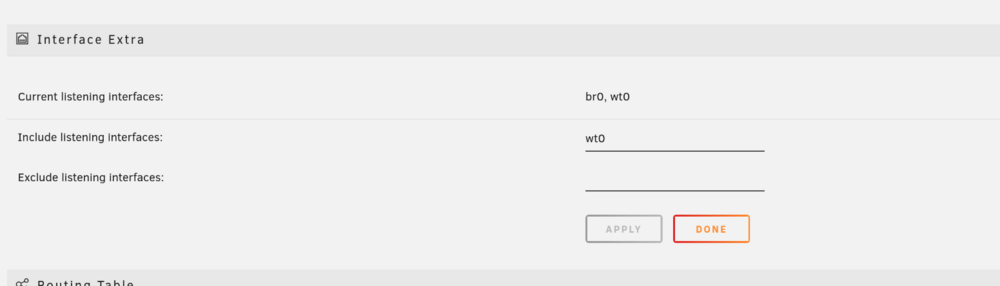
You can see my example turnserver.conf here: https://github.com/dannymate/unraid-templates/blob/master/Conf Samples/Coturn/turnserver.conf.sample (line 252?). I think I mention it in my guide too. I can access my local network using an exit node. In fact I've done it for two different networks. You may need to enable "masquerade". Edit: I would fix your turnserver first if it isn't working because it's also kinda used for routing. I vaguely remember having issues when my coturn server wasn't configured properly. I'm not sure if this affects it but as of unraid 6.12 there's a little bit of extra config (Settings > NetworkSettings): You need this to access the Unraid WebGUI through netbird dns (unraid.netbird.com for example). I don't include it because you technically need to do it every time you reboot and it's not great. But I'll put this here for posterity.
-
Your templates look fine to me. My management.json was configured before some of the options in the example provided by netbird were available. I have attached my management.jsonwith domains and secrets stripped. Your config will look slightly different to mine but it should be useful as a known working example. As a note any "" values are actually empty strings. Anything with a value that I censored has been replaced with a different string. The management.json file is one of my blindspots in terms of knowledge as it was mostly generated for me following steps 1, 2 & 5 from the Advanced Guide page, with some modifications. Let me know if you get it working or if you need anything. I may need to change the management.json I provided in my github repo if it's ended up out of date.
-
Well you would in theory run it inside the NetBird-Client container, but you shouldn't need to. It should try to connect for you but you can give it a shot if you want to.
-
So my understanding is that you're unable to access your dashboard. From the picture it seems you can physically access it but there's possibly a configuration issue due to receiving those 404 errors. I would double check you've set all the URLs correctly. I would also check the logs for each of the parts of Netbird and see if there's any obvious errors. If Keycloak is redirecting alright then that's probably not the issue. I would check your proxy config as well as just double checking any configured variables and domains for spelling mistakes etc. Post the logs in here (you can censor any urls) if you need more help. That last command should use "--management-url" not "--managementurl". The domain is also missing the "//" after the "https:". The domain you use as an example uses ".net" instead of ".com" as was mentioned in the previous url you gave. If you don't want to have an --admin-url you can just omit that part of the command.. The command is also only for netbird clients whether that's the container or PC client etc. netbird up --management-url https://netbird.mydomain.net:443 Should work.
-
This is a good introduction video:
-
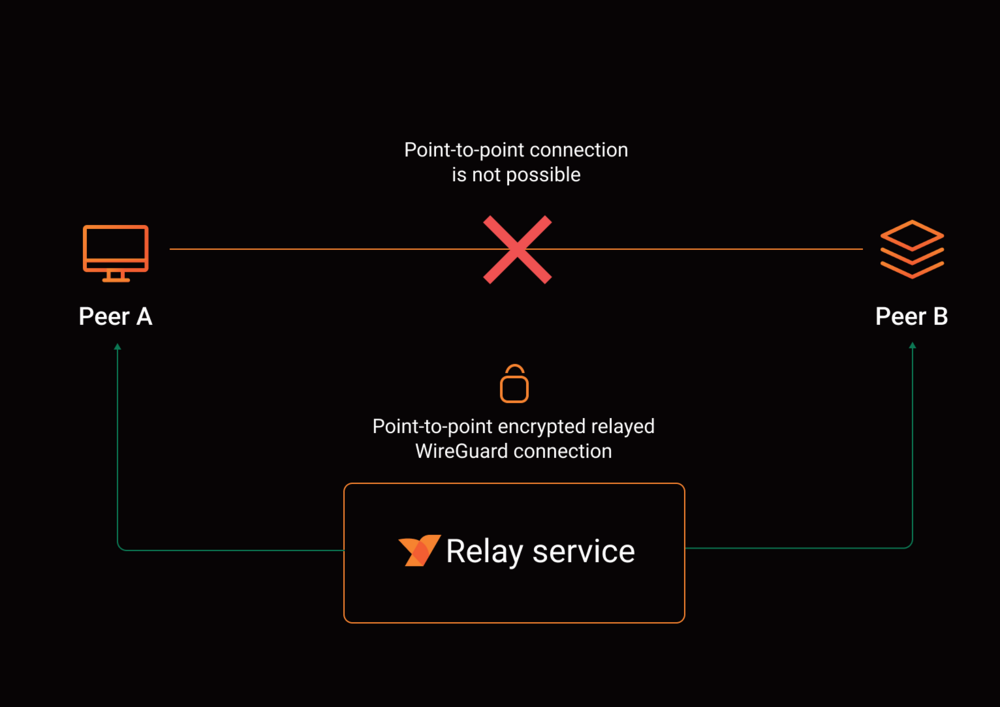
Sorry for the delay answering these. It's hard to build up the motivation sometimes :p. Netbird have explanations in their docs. Check out the "How Netbird Works" page, specifically the "Relay Service" section. To quote: "The Relay service is a TURN server in WebRTC terminology. In fact, we use an open-source implementation called Coturn. The purpose of this service is to be a "plan B" and relay traffic between peers in case a point-to-point connection isn't possible." I personally self-host Coturn. I originally set it up for "Matrix Synapse" and repurposed it for Netbird. I basically did the bare minimum configuration from stock in the config. The config is one of those 500 line variable things that your eyes glaze over looking at. I'll take a look around and see what I can find in terms of security practices. When I made these templates Netbird was pretty early on and only had auth0 and Keycloak support. I couldn't figure out at the time how to get Authentik working with Netbird so I set up Keycloak instead and followed the docs. Netbird have since added Authentik support so check that out. I may replace my Keycloak instance with Authentik at some point as I'm only using it for Netbird. I'll be sure to write up a guide for that if I do. As for the Environment Variables I'm actually unsure what they mean. It's all OAuth2 nomenclature. I'd have to do some reading and get back to you on that too. In terms of changing the network type of Netbird-Client from host to some vlan. I don't see why not, seems like a good idea to me. "host" is what I chose, as the common use case is remote server access. I haven't tried it though. Let me know how it goes for you. Let me know if there's anything I missed! NOTICE: The Netbird-Dashboard template will be updated shortly to point to a new docker registry. When possible update the Netbird-Dashboard container "Repository" from "wiretrustee/dashboard" to "netbirdio/dashboard". The WebGUI will be updated (and it's very nice in my opinion). No other changes should be required.
-
Yeah it seems my template changes haven't made it to those who already have it installed you need to add these variables: Variable: CONDUIT_DATABASE_PATH - /var/lib/matrix-conduit/ Variable: CONDUIT_PORT - 6167 Variable: CONDUIT_CONFIG - leave emptyI have updated the template and the nginx conf (in the main post). Hopefully that should be reflected soon for everyone. The NGINX conf is not required but if you have issues then give it a look and apply the changes. The lines I added into the template in case you have issues (they're hidden in the advanced section because they shouldn't need changing): <Config Name="CONDUIT_DATABASE_PATH" Target="CONDUIT_DATABASE_PATH" Default="/var/lib/matrix-conduit/" Mode="" Description="" Type="Variable" Display="advanced-hide" Required="false" Mask="false">/var/lib/matrix-conduit/</Config> <Config Name="CONDUIT_PORT" Target="CONDUIT_PORT" Default="6167" Mode="" Description="" Type="Variable" Display="advanced-hide" Required="false" Mask="false">6167</Config> <Config Name="CONDUIT_CONFIG" Target="CONDUIT_CONFIG" Default="" Mode="" Description="" Type="Variable" Display="advanced-hide" Required="false" Mask="false"/> So: Variable: CONDUIT_DATABASE_PATH - /var/lib/matrix-conduit/ Variable: CONDUIT_PORT - 6167 Variable: CONDUIT_CONFIG - leave empty




