





Coolsaber57
Members
-
Joined
-
Last visited
Everything posted by Coolsaber57
-
Hmm, that's what I was afraid of. I think if I ever do expose it, I'll setup fail2ban at the same time to prevent that. Thx.
-
This is probably a far-fetched request, but is there any chance of including a text editor like Gedit in this container? I often use this to look through config files and it would be super convenient to be able to edit text files in the container without using the terminal.
-
Thanks for all your help - and good luck on your midterm! Apologies for bugging you about this, I'm just trying to get this set up, and there's no rush as I'm sure you're still busy. I don't know if the issue is my reverse proxy config, which is based off of how I saw how the other containers were connecting: # only office doc server server { listen 443 ssl; listen [::]:443 ssl; server_name docs.*; include /config/nginx/ssl.conf; client_max_body_size 0; location / { include /config/nginx/proxy.conf; resolver 127.0.0.11 valid=30s; set $upstream_docs OnlyofficeDocumentServer; proxy_pass http://$upstream_docs:443; } } or some issue with the config of the OnlyOfficeDocumentServer config. When I access via the internal IP, I get a Cert error for both the http (tells me my certs are only for my sub-domains) and https (shows as "self-signed") WebUIs URLs, but I can add an exception and get to the page. When I attempt to access the docs server via the external subdomain, I get a 502 error (I'm not sure what I'm supposed to get - perhaps a "document server is running" page?). Any advice? Is there a better example of how I should be proxying the doc server?
-
Understood, thanks for taking the time to look.
-
Dumb question: Is it a bad idea to expose the OpenVPN-AS front end via reverse proxy, or is that its intended purpose? I have everything set up and working, but wanted to double check myself before creating the proxy rule.
-
So I've been playing with Guac a bit more and like it a lot. One thing I've wanted to do that doesn't appear to be a feature yet is Wake-On-LAN for VMs. There's a plugin to have a listener for the VM, which I've got, but now I need the other side: Send a magic Packet with Guacamole. My research has so far found this: http://apache-guacamole-general-user-mailing-list.2363388.n4.nabble.com/Wake-on-lan-function-working-td2832.html Is there any chance that this could be included as a script in the Guac container? Perhaps with an easy way to manage the Macs file? (if not, maybe another mapping for appdata so if I add a MAC address it doesn't get wiped when the container reloads). Thoughts?
-
Sorry for the 20 questions game, but where do you get the certs from? Or are they just blank files?
-
Dumb question, but how do you set https in onlyoffice for the doc server? there's no GUI config/admin page right? Do you just mean to point it to the https port?
-
When you say onlyoffice must also have https, is it sufficient to have it behind the same reverse proxy (i.e. letsencrypt container) or do I need to set up https in the onlyoffice config itself? I didn't see any sample proxy config files for onlyoffice in the letsencrypt container, so I made a basic one, but it's not working - is there any trick to getting it working? Also, I keep seeing references to running "set_configuration.sh" bash script in other guides - do you need to do that here?
-
I couldn't get it to work if I removed /guacamole. I am using subdomains everywhere else, and wanted to remain consistent, so, in my case, I wanted mgt.mydomain.com to go to the Guacamole page. In this case, it's the root of my subdomain that gets redirected to mgt.mydomain.com/guacamole. If there's a more graceful way of doing that I'm all ears. Edit: I did see on that page that you can change the Path: location /new-path/ { proxy_pass http://HOSTNAME:8080/guacamole/; proxy_buffering off; proxy_http_version 1.1; proxy_set_header X-Forwarded-For $proxy_add_x_forwarded_for; proxy_set_header Upgrade $http_upgrade; proxy_set_header Connection $http_connection; proxy_cookie_path /guacamole/ /new-path/; access_log off; } But I'd have to experiment to see if it works changing /new-path/ to / (root).
-
So is this a config for subfolder? How did you change the entry point ? Edit: Just tried this and it works! Here's my contribution: I wanted to just be able to type my sub-domain and go straight to the page, but couldn't get it to work without typing /guacamole in the URL. So I added this to redirect it: location / { return 301 /guacamole/; } Thanks for the help!
-
I'm struggling to get this to work with the Letsencrypt/nginx docker. Here's what's in my mgt.proxy.conf: server { listen 443 ssl; listen [::]:443 ssl; server_name mgt.*; include /config/nginx/ssl.conf; client_max_body_size 0; # enable for ldap auth, fill in ldap details in ldap.conf #include /config/nginx/ldap.conf; location / { include /config/nginx/proxy.conf; resolver 127.0.0.11 valid=30s; set $upstream_mgt ApacheGuacamole; proxy_pass http://$upstream_mgt:8802; } location /guacamole/websocket-tunnel { include /config/nginx/proxy.conf; resolver 127.0.0.11 valid=30s; set $upstream_mgt ApacheGuacamole; proxy_pass http://$upstream_mgt:8802/guacamole/websocket-tunnel; proxy_set_header Upgrade $http_upgrade; proxy_set_header Connection "upgrade"; } } I tried to integrate what someone else had posted with the way that the other Proxy.confs work in the letsencrypt docker config (e.g. sonarr, sab). All of my docker containers that get proxied are under a single Docker network (called proxynet) per the SpaceInvaderOne letsencrypt video. It just appears to load for a while, then I get a 502 screen. What is the correct way to do this?
-
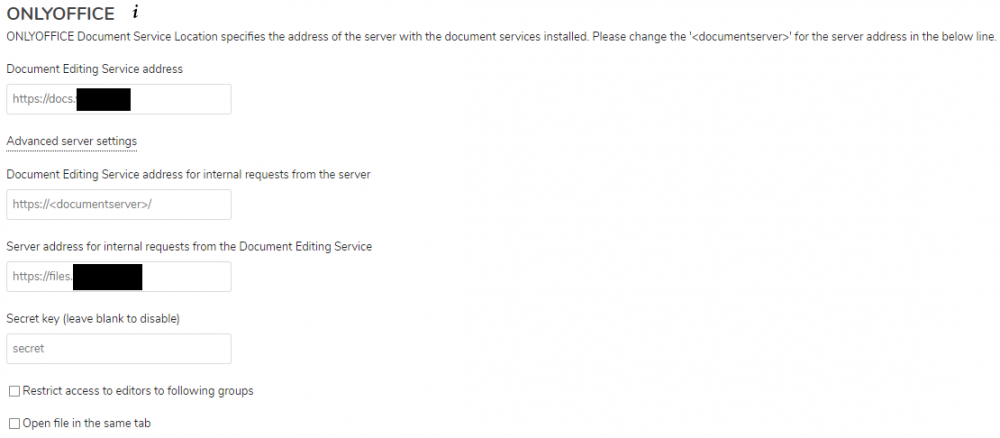
I installed "onlyoffice" app in the NextCloud UI, and I'm confused as to what should go here: I tried to port forward the docs server, but I'm not sure if I did it correctly. If you have an example proxy.conf (or just the nginx config for onlyoffice) that would help me double check. Are these supposed to be my internal IP addresses? Or should they be the public-facing web addresses? Or is this not the way I'm supposed to configure the integration between NextCloud and OnlyOffice?
-
ANy chance you would be able to give detailed instructions on how to do this? I've been trying to set the config inside the NextCloud container, but it doesn't seem to save anything for me.
-
Do you have your Downloads folder in a Share on the array? Or did you map directly to a cache drive (that's that it looks like to me).
-
Hmm, I thought I had this working before, but I'm having a little trouble getting Sabnzbd to work. I've got the CNAME set up already, and here's my proxy-conf fro Sab: server { listen 443 ssl; listen [::]:443 ssl; server_name sabnzbd.*; include /config/nginx/ssl.conf; client_max_body_size 0; location / { include /config/nginx/proxy.conf; resolver 127.0.0.11 valid=30s; set $upstream_sabnzbd binhex-sabnzbd; proxy_pass http://$upstream_sabnzbd:8800; } location ~ (/sabnzbd)?/api { include /config/nginx/proxy.conf; resolver 127.0.0.11 valid=30s; set $upstream_sabnzbd binhex-sabnzbd; proxy_pass http://$upstream_sabnzbd:8800; } } Note that my Sabnzbd port is 8800, and not 8080. I keep getting 502 bad gateway when attempting to access the site using the reverse proxy. Anything I should check? Edit: Posting in these threads apparently is the magic step, because I just realized I need to keep the Port at 8080 because it's the Docker network I created where it's looking for the Sab GUI.
-
I was just accessing the service internally via the IP:Port to remove that possibility.
-
Ugh, it turned out that my laptop is dumb and refuses to play the videos, just tried it on my phone and it works fine.
-
I'm having trouble actually getting anything to play. I can access the webUI and I setup everything just fine, all my media shows, but if I choose a video, it just sits there and won't play. Any advice?
-
Heh yep, now I'm trying to figure out how to set up services that don't have any of the sample proxy.confs, e.g: Unraid GUI (maybe) OnlyOffice Community and Document Servers
-
oh man, I had this whole post written out detailing my steps when I noticed there there are two sections where i needed update the name of my container so that it resolves the right IP. Updated the 2nd place (i use binhex's container) and it works great. Sorry for wasting your time.
-
Yes, I was following the SpaceInvaderone video on this container.

-
Well, I was under the impression that was only needed for sub folder configuration (I'm using subdomains) , but I tried it anyways and still the same, unfortunately. Does anyone have this working with sonarr and radarr? Oddly enough, lidarr does work.
-
Hmm, I followed the SpaceInvaderOne video for this container, and almost have it working. However, when I try to access the site remotely (e.g. Sonarr), it shows the Sonarr loading screen and just stays there. Any advice?
-
This is a really basic question, but how do you actually use OnlyOffice? When I go to the webUI I just see a welcome page and nothing else.

