





pmarq2008
Members
-
Joined
-
Last visited
-
Ok, I do not believe i have made any changes since that backup other than maybe a docker update.
-
Thank you, I have a backup from march which lines up with the up time of the server currently which means I either rebooted or did an upgrade to the latest version. If it was an upgrade and the config is from the previous version is that an issue?
-
Ok, So I am still trying to fully understand what is going to be involved with a worst case scenario if after rebooting it still doesnt work. Is it just a matter of rebuilding the drive config in the proper order according to the Screen shot I posted earlier or is there more. I have found a back from march that I am fairly certain that i have not made any drive changes to but does the config store more info than just drive changes such as VM and docker because I have done work on those since then. I also am unsure if that backup from march was prior to an OS upgrade to unraid. Does that make a difference? The server houses a VM for a PBX and Domain controller I kind of want to have an idea of down time from someone that knows more about this than I do. Along with not mess something up to cause data loss. I am reading through this troubleshooting document and it looks like what I am looking for is to go through the lost boot drive section. How ever in my case from the screen shot I have I technically know the parity drives.
-
I read here https://wiki.unraid.net/Manual/Troubleshooting#Lost_boot_drive_and_do_not_know_which_are_the_parity_drives that you should run a check on the flash drive with a windows PC. Can this be done prior to powering down the unraid server or should the flash drive not be removed?
-
Ok I will try it later this afternoon when I can do it with out interrupting anything. Before that though what is going to be the worst case scenario if it does not come back up. As in what do i need to plan to do in that case? I am not able to afford it being down for long so I would like to have a plan in place for restoring everything back.
-
does that mean reinstall unraid on the flash drive and start from scratch or is it still good and rebooting it should bring it back? Will I loose data, VM's, or dockers?
-
Nothing happens when I do that. it just goes to a white screen and does not pop up a download window.
-
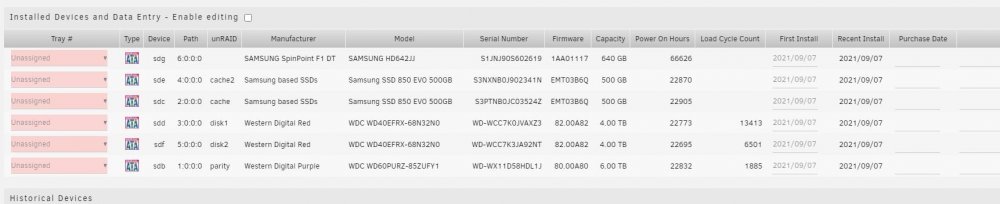
I thought I was backing it up with CA Backup /Restore Appdata plugin but apparently either do not remember where i was backing it up to or thought I set it up when I actually didn't. I have read through this https://wiki.unraid.net/Manual/Changing_The_Flash_Device#What_to_do_if_you_have_no_backup_and_do_not_know_your_disk_assignments but not being well versed in unraid I didnt want to do something and end up loosing data. I am not sure if there is other data other than the drive configurations on the flash drive. I think the plus to this is that I believe I do know what the disk assignments are with the attached screen shot.
-
I logged into Unraid today and found that in the top right next to registration it says Unraid OS - Flash device error. If I click on the error it goes to a page that says error accessing your physical USB Flash Boot device with error code ENOFLASH3. Everything seems to be working (shares, VM's, Dockers) however browsing through the Web UI there are things that do not show up. I do not see the VM and Dockers tabs and in dashboard neither shows up. On the Main tab I can see my array devices with the appropriate Disks but it does not show the Cache Drives. I am however to see the all of the drives when I goto settings/server layout/data. The downfall is I thought the flash drive config was being backed up but I am unable to find it. The last backup that I see is from March. I do not believe I have made any drive changes since then. Is it possible to get the configuration for the USB drive with the server still running? I have not rebooted it since seeing this error. Any Help is greatly appreciated.
