Frank1940
Members
-
Joined
-
Last visited
-
Attach a monitor and keyboard to the server. You should see a login prompt. Log into your Unraid server. At the command line, type: diagnostics You will get an result like this: As you can see the diagnostics file is stored in the logs directory/folder in the root of the Unraid boot drive. Remove the flash drive, plug it into your PC and upload the complete .zip file to a new post in this thread.

-
Years ago when the networking setup in Unraid was much simpler, when problems with symptoms like this appeared, rebooting the entire network-- router, switches, clients, and server --was a early part of the troubleshooting procedure. Each one of these devices contains a computer chip with memory running an OS (Usually Linux for the peripherals) and they can encounter anomalies that affect their performance. Today, it seems like this has become less of an issue (Or more people do the reboot before posting...) but it is still one thing to be tried before taking more drastic steps.
-
IF possible, use cable to desktop and see what the results are.
-
Is any part of the connection using WiFi?
-
You really did not provide much information. Where and how was the graph generated? What is the time scale? Was screenshot captured during the transfer of a single file? Where the source and destination on the same switch? What was the switch manufacturer and model? (Remember, high speed transfers require much more resources from all the network components in the link.) Is it repeatable? Are you looking for an answer (In that case, what is the question?) or just making an observation on your finding?
-
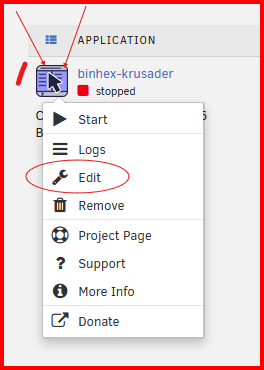
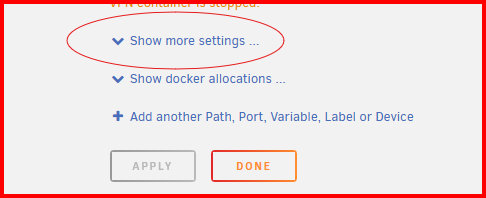
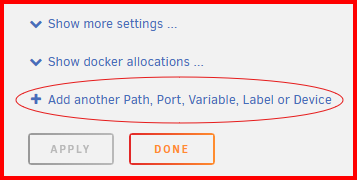
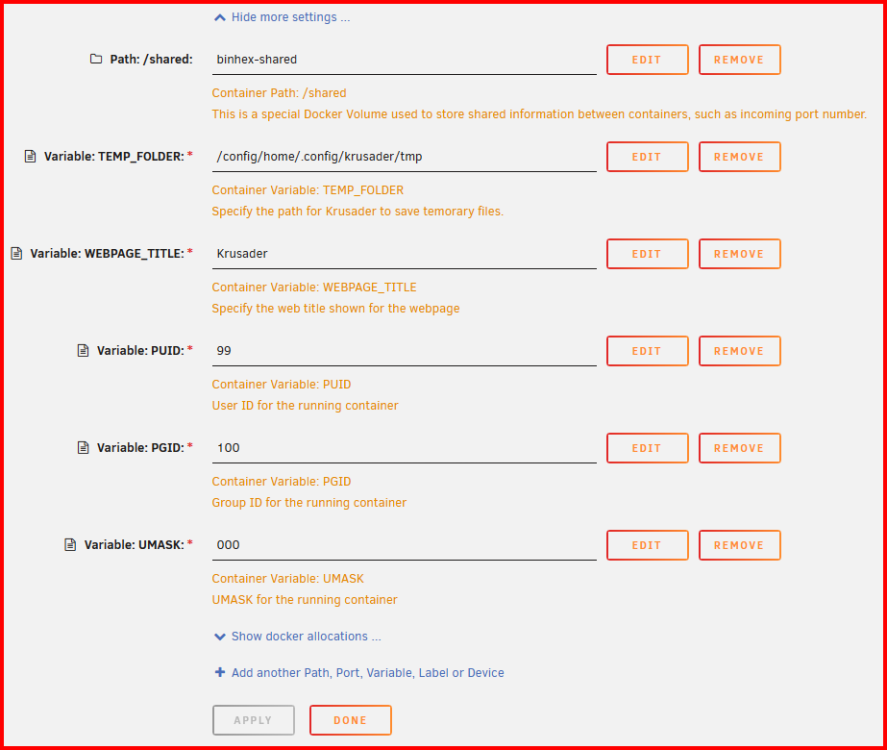
Not quite the method I used. here is a walk through: 1– Left-click on the icon of the container. Then click on 'Edit': 2– Go to the bottom of the page. click on the 'Show more setting...' dropdown menu. Check and see if PUID, PGUI and UMASK variable are already defined. If they are– edit them. 3– If one or more are missing, add them by clicking here: 4– Then follow the instructions from here: https://forums.unraid.net/topic/188600-share-permissions-changed-to-owner-99/#findComment-1540351 5– When done, it will look something like this: The first items were already there. The Variables– PUID, PGID and UMASK –were the ones which I had to add for this container. Hope this helps....
-
DISCLOSURE: I am not a Docker Container expert! It was not clear to me from your post of how you were trying to setup the PUID, PGID and UMASK variables. Here is a post which explains how I did it for one container: https://forums.unraid.net/topic/188600-share-permissions-changed-to-owner-99/#findComment-1540351
-
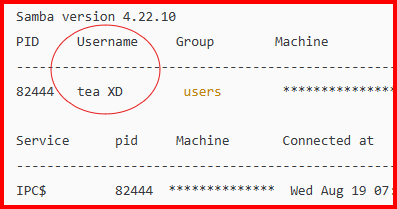
Just noticed this— you have a user name that does not meet Unraid requirements (space in the user name and upper case letters) for creating user names: Here is the help from the "Add user" page: I am not completely sure why a space and upper case letters after the initial starting lower case letter are not permitted but I want to alert you to it.

-
The server min protocol = SMB2 is a leftover from many years when I was blocking SMBv1 from running. As I recall, Windows will now block any connection that does not use SMB3_11 protocol. I can' understand why anyone who has the least possible interest in security would even consider using null passwords = Yes The default has been null passwords = No for years! Server signing– the Samba documentation on this topic has this: The 'if required' is not even an option in the description. MS has made changes in the Windows SMB client recently to require signing and I suspect that Samba has had some changes in way this parameter works but those changes apparently have not made it into the docs. But if you think about it, 'if required' is quite similar to what would be expected with 'auto'.

-
The default testparm shows only that Samba parameters which have been changed from the SMB defaults. You run it with the -v switch, it will show all of the samba parameters and their settings. testparm -v Be prepared as it will hundreds of lines long. Here is the configuration information webpage for smb.conf: https://www.samba.org/samba/docs/current/man-html/smb.conf.5.html
-
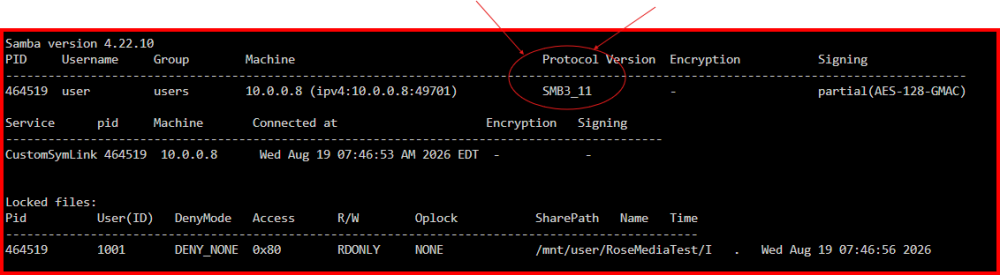
One more post for you: https://forums.unraid.net/topic/170027-smb-windows-settings-available-through-power-shell-and-linux-samba-tools-informational-posting/#findComment-1545332 Note the smbstatus command. It will show the actual protocol being used. See below: EDIT: Here is my Samba extras configuration. Note that I have set the min protocol to SMB2 but the client/server negotiation has set it to SMB3_11 # max protocol = SMB2_02 [global] server signing = auto case sensitive = true map to guest = Never # acl allow execute always = no # create mask = 0666 map archive = no # store dos attributes = no # server min protocol = NT1 server min protocol = SMB2 Note that I have set the min protocol to SMB2 but the client/server negotiation has set it to SMB3_11 Remember that not everything is dependent of the server side settings. (In fact, more thing fail for the Windows side to prevent connections than on the Unraid side.)
-
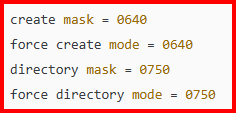
I think you might have a problem with these settings: The explanation is below: https://forums.unraid.net/topic/191221-some-musings-on-smb-and-samba-and-unraid-and-windows/#findComment-1561580 These permissions may work depending your user setup for file access. However the default settings of 777 and 666 will work if you set the Unraid SMB file sharing to 'Private' and setup the permissions fos all of the Share Access users to restrict them as required by your security requirements. (The problem with the default permissions is if you permit NFS access via networking or a VM. Or Docker Container access via Linux. But the Unraid Linux default permissions are not controlled by the SMB settings...)
-
Don't these two point to the same directory on the cache drive????????? Yes one is a share but the other is top level directory on a disk which could be a part of the share depending on the share setting. You can write to a share by using the /mnt/user/share_name or mnt/disk#/share_name. disk# can be cache if the share_name's primary storage location is cache. See here for a way to use this situation: https://forums.unraid.net/topic/58374-secure-writing-strategy-for-unraid-server-using-write-once-read-many-mode
-
Absolutely, this is the first thing that I would do. (Understand that there are 'reserved' words that should never be used for file names, directory/folder names or variables at the OS level for EVERY OS in existence. For examples, Google reserved words for Windows)
-
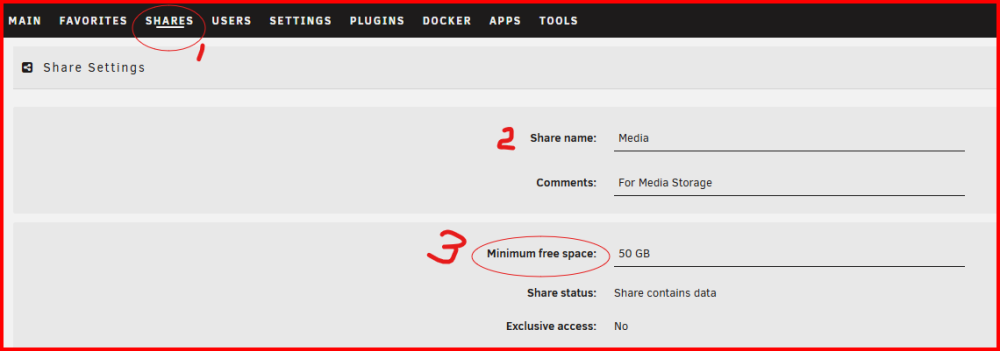
Got to the SHARES tab (#1). Click on the share name in that tab (#2) and that will take to this screen: Then set #3 to a value large than the largest file you will be copying to that share. Here is the 'Help' for that setting: