Beryllium
Members
-
Joined
-
Last visited
-
Thanks will do!
-
Hey I want to update to the V14 version, but it tells me that it is in --noupdate mode? Can i change that? Or can I just download the new Linux files from the foundry site and overwrite the Appdata folder?
-
hahahaha yeah very true. Just a bit paranoid. I mean I am aware that the URL just resolves the IP, but maybe I could bypass the most basic script kiddies hahaha Thanks @Mainfrezzer @Kilrah @ich777 I think its more malware on my personal machine. It seems like a cookie session hijack. since the accounts that were hacked had to common email or password. Alright, then I will just do it normally and keep an eye on it. Since its only dedicated friends I wanted to whitelist their IPs, but theirs rotate every 24 hours. Thanks for all the help! Will need to look into this. If its not too expensive this may sound like a good option.
-
Thanks a lot! I was just recently hacked and wanted to minimize the attack vector. Instead of giving the IP out, I will add a CNAME in Cloudflare with DNS only and then the can manually add the port at the end of the URL. I just wanted to check with someone The docker does not have privileged permissions. I initially tried it with the cloudflare tunnel service, since it would still just connect normally, but it seems Palworld can't resolve URLs without a port.
-
Hey Has anyone managed to get the Palworld server running via reverse proxy? Or seen any weird access through the palworld port? I am not sure if there is any security implication by exposing my Port to the public? Thanks for any help or suggestions.
-
Yeah I deleted the worldoptions.sav file and now it works again. Its weird. At some moment it stopped working with the password (you didnt need a password to enter) and that is the fix apparently.
-
Took a bit but got it to run. Maybe related, but it seems that no password is needed to enter the server. In the config folder there is a server password. Anyone else have that issue?
-
Hey Anyone had success with migrating their local data to the server? A friend ist asking me to host it on unraid. I don't play the game itself. We created the server (without the community server parameters). I copied over the level and player files. His friends could connect. I used this python file to fix his file: GitHub - JannikBirn/palworld-host-save-fix: A variation of the Palworld Host Save Fix from xNul with additional bug fixes. This script can be used in a similar way to convert co-op games to dedicated server and vice versa. Basically it should rewrite the 0000*1.sav file to whatever his GUID file is. He can see his map state and so on, but none of the pals or the skill tree. Is this a known issue? Thanks for the support! Best regards
-
Dear all I want to run two plex dockers with one using the iGPU and one the P2000 I have it setup but the moment one of the Plex dockers use intro detection or chapter generation the other Plex instance only get this error: Conversion failed. The transcoder exited due to an error. Is there any reason for this? Maybe I need to change the UID and GUID? Maybe because part of the library they access are the same? BR Beryllium
-
Anyone run into the issue: Conversion failed. The transcoder exited due to an error. If the second plex instance is doing something this error appears.
-
Found the issue, the key value was not correct, as I only added it as a name!
-
Do I need something like a dummy plug in the GPU? I have one in the iGPU.
-
Dear Community I would like two run two plex servers on my server, one on the iGPU (intel QS) and one on the P2000. I have setup the dockers: For the Intel one. And the Nvidia one: It seems though that the nvidia docker does not use the quadro at all, when I go to terminal and do: watch nvidia-smi Anything I am missing? Thanks for the support! Best regards



-
ok thanks for all the help!! will check, but it is a super old board with not a lot of documentation. I guess taping will be my option.
-
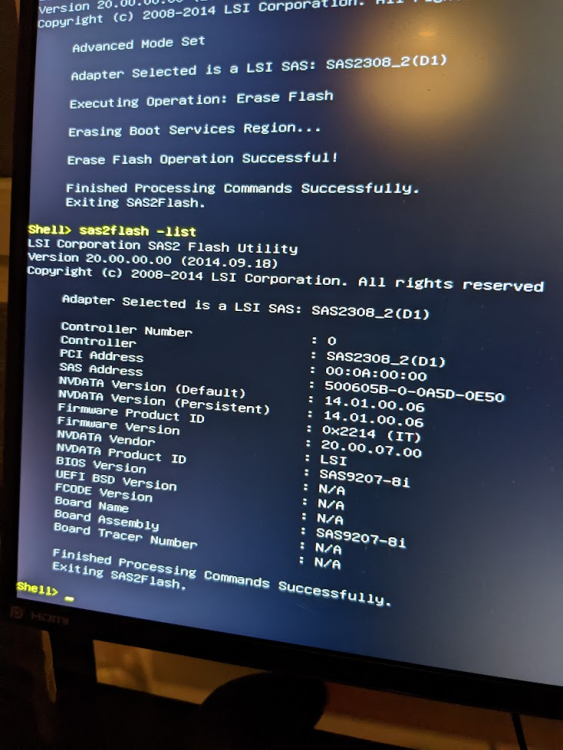
Ok I managed to delete the BIOS version: Now on my Windows machine it boots directly into the bios, but on the Unraid machine it still gets stuck in the bootloop. Taping the 5 & 6 PCI pins still works. I guess I will need to do that? Not sure if this is a motherboard issue? Any settings I would need to change?