





Nivin37
Members
-
Joined
-
Last visited
-
Data rebuild was successful and there looks to be no ongoing issues with this little event. I did workout why I did not have an up to date backup of the Flash Drive, as I always thought I was good with keeping up with backups. I had taken a backup of the Flash Drive using the GUI some time ago and this was what I ended up using. However after this was done along came the My Server app and I started using it to perform Flash Drive backups instead of using the GUI. This in its self is not an issue, but how they were saved is the issue. I use a MBP and have Safari to expand any zip file I download, so what do I get when I perform a Flash Drive backup from the My Server page, I get a folder not a zip file. At the time I did not notice the difference and just archived the folder, but when it came time to rebuild the Flash Drive I was unable to rebuild using the folder. I did try to zip up the folder and use it to rebuild but that failed and I just moved on thinking I was doing somthing wrong with the backup process. So I have changed Safari so it will not unzip any file I download, thinking about it this is also more secure way of handling files as well. I was just lazy and wanted the brouser to do the work for me...:) Again thanks for the support...
-
Data-Rebuild in progress, I'll post the results once finished. I gain more knowledge about unRAID with each issue. trurl, thanks for your time and help...:)
-
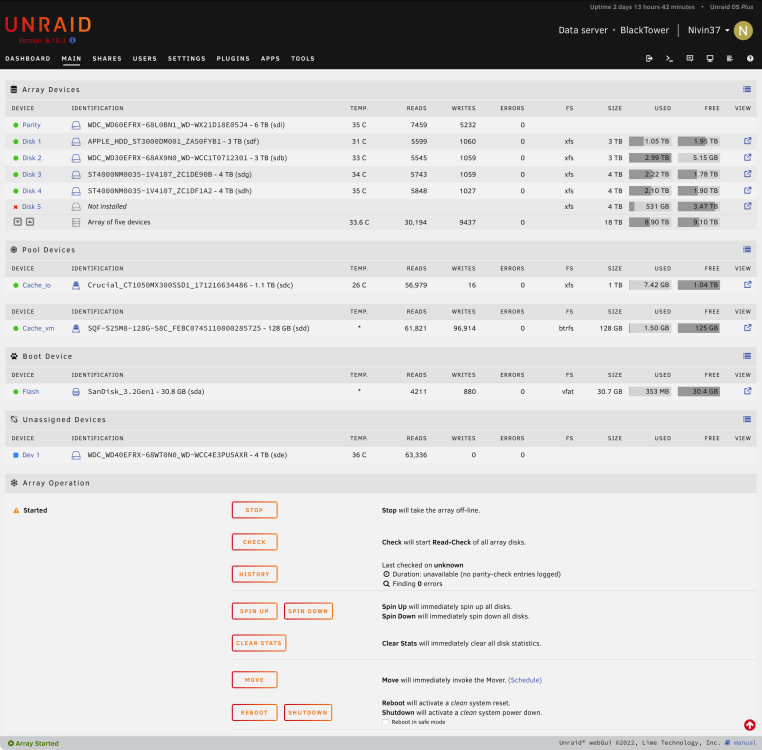
Full main page...
-
Sorry, missed that, here is the new Diag... blacktower-diagnostics-20220914-0941.zip
-
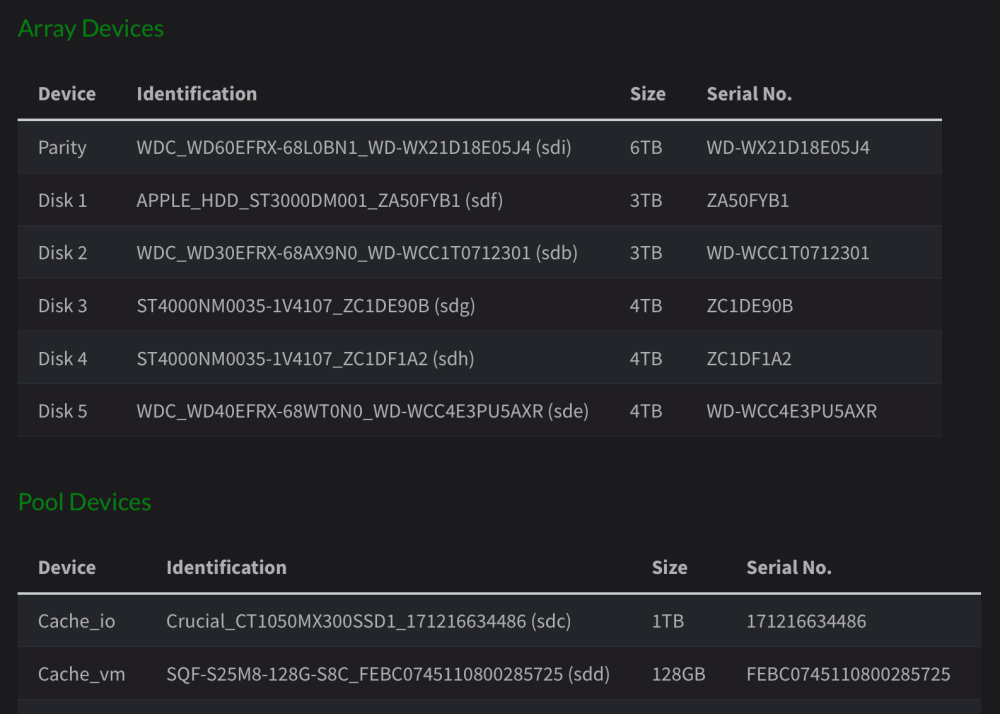
Docker & VM managers both disabled. I know which drive is parity drive as it is only 6TB drive and I do have some documentation saved to my Jekyll Doc server. New Diag file attached. Thanks... blacktower-diagnostics-20220914-0923.zip
-
Nivin37 changed their profile photo
-
No spare drives available.
-
No, I told it parity was valid.
-
No current backup. File attached. blacktower-diagnostics-20220913-0926.zip
-
Hi, After a six weeks shutdown the Flash Drive failed upon restart and needed to be replaced. During the replacement process one of the data drives was used as the parity drive, I was able to stop it after a few minutes. The array is now back up with the right parity drive, however I now have this one unmounted drive. My question is, have I lost all the data on that drive or can I get it back and if so how. Thanks.



