





sjoerger
Members
-
Joined
-
Last visited
-
Thanks. Reinstalling the plugin seems to have fixed the API crash for the time being.
-
Hello, On Sept 17th 2021 I (finally) updated my system from 6.9.1 to 6.9.2 and also updated the My Servers plugin to version 2021.09.15.1853. I am seeing a unraid-api crash however: Sep 17 10:09:20 Tower root: plugin: skipping: /boot/config/plugins/dynamix.my.servers/unraid-api.tgz already exists Sep 17 10:09:35 Tower emhttpd: shcmd (43): /etc/rc.d/rc.unraid-api install Sep 17 10:09:35 Tower root: /etc/rc.d/rc.unraid-api: line 47: /usr/local/bin/unraid-api/unraid-api: No such file or directory Sep 17 10:09:37 Tower root: Starting unraid-api v2.26.12 Sep 17 10:09:38 Tower unraid-api[12342]: ✔️ UNRAID API started successfully! Sep 17 10:09:39 Tower root: Starting unraid-api v2.26.12 Sep 17 10:09:40 Tower unraid-api[12623]: ✔️ UNRAID API started successfully! Sep 17 10:10:58 Tower unraid-api[12623]: ⚠️ Caught exception: Cannot read property 'includes' of undefined Sep 17 10:10:58 Tower unraid-api[12623]: ⚠️ UNRAID API crashed with exit code 1 System diagnostics attached. Please let me know if I can provide any other information. Steve tower-diagnostics-20210918-1506.zip
-
Confirming my container now has unrar support after pulling latest container update. Thanks for the quick fix. 2021-03-12 10:40:15,126::INFO::[SABnzbd:425] par2 binary... found (/usr/bin/par2) 2021-03-12 10:40:15,126::INFO::[SABnzbd:432] UNRAR binary... found (/usr/bin/unrar) 2021-03-12 10:40:15,127::INFO::[SABnzbd:442] UNRAR binary version 6.00
-
I was about to post the same thing. I saw there was image update this morning and I get the same error as well as the following: 2021-03-12 09:20:19,429::INFO::[SABnzbd:425] par2 binary... found (/usr/bin/par2) 2021-03-12 09:20:19,430::INFO::[notifier:122] Sending notification: Error - unrar binary... NOT found! (type=error, job_cat=None) 2021-03-12 09:20:19,429::ERROR::[SABnzbd:444] unrar binary... NOT found! 2021-03-12 09:20:19,430::INFO::[SABnzbd:450] 7za binary... found (/usr/bin/7za)
-
Yep that was it. The dropdown for mainboard temp was set to Not Used. This still seems like a bug as the default for not used should not insert something else that makes little sense.
-
Apologies, I didn't recall that this was part of a plugin.
-
See the attached screenshot. My Dashboard is showing fan speed instead of motherboard temp.
-
See the attached screenshot. My Dashboard is showing fan speed instead of motherboard temp.
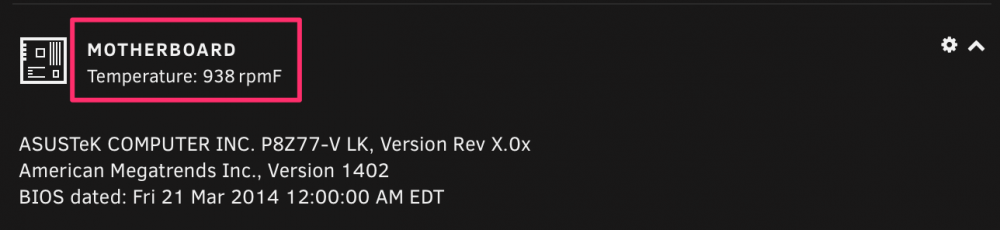
-
Excellent, thanks for the quick update!
-
Just curious if this update is coming soon for the Docker container? I see you added the 2.7.0.28 deb file to the github project, but the Dockerfile still references 2.6.0.31.
-
Any chance you could add the least amount of mysql packaging needed to dump databases?
-
Version is 6.1.9. I found that setting the users homedir path to "/mnt/disk#/$user" screen now works where the original path "/mnt/user/$user" does not.
-
I should have added that I tried that originally as well. And just tried it again with the same results. steve@Tower:~$ pwd /mnt/user/steve steve@Tower:~$ rmdir .screen steve@Tower:~$ screen bind (/mnt/user/steve/.screen/9324.pts-0.Tower): Function not implemented steve@Tower:~$ ls -la | grep .screen drwx------ 1 steve users 6 Mar 17 13:36 .screen and just for fun: steve@Tower:~$ chmod 755 .screen steve@Tower:~$ screen Directory /mnt/user/steve/.screen must have mode 700. steve@Tower:~$ chmod 700 .screen steve@Tower:~$ screen bind (/mnt/user/steve/.screen/9748.pts-0.Tower): Function not implemented
-
Hello, I am getting the following error when trying to use screen as a non-root user: steve@Tower:~$ screen bind (/mnt/user/steve/.screen/9390.pts-1.Tower): Function not implemented However using screen as root works just fine. Any thoughts on how to fix this? I have tried removing and reinstalling the screen package as well as the whole plugin. Thanks!

