PoppaJohn
Members
-
Joined
-
Last visited
-
Since I have 64 gigs of ram, I felt safe to increase mine to 512Mb Just saw that this is an old thread, but it still comes up on google search.
-
PoppaJohn changed their profile photo
-
Thank you, itimpi. That is good to know going forward.
-
It rebooted just fine. Thank you. (Afterward, I removed the two plugins in question, and manually cleaned up)
-
Yes, I do have it installed. Oh bummer. I love that pluggin, but I guess I will have to remove it. Do you think it's safe to reboot? If I don't get a GUI I don't know if I can remove pluggins.
-
Server had been incident free for about 10 days... lol After updating GPUstats pluggin, and chaning a couple dockers/apps to use my onboard intel rather than nvidia, everything was working fine. A couple days later, I can't get into the GUI anymore, but as the title says, everything continues to run, including Windows SMB access. But I noticed that in my mnt/users/ folder (which normaly only has my share folders in it) I now see a slew of new folders, as if the pluggin did not install correctly. I have the following additional folders: agents api assets cron css data event extra icons images include javascript lib license nchan novnc pages post-hooks pre-hooks scripts sheets skins spice styles templates unraid-components I suspect that this has caused my problem. I have no idea how the plugin got into the incorrect folder, especially with just an update, since I access my shares daily and would have noticed all these additional folders. Sooooo.... Can I uninstall this from terminal shell? I'm leery to force a reboot since the server is otherwise running fine and it might not come back up. Also, I don't know how to get diagnostic files from terminal or I would provide these. THANK YOU to anyone who can advise.
-
Hey all, I am using AOMEI Backupper Pro to back up my PC onto my unraid server. I have a share setup called "backup," and that share uses a 4tb Samsung SD called "cache4tb" for writes, and then mover moves them to the pool after the backup completes. I figure this makes the backup much quicker. Both the pool device cache4tb and the pool drives are formatted xfs and I am using unraid 7.0.1 Does anyone know a work around for preventing this error? Is it an error in the mover tuning plugin, or is this a problem with mover in general? Most of these files that have a dollar sign in them "$" are created as backup/temp files by ms word. **** Added I thought I'd add that I can manually move these files/folders without an issue using Krusader.
-
Yes, the pool drive had a LOT of errors. I've been testing that drive for days now, and the drive appears to be fine, but I guess a couple of times that the power went out and my batteries failed in my UPS (it went off immediately.... I've replaced it now, btw) it must have corrupted the file system. The biggest problem seemed to be that the docker image was on it, and that would make the machine crash eventually. So I put a new nvme in the machine and rebuilt my docker image and put it on the new drive.
-
I ran memtest 3 times and my memory passed each time. I don't think there is any problems with my memory. What I meant by the statement above was that I had read that ZFS uses a lot more RAM (for technical reasons beyond me, at the moment) and that if you have a bitflip in memory, it could get written to the pool/share. Many people said that if you don't have ECC memory, you are better off to stick with XFS.
-
Oh yeah, thanks for pointing that out. Oddly enough, I have two btrfs cache drives and one xfs. I think I will convert them all to xfs in the future, once I get everything stable again. I really wanted to create a ZFS pool of cache drives since I have 64GB of memory, but since it's not Error Correcting, I don't want to chance the corruption.
-
Thanks JorgeB! Isn't it odd that btrfs is detecting data corruption on the pool, when all my pool hard drives are xfs?
-
Here are the diagnostics. Lots of strange stuff going on. Thank you for your help! tower-diagnostics-20250305-0123.zip
-
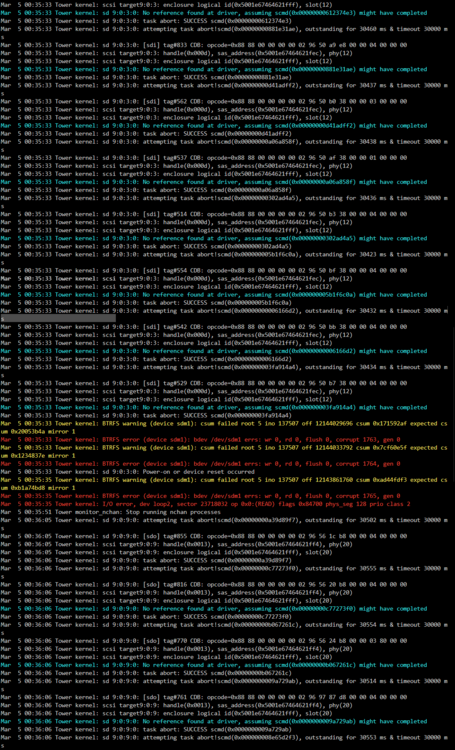
Do I have drive errors, disk errors, or do I need to fix a BTFS file system on the drive I am trying to copy data off of?
-
Is there a way to take that Sas address and figure out which drive is reseting?
-
I found this in the log file: Mar 4 00:40:21 Tower kernel: sd 9:0:11:0: No reference found at driver, assuming scmd(0x00000000618891aa) might have completed Mar 4 00:40:21 Tower kernel: sd 9:0:11:0: task abort: SUCCESS scmd(0x00000000618891aa) Mar 4 00:40:21 Tower kernel: sd 9:0:11:0: attempting task abort!scmd(0x00000000cc0ca5d1), outstanding for 30640 ms & timeout 30000 ms Mar 4 00:40:21 Tower kernel: sd 9:0:11:0: [sdq] tag#862 CDB: opcode=0x88 88 00 00 00 00 02 14 6f 60 e8 00 00 03 b0 00 00 Mar 4 00:40:21 Tower kernel: scsi target9:0:11: handle(0x0015), sas_address(0x5001e67464621ff6), phy(22) Mar 4 00:40:21 Tower kernel: scsi target9:0:11: enclosure logical id(0x5001e67464621fff), slot(22) Mar 4 00:40:21 Tower kernel: sd 9:0:11:0: No reference found at driver, assuming scmd(0x00000000cc0ca5d1) might have completed Mar 4 00:40:21 Tower kernel: sd 9:0:11:0: task abort: SUCCESS scmd(0x00000000cc0ca5d1) Mar 4 00:40:21 Tower kernel: sd 9:0:11:0: attempting task abort!scmd(0x00000000dbf6e775), outstanding for 30643 ms & timeout 30000 ms Mar 4 00:40:21 Tower kernel: sd 9:0:11:0: [sdq] tag#859 CDB: opcode=0x88 88 00 00 00 00 02 14 6f 57 30 00 00 04 00 00 00 Mar 4 00:40:21 Tower kernel: scsi target9:0:11: handle(0x0015), sas_address(0x5001e67464621ff6), phy(22) Mar 4 00:40:21 Tower kernel: scsi target9:0:11: enclosure logical id(0x5001e67464621fff), slot(22) Mar 4 00:40:21 Tower kernel: sd 9:0:11:0: No reference found at driver, assuming scmd(0x00000000dbf6e775) might have completed Mar 4 00:40:21 Tower kernel: sd 9:0:11:0: task abort: SUCCESS scmd(0x00000000dbf6e775) Mar 4 00:40:21 Tower kernel: sd 9:0:11:0: attempting task abort!scmd(0x0000000016beb824), outstanding for 30634 ms & timeout 30000 ms Mar 4 00:40:21 Tower kernel: sd 9:0:11:0: [sdq] tag#852 CDB: opcode=0x88 88 00 00 00 00 02 14 6f 6b a0 00 00 04 00 00 00 Mar 4 00:40:21 Tower kernel: scsi target9:0:11: handle(0x0015), sas_address(0x5001e67464621ff6), phy(22) Mar 4 00:40:21 Tower kernel: scsi target9:0:11: enclosure logical id(0x5001e67464621fff), slot(22) Mar 4 00:40:21 Tower kernel: sd 9:0:11:0: No reference found at driver, assuming scmd(0x0000000016beb824) might have completed Mar 4 00:40:21 Tower kernel: sd 9:0:11:0: task abort: SUCCESS scmd(0x0000000016beb824) Mar 4 00:40:21 Tower kernel: sd 9:0:11:0: attempting task abort!scmd(0x000000009ec15a9b), outstanding for 30645 ms & timeout 30000 ms Mar 4 00:40:21 Tower kernel: sd 9:0:11:0: [sdq] tag#846 CDB: opcode=0x88 88 00 00 00 00 02 14 6f 54 f8 00 00 02 38 00 00 Mar 4 00:40:21 Tower kernel: scsi target9:0:11: handle(0x0015), sas_address(0x5001e67464621ff6), phy(22) Mar 4 00:40:21 Tower kernel: scsi target9:0:11: enclosure logical id(0x5001e67464621fff), slot(22) Mar 4 00:40:21 Tower kernel: sd 9:0:11:0: No reference found at driver, assuming scmd(0x000000009ec15a9b) might have completed Mar 4 00:40:21 Tower kernel: sd 9:0:11:0: task abort: SUCCESS scmd(0x000000009ec15a9b) Mar 4 00:40:21 Tower kernel: sd 9:0:11:0: attempting task abort!scmd(0x0000000074fc78e4), outstanding for 30641 ms & timeout 30000 ms Mar 4 00:40:21 Tower kernel: sd 9:0:11:0: [sdq] tag#845 CDB: opcode=0x88 88 00 00 00 00 02 14 6f 60 90 00 00 00 58 00 00 Mar 4 00:40:21 Tower kernel: scsi target9:0:11: handle(0x0015), sas_address(0x5001e67464621ff6), phy(22) Mar 4 00:40:21 Tower kernel: scsi target9:0:11: enclosure logical id(0x5001e67464621fff), slot(22) Mar 4 00:40:21 Tower kernel: sd 9:0:11:0: No reference found at driver, assuming scmd(0x0000000074fc78e4) might have completed Mar 4 00:40:21 Tower kernel: sd 9:0:11:0: task abort: SUCCESS scmd(0x0000000074fc78e4) Mar 4 00:40:21 Tower kernel: sd 9:0:11:0: attempting task abort!scmd(0x00000000d6d1a0b4), outstanding for 30636 ms & timeout 30000 ms Mar 4 00:40:21 Tower kernel: sd 9:0:11:0: [sdq] tag#837 CDB: opcode=0x88 88 00 00 00 00 02 14 6f 68 78 00 00 03 28 00 00 Mar 4 00:40:21 Tower kernel: scsi target9:0:11: handle(0x0015), sas_address(0x5001e67464621ff6), phy(22) Mar 4 00:40:21 Tower kernel: scsi target9:0:11: enclosure logical id(0x5001e67464621fff), slot(22) Mar 4 00:40:21 Tower kernel: sd 9:0:11:0: No reference found at driver, assuming scmd(0x00000000d6d1a0b4) might have completed Mar 4 00:40:21 Tower kernel: sd 9:0:11:0: task abort: SUCCESS scmd(0x00000000d6d1a0b4) Mar 4 00:40:21 Tower kernel: sd 9:0:11:0: attempting task abort!scmd(0x000000002c43237e), outstanding for 30641 ms & timeout 30000 ms Mar 4 00:40:21 Tower kernel: sd 9:0:11:0: [sdq] tag#834 CDB: opcode=0x88 88 00 00 00 00 02 14 6f 5c 90 00 00 04 00 00 00 Mar 4 00:40:21 Tower kernel: scsi target9:0:11: handle(0x0015), sas_address(0x5001e67464621ff6), phy(22) Mar 4 00:40:21 Tower kernel: scsi target9:0:11: enclosure logical id(0x5001e67464621fff), slot(22) Mar 4 00:40:21 Tower kernel: sd 9:0:11:0: No reference found at driver, assuming scmd(0x000000002c43237e) might have completed Mar 4 00:40:21 Tower kernel: sd 9:0:11:0: task abort: SUCCESS scmd(0x000000002c43237e) Mar 4 00:40:22 Tower kernel: sd 9:0:11:0: Power-on or device reset occurred
-
I'm trying to rebuild Disk 1, and it's already been 11 hours and it's only 3.5TB in. The speed keeps fluctuating but as I sit and watch it, it doesn't even go a minute before it pauses for 5 to 10 seconds, and then continues. I thought it might be drive temps, so I changed the settings to 55C and to stop 1 degree under. That didn't help. Maybe it wont re-check the tuning settings while it runs, I thought. So I put a big house fan on my open server case and have it blow in. Drive temps seem good. (none were over 39 to begin with) So I thought maybe the HBA card is hot, so I moved the fan to really blast it (I risked touching the heatsink while on, and it didn't even feel warm let alone hot) It seems to keep the drives cooler too (pic attached) but it still keeps pausing. So if it's not temps, does anyone know what else could be making it pause all the time like this? (Just saw it up to 178MB/sec and down to 10 hours, then it paused and dropped to 36MB/sec and it's 1 day 12 hours)